
- NewsmagUsing the theme translations together with WPML
- NewsmagHow to update a plugin
- NewsmagCustom Post Type Support
- NewsmagAbove footer ads
- NewsmagWeather Widget
- NewsmagHow to update the theme
- NewsmagIntroduction
- NewsmagLogo & Favicon
- NewsmagFooter templates
- NewsmagUsing other ads
- NewsmagCustom ad spots
- NewsmagArticle ads
- NewsmagSidebar ads
- NewsmagHeader ads
- NewsmagLoading image effects
- NewsmagCategory top post styles
- NewsmagSmart Lists
- NewsmagGeneral settings
- NewsmagTheme thumbs
- NewsmagtagDiv slider gallery
 embarcado
 Hello Vlad,
Thanks but suggestion didn’t work. Removed and reinstalled AMP plugin w/o success. It still shows the same error:
Notice: amp_has_paired_endpoint was called incorrectly. Function called while AMP is disabled via ‘amp_is_enabled’ filter. The service ID “paired_routing” is not recognized and cannot be retrieved. Please see Debugging in WordPress for more information. (This message was added in version 2.1.1.) in /home2/adepton/public_html/wp-includes/functions.php on line 5171
Note that when reinstalling, it showed the following error and then it looked like the system got it fixed:
Notice: Undefined property: Vc_Updater::$title in /home2/adepton/public_html/wp-content/plugins/js_composer/include/classes/updaters/class-vc-updating-manager.php on line 99
 simchris
 AMP is mainly useful if you’re looking for a simpler, pure mobile experience for your information; kind of like the WordPress default themes. The idea is to make page load faster in places with slow internet, slow mobile connections, etc. — there is no inherent ‘better’ reason to do AMP vs normal desktop responsive layouts, unless you have very slow server and are unable to pass Google Lighthouse mobile/desktop tests for best practices.
In our case we use Newsmag desktop theme for desktop, ipad, and mobile. We use the AMP plugin as fallback for Google to serve that simple version to those on slow connections. AMP is something Google invented to cache popular content in the cloud for slow phone connections. Really not intended to replace ‘normal’ pages, site layouts, and almost nobody actually doing that unless a simple blog.
SEO is about pagespeed, best practices, optimization for loading elements, and the like. You can test your site using the Chrome web browser by learning to use the ‘console’ to see if your site is horribly slow — in that case AMP might be worth looking into as default format to serve, but it is not ‘better’ for SEO than normal pages. Having both normal pages and AMP format pages also does not hurt SEO as Google knows one is the ‘canonical’ version and one is ‘alt’ version.
(( I don’t work here, just longtime user. ))
 jmbren
Hello,
I am having trouble creating custom button sizes. I’ve attached an example of what I’m trying to achieve.
Thanks!
 whigitalia
Hello,
In the last few days we have noticed an anomaly in the images that are inserted as a preview in google news feed or/and google searches.
Until now, the images in the google previews were always the featured images of the articles. Since we updated to the new WordPress 5.7.2 and to the Newspaper 11 version it seems that the images that are inserted in the Google previews are no longer those in featured in the articles, but a random image within the article. We would like google to preview the featured image as it has been until now. How can this problem be solved? Is there a Newspaper setting to set?
Here an example: https://www.fumettologica.it/2021/06/gobbo-di-notre-dame-film-disney/
Here what we see in google news feed: https://www.fumettologica.it/screen.jpg
Thanks for your help!
 lyon
lyonHello, We are using Newspaper Theme version 10.4 on our multisite network, with WordPress 5.7.2. Ever since updating to 10.4, we’ve had an issue that affects just two of our sites on the network, one of which is the main site. All the other sites have no issue.
What happens is when we build a page with a sidebar in TD Composer, and leave the page template set to default, we are seeing a strange overlapping sidebar:
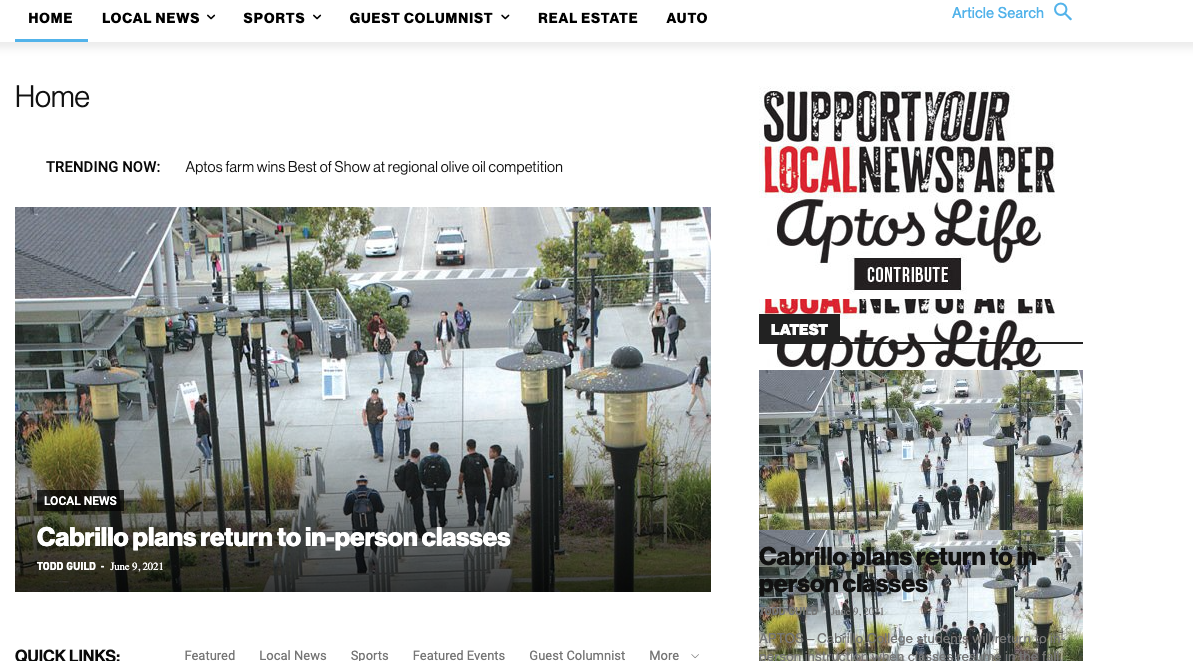
This is how we have the sidebar set in TD Composer:
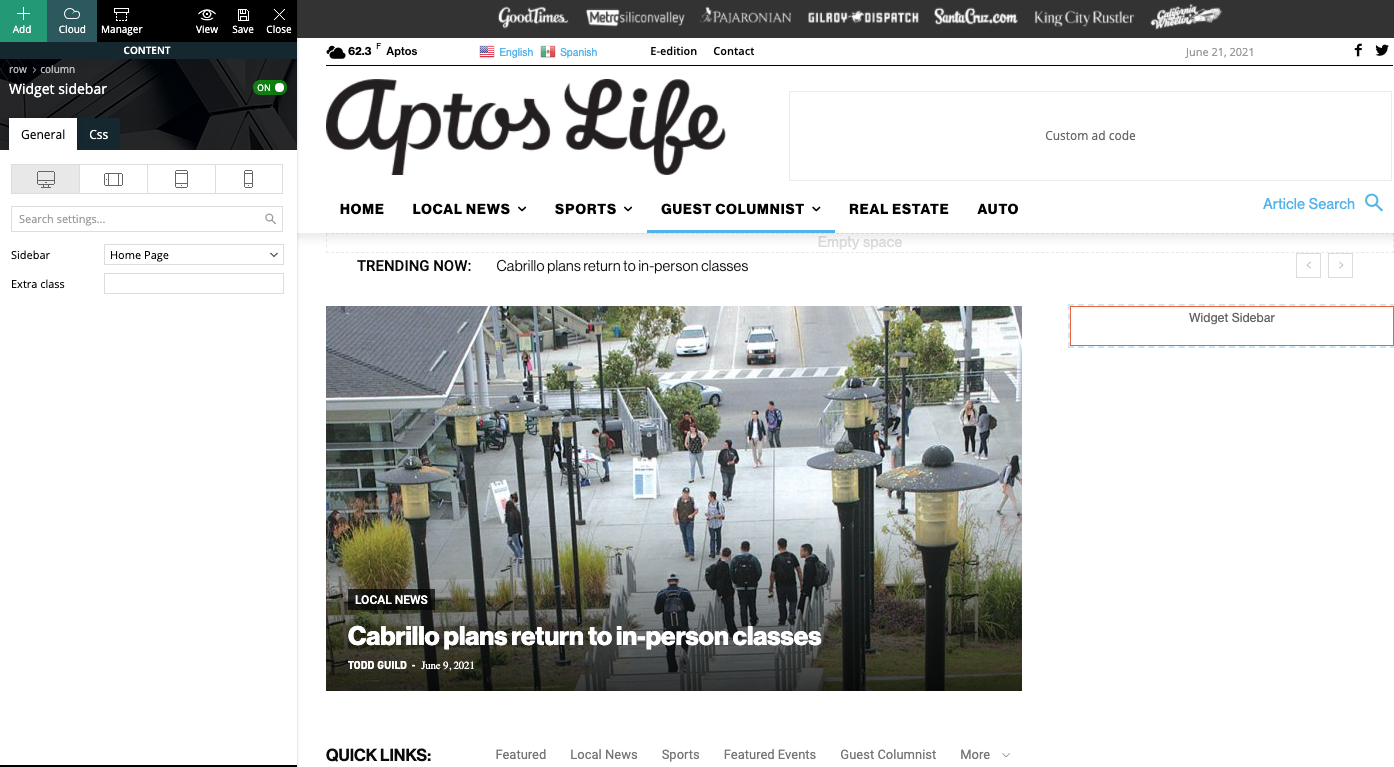
As a temporary workaround we can set the page template to Pagebuilder + latest articles + pagination, but this opens up a whole new set of problems. For example, if we try to change or hide the sidebar in the “Homepage latest articles” settings, no changes occur. Even something such as changing the title on the post loop won’t take affect.
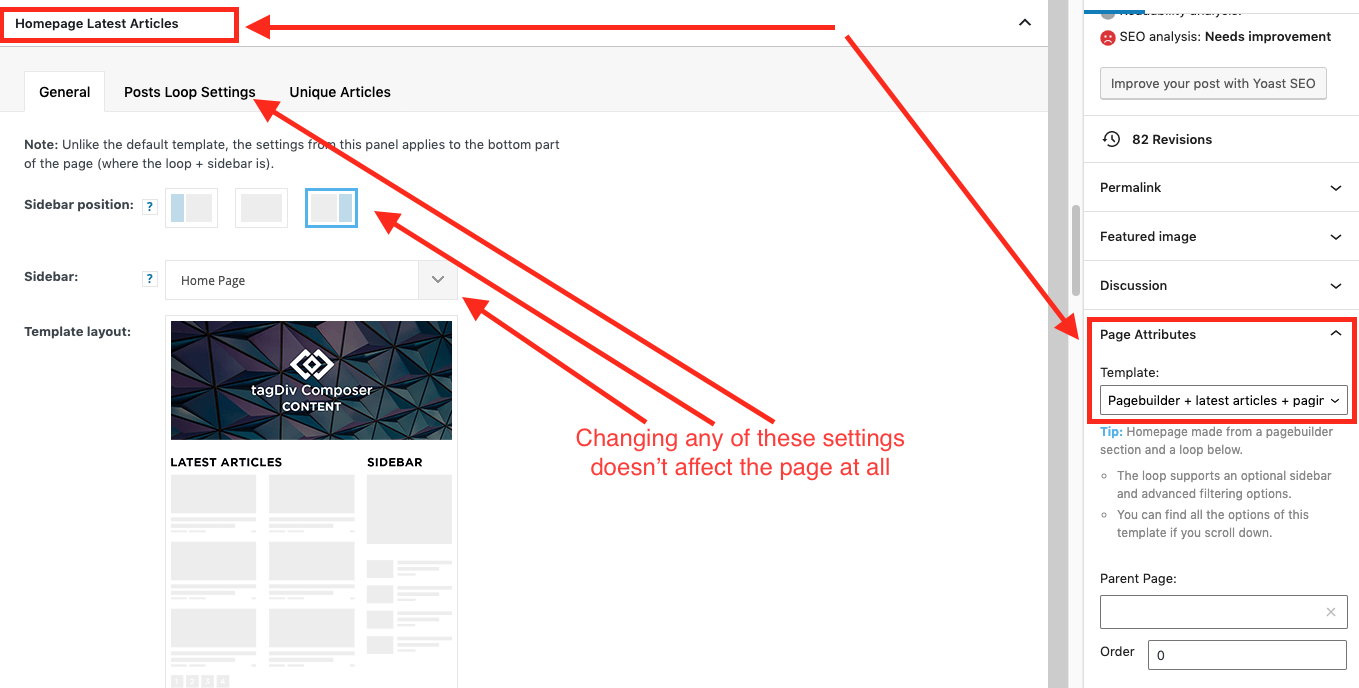
As a result, instead of two overlapping sidebars, we now have two duplicate sidebars stacked on top of each other:
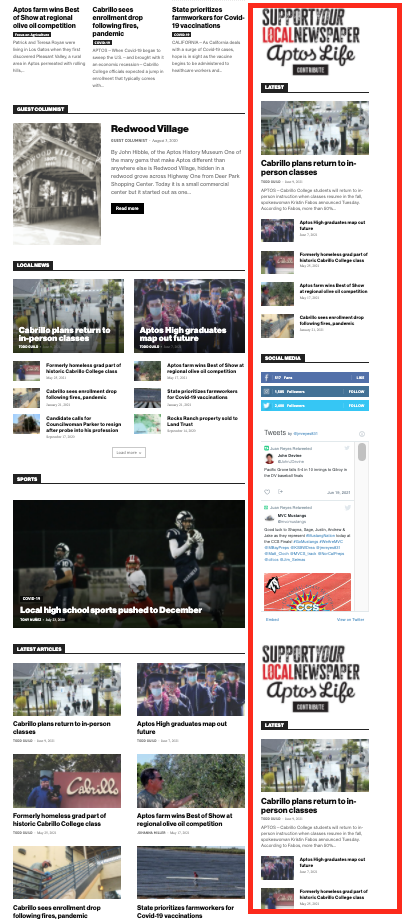
Is there any way to fix these issues? Ideally we would like to leave the page template set to default, with the overlapping sidebars eliminated.
We’ve already tried disabling all our plugins to check for conflicts. Here is some more info from the System Status panel:
Theme name Newspaper
Theme version 10.4
Theme database version 10.4
HTTP channel test wordpress
Installed demo Default – demo ID: default | install type: full
Theme Mobile Newspaper mobile version
php.ini configuration
Server software Apache/2.4.38 (Debian)
PHP Version 7.3.19-1~deb10u1
post_max_size 32M – You cannot upload images, themes and plugins that have a size bigger than this value. To see how you can change this please check our guide here.
max_execution_time 120
max_input_vars 3000
SUHOSIN installed false
PHP extensions
mbstring available
GD library available
WordPress and plugins
WP Home URL https://aptoslife.com
WP Site URL https://aptoslife.com
WP version 5.7.2
WP multisite enabled Yes
WP Language en_US
WP Memory Limit 1 GB/request
WP_DEBUG False
Caching plugin No caching plugin detected – for best performance we recommend using WP Super Cache
 leger7493
Hi,
When I add the URL to the Social Networks in the Newspaper Theme Panel, it leads to the wrong link.
For example, I’m trying to get it to go to facebook.com/theledgesports… but it instead leads to http://www.theledgesports.com/facebook.com/theledgesports. It’s like this for all social networks.
Also, I’m having issues adding the Instagram footer. I’m getting a message that reads:
Instagram data error: The data could not be retrived using the theledgesports Instagram ID. If you own this account, please connect to it in Theme’s Panel Social Networks > Instagram Account Access Configuration section.”
I’ve linked my Instagram info to the configuration section, so not sure what else to do there.
Any help is appreciated. Thanks!
 cheryldimof
 I have active the regular AMP plugin that works with the mobile theme, the mobile theme plugin, Newspaper 11. However, the toggle which usually appears to turn AMP of and on on a per-post basis is now missing and reappears if I activate a different theme.
 Bezukhof
Some posts using the same global template have very small fonts, even though when I edit it with the TagDiv Composer the font’s are showing larger.
Example page with small font:
Example page with appropriate font size:
https://nichefacts.com/wordpress-affiliate-program/
Demonstration of issues:
https://www.awesomescreenshot.com/video/4207926?key=e4a8ae82f33f13635f761d456b241d1d
 vikramsaiteja
Hey there ,
I have created two contact us pages one for desktop and other for mobile , Amp with same content , the page is correctly being displayed in desktop when it comes to mobile only the title tag is being displayed , I have used a premed template from cloud library to create this page . How could I resolve this to show the AMP page in mobile
 Bettina
 Hello!
A workaround for this is to create a row with 3 columns(Take a look here in this video for example where I build 6 columns: https://www.screencast.com/t/mZ2c5XamTFN ), in each column add a flex block with a limit of 1 and choose to display the posts from one of the categories you mentioned above. For columns 2 and 3 do the same, but choose to display the posts from the rest of the categories.
Hope that helps you!
Thank you!
 MattiaVe
 sorry if I enter but it’s important speaking of CSS:
I upgraded to 11 and everything works fine except for a small bug:
when you store the “critical” css on a post page, the related amp page loses its custom settings.
Eg, the color of the header, the font size, are only possibles in default ones.
If you want to customize a bit the amp pages of the articles you have to give up the “css generator”.
Sorry for the intrusion, but it was important, maybe it can be fixed with little …
Thanks for your attention
M
 Vlad S
 Hello!
Please remove and reinstall AMP plugin, I have tested on our side and the plugin is working.
Let us know the results!
Thank you!
 VisualSuspect
 the second problem i managed to fix it by going on tagdiv composer on css tab and putting zeros on the right and left.
On the first problem it is loading more and different posts but not from the same category. For example we go to “gaming news”. The first 6 posts that shows are from the “gaming news”, but when i am loading more then it shows posts from all the categories. This is happening on mobile and desktop too.
-
This reply was modified 5 years by
VisualSuspect.
Vlad S Hello!
1. How exactly was the plugin broke ? If it displays shortcodes everywhere you will have to simply reinstall it and activate it. This should fix the issue, if not, please let us know what the result is and send us a screenshot of the error.
2. AMP plugin does work with Newspaper theme and the plugins. Please make sure to use the official AMP that comes with the theme: https://www.screencast.com/t/HKHUKosVx
3. Page speed of any website depends on how well the website is optimized. That mean that everything from content, fonts, images, host, caching, plugins, everything has to be adjusted so the performance will be top notch. You can see here examples of websites that are very well optimized: https://forum.tagdiv.com/topic/why-i-cant-pass-google-core-vitals/
I hope this was helpful!
Thank you!
 flyingfinn
Hello and thank you for your support.
We read the documentation but we cant find why we cant edit the rows in some positions.
For example in basic header and in articles. We cant delete inner row and put two banners or inside article we cant add anoter element next to date in the same line.
Can you help us?
Attaching the two images.
Header

Article

 Korik12
The update broke my site.. I went back to 10.4 and the whole site is down and the tagdiv Composer won’t load.. just gives me a “sorry you are not allowed to access this page”..
Please provide an answer as soon as you can.. not a happy camper
 t4fs
t4fsHello tagDiv community,
I recently purchased newspaper theme Version: 10.4, Now update 11 is available. I would like to know if I will update to 11, would I be able to see all customization that I did in default templates or they will get override and I need to make customizations again.
Another question is about the Mobile theme. Activating a mobile theme is equivalent to activating AMP on a website?. I don’t want to go AMP for now. But Mobile theme light version looks good.
Also, is autoload next post feature available on Mobile theme?
Thanks
 Ashraf-7492
I am using the latest newspaper theme with active mobile theme plugin and official amp.Whenever I turn on automatically redirect mobile visitor to amp, page loading successfully but menu icon does not respond on amp pages. How can I fix it.
 papp0us
Hello,
in the last few days when somebody visits a link to my site through the Facebook app (the page loads in the Facebook Mobile Browser) the page seems empty.
If you open the same page normally, via google, the site works just fine.
The problem is there, only when the amp Plugin and the tagDiv Mobile Theme is enabled. When i disable them and use a custom Mobile template it works just fine.
Any ideas?
 mwhym
mwhymSomething has gone wrong with the theme and now all pages seem to have a graphic which points to the theme forest page of the theme. The theme is registered and it does even say so in the theme panel… and yet it does display a graphic that point to :
https://themeforest.net/item/newspaper/5489609?utm_source=theme&utm_medium=notice&utm_content=activate_np
Absolutely disappointing and completely unprofessional behavior of the theme… couldn’t not be more disappointed with my decision to purchase it.
George
 xnoybis
 Hi – does Newspaper 11 fix this issue?
It’s really quite important for ranking most likely. We’ve spent a lot of time changing our image size to 1200px width in line with Google’s AMP requirements, but it’s no use if the theme is loading 696px width.
Thanks.
flyingfinn Hello Anamaria thank you for your answer.
Though i already read the documentation and cant find a way to do what i asked.
to explain better lets say i want to display the latest article only from 3 categories.
If i have for example categories food, recipes, restaurants i want to show in a flex block only one article the latest from each category.
Is there any way to do that? Thank you very much!
 jeiboy
 Same issue here, the toggle AMP is gone. In my case, AMP is automatically enabled to newer posts, but for older posts which I have previously disabled AMP, there’s no way to turn AMP back on.
That toggle feature for turning off/on AMP is important.
I tried disabling all my plugins while leaving only Tagdiv’s but it doesn’t solve the problem. Hopefully you guys will fix this. Thank you.
 Anonymous
 The Mobile Theme is being neglected… some fixes (the CSS on the captions) were not fully implemented, some new functions (to disable the toTop button) were released only for desktop and mobile (but not for the Mobile Theme).
Also, the Theme is throwing some errors in the php log:
/themes/Newspaper/includes/wp-booster/wp-admin/tagdiv-view-header.php on line 26, for example.
Other than that, it is working well for me.
 thcp2020
 Hi there,
On our homepage as you scroll down to ‘recent comments’ on the righthand side. We unfortunately cannot see it.
Also next to that element you will see a ‘Popular’ section. Further down there are some category tags that do not fit on one line. ‘East Timorese’ ‘Korean’ and ‘Art & Literature’ for example.
Please see the screenshot attached – https://paste.pics/CVCUR
our site: http://www.multippl.com
Let me know if you need admin credentials
All the best
Thomas

