- NewsmagUsing the theme translations together with WPML
- NewsmagHow to update a plugin
- NewsmagCustom Post Type Support
- NewsmagAbove footer ads
- NewsmagWeather Widget
- NewsmagHow to update the theme
- NewsmagIntroduction
- NewsmagLogo & Favicon
- NewsmagFooter templates
- NewsmagUsing other ads
- NewsmagCustom ad spots
- NewsmagArticle ads
- NewsmagSidebar ads
- NewsmagHeader ads
- NewsmagLoading image effects
- NewsmagCategory top post styles
- NewsmagSmart Lists
- NewsmagGeneral settings
- NewsmagTheme thumbs
- NewsmagtagDiv slider gallery
 Muflonheart
 Hi, for example take this article https://rondine.fi/elezioni-politiche-in-finlandia-vincono-le-donne-e-la-frammentazione-coalizione-di-governo-problematica/ and print it or save it as a pdf from any browser. The output file will only include the first image but blank spaces for the remaining ones.
 GurjyotSandhu
 Hi Catalin,
I have cleared caches and purged CDN files. My “disable admin bar on AMP pages” was unticked so I guess this is the main reason for this problem. Till now no error has occurred. Thanks!
 simchris
 The minimum size for an image for AMP support is 696 pixels for the old methodology; meaning any image placed into a post smaller than that, will not meet AMP requirements, but may still be used. They are moving to a larger size which I think is something like 1200pixels, but we’re still using 696 pixels for our images (or 700 pixels), without any trouble with AMP.
If you have legacy pages with images 500 pixels wide, or old old 400 pixels wide; those are not AMP compatible and will generate warnings.
Just some feedback as we went through this with our legacy pages from prior to 2016 going back to 2005 !
 Catalin
 Hi,
If you want to roll back to an old version of AMP, you need to downgrade the theme but notice that we do not recommend to do this, sorry! The latest version of AMP with the theme works as expected and we do not have any bad reports in this case, sorry! Check your setup configuration and all of your used plugins in order to achieve good theme results. Also, if you are using some untested plugins you need to disable all of them because these might interact with the theme and causes a lot of unknown issues.
Thank you!
 Calin
Calin Hi,
Please note that you need to ad auto ads
How to set up Auto ads -> https://support.google.com/adsense/answer/7480616?hl=en
About Auto ads for AMP -> https://support.google.com/adsense/answer/9011462?hl=en
The code for desktop need to be set in Theme panel>Analytics -> https://www.screencast.com/t/4yGlHBBQIGgH and for mobile theme need to be set in theme panel > Mobile theme > AMP Ads -> https://www.screencast.com/t/0WqKEVLN
Please notice that you did not extend your support and you are outside of the support period. We have not taken any action regarding the support periods until now but we will slowly start to respect envato rules regarding the support and we suggest you extend your support if you still need our help with your website.
Thank you for your understanding!
 TheWrestlePost
Hey team! I have 2 issues with the sidebar I created.
1) I want the sidebar to move along with the website as I scroll down. Right now it stutters and does a weird movement.
2) With one of the article templates that I have used, the sidebar appears to be quite narrow as compared to its default size that appears on the other articles.
Example of how I want it: https://bit.ly/2v903Q9
This type of template doesn’t show the sidebar exactly like the above one: https://bit.ly/2VPkxcj
 Premjit
Hi,
I used Newspaper Theme in My website – http://www.shampaskitchen.com where I got a “u” symbol error on upper left corner. Also have problem to add or edit in post or page section.
I need your help to solve this issue.
 YouVape
Hi, i would to change the demo images, i used the composer but i didn’t get it.
In particular, I would like to change the images and the writings of the home in the demo ‘art creek’ example the image immediately below the header. How can I do?
Catalin Hi butur,
I have checked your AMP errors and it seems to be caused by your additional customizations. I saw that you are using another Analitycs tool like Yandex Metrica which causes some errors, as you can see here -> https://www.screencast.com/t/QscFSaUve Try to disable it together with all of your untested plugins used by you, clear all the caches, purge CDN files and check the results. If you want to add more Analityc codes, you need to check the special Analitycs section for that, like this -> https://www.screencast.com/t/q10KpKzz
Thank you!
Calin Hi,
That validator finds errors in everything it seems, I believe you should not worry about that test, it is to strict. It finds errors anywhere, for example
– https://blog.codinghorror.com/html-validation-does-it-matter/
It would be next to impossible to fix each of the issues it detects.
Thanks
Calin Hi,
Please provide some more details and some examples for this problem.
Thank you for your understanding!
 khelesh.mehra
Hello TagDiv Team
I want to Hide Post View Count on post single page.
check it : http://prntscr.com/ncl7r4 & http://prntscr.com/ncl614
Thanks
Calin Hi,
Please make sure that you set the number for paragraphs -> https://www.screencast.com/t/14RqwWrQHJ
Also please check carefully our documentation for Article Inline Ad: -> https://forum.tagdiv.com/article-ads/
You can make a test and set a banner instead ads, in this way you’ll know if this is working correctly.
Also make sure that you set a number for paragraphs, for example if in most of your post you have over 5 paragraphs will be indicate to set the number 1 or 2 or 3 or 4.
Thank you for your understanding!
Calin Hi,
The codes for auto ads need to be set only in analytics -> https://www.screencast.com/t/4yGlHBBQIGgH or in mobile theme > amp analytics -> https://www.screencast.com/t/0WqKEVLN
Please make sure that you are using for AMP the auto ads like in this documentation -> https://support.google.com/admanager/answer/6352089?hl=en -> https://prnt.sc/mzxm0t and for adsense ads in amp -> https://prnt.sc/my5bbs
Thank you!
 GoingFor2
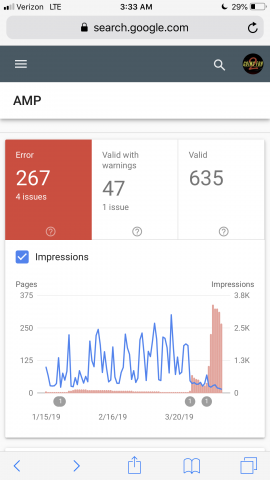
 Okay. It looks like AMP is showing up properly now, but is it possible to revert back to the older version? Take a look at this image, I’ll give you one guess as to when I upgraded to the new version. Right about the time you see my impressions take a nose dive and my errors skyrocket. Here is the image: http://goingfor2.com/wp-content/uploads/2019/04/9ADB38E9-4EE1-4261-B205-29028F44ABAE.png
Calin Hi,
Tested your video and is working, please make sure that you set this code
<iframe src="https://www.facebook.com/plugins/video.php?href=https%3A%2F%2Fwww.facebook.com%2FRealoffroad17%2Fvideos%2F634414497005186%2F&show_text=0&width=560" width="560" height="315" style="border:none;overflow:hidden" scrolling="no" frameborder="0" allowtransparency="true" allowfullscreen="true"></iframe>
in code editor -> https://www.screencast.com/t/A8whZLQONB
Results -> https://www.screencast.com/t/SozeUSzpE3
Thank you for your understanding!
 viatxtLG
 This is not an issue with Newspaper – It works on the actual server but does not work on my local drive running the (Mac) MAMP Apache simulated server.
I can live with that, although it’s not ideal as Id prefer to be able to design and experiment with the site locally (off-line) prior to running it on the actual server.
But if there is anyone out there that has come across the same issue with MAMP and managed to resolve it, Id appreciate the solution.
Thanks
 mgpl
mgplThis is another MAJOR issue we’ve found out recently after migrating to Newspaper.
Our existing articles which had Hyperlinks & Pingbacks to other internal site content.. are now returning as comments on the POSTs.. Please assist.
The comments on this posts were pingbacks on the article.
https://www.talkesport.com/news/daniel-ddk-kapadia-to-attend-cobx-masters/
This is really creating a big problem for us. PLease help!!!
Catalin Hi,
At the moment, the AMP has not been implemented in Newsmag and if you want to use it on the theme, you can use the default AMP plugin. We cannot say for sure but we hope to update the theme in the near future.
Thank you!
Catalin Hi,
Unfortunately, the theme does not have any such an option that allows you to make this redirection, sorry! The user will navigate on the AMP only if he will find your post website from the Google Search and then, he will come from your website. The main functionality of the theme is that the user to navigate on your website and not on AMP.
Thank you for your understanding!
 butur
butur Excuse me. But I don’t change anything. Give same error again. Please help about amp.
 Quigs89
Hello,
I recently added the AMP and mobile theme plugins, but now some of my pages’ content aren’t displaying on mobile.
I have tried using the TD composer but it is saying that “the current content hasn’t been created by the tagdiv composer”.
Am I right that the pages content will only be displayed if it has been composed using the TD composer?
mgplHello,
We’ve just migrated to Newspaper – Local_news.
Our website is among the best sites in the world in a niche market and we can’t afford any bugs on the site when it’s live.
Currently, the homepage on both mobile & PC is showing only ‘Latest Posts’ and the whole theme disappears. However, without any fixation, it returns back to normal. This has happened twice in the past two days only.
Examples as follows:
Website when everything is fine – http://prntscr.com/nc92gx
Website unusual behavior – Mobile: http://prntscr.com/nc931m
Website unusual behavior – PC: http://prntscr.com/nc9498
Do you know what can be causing the issue?
 suresh
 Here is the link to the gallery: https://www.studioflicks.com/gallery/watchman-movie-stills/
AMP Version: https://www.studioflicks.com/gallery/watchman-movie-stills/?amp
-
This reply was modified 7 years by
suresh.
Calin Hi,
Please provide some more details and screenshots also a link were I can inspect the problems that you have with AMP
How to Make an AMP Ready Website with Newspaper Theme ->https://tagdiv.com/amp-newspaper-theme/ in Newspaper c9.6.1 you have 3 options, one for only mobile, one for mobile and AMP( this option is working only with the AMP that we provide ), and AMP ( this option allow you on which page/post to make AMP, also this option is available only with provided AMP plugin and will display the mobile design ); if you choose to use others amp plugins -> https://www.screencast.com/t/klPekGTzwi0F -> https://www.screencast.com/t/EjRDB03fp
Thank you for your understanding!