- NewsmagBlock settings tutorial
- NewsmagCategory tag on modules/blocks
- NewsmagtagDiv Composer Tutorial
- NewsmagWeather Widget
- NewsmagExchange widget
- NewsmagInstagram widget
- NewsmagHow to use the Visual Composer plugin
- NewsmagIntroduction
- NewsmagFooter templates
- NewsmagCustom ad spots
- NewsmagLoading image effects
- NewsmagSmart sidebar
- NewsmagFeatured images
- NewsmagGeneral settings
- Newsmag7 days post sorting
- NewsmagTheme thumbs
- NewsmagExcerpts introduction
- NewsmagTheme colors introduction
- NewsmagtagDiv slider gallery
- NewsmagVideo playlist
 charlie_moreno
 I have a similar issue, but I can’t identify the modules for some blocks, I’ve made some changes to test the modules but I haven’t had any luck. don’t you have a list of the modules and where are they used?
 rcallejonvillalobos
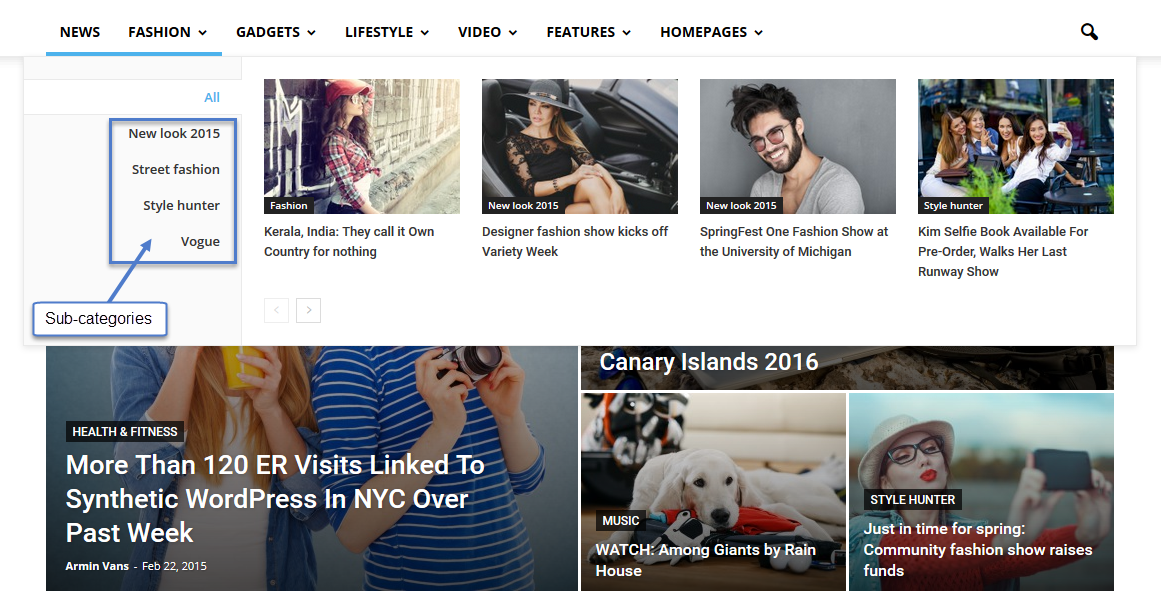
My mega menu is not displayed well
Mega menu original: https://forum.tagdiv.com/wp-content/uploads/2015/05/2015-06-15_13-48-10.png
My mega menu: http://oi59.tinypic.com/estbp5.jpg
my mega menu is displayed under the blocks.. How do I change it ?
My website: informeinsolito.com
 akopein
Hi
I am seeing a bug related to these blocks. I have removed all my custom changes and everything but i still face this issue
http://www.screencast.com/users/akopein/folders/Default/media/fd7e8d1d-f81e-462b-b01d-7322ec409d23
http://www.screencast.com/users/akopein/folders/Default/media/27d206e2-4f44-4eab-8097-224ad9f9115d
http://www.screencast.com/users/akopein/folders/Default/media/6a07b82e-bcd9-4292-ae9e-fd4c6d3c2ccb
I am not sure why this is happening. It happens when i place these blocks in a row of 3/4 + 1/4 column width
My site: theindiantelegram.com
 jorgecastro91
 Ahh ok ok thanks!
Well, what I need is to block the map on mobile, is there a way I can use your element to do that?
Thanks for the help!
charlie_morenoI’m looking for what modules conform each of the blocks on Newspapper 6, I’ve searched the documentation but nothing.
Jose Carlos Moreno
 MAndrew
Hi,
On my website http://www.sikh24.com, the featured homepage block is not showing properly. In addition, whenever I post something in featured category, it doesn’t show up in the blocks.
Thanks
 shae101s
 Hey reloaded, did you set specific ones for each ad. For example if you’re targeting the top ad, you want the code to say hide_top_ad
Here’s the entire lines of code for the full ad section in the file found in the wp-booster folder:
/*  ----------------------------------------------------------------------------

			ad support on content

		*/
//read the current ad settings
$tds_inline_ad_paragraph = td_util::get_option('tds_inline_ad_paragraph');
$tds_inline_ad_align = td_util::get_option('tds_inline_ad_align');
//add the inline ad
if (td_util::is_ad_spot_enabled('content_inline') and is_single() and !get_field('hide_inline_ads')) {
if (empty($tds_inline_ad_paragraph)) {
$tds_inline_ad_paragraph = 0;
}
$cnt = 0;
$content_buffer = ''; // we replace the content with this buffer at the end
$content_parts = preg_split('/(<p.*>)/U', $content, -1, PREG_SPLIT_DELIM_CAPTURE | PREG_SPLIT_NO_EMPTY);
$p_open_tag_count = 0; // count how many <p> tags we have added to the buffer
foreach ($content_parts as $content_part_index => $content_part_value) {
if (!empty($content_part_value)) {
// Show the ad ONLY IF THE CURRENT PART IS A <p> opening tag and before the <p> -> so we will have <p>content</p> ~ad~ <p>content</p>
// and prevent cases like <p> ~ad~ content</p>
if (preg_match('/(<p.*>)/U', $content_part_value) === 1) {
if ($tds_inline_ad_paragraph == $p_open_tag_count) {
switch ($tds_inline_ad_align) {
case 'left':
$content_buffer .= td_global_blocks::get_instance('td_block_ad_box')->render(array('spot_id' => 'content_inline', 'align' => 'left'));
break;
case 'right':
$content_buffer .= td_global_blocks::get_instance('td_block_ad_box')->render(array('spot_id' => 'content_inline', 'align' => 'right'));
break;
default:
$content_buffer .= td_global_blocks::get_instance('td_block_ad_box')->render(array('spot_id' => 'content_inline'));
break;
}
}
$p_open_tag_count ++;
}
$content_buffer .= $content_part_value;
$cnt++;
}
}
$content = $content_buffer;
}
//add the top ad
if (td_util::is_ad_spot_enabled('content_top') and is_single() and !get_field('hide_top_ad')) {
$content = td_global_blocks::get_instance('td_block_ad_box')->render(array('spot_id' => 'content_top')) . $content;
}
//add bottom ad
if (td_util::is_ad_spot_enabled('content_bottom') and is_single() and !get_field('hide_bottom_ad')) {
$content = $content . td_global_blocks::get_instance('td_block_ad_box')->render(array('spot_id' => 'content_bottom'));
}
return $content;
}
You can see each of the different ad placements (top, inline and bottom) have their own name and respective field in ACF.
 reloaded
 I’m still trying to paste the code in the file you suggested, even just this part of the one above:
//show the header ad spot
			if (!get_field('hide_ad')) {
				echo td_global_blocks::get_instance('td_ad_box')->render(array('spot_id' => 'header'));
			}
but or i get syntax error or simply nothing happens and ads keeps showing
-
This reply was modified 10 years by
reloaded.
 gmaio
gmaioHi there,
I’ve found a couple of strange things in the amazing Newsmag theme:
1) Even if I set up the sort order filter on the block 7 to “Popular” and also already enabled the 7 Days Post sorting option in the Newsmag theme panel, I can’t get the “most popular” posts listed in the block 7 (http://352.be7.myftpupload.com i.e. “PIU’ VISTI”, PIU’ COMMENTATI” right sidebar). I suppose that the “most popular” post are posts the are most clicked and therefore viewed isn’t it? So, if my site is not published yet, the “most viewed” posts should be the ones I’ve clicked more during my tests, isn’t it? But I can’t get any post at all!
2) Opposite of the above considerations for the “most commented” posts: a list of posts are reported on a block 7 but they have all zero comments! What’s wrong in this case?
3) The top right post filter (Latest, In evidence, Most popular, Random, …) located in the landing page when user clicks on a category mega menù, doesn’t give any posts when “In evidence” option has been seleceted, even if some posts of that category have been flagged as “In evidence”. Why I get this behaviour?
Thanks a lot for any advice.
Giuseppe Maio
 Bogdan B.
 Hi,
You can use a bit of custom CSS to make it more visible:
.td_block_14 .td_module_mx1 .entry-title{

text-shadow: -1px -1px 0 rgba(130, 132, 130, 0.75), 1px -1px 0 #615D5D, -1px 1px 0 #5D5B5B, 1px 1px 0 #636262;}
result: http://screencast.com/t/umTSeNEy
Thanks.
 Andrei L.
 Hi
To display a different header ad depending by category you need to edit the ads.php file and add a set of conditions like here: http://screencast.com/t/bFwpJ40a2D
if (is_category('New Look 2015')){
        echo do_shortcode('[td_block_ad_box spot_id="custom_ad_1"]');
    }elseif (is_category('Street Fashion')){
        echo do_shortcode('[td_block_ad_box spot_id="custom_ad_2"]');
    }elseif (is_category('Style Hunter')){
        echo do_shortcode('[td_block_ad_box spot_id="custom_ad_3"]');
    }
You need to replace the current categories names with your names. This code will display different header ad on the category page. If you want the same implementation for posts you need to use this function: in_category(): https://codex.wordpress.org/Function_Reference/in_category
Thanks!
-
This reply was modified 10 years by Andrei L..
 Catalin
 Hi @snowwatchGB,
I’ve checked your site and i think your problem is related to the appearance of advertising banner on iPad Portrait View.
Please try this code below within theme panel->custom CSS area: http://screencast.com/t/O59fSfIHD
.td-rec-hide-on-tp {

    display: block!important;

}
If is not what do you mean, please provide more details for solve the problem.
Thanks.
 byothe
 oh sorry… I made a bad translation of the french word 😉
We are getting closer to mmy problem 😉
I have no problem with the way the blockquotes appears when the article is published… it looks good…
It’s just that when I write my article and I use the bloquotes, it appear in uppercase in the editor… so I wanted to know if there was a way to put it in normal text
Thanks 😉
Catalin Hi byothe,
Ohhh, sorry!
So you are refering to the UPPERCASE letters in the blockquote.
You can change this within Theme panel like this: http://screencast.com/t/35gBYSX9F38V
Thanks.
byothe Oh no, the problem is not with the extra space… the problem is the fact that the blockquotes is capitalized…
Bogdan B. Unfortunately there is no easy way to do it. There is no easy piece of code you can add somewhere. It has to be made custom, that means editing more files than one to change the functionality of the blocks. It needs custom work which we cannot provide. It is no easy task even though it seems like one. If you really need this done, you can hire a freelancer to do it for you from sites like studio.envato.com
Thank you!
Bogdan B. Internet explorer seems to hate us as much as we hate it.
Try it like so:
.ie11 .col1{

display:block!important;

}
http://screencast.com/t/FVKDWG7oB9dN
If this one does not work as well, please send us an email at contact@tagdiv.com so we can make the modification directly and see why it does not apply.
Bogdan B. Hi,
I understand your request, but unfortunately there is no easy solution for it. The example you provided is for another option. It is set to remove the currently viewed post from the sidebar, not show unique articles on blocks.
In order to have different articles on post blocks (widget and related) you can edit the widget block and set another category to it, or filter it by tag. You can also filter the related articles by tag from the theme panel.
Unfortunately there is no unique articles site-wide option.
Thank you!
Bogdan B. Hi,
At the moment these are the only options for the mobile menu. In a future update we hope to implement a number of options for the mobile version. What you can do is make the top-menu appear above the main menu, but again it will need custom work to display properly. Not all options from the top menu will fit.
As an example:
http://screencast.com/t/PL9o8rRCN6N6
code:
@media (max-width: 767px){

.td-header-top-menu-full {

    display: block;}

.td-header-sp-top-menu{

display:block!important;

}
You can then hide elements you do not want with the ‘display:none’ property.
Thanks.
Bogdan B. Hi,
Try this one instead:
.ie11 table td {

display: inline-block;

}
 vladimirtrajkovic
Hi,
I would like to have h1 and h2 tag on my frontage. Problem is that whenever I put it (whichever block or widget I use), these two headings are shown with default font size which does not suit my needs.
My question is whether it is possible to define h1 and h2 font size in Theme Panel->Footer->Footer Info Content->Footer Text which will be the same as the rest of the text which will not be h1 or h2.
Basically what I want to do is to define h1 and h2 in the About Us section in the Footer which will be the same size as the rest of the font in this section.
For example, this is the About Us part of the footer:
High Tech News is our effort to bring the best latest science and technology news to a broader audience. We live in the most advanced science and technology era and it will be a great shame if people do not get familiar with all the latest events. This is our personal effort to make that possible. Stay Informed!
Here I would like to make “High Tech News” as h1 and “Stay Informed!” as h2, but I would like to keep the font size of these two headings as the rest of the text in this section.
Many thanks,
Vladimir
 adi_mitran
Hello,
i want to remove the gradient from the pictures in big grid 7. and replace it with a uniform grey.
how can i do that?
Take a look at my page:
http://www.good-life.ro/gurmand/ (goodlife!23 password)
Also is there a way to add a space between pictures so that they don’t look so crowded. Something like the Block 14.
thank you.
 Alin [tagDiv]
 Hi,
For the grey border on images, please disable Jetpack Photon feature as the theme works based on the same system (creates and serves/uses thumbnails for each uploaded image). We don’t recommend using that photon module as it tends to create issues sometimes so we suggest you disable it. Or if you use CDN try to disable it.
All the issues related to the thumbs on Big Grid or other blocks/modules should be solved if you disable this feature and regenerate thumbnails – https://forum.tagdiv.com/using-the-theme-with-existing-content/
Thanks!
Alin [tagDiv] Hi,
You can easily create a shop page like the demo. For top image and text we use a text block – http://screencast.com/t/R39kDYhIkmYf For Featured and Best Selling products you can use these elements using Visual Composer pagebuilder – http://screencast.com/t/1lBQyrrl
On the demo page we use the shortcodes of these blocks in a Text Block so you will have the ability to add also title – http://screencast.com/t/zjkzGCbEBcDn
The page is set as Shop page in Woocommerce settings – http://screencast.com/t/kiRI7UqFh5G
I will provide the entire content of the shop page from demo, maybe it will help you more – http://screencast.com/t/Q8DbI5tOu28 – http://pastebin.com/1m2KzRw5
Thanks!
Andrei L. Hi
I’ve checked your site and noticed that the sidebar from homepage is built in Visual Composer page builder. To have the same sidebar in posts or on different pages you need to create it as a widget under Appearance > Widgets: http://screencast.com/t/eOfk9MY9 then you will be able to chose the respective sidebar for posts: http://screencast.com/t/VjrRFS4S and also for pages, either using a widgetized sidebar block: http://screencast.com/t/KIBUjQLMLWbM or using the sidebar options from page settings: http://screencast.com/t/g458O6rHl9V
Let me know how it goes and if you need further instructions please provide more details.
Thanks!