
- NewspaperFlex Block Builder and Flex Loop Builder
- NewspaperHow to use the Flex Blocks cache option
- NewspaperHow to edit modules for Flex Block X
- NewspaperHow to insert a block inside the content of a post
- NewspaperFlex Block Settings Guide
- NewspaperMeta Info on Modules and Blocks
- NewspaperTheme modules and blocks
- TutorialsDefault Block Settings Guide
- NewsmagBlock settings tutorial
- NewsmagCategory tag on modules/blocks
- NewspaperThumbnails – Fix strange looking images on blocks
- NewspaperBlock settings tutorial
- NewspaperCategory Tag on Modules/blocks
- ApiPractical example – How to add a new Block and Module
- Apitd_api_block::delete
- Apitd_api_block::update_key
- Apitd_api_block::update
- Apitd_api_block::add
- ApiAPI – Blocks – Introduction
- NewspaperWP Rocket and Newspaper Theme: Optimization Guide
 dano1066
I know there are third party plugins for this but i feel this would be quite simple to do if i could style the comments differently. Add a category called “question” and the title/post content would make up the question and then the comments could be the answers. Its already the perfect hierarchy. All i would need to do is use a different theme for posts of this category. I would style it so the comments are a more prominent part of the page so the user could clearly see the answers to the question at the top.
I was hoping there might be a cloud template for this but I couldn’t see one. I have tried creating this but I am struggling to restyle the comments to make them look more like answers to a question as opposed to traditional comments. Theres also no way to modify the title of the comment block to read “2 Answers” instead of “2 Comments”.
 Kunal Pandya
Hello, I’m facing trouble to make the header work properly in the newspaper journal theme. First the logo was not coming and then this alignment issue is there. I’ve tried adding empty space block but that is not helping. The issue is the same on all pages including the homepage, inner pages etc. Here is the staging link – https://sgnew.ncryptedprojects.com/. Please if someone can look into this asap, thanks.

 Atithya
Hi, since 4-5 days, I am not able to edit custom HTML block as well as Title with Text block which has description area. The block details keeps on loading. This is causing problems in updating pages.
Is there any alternative to use blocks or any other way I can edit blocks?
 hadharm
 Now you just understand my point. Setting it from the front page of create a job page is not possible because I imported the posts.
Is there any other solution or way out pls???
or is there any code I can put into my XML file (XML file containing job posts to import) to assign company name or company id to the posts directly as it is been imported??
It would have been very easy if post a job page can allow editing or updating of draft jobs. But I don’t see an option for that in tds my job listing page. Only delete and publish are available see screenshot => https://prnt.sc/zcU7yTET_-PF. I think you guys should consider edit option on post list element/block for draft items in upcoming updates.
Thanks
 Anamaria
 Hi,
It seems the images are not loaded https://i.imgur.com/OJz4mwX.png. If you use Wp Rocket, you can try to exclude the following files
/jquery-?[0-9.](.*)(.min|.slim|.slim.min)?.js
/jquery-migrate(.min)?.js
/wp-content/plugins/td-composer/legacy/Newspaper/js/tagdiv_theme.min.js
tdBlocksArray
Thank you!
Anamaria Hi,
The steps are the same, you need to edit the page from where you have the block and in the tab layout, you can set the height and width of the block -> https://i.imgur.com/gxV4kCV.png
Thank you!
 Bettina
 Hello!
Ofcourse. You can build a module template and use it in any page you need: https://forum.tagdiv.com/flex-block-builder-flex-loop-builder/
Thank you!
Anamaria Hi,
1. Unfortunately, this is how it works.
2. The bookmark refers to having this on the blocks enabled, and in the page use a block and sort to display only the bookmarked posts -> https://i.imgur.com/angjj57.png https://i.imgur.com/j6Yx0RN.png -> https://i.imgur.com/j3uVQ3t.png
5. I don’t know about you referring to the company and jobs. If you want to have the company here -> https://i.imgur.com/jAvnrmt.png, then you need to create a new taxonomy for the CPT jobs. You need to go to the ACF plugin and uncheck it to be required -> https://imgur.com/6Cy7W5M because I think that you have disabled other groups of the custom fields. The companies is another custom post type with taxonomies.
Thank you!
Anamaria Hello.
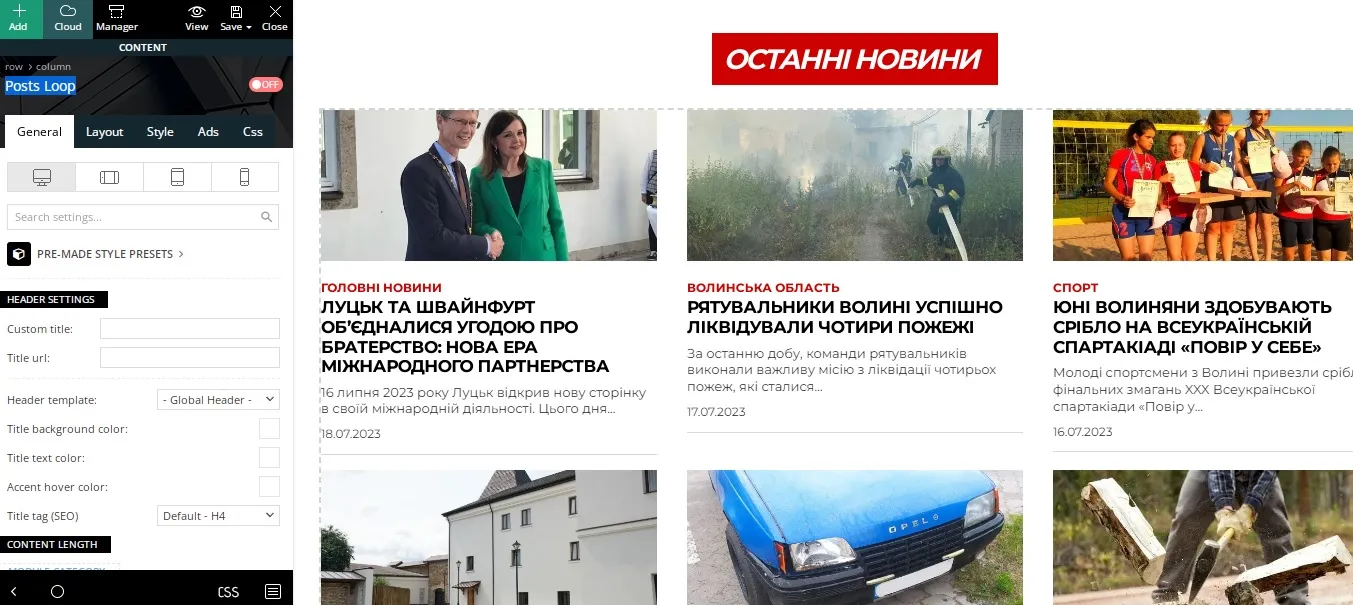
Unfortunately, the Post Loop element does not offer filtering options. You can replace it and use Flex Blocks. In flex blocks, you can go to filter settings and exclude by category/post id using a negative in front. For example: ” -24 ”: https://imgur.com/IKkIQfV
Thank you!
 24.lutsk.ua
Hello, tell me how to set up the display of all posts in this block, without displaying certain categories.
I need to exclude posts from certain categories.
 bardzolubie
Is it possible to remove the Title view in Flox Block – as in the attachment?
https://kochaniemoje.pl/wp-content/uploads/2023/07/title.jpg
Bettina Hello!
You can use a flex block only on the category pages with its special filter: current category: https://forum.tagdiv.com/flex-block-settings-guide/
Thank you!
Bettina Hello @akisloukas !
I can see that you get a 403 error, that’s why the image is not opening at the first click. It’s possible to be from the firewall or security module which blocks the admin-ajax.php request, which usually displays a 403 or 404 error.
If you don’t use a security plugin, please ask your host about this, maybe you have a security module that blocks this.
If you use a plugin like Wordfence please set it in learning mode.
Also, if you are using Cloudflare, please make sure that is set as in our guide https://forum.tagdiv.com/cloudflare-cdn/, you need to disable the Rocket Loader.
Examine some other potential interfering factors: https://forum.tagdiv.com/general-options-may-interfere-newspaper-theme/
Make a test and deactivate ALL plugins except tagDiv ones, also if you are using a cache plugin, deactivate it, clear all cache and try again.
Let me know the results!
Thank you!
Bettina Hello @Peterchoge !
You can use a flex block only on the category pages with its special filter: current category: https://forum.tagdiv.com/flex-block-settings-guide/
Thank you!
Anamaria Hello,
The footer seems to be the same; the only difference is the limit post, so please set the limit on the block here -> https://i.imgur.com/OLimEkd.png
Thank you!
Anamaria Hi,
The page loading speed can depend on many factors, and each website is unique from this point of view. Let me explain some of these factors and maybe they give you some starting points for optimizing your website. A good choice for the page speed, could be the mobile layout which contains fewer elements because it can improve a bit your page speed.
There are many optimization guides provided by our users here in the forum, some made by us; you could check some of them
– https://www.infophilic.com/get-almost-100-pagespeed-newspaper-theme/
– https://forum.tagdiv.com/cache-plugin-install-and-configure/
– https://forum.tagdiv.com/how-to-make-the-site-faster/
– https://forum.tagdiv.com/topic/high-number-of-ajax-request/
– https://forum.tagdiv.com/topic/score-100100-pagespeed-with-newspaper-wordpress-theme/
– https://www.andraware.com/wp-rocket-for-newspaper-theme/
– https://forum.tagdiv.com/topic/page-speed-guide-for-2023-beginners-and-advanced/
– https://forum.tagdiv.com/topic/newspaper-theme-speedify-your-website/
– https://forum.tagdiv.com/topic/tutorial-chriss-custom-optimizations-for-functions-php-etc/
– https://forum.tagdiv.com/cloudflare-cdn/
– https://forum.tagdiv.com/topic/theme-causing-high-cpu-usage-2/
– https://forum.tagdiv.com/topic/sql-querys-high-cpu/
– https://forum.tagdiv.com/topic/newspaper-theme-slow-to-respond/
– https://premium.wpmudev.org/blog/optimizing-your-wordpress-database-a-complete-guide/
– https://underconstructionpage.com/optimize-wordpress-database/
– https://crunchify.com/better-optimize-wordpress-database-all-in-one-guide/
Also, pagespeed is not covered by support -> https://forum.tagdiv.com/newspaper-theme-support/
If you use Wp Rocket, you can try to exclude the following files
/jquery-?[0-9.](.*)(.min|.slim|.slim.min)?.js
/jquery-migrate(.min)?.js
/wp-content/plugins/td-composer/legacy/Newspaper/js/tagdiv_theme.min.js
tdBlocksArray
To be able to optimize and to remove CLS and LCP please check these guide => https://developers.google.com/web/tools/lighthouse/ -> https://www.sqlpac.com/en/documents/google-pagespeeds-lighthouse-6-new-features-lcp-cls.html -> https://web.dev/lighthouse-whats-new-6.0/ -> https://web.dev/lcp/ -> https://web.dev/cls/
Thank you!
Anamaria Hi,
You need to hide the image on that block, so please edit the page from where you have taken the block with tagdiv Composer and hide it -> https://i.imgur.com/tVhCbJk.png.
Thank you!
 mik989
Greetings,
from desktop I have Eliminate render-blocking resources problems.
I currently use wp-rocket and I’ve already followed various guides on how to optimize the newspaper theme, but from the desktop I can’t figure out how to optimize these css coming from the theme.
I put here the link to google pagespeed, I would be grateful if you could give me some suggestions.
Thank you
 2B-On
2B-On Hello,
But this is the block I can’t select to edit on the home page, next to the footer, how can I hide it?
Bettina Hello!
You can use big grid flex or a flex block in any cloud page. But you cannot use a single post shortcode on a page, only in a single post or article template.
More documentation about the cloud templates is here:
– https://forum.tagdiv.com/cloud-library-templates/
– https://forum.tagdiv.com/design-post-pages-using-cloud-library-templates/
– https://forum.tagdiv.com/cloud-library-category-templates/
Thank you!
Anamaria Hello,
Unfortunately, the only options for the header and footer are in the theme panel -> mobile theme. You can’t redesign with tagdiv Composer.
There are many optimization guides provided by our users here in the forum, some made by us; you could check some of them
– https://www.infophilic.com/get-almost-100-pagespeed-newspaper-theme/
– https://forum.tagdiv.com/cache-plugin-install-and-configure/
– https://forum.tagdiv.com/how-to-make-the-site-faster/
– https://forum.tagdiv.com/topic/high-number-of-ajax-request/
– https://forum.tagdiv.com/topic/score-100100-pagespeed-with-newspaper-wordpress-theme/
– https://www.andraware.com/wp-rocket-for-newspaper-theme/
– https://forum.tagdiv.com/topic/page-speed-guide-for-2023-beginners-and-advanced/
– https://forum.tagdiv.com/topic/newspaper-theme-speedify-your-website/
– https://forum.tagdiv.com/topic/tutorial-chriss-custom-optimizations-for-functions-php-etc/
– https://forum.tagdiv.com/cloudflare-cdn/
– https://forum.tagdiv.com/topic/theme-causing-high-cpu-usage-2/
– https://forum.tagdiv.com/topic/sql-querys-high-cpu/
– https://forum.tagdiv.com/topic/newspaper-theme-slow-to-respond/
– https://premium.wpmudev.org/blog/optimizing-your-wordpress-database-a-complete-guide/
– https://underconstructionpage.com/optimize-wordpress-database/
– https://crunchify.com/better-optimize-wordpress-database-all-in-one-guide/
Also, pagespeed is not covered by support -> https://forum.tagdiv.com/newspaper-theme-support/
If you use Wp Rocket, you can try to exclude the following files
/jquery-?[0-9.](.*)(.min|.slim|.slim.min)?.js
/jquery-migrate(.min)?.js
/wp-content/plugins/td-composer/legacy/Newspaper/js/tagdiv_theme.min.js
tdBlocksArray
To be able to optimize and to remove CLS and LCP please check these guide => https://developers.google.com/web/tools/lighthouse/ -> https://www.sqlpac.com/en/documents/google-pagespeeds-lighthouse-6-new-features-lcp-cls.html -> https://web.dev/lighthouse-whats-new-6.0/ -> https://web.dev/lcp/ -> https://web.dev/cls/
Thank you!
Anamaria Hello,
Please regenerate the thumbs https://forum.tagdiv.com/thumbnails-fix-strange-looking-images-on-blocks/
Thank you!
Anamaria Hi,
There is no page to display where the blocks are used, but you can take them one at a time.
Also, the blocks have a filter tab to filter them -> https://i.imgur.com/Mj9LT8A.png
Thank you!
 simchris
Hey folks — just heads up if you get the site messed up after upgrading from 5x to 5.4, in my case the solution was I had to reactivate the td-composer plugin.
If you update and notice custom fonts, footer gone, wrong post template, wrong archive template, home page just block of code … that likely the reason.
I did manual FTP upload;
a) delete old plugin; delete old theme
b) upload new plugin; upload new theme
c) go to plugins > activate the td-composer
Most smart folks likely figured this out. But I had panic moment there 🙂
 propagare
We are trying to apply a radius to the flex block 1 image, but only the top corners are getting rounded
https://i.imgur.com/azYr9HU.png
https://eshoje.com.br/noticias/teste/
How to solve?



