- NewspaperFlex Block Builder and Flex Loop Builder
- NewspaperHow to use the Flex Blocks cache option
- NewspaperHow to edit modules for Flex Block X
- NewspaperHow to insert a block inside the content of a post
- NewspaperFlex Block Settings Guide
- NewspaperMeta Info on Modules and Blocks
- NewspaperTheme modules and blocks
- TutorialsDefault Block Settings Guide
- NewsmagBlock settings tutorial
- NewsmagCategory tag on modules/blocks
- NewspaperThumbnails – Fix strange looking images on blocks
- NewspaperBlock settings tutorial
- NewspaperCategory Tag on Modules/blocks
- ApiPractical example – How to add a new Block and Module
- Apitd_api_block::delete
- Apitd_api_block::update_key
- Apitd_api_block::update
- Apitd_api_block::add
- ApiAPI – Blocks – Introduction
- NewspaperWP Rocket and Newspaper Theme: Optimization Guide
 stefanegirard
Hello,
I created a sidebar here: Attachment template
Name of the sidebar: spots sidebar.
I went to Widgets to add a “[tagDiv] Block 1”.
But I cannot find in “Category filter” the default category that must be set to “use the ‘Multiple taxonomies filter” as explained: If you want to filter multiple categories, use the ‘Multiple taxonomies filter’ and leave this to default.
Please help.
 Alastair Dixon
 Sadly still not working for me – I used the recommended exceptions below, but till the live search or secondary menus don’t load:
/jquery-?[0-9.](.*)(.min|.slim|.slim.min)?.js
/jquery-migrate(.min)?.js
/wp-content/plugins/td-composer/legacy/Newspaper/js/tagdiv_theme.min.js
tdBlocksArray
 Caiaphas
When WordPress updated to blocks, it caused issues with the widgets on my website. I disabled the blocks and it was working again. Now I can’t access widgets to make changes regardless of what I do. If I disable the block editor and try to access Appearance>Widgets, it won’t fully load the page so I can’t get into the widget that I need to modify. If I switch back to the block editor, I get a ton of error messages about conflict with the theme and tag-div composer and the block widget won’t fully load either. The end result is the widgets are on the website and working, but I can’t get to them to edit or modify. Any idea what caused this issue? WordPress and Newspaper updates have been causing issues with the widgets for awhile now.
 Anamaria
 Hello,
You can edit the child theme with the Standard WordPress theme editor.
You need to edit each module which the block uses.
You can check this topic for some paths https://forum.tagdiv.com/topic/custom-block-dynamic-font/ -> https://i.imgur.com/6qayOqz.png
Thank you!
 mixos
mixos Could you fix the third attachment ?
As for now, i made it work with an ad-block.
 Bettina
 Hello!
From that screenshot I see that you are using “Charly” as the sidebar on that page. Go to Appearance -> Widgets and make sure that you are placing your ad block into that sidebar.
Thank you!
 tomakisz
Hi! I have a problem with customizing the HOME page (https://mgaesports.com/). At the bottom there is an uneditable LATEST ARTICLES (NAJNOWSZE ARTYKUŁY) block. Is there any possibility to edit the number of articles displayed there? Or the way they are displayed? I would like information about the category the article belongs to on the thumbnail, as it is the case in other blocks.
Thank you!
Anamaria Hello,
All the blocks and grids have the same filtering options – https://tagdiv.com/tagdiv-composer-flex-block-elements/ -> https://i.imgur.com/Nr4p9At.png
You can set the filtering you want for each block and grid.
If you want the grid you mention to display posts from a category of your choice, select simply that category in the filter section of the grid, for example – https://i.imgur.com/upmJAjg.png
Thank you!
 aliran
 1. I tried to add a new block to a sidebar — [Newspaper default] by using Widgets, /wp-admin/widgets.php
2. After adding, I clicked Update, and I got this error: There was an error. The response is not a valid JSON response
3. Then I checked on browser debug console, I saw this error: /wp-json/batch/v1?_locale=user 405
Details of the response from browser console:
<!DOCTYPE HTML PUBLIC "-//IETF//DTD HTML 2.0//EN">

<html><head>

<title>405 Method Not Allowed</title>

</head><body>

<h1>Method Not Allowed</h1>

<p>The requested method OPTIONS is not allowed for this URL.</p>

</body></html>
mixos Hi there,
I have a shortcode [LiveEmbedCode] that I want to embed on the top of the homepage. Can this be done on the visual editor using a block or something or do I have to EDIT PAGE content? I tried creating an ad box and insert it as a code but this does not work.
Thanks
 Mamuka Kavtelishvili
Hey!
Them is great! functionality is amazing!
I uploaded custom fonts but it doesnt work… something is blocking them.
I cleaned the cache and did everything right. font files are in .woff format using fontsquirel tool
 Rigsbyx
Hello,
As you can see from my other posts, I am having major issues with your theme. I’m not doing anything out of the ordinary. I don’t know PHP or CSS. I am merely creating copies of your Cloud templates and making test posts.
I have been using Single Post Template 62 for everything, but trying to open one specific page to edit causes a 500 error. All other pages are fine. I wasn’t able to work on the website last night because I kept being frozen out. All my other websites on the server load fine; its only yours. My hosts confirmed this for me.
Also, the aforementioned template has a nice layout (with both text and images), but when selecting it when I am creating the new post I don’t get to see the layout; all I see is an empty Gutenberg page, and thus when viewing the page I also don’t see your layout, just the Featured Image and one long block of text. It has always been this way from day one.
I have had this theme for just under 3 weeks, and the amount of time spent trying to find workarounds is unacceptable, and so I really need you to have a look at this for me. I don’t wish to provide screenshots or videos because you don’t have a private area where my work is hidden from the public; my other theme suppliers do it and it works well.
Please let me know what you can do for me and if you have any bug updates that you can supply.
Thanks : )
 duck1970
838 / 5000
Resultados de traducción
Hi, I have 2 questions to ask you regarding widgets
The first question is that I see that since the last update of the theme the Widgets section has changed me to blocks, but the problem is that now in the widgets where I have added Adsence or The Monetyzer code I get a FORBIDDEN message
You don´t have permission to access /wp-admin/widgets.php on this server
Why do I have this ban all of a sudden?
How can I fix it attached photo (forbidden.png)
https://www.radiomarcabarcelona.com/goodnews-design/forbidden.png
and 2nd question now in the Widgets section I have 5 widgets available and a tab with inactive widgets
My question is, how to get new Widgets? I would need 2 more
and in one of them insert a video and then use it in tagDiv
and load that widget that I want to build again.
attached photo (widgets.png)
https://www.radiomarcabarcelona.com/goodnews-design/Widgets.png
Hope your help. Thanks
 krisoy52001
 I cannot edit it with tagDiv Composer because there are no blocks
 kubazabran
Hi,
is there an option or some simple PHP tweak how to modify displaying comments number in the lists? (whether it’s post loop or flex block). I’d like to display the number of comments only when there’s at least one comment. When there’s none, nothing is displayed. It seems there just on/off option in tagDiv Composer.
The site is carnewschina.com
Thanks!
Rigsbyx Where did I mention a mobile page?? Did I mention header logos?!
No, I am referring to FLEX BLOCK 5, not Loops!
Why is one template deleting an entire row of FB5’s elements and another template adding a row of FB5’s elements? They both go around in circles, as do my questions on here, haha.
Thanks : )
 im7thson
 Will it be added translation for word on in translation panel from theme? I added recent commentary block and now it showing /Name/ on /post/.
Thank you
 kappe79
Hi, if I let WordPress to show PHP errors
ini_set(‘display_errors’, 1);
ini_set(‘display_startup_errors’, 1);
error_reporting(E_ALL);
I get on the top of my webpage, in mobile version, the following alert:
Notice
Undefined index: color-1-overlay in <b>/var/www/vhosts/FOLDER_ON_SERVER/wp-content/plugins/td-composer/legacy/common/wp_booster/td_block.php</b> on line 2407
Notice
Undefined index: color-2-overlay in <b>/var/www/vhosts/FOLDER_ON_SERVER/wp-content/plugins/td-composer/legacy/common/wp_booster/td_block.php</b> on line 2407
Is it a theme error? How do I fix it?
Enzo
 Essentia
 [td_block_12 category_id=”_current_cat”]
EssentiaHi I have updated to Version: 11.2 but have lost a lot of the styling and getting this block of code on pages that should be displaying categories please can you help?
[td_block_12 category_id=”_current_cat”]
Thank you
Bettina Hello!
If you mean that you built mobile pages and you have the same news articles showing on all your categories, then try to use a Flex Block element for each page and select at the filter: Current category. In this mode you won’t have the same articles there.
If this is no what you mean, please let me know.
Thank you!
Anamaria Hello,
Please provide a screenshot or a link to your website where you have set the pagination.
Normally, the load more button is set on the center https://i.imgur.com/etcehbr.png https://forum.tagdiv.com/topic/center-flex-block-1-pagination-arrows/
Thank you!
Anamaria Hi,
Unfortunately, there is no global setting to set color on the website, for all blocks, but if you want you can copy the style for the title, image, category tag, meta info and excerpt => https://www.screencast.com/t/APIkNp7q, but be careful, it will copy everything (color, font), for other elements from the block, you need to do the changes on each block.
Thank you!
Rigsbyx Okay so, here’s what happens. When I re-add the missing element into the global category homepage template, the main homepage template re-adds the element I want to delete.
In another support ticket, I was recommended that I use Flex Block 5 because I wanted to use a set of 12 Loops (1-12), but lower down the page the copied element with 13-24 didn’t work, and nor did 25-36, and so on.
So, I recreated what I needed with Flex Block 5. As mentioned at the top of this ticket, I haven’t been able to save the element (or delete other saved elements), and so I have been copying the row and pasting it in. There’s nothing wrong with using the copy-paste process. So, all sets of 12 posts work fine and continue on as I want right down the page (1-12, 13-24, 25-36 etc.) Great!
I am using the same method of copy & pasting from one template to another template because I can’t save the element.
Both pages work fine except for the very last element located just above the footer, on both pages. Again, one element reappears and one element is being deleted…
Thanks : )
 Anonymous
 dear Bettina,
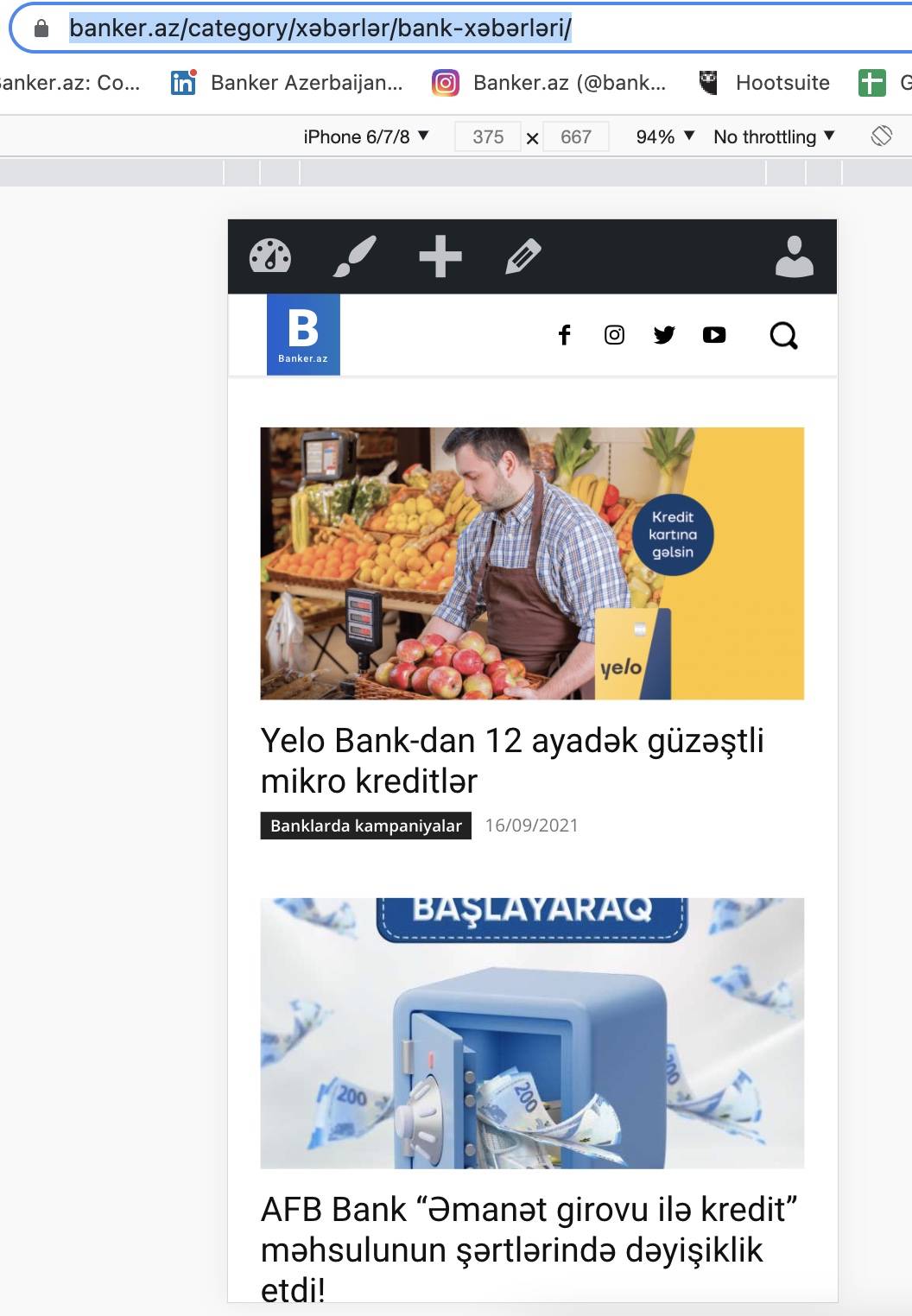
i’ve created mobile view which is shown for this category . it’s correct here https://banker.az/category/x%c9%99b%c9%99rl%c9%99r/bank-x%c9%99b%c9%99rl%c9%99ri/
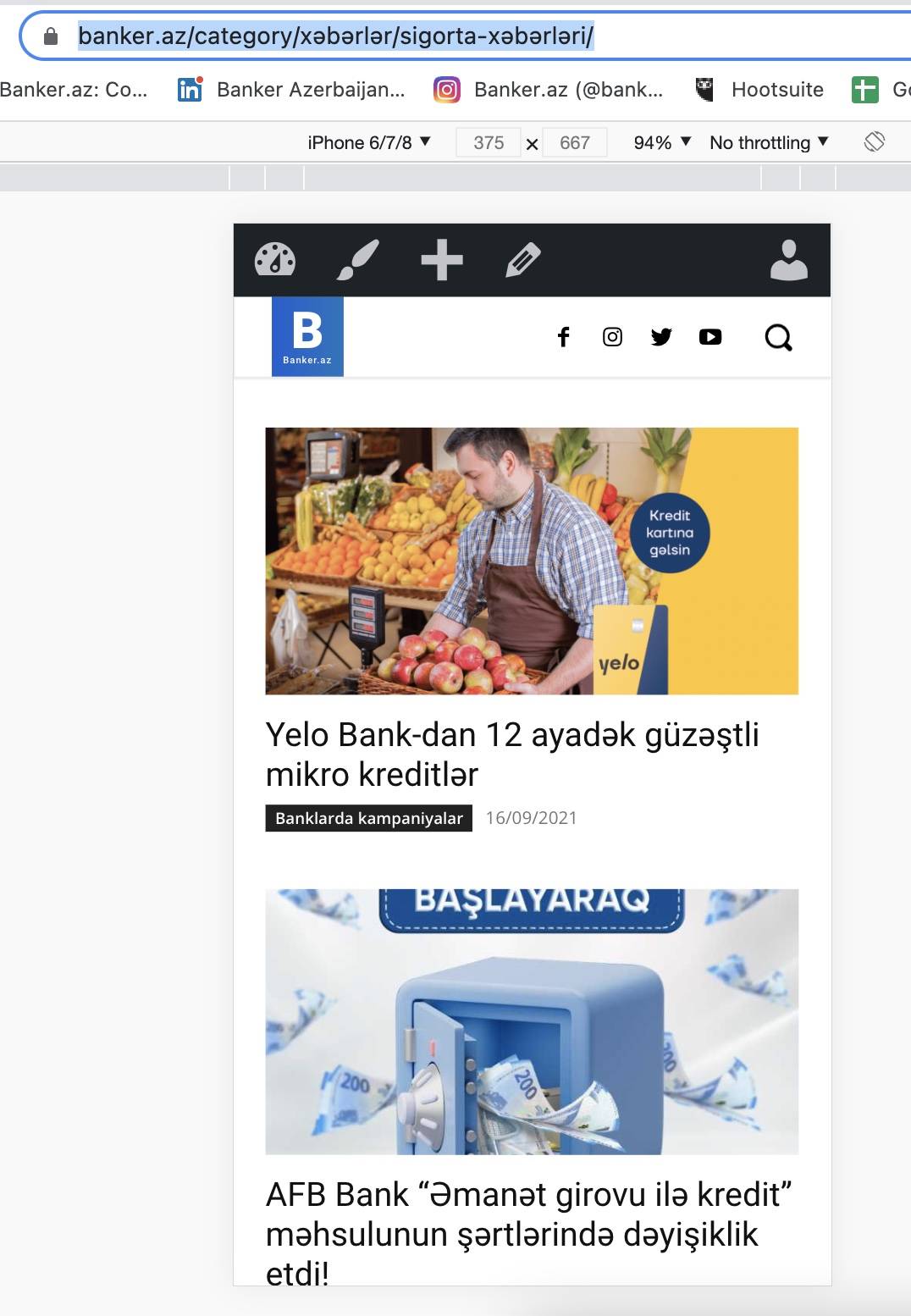
the same thing shown here, inspite of that, it’s different sub category. in desktop it works fine. but in mobile it’s showing same category news that is for above category. https://banker.az/category/x%c9%99b%c9%99rl%c9%99r/sigorta-x%c9%99b%c9%99rl%c9%99ri/
my question is that, how make so that, i use same mobile layout with same blocks, but Category change ( which category users opens, to see news from that category) see relative news. like in desktop version. there we create page and it works with all sub categories.
https://banker.az/wp-content/uploads/2021/09/Screen-Shot-2021-09-16-at-18.42.20.jpg
https://banker.az/wp-content/uploads/2021/09/Screen-Shot-2021-09-16-at-18.42.14.jpg