- NewsmagBlock settings tutorial
- NewsmagCategory tag on modules/blocks
- NewsmagtagDiv Composer Tutorial
- NewsmagWeather Widget
- NewsmagExchange widget
- NewsmagInstagram widget
- NewsmagHow to use the Visual Composer plugin
- NewsmagIntroduction
- NewsmagFooter templates
- NewsmagCustom ad spots
- NewsmagLoading image effects
- NewsmagSmart sidebar
- NewsmagFeatured images
- NewsmagGeneral settings
- Newsmag7 days post sorting
- NewsmagTheme thumbs
- NewsmagExcerpts introduction
- NewsmagTheme colors introduction
- NewsmagtagDiv slider gallery
- NewsmagVideo playlist
 simchris
 In olden days you could remove those from search console, but who knows if that even works now that Google truly doesn’t give a shite and is focused on AI vs actual site endpoints.
I know on one site, years back, we did a trick of putting a robots txt no index file in the separate images folder for ads (e.g., mysite.ooo/ads/ads1234.jpg — *not* /wp-uploads/ad1234.jpg
I think were able to block googlebot from loading the images there. No idea if that still works.
(I don’t work here.)
-
This reply was modified 1 year by
simchris.
 plotwit-team
Hi I am tying to show Latest post in one of the section but its not showing up when using Flex box1 module.
https://plotwit.com/beyond-the-blockbusters-jake-gyllenhaals-10-must-see-performances/ this is the latest post added under “Star Spotlight” category. but its showing different post.
https://ibb.co/MxLY4pHM
Please Help!
 jorronchi
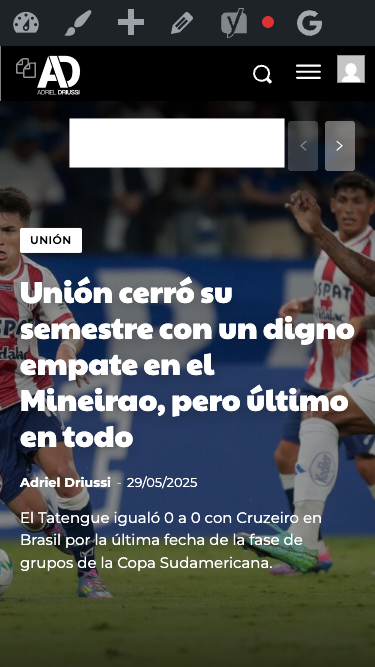
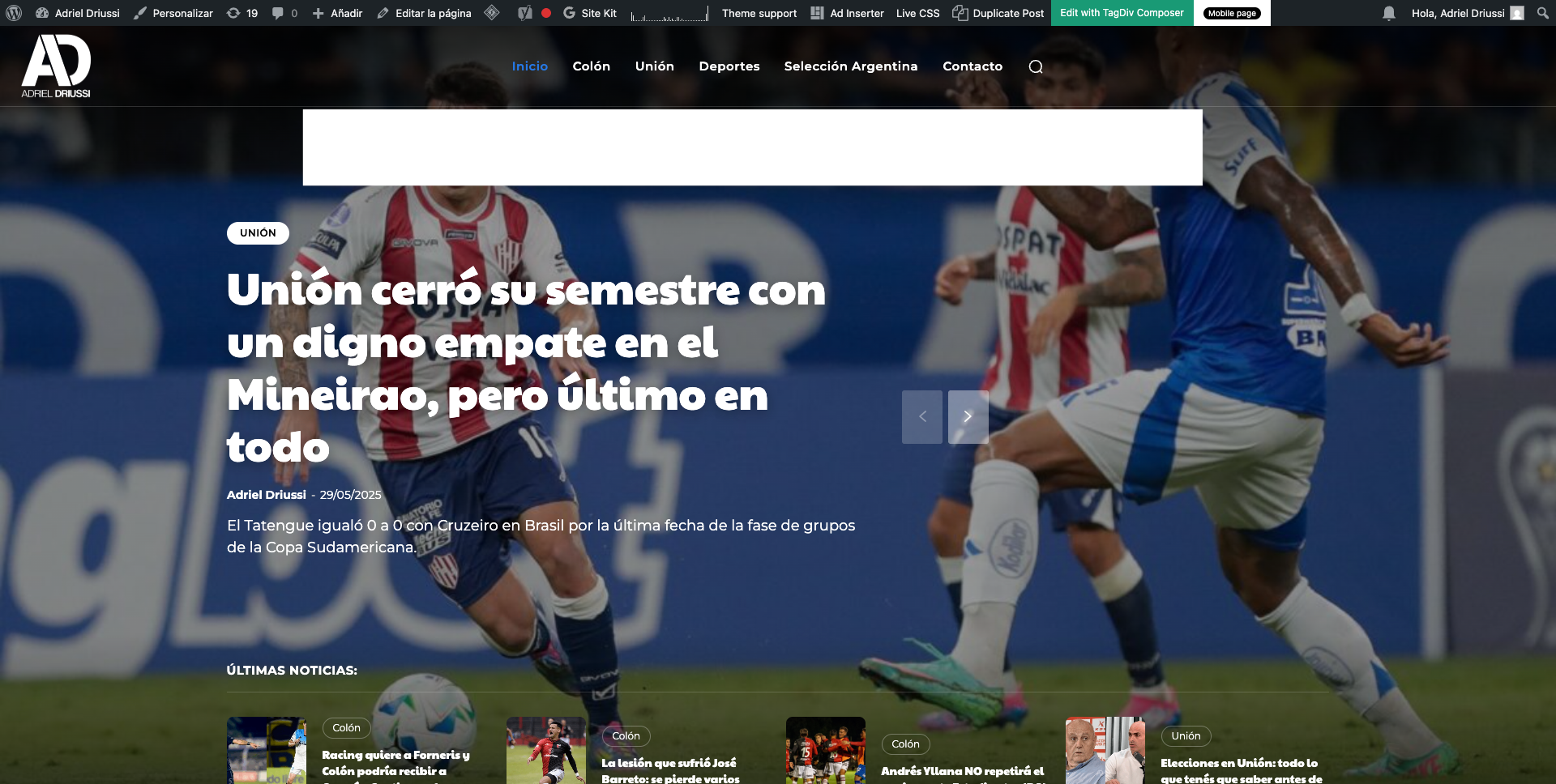
Hello, we would like to insert a banner that appears immediately after the header on https://adrieldriussi.com.ar/. Ideally, the banner should be placed above the featured image, both on desktop and mobile. I’m attaching images showing where we’d like to place the banner.
http://imgfz.com/i/4hW0nIe.png
http://imgfz.com/i/6c4byZN.png
We tried doing this through the Ad Inserter plugin but couldn’t find a way to insert the banner in the correct spot (I tested with different divs). Could you help me with this?
Thanks!
 Carvibz
 Hi Calin and thank you for the reply.
1)I added the Lazyload exclusions you suggested and the gallery now works.
2)I used to add galleries using the [add block>gallery], and there used to be a “link to media file” item that’s now gone from the editor, as can be seen in the video below. I didn’t use any plugins, the only change that happened is the website migrating to Hostinger.
https://drive.google.com/file/d/1PLPdMc-xVkpDqyGSjkvZQo0e1ESbNhY1/view?usp=sharing
And, as stated, my 2,000 posts now show galleries with medium-sized images (performance) that, when clicked, only display the image in the center rather than on the whole screen-I believe they show the medium-sized image instead of the media file. This leads to poor user experience and changing something would mean manually going through 2,000 posts.
I never used the method shown in the link you provided and tested this in the post here https://www.carvibz.com/custom-cars/mid-engined-vw-caddy-pickup-with-audi-4-2l-v8-has-lm-race-car-wheels-and-rabbit-face/, as I show in the video below:
The said test post show 3 types of galleries, from top to bottom:
1 what you suggested in Default mode [V] could use this, but what of the 2,000 posts?]
2 same but in Tagiv slide gallery (images get stretched in preview) [X] can’t use]
3 my old gallery (shows even images, but is now broken and displays medium images when clicked) [X] can’t use]
https://drive.google.com/file/d/12X_jV2J4YRiFa13Lg9xkPqu95D34_tfb/view?usp=sharing
Can you help me find a solution?
Thank you!
 Sebshot69
 I created my own custom field and I solved my problem… Now your theme bug with an insert of a ReVSlider shortcode on the home page. This permanently blocks the front TagDiv editing again. I can no longer remove the problematic content. I turned off the revslider plugin and all the others but nothing moves anymore!! Look at my screenshot, here is my home page is no longer editable. It is impossible to find the section that is causing the problem in the code mode in traditional editing. In short, I am starting to really regret my choice. I am wasting hours in problems that do not exist with editors like Elementor or Avada, to name just a few. You are the site admin, I will let you solve this problem. copy screen
 percezioni
 Hi,
i have disabled the modal pop up element that is inside of demo (is for subscribe and follow to social) but i continue to view and have many 404 error.
With ahrefs i see many 404 error for this link:
<a href=”switching-plans-wizard/” title=”See pricing”
and also for
<div class=”tdm-social-item-wrap”><a href=”tagdivofficial” rel=”nofollow”
For me is impossible to find where i can disable. Please explain with much more details
I paste here the source code that you can view from source page:
<style>.tdm_block.tdm_block_button{margin-bottom:0}.tdm_block.tdm_block_button .tds-button{line-height:0}.tdm_block.tdm_block_button.tdm-block-button-inline{display:inline-block}.tdm_block.tdm_block_button.tdm-block-button-full,.tdm_block.tdm_block_button.tdm-block-button-full .tdm-btn{display:block}.tdc-row .tdi_30 .tdm-btn{height:auto;padding:15px 25px}@media (min-width:768px) and (max-width:1018px){.tdc-row .tdi_30 .tdm-btn{height:auto;padding:12px 20px}}</style>
<style>.tdc-row .tdi_31{padding:15px 25px;height:auto;line-height:1;font-family:var(–tt-extra)!important;font-size:16px!important;line-height:1.2!important;font-weight:600!important;text-transform:uppercase!important;letter-spacing:0.5px!important;height:auto}.tdc-row .tdi_31 i{font-size:16px}body .tdc-row .tdi_31 .tdm-btn-icon:last-child{margin-left:10px}body .tdc-row .tdi_31{background-color:var(–tt-accent-color)}body .tdc-row .tdi_31:after{background-color:var(–tt-hover)}body .tdc-row .tdi_31 .tdm-btn-text,body .tdc-row .tdi_31 i{color:#ffffff}.tdc-row .tdi_31 svg{fill:#ffffff;fill:#ffffff}.tdc-row .tdi_31 svg *{fill:inherit;fill:inherit}body .tdc-row .tdi_31:hover .tdm-btn-text,body .tdc-row .tdi_31:hover i{color:#ffffff;-webkit-text-fill-color:unset;background:transparent;transition:none}body .tdc-row .tdi_31:hover svg{fill:#ffffff;fill:#ffffff}body .tdc-row .tdi_31:hover svg *{fill:inherit;fill:inherit}body .tdc-row .tdi_31 i{color:#ffffff;-webkit-text-fill-color:unset;background:transparent}body .tdc-row .tdi_31:hover i{color:#ffffff;-webkit-text-fill-color:unset;background:transparent;transition:none}.tdc-row .tdi_31:before{border-width:0px;border-style:solid}@media (min-width:768px) and (max-width:1018px){.tdc-row .tdi_31{padding:12px 20px;height:auto;line-height:1;font-size:14px!important}}</style><div class=”tds-button td-fix-index”><span class=”tdm-btn-text”>See pricing</span><i class=”tdm-btn-icon td-icon-arrow-right-rounded”></i></div></div></div></div><div class=”vc_column tdi_33 wpb_column vc_column_container tdc-column td-pb-span4″>
<style scoped>.tdi_33{vertical-align:baseline}.tdi_33>.wpb_wrapper,.tdi_33>.wpb_wrapper>.tdc-elements{display:block}.tdi_33>.wpb_wrapper>.tdc-elements{width:100%}.tdi_33>.wpb_wrapper>.vc_row_inner{width:auto}.tdi_33>.wpb_wrapper{width:auto;height:auto}.tdi_33{justify-content:center!important;text-align:center!important}@media (min-width:768px) and (max-width:1018px){.tdi_33{padding-top:30px!important;width:36%!important}}</style><div class=”wpb_wrapper” ><div class=”tdm_block td_block_wrap tdm_block_socials tdi_34 tdm-content-horiz-left td-pb-border-top td_block_template_1″ data-td-block-uid=”tdi_34″ >
<style>.tdm_block.tdm_block_socials{margin-bottom:0}.tdm-social-wrapper{*zoom:1}.tdm-social-wrapper:before,.tdm-social-wrapper:after{display:table;content:”;line-height:0}.tdm-social-wrapper:after{clear:both}.tdm-social-item-wrap{display:inline-block}.tdm-social-item{position:relative;display:inline-flex;align-items:center;justify-content:center;vertical-align:middle;-webkit-transition:all 0.2s;transition:all 0.2s;text-align:center;-webkit-transform:translateZ(0);transform:translateZ(0)}.tdm-social-item i{font-size:14px;color:var(–td_theme_color,#4db2ec);-webkit-transition:all 0.2s;transition:all 0.2s}.tdm-social-text{display:none;margin-top:-1px;vertical-align:middle;font-size:13px;color:var(–td_theme_color,#4db2ec);-webkit-transition:all 0.2s;transition:all 0.2s}.tdm-social-item-wrap:hover i,.tdm-social-item-wrap:hover .tdm-social-text{color:#000}.tdm-social-item-wrap:last-child .tdm-social-text{margin-right:0!important}</style>
<style>.tdi_35 .tdm-social-item i{font-size:14px;vertical-align:middle;line-height:28px}.tdi_35 .tdm-social-item i.td-icon-linkedin,.tdi_35 .tdm-social-item i.td-icon-pinterest,.tdi_35 .tdm-social-item i.td-icon-blogger,.tdi_35 .tdm-social-item i.td-icon-vimeo{font-size:11.2px}.tdi_35 .tdm-social-item{width:28px;height:28px;margin:5px 10px 5px 0}.tdi_35 .tdm-social-item-wrap:last-child .tdm-social-item{margin-right:0!important}.tdi_35 .tdm-social-item i,.tds-team-member2 .tdi_35.tds-social1 .tdm-social-item i{color:var(–tt-accent-color)}.tdi_35 .tdm-social-item-wrap:hover i,.tds-team-member2 .tdi_35.tds-social1 .tdm-social-item:hover i{color:var(–tt-hover)}.tdi_35 .tdm-social-text{display:none;margin-left:2px;margin-right:18px}@media (min-width:768px) and (max-width:1018px){.tdi_35 .tdm-social-item i{font-size:12px;vertical-align:middle;line-height:24px}.tdi_35 .tdm-social-item i.td-icon-linkedin,.tdi_35 .tdm-social-item i.td-icon-pinterest,.tdi_35 .tdm-social-item i.td-icon-blogger,.tdi_35 .tdm-social-item i.td-icon-vimeo{font-size:9.6px}.tdi_35 .tdm-social-item{width:24px;height:24px}}</style><div class=”tdm-social-wrapper tds-social1 tdi_35″><div class=”tdm-social-item-wrap”><i class=”td-icon-font td-icon-instagram”></i><span style=”display: none”>Instagram</span></div><div class=”tdm-social-item-wrap”><i class=”td-icon-font td-icon-linkedin”></i><span style=”display: none”>Linkedin</span></div><div class=”tdm-social-item-wrap”><i class=”td-icon-font td-icon-twitter”></i><span style=”display: none”>Twitter</span></div></div></div><div class=”td_block_wrap td_block_raw_css tdi_36 td-pb-border-top td_block_template_1″ data-td-block-uid=”tdi_36″ ><div id=tdi_36 class=”td_block_inner td-fix-index”><style>.td-coaching-mm .td-sd-menu-icon.tdm_block_icon_box {
cursor: pointer;
}
 Calin
Calin Hi,
Unfortunately the cache option is only on flex blocks.
If you want to make a few tests I will suggest to remove on homepage the youtube videos and for menu to replace all menus that are made using page or category with custom links – https://i.imgur.com/3TU1ttE.png this will reduce the number of queries and the website should become faster.
Thank you!
Calin Hi,
This situation can be caused by more situations.
– it is possible to have an offset on the block were it should be display the article (it can be checked using tagDiv Composer)
– it can be related to a cache that is apply on blocks, it can be a cache from a plugin or the cache from the blocks – https://forum.tagdiv.com/use-flex-blocks-cache-option/
If you already checked those and the problem persist, please contact us via email at contact@tagdiv.com, provide a temporary wp-admin access and we’ll check it out.
Thank you!
Calin Hi,
A 403 status means “Forbidden”, meaning something is blocking the request. Here are the most likely causes and fixes:
– Security Plugins or WAF (e.g. Wordfence, Sucuri, Cloudflare)
– ModSecurity (Server Firewall)
– Incorrect File Permissions, file should be 644.
– Theme or Plugin Conflict, do a test using only the main theme and tagdiv plugins.
Thank you!
 virajbpd
 Hi Calin,
We are using object / redis cache on our websites.
As you have mentioned about flex block, but on the Homepage we are not using flex block, we are using only Blocks and there is not option of cache in that.
So, how can we set cache on block things?
Thanks & regards,
Prathimesh
 dataconurbano
 It’s now fixed. The Wordfence plugin installed on the main site was blocking me from this staging site.
Thanks
 PetrosKif
Hi everyone,
We are faced with an usual issue, suddenly TagDiv Composer has stopped working and seems broken.
We are not able to create/edit/remove any blocks and they are not visible as they should.
We only get this error: “Error at rows: 13(models) : 14(dom). The model does not match the content Current state has involved an issue. You could try an UNDO operation (CTRL+Z / CTRL+SHIFT+Z)”.
Is this something anyone else has come up against?
Any help would be appreciated!
Thank you.
Calin Hi,
What can be done is to replace all standard template and standard blocks with cloud template and flex blocks and after that to disable the tagDiv Standard Pack plugin, after that a good part of css will be removed.
Also, check if you are using css in live css – https://i.imgur.com/RyLF3vQ.png
Also, please check if the plugin has any option to remove unused css
Thank you!
Calin Hi Rajender Singh,
I see that you are using standard templates and not cloud templates, but the mode that the block works is the same, the Related Articles will display only article s on the same level, so if you are in a subcategory, then will display only articles from that subcategory. If you want to change it you’ll need a developer that know how to change the code in wp-content/plugins/td-standard-pack/Newspaper/includes/shortcodes/td_block_related_posts.php file so it will work as you need.
Thank you for your understanding!
 Antonio Ungaro
Hi
These resources block the first page rendering (my site is http://www.sport24h.it). I tried serving the embedded core JS/CSS resources and deferring all non-core JS/styles resources with LiteSpeedCache ((I have to use this plugin because my hosting is with LiteSpeed), but it doesn’t work and the server response times are too slow.
I only use a small percentage of these resources, is there a way to lighten these css?
td-standard-pack/Newspaper/assets/css/td_standard_pack_main.css?ver=8ae1459a1d876d507918f73cef68310e
td-composer/css-live/assets/external/ace/ace.js?ver=492e3cf54bd42df3b24a3de8e2307cafx
td-composer/legacy/Newspaper/assets/css/td_legacy_main.css?ver=492e3cf54bd42df3b24a3de8e2307cafx
td-composer/legacy/Newspaper/js/tagdiv_theme.min.js?ver=12.7.1
style.css?ver=12.7.1
Antonio UngaroHi
These resources block the first page rendering (my site is http://www.sport24h.it). I tried serving the embedded core JS/CSS resources and deferring all non-core JS/styles resources with LiteSpeedCache ((I have to use this plugin because my hosting is with LiteSpeed), but it doesn’t work and the server response times are too slow.
I only use a small percentage of these resources, is there a way to lighten these css?
https://www.sport24h.it/wp-content/plugins/td-standard-pack/Newspaper/assets/css/td_standard_pack_main.css?ver=8ae1459a1d876d507918f73cef68310e
https://www.sport24h.it/wp-content/plugins/td-composer/css-live/assets/external/ace/ace.js?ver=492e3cf54bd42df3b24a3de8e2307cafx
https://www.sport24h.it/wp-content/plugins/td-composer/legacy/Newspaper/assets/css/td_legacy_main.css?ver=492e3cf54bd42df3b24a3de8e2307cafx
https://www.sport24h.it/wp-content/plugins/td-composer/legacy/Newspaper/js/tagdiv_theme.min.js?ver=12.7.1
https://www.sport24h.it/wp-content/themes/Newspaper/style.css?ver=12.7.1
Calin Hi,
If you’re encountering an infinite loading screen after clicking Save Settings in the theme panel, the issue is likely related to admin-ajax.php. To diagnose the problem, please open your browser’s developer console and check for any error messages.
This behavior is commonly caused by admin-ajax.php being blocked by modSecurity, your hosting provider’s firewall, or certain security plugins or server modules.
Thank you!
Calin Ok, this situation is because one one element you have set the padding right to 10% https://i.imgur.com/IrVLqqa.png (you need to check the column padding or if you can not find it you can use this custom css to overwrite it.
.category  .td_block_wrap.tdb_category_description {

padding-right: 0px;

}
Thank you!
Calin Hi,
1. For this you need to select each block from your website and use the filter tab to set the category articles you want there – https://forum.tagdiv.com/flex-block-settings-guide/ – https://i.imgur.com/vVTJoha.png
2. This is similar to point 1 you need to use the settings from the block. You can set the number of articles, to filter the articles, to short them .. all this can be done using tagDiv Composer and selecting the blocks – https://forum.tagdiv.com/flex-block-settings-guide/
Thank you!
Calin Hi,
Ok, the good news are that this is only a css problem and is only on web-stories page. You can use this custom css in the theme panel > custom code > custom css to resolve the problems from the image:
.post-type-archive-web-story .td_block_list_menu ul,

.post-type-archive-web-story .tdm_block_socials .tdm-social-wrapper  {

display: flex;

}

.post-type-archive-web-story .tdm_block_socials .tdm-social-wrapper a{

  display: flex;

  align-items: center;

  justify-content: center;

}
To display the web stories on frontpage please check if there are any shortcodes provided by the plugin. Also, if the web stories is a cpt, then you can use a flex block and set the post type of cpt in this place – https://i.imgur.com/m7s7qEa.png
Thank you!
Calin Hi,
If you’re encountering an infinite loading screen after clicking Save Settings in the theme panel, the issue is likely related to admin-ajax.php. To diagnose the problem, please open your browser’s developer console and check for any error messages.
This behavior is commonly caused by admin-ajax.php being blocked by modSecurity, your hosting provider’s firewall, or certain security plugins or server modules.
If you’re unable to resolve the issue on your own, we’re here to help. Before reaching out, please ensure you’ve created a full backup of your website. Then, contact us at contact@tagdiv.com and include the following:
– WordPress admin login credentials
– cPanel (or hosting control panel) access details
– A link to this support topic for reference
Thank you!
 rusinborg
 muspet
Hi,
I want to see vertical video with proper aspect ratio 9:16 in article on phones only.
Normally I use Essential Blocks – advanced video – it works perfect , but not with your themes.
this is custom CSS for the Essential Blocks – advanced video: eb_selector {
/*position: relative;*/
aspect-ratio: 9/16 ;
}
@media (max-width: 767px) {
eb_selector {
/*display: block;*/
}
}
Can you give me any suggestion how to do it with your TAGDIW Week PRO, tested also in GOSSIP PRO theme and it is not working also. (It only shows wordpress standard 16:9 for all videos)
Thanks Peter
Calin Hello,
In addition to using caching, Cloudflare, and Redis, I’d also recommend enabling caching for the Flex Block. This feature can make a noticeable difference by significantly reducing the number of server requests, especially on content-heavy pages.
It’s also good to keep in mind that, like any visual page builder, tagDiv Composer requires more resources while editing. This is perfectly normal. Real-time builders perform many background processes—adding, removing, and modifying elements, all of which generate multiple live requests. On websites with large databases (for example, those with a high volume of articles), using filters on blocks can slow things down a bit, as each block applies its own query to retrieve specific content.
This behavior is common across most live builders, not just tagDiv Composer. The system is working hard to provide instant feedback, which naturally increases resource usage.
What you can do:
A good next step would be to monitor resource usage and identify which pages or specific elements are using the most server resources. Often, features like AJAX filters or “most popular articles” widgets can be more demanding, since they constantly query the database for up-to-date information.
Identifying and optimizing these high-impact areas can help keep your site fast and responsive both for your visitors and during editing sessions.
Thanks again
 teknobilimadami
Dear TagDiv Support,
My website is the problem: https://teknobilimadami.com/
I am experiencing a critical issue on my WordPress site that is directly related to the Newspaper Theme. When attempting to upload media files, the system either stalls significantly or fails with a 503 Service Unavailable error, specifically affecting the async-upload.php process.
Sometimes I add an image and when I open and close the page, I see that the image with the error has been loaded.
But these happen in the Newspaper theme. When I switch to the 2025 wordpress theme, images are uploaded instantly from the Media – Add Media – Media Library section without any problems.
After thorough debugging over the past 48 hours, I have tested and ruled out all other possible causes. Below is a complete breakdown of actions I took:
1. Hosting and Configuration
– PHP: 8.1
– Hosting: LiteSpeed / Shared Hosting (GuzelHosting)
– Limits Increased to:
– max_execution_time = 300
– upload_max_filesize = 128M
– post_max_size = 128M
– memory_limit = 512M
– Cloudflare set to “Development Mode”, and later fully paused
– WP Rocket and cache tools disabled during tests
2. Steps Taken & Results
– Switching to Twenty Twenty-Five theme resolves the issue instantly. Image uploads are fast and reliable.
– Activating Newspaper theme causes:
– Slow or failed uploads
– DevTools shows async-upload.php requests returning 503 errors
– Hosting panel shows CPU limit exceeded only when Newspaper is active
– Plugins tested individually (only Rank Math, SMTP, and Converter for Media were active; Converter later disabled)
3. Functions.php and Theme Code Review
– Output buffer using ob_start(“sanitize_output”) was temporarily removed.
– Theme update filters (pre_site_transient_update_themes) commented out.
– Admin-side JS injection via admin_head tested and removed.
These changes made little to no difference — the core issue seems to lie deeper in Newspaper’s admin/AJAX logic.
4. Attached Visual Evidence (8+ screenshots)
Please find attached:
1. DevTools console error (503 on async-upload.php) : https://prnt.sc/qHY-ahJWeCbr
2. CPanel CPU usage exceeded panel : https://prnt.sc/V4Wcb6RWVm8O
3. Functions.php sample (Attachments)
4. Theme switched: Twenty Twenty-Five (success) : https://prnt.sc/XsbBJDqxrBK_
5. Theme active: Newspaper (failure) : https://prnt.sc/3ORZ-qt9OwHj
6. WordPress debug.log output (Attachments)
7. Network panel XHR timing chart : https://prnt.sc/T1_rYdno5uaL
8. Cloudflare paused, issue persists : https://prnt.sc/CKQqSZ2OlLc-
I attach all other detailed screen photos to the e-mail. (20 attach picture screenshot)
Final Note & Request
I believe this issue can only be resolved from the theme side, not via hosting or plugin tweaks. I kindly request:
– Review of internal AJAX handling within the Newspaper theme
– Guidance on patching or disabling blocks that might interfere with admin upload requests
– Confirmation if this is a known issue, and whether an update will address it
I truly want this resolved. I have done my part as much as possible. Now I believe your team can take over and fix this properly.
I sent you contact@tagdiv.com e-mail in more detail. I would like to ask for your help in solving the problem.