
- NewspaperFlex Block Builder and Flex Loop Builder
- NewspaperHow to use the Flex Blocks cache option
- NewspaperHow to edit modules for Flex Block X
- NewspaperHow to insert a block inside the content of a post
- NewspaperFlex Block Settings Guide
- NewspaperMeta Info on Modules and Blocks
- NewspaperTheme modules and blocks
- NewspaperThumbnails – Fix strange looking images on blocks
- NewspaperBlock settings tutorial
- NewspaperCategory Tag on Modules/blocks
- NewspaperWP Rocket and Newspaper Theme: Optimization Guide
- NewspaperSearch setup for custom post type
- NewspapertagDiv Opt-In Builder – Emails
- NewspaperBookmark – Save For Later
- NewspaperModules Builder in Newspaper Theme
- NewspaperFilters and sorting for taxonomies
- NewspaperUser review system
- NewspaperWooCommerce: Happy “Add to Favorites!”
- NewspaperLockers
- NewspaperLeads
 Calin
Calin Hi,
The slider revolution can be set with tagDiv Composer on homepage, but the blocks from widgets will be removed without standard pack, the can be created now with tagDiv Composer on pages and Cloud Templates.
Thank you!
Calin Hi,
If I understand correctly you want the blockquote to not be so big, please check the settings from backend -> http://prntscr.com/q28xbg
Thank you!
 Grexi126
Hi,
I am wondering why there is duplicate content in the source-code.
Example: view-source:https://zock-around-the-clock.com/conventions/
* portrait */
@media (min-width: 768px) and (max-width: 1018px){
.tdi_66_dc5 .tdb-menu > li > a,
.tdi_66_dc5 .td-subcat-more{
padding: 0 9px;
}.tdi_66_dc5 .tdb-menu > li > a,
.tdi_66_dc5 .td-subcat-more > .tdb-menu-item-text{
font-size:11px !important;line-height:40px !important;
}.tdi_66_dc5 .td-subcat-more{
line-height: 40px;
}
}
</style>
<style>
.tdi_66_dc5 .tdb-menu > li > a:after,
.tdi_66_dc5 .tdb-menu-items-dropdown .td-subcat-more:after{
background-color: ;
bottom: 0px;
}
</style>
<style>
</style><div id=tdi_66_dc5 class=”td_block_inner td-fix-index”><div class=”tdb-menu-items-pulldown tdb-menu-items-pulldown-inactive”><ul id=”menu-unten-kategorien-2″ class=”tdb-block-menu tdb-menu tdb-menu-items-visible”><li class=”menu-item menu-item-type-taxonomy menu-item-object-category menu-item-first tdb-menu-item-button tdb-menu-item tdb-normal-menu menu-item-3809″>News
<li class=”menu-item menu-item-type-taxonomy menu-item-object-category menu-item-has-children tdb-menu-item-button tdb-menu-item tdb-normal-menu menu-item-39093 tdb-menu-item-inactive”>Reviews<i class=”tdb-sub-menu-icon td-icon-down”></i>
<ul class=”sub-menu”>
<li class=”menu-item menu-item-type-taxonomy menu-item-object-category tdb-menu-item tdb-normal-menu menu-item-39094″>Hardware
<li class=”menu-item menu-item-type-taxonomy menu-item-object-category menu-item-has-children tdb-menu-item tdb-normal-menu menu-item-39098 tdb-menu-item-inactive”>Games<i class=”tdb-sub-menu-icon td-icon-right-arrow”></i>
<ul class=”sub-menu”>
<li class=”menu-item menu-item-type-taxonomy menu-item-object-category menu-item-has-children tdb-menu-item tdb-normal-menu menu-item-39099 tdb-menu-item-inactive”>Konsole<i class=”tdb-sub-menu-icon td-icon-right-arrow”></i>
<ul class=”sub-menu”>
<li class=”menu-item menu-item-type-taxonomy menu-item-object-category tdb-menu-item tdb-normal-menu menu-item-39100″>Nintendo
<li class=”menu-item menu-item-type-taxonomy menu-item-object-category tdb-menu-item tdb-normal-menu menu-item-39102″>Playstation
<li class=”menu-item menu-item-type-taxonomy menu-item-object-category tdb-menu-item tdb-normal-menu menu-item-39104″>Xbox
<li class=”menu-item menu-item-type-taxonomy menu-item-object-category tdb-menu-item tdb-normal-menu menu-item-39106″>PC
<li class=”menu-item menu-item-type-taxonomy menu-item-object-category tdb-menu-item-button tdb-menu-item tdb-normal-menu menu-item-39092″>Angebote
<li class=”menu-item menu-item-type-taxonomy menu-item-object-category tdb-menu-item-button tdb-menu-item tdb-normal-menu menu-item-3812″>Messen & Events
<li class=”menu-item menu-item-type-taxonomy menu-item-object-category tdb-menu-item-button tdb-menu-item tdb-normal-menu menu-item-39629″>Tipps
<li class=”menu-item menu-item-type-taxonomy menu-item-object-category tdb-menu-item-button tdb-menu-item tdb-normal-menu menu-item-43010″>Lifestyle
<div class=”tdb-menu-items-dropdown”><div class=”td-subcat-more”><div class=”tdb-menu-item-text”>More</div><i class=”tdb-menu-more-subicon td-icon-down”></i><ul class=”td-pulldown-filter-list”></div></div></div></div></div><div class=”td_block_wrap tdb_header_search tdi_69_68b td-pb-border-top td_block_template_1 tdb-header-align” data-td-block-uid=”tdi_69_68b” >
<style>
Grexi126Hey,
I am using the block header 18 and set the H2 tag in the composer.
Unfortunately it is not recognised as H2 but H4.
Ideas?
https://zock-around-the-clock.com/
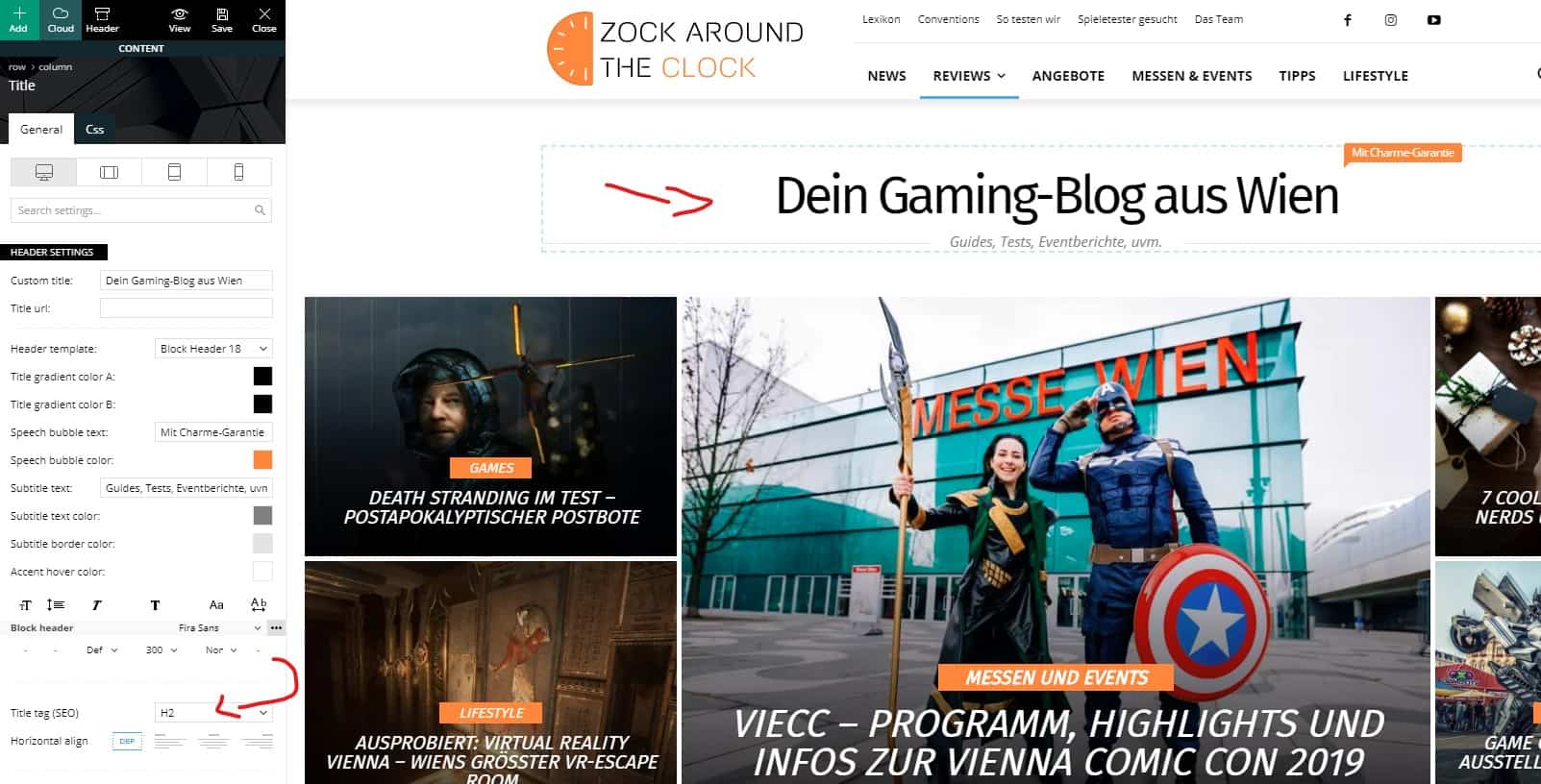
and
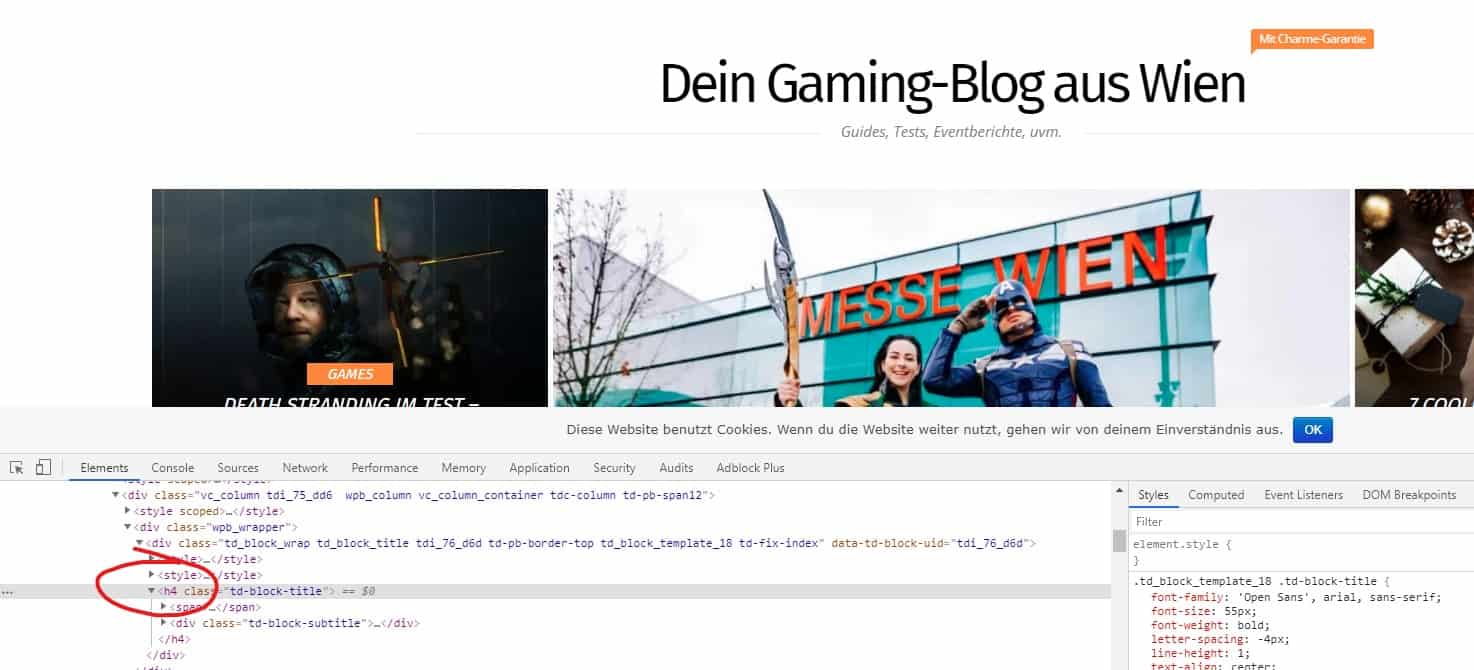
Cheers,
Gregor
 Vlad S
 Hello !
Please find out how to setup this process fast and clean by following our tutorial here: https://forum.tagdiv.com/thumbnails-fix-strange-looking-images-on-blocks/
Thank you !
Vlad S Hello !
Unfortunately in blocks you cannot do those kind of changes.
Thank you for your understanding !
Calin Hi,
Unfortunately, only the flex elements have these options, sorry!
You can change the block 4 with flex blocks 1 or you can use a custom css like this one
.td_block_4 h1 > a, h2 > a, h3 > a, h4 > a, h5 > a, h6 > a,

.td_block_4 .td-post-author-name a,

.td_block_4 .td-post-date,

.td_block_4 .td-excerpt  {

  color: #fff;

}
The code will apply on all block 4 and will make the text in #fff.
The code must be set in Theme panel> Custom code> Custom css
Thank you!
 neha.ecm
I have selected layout for the row then selected the Block 4 to include the post. What I find the page layout for the post seems fine in edit mode but when I previewed/published it, the layout of the post is changed.
I have sent all the details through email. Kindly look into this.
Thanks
 CParkerPR
 Just upgraded to 5.3 and the posts could not be edited via block.
Downgraded back to 5.24 Block now work.
Site is currently demo40.headmagazine.com
I kept restoring it to another demoXX site figuring I did not reinstall it right. I feel better knowing I restored it right. Not so good that I spent most of the day doing it.
Theme config shows the site at version 10.
Thanks.
 pierpaolocorso
Good evening
Is it possible to insert adsense advertisements between the articles in block 3?
If yes, how to do it?
I use AdInserter as a plugin if it can be of interest.
 Otacool
 What about just the “title” block?
Calin Hi,
In order to have the blocks back -> http://prntscr.com/q1r7jp you’ll need to activate the standard pack,please try the steps from this documentation, this will make your website more faster, you’ll need to check very carefully our documentation.
-> https://forum.tagdiv.com/topic/action-required-please-read-how-to-update-to-the-newspaper-theme-v-10/
-> https://tagdiv.com/newspaper-theme-update-standard-pack-or-tagdiv-cloud-templates/
Thank you!
 diadiktio
When editing a “Text with Title” element via TagDivComposer, it seems that when you leave the text area blank and save, the produced short-code markup does not contain the closing tag [/td_block_text_with_title]. This leads to a corrupted result as a whole.
 Carlichy
Hello
I have used a Flex Block (number 5) in one page, it´s configured for showing 6 posts, so the scroll on the page is high (the size of the post is high also), my doubt is if is possible to go directly to the top of the page when I press the next pagination button, because if not you have to scroll another time to go up and see the news posts.
Thanks
Calin Hi,
I do not quite understand, I think that you are referring to the image from blocks, if is son then please check this article -> https://forum.tagdiv.com/thumbnails-fix-strange-looking-images-on-blocks/
If there is still a problem, please provide some more details and a link or some screenshots where I can check/see the problem.
Thank you!
 Fitim
Fitim Hi
Thx for the feedback. The block there is not a flex box so i don’t have in the style section the color avaible. It’s block4. Is it there possible? I just want to make that section with white text.
Regards
Fitim
Calin Hi,
Yes, if the section is set with tagDiv Composer, then you can edit it and change the color how you want.
Flex Block Settings Guide -> https://forum.tagdiv.com/flex-block-settings-guide/
Thank you!
Calin Hello !
Usually this issue is related to a firewall or security module which blocks admin-ajax.php request. Please verify the console for error while saving the settings on the Theme Panel, usually it displays a 403 or 404 error.
I suggest to check your System Status and increase all the php.ini directives at least to the recommended values – https://forum.tagdiv.com/system-status-parameters-guide/
If you don’t use a security plugin, please ask your host about this, maybe you have a security module which blocks this.
If you use a plugin like Wordfence please set it in learning mode.
Let us know and if the issue persist please contact us via email at contact@tagdiv.com and provide wp-admin access so we can take a closer look. Also paste a link to this topic so we can identify you.
Thank you !
 meri
meri Hi,
Unfortunately, it does not the job.
My code hides the date but doesn’t remove it:
<div class="td-main-content-wrap td-main-page-wrap">
<div class="td-container">
<div class="td_block_wrap td_block_big_grid_mob_1 tdi_1_58b td-grid-style-1 td-hover-1 td-pb-border-top td_block_template_1"><div id=tdi_1_58b class="td_block_inner"><div class="td-big-grid-wrapper">
<div class="td_module_mob_2 td_module_wrap td-animation-stack">
<div class="td-module-thumb"> </div> <div class="td-meta-info-container">
<div class="td-meta-align">
<div class="td-big-grid-meta">
<h3 class="entry-title td-module-title">Meilleur site de poker en ligne</h3> </div>
<div class="td-module-meta-info">
<span class="td-post-author-name">Coup de Poker <span>-</span> </span> <span class="td-post-date"><time class="entry-date updated td-module-date" datetime="2018-11-02T11:15:14+00:00" >2 novembre 2018</time></span> </div>
</div>
</div>
</div>
This is a big SEO issue as Google picks the date (2 novembre 2018) and shows it on my homepage SERP.
How can I remove it?
Thanks
Calin Hi,
Make sure that you disable this option -> https://i.imgur.com/NAwoP7Y.png also if you are using cache plugin, clear all cache and try again.
-> https://forum.tagdiv.com/meta-info-modules-blocks/
Thank you!
Vlad S Hello !
For that you can use this custom css code as you can see it here: .td-block-title-wrap {
margin-bottom: -19px;
}
The code must be inserted here: https://www.screencast.com/t/J1Nxw5s5
Thank you !
 manasek
Hi, there are two fields inside of a general tab of the empty space block: the height field and the extra class field. I would like to have different height values for a desktop, tablet and mobile view, but the field keeps the same value through all view modes. Is this behaviour an intended feature or a bug? Using latest version of the theme…
 Allraps.com
 I deactivated the Smush plug-in as you said, wanted to follow your instructions and now still randomly the images on my homepage in 2 sections where I’m using “Block 1” still there is problem with the images. Any advice please?
 lisamariet
There seem to be something wrong with the theme for grids. I installed the politics demo. trying to create a front page, and the colums does not align correctly always.
ex:
1. I add an empty row (no columns)
2. change row to be 2:1 layout. Meaning a sidebar (1 col) at the right and rest (2 col) main body content.
3. Add Flex Block 3 to the 2-col part of the row. But the layout is not correct.
4. If I change column to be full width it displays correctly.. but then I cannot have a sidebar.
Is the page somehow to narrow? That makes the last column always fall below?
How to fix this?
 Tengel
Hello, Just recently, when creating a new post or editing an old one, I’m having trouble. It’s ok for the first part of the post while I’m typing in content, but when I get down below the first half of the page and create a new “block” to write in, the screen jumps back up to the top part of the page and I cannot see what I am typing. I can still type in the block, but I just can’t see what I typed without scrolling back down to that block.
Any idea what is going on maybe? I have not updated for a while and wondered if that might be the reason…
Thanks,
Trudy

