
- NewspaperFlex Block Builder and Flex Loop Builder
- NewspaperHow to use the Flex Blocks cache option
- NewspaperHow to edit modules for Flex Block X
- NewspaperHow to insert a block inside the content of a post
- NewspaperFlex Block Settings Guide
- NewspaperMeta Info on Modules and Blocks
- NewspaperTheme modules and blocks
- TutorialsDefault Block Settings Guide
- NewsmagBlock settings tutorial
- NewsmagCategory tag on modules/blocks
- NewspaperThumbnails – Fix strange looking images on blocks
- NewspaperBlock settings tutorial
- NewspaperCategory Tag on Modules/blocks
- ApiPractical example – How to add a new Block and Module
- Apitd_api_block::delete
- Apitd_api_block::update_key
- Apitd_api_block::update
- Apitd_api_block::add
- ApiAPI – Blocks – Introduction
- NewspaperWP Rocket and Newspaper Theme: Optimization Guide
 bformhals
 Ah, I still think the footer looks out of whack the logo is either too big as it displays much further down that the text or I need to make the other columns align higher. I posted here in the forum a major issue/bug.. a bad one where if you go to my home page
Go to either section that says business or entertainment and then it has the words to the right. I believe these are different styled block 2. Well none of the images show up when clicked. Its not a good thing definitely an issue
 Calin
Calin Hi,
The mobile theme is a plugin that provide you a better speed then responsive version of theme, but in order to achieve that speed you’ll need to create a new content for pages because in the most of cases those were made with builders ( tagDiv Composer, WPBakery ) and you need to use only the mobile editor ( you need to set the content for pages in mobile editor and this content will be display on mobile theme)
-> https://www.screencast.com/t/ebUIzt4se
If you want the responsive version and amp you should use this opinion -> https://www.screencast.com/t/jZct5ueBqOrb but if you have amp activate on pages you’ll need to create in Mobile editor a content for AMP version of page.
Mobile Theme: Automatic Optimization for Mobile with Newspaper Theme -> https://tagdiv.com/mobile-theme-automatic-optimization-for-mobile-newspaper-theme/
Also for the 3 blocks, you’ll need to have set same feature posts (that have set feature category) -> https://forum.tagdiv.com/featured-posts-2/ -> https://www.screencast.com/t/QsJ6ppY4
If you do not have the featured category, you’ll need to add some posts in feature category -> https://forum.tagdiv.com/featured-posts-2/ if you do not have this category you can create it, just make sure that you set the category name to be
Featured
Let me know if you have more questions!
 andxtagdiv
 I did reply yesterday:
I switched them all off and the problem persists.
Please check.
 Vlad S
 Hello !
If you’re refering to the posts blocks like this: https://www.screencast.com/t/bYMV0WQM1EIV They can be edited from the Edit Post option.
Thank you !
Calin Hi,
Unfortunately, the old td-api-plugin plugin does not work anymore and we recommend using this -> https://forum.tagdiv.com/developer-info/
You can create these modules that you made with that api using the flex blocks and you can save the element in a shortcode to can use it later in orders pages -> https://www.screencast.com/t/a2ikt4tq
Thank you for your understanding!
 Justin2020Vlad S
 Hello !
The grids cannot display anything else than posts, blocks are the same. So a banner in a big grid is not possible.
Maybe use image elements that also have options for custom URLs. You can find them here: https://www.screencast.com/t/vJKlmWBPlE
Thank you !
Calin Hi,
Unfortunately for the moment these are the only filters/sorts that our theme have -> https://forum.tagdiv.com/block-settings-guide/
Thank you for your understanding!
Vlad S Hello !
In order to remove the comment count from the blocks you have to go in Theme panel – Block Settings and disable the block comment count like here: https://www.screencast.com/t/PHcH0yugk2T7
Thank you !
Calin Hi,
Unfortunately the stick post option do not work with our theme, sorry! if you wan to show a post as sticky you can set the id post in the block settings, you can check our documentation -> https://forum.tagdiv.com/block-settings-guide/
-> https://www.screencast.com/t/9WvWXQrwte
Thank you!
 phinx1
While in TD Composer, I added a shortcode for a different plugin using a text box and now I can’t edit my home page in TagDiv Composer, I get the following error:
Errors at columns elements: 4(models) : 5(dom). The model does not match the content
Is there a manual way to remove that shortcode or overwrite the column it is in to get the TD Composer working again? BTW, I’m using the Politics/World News template.
Second, my intention was to have the column on the Home page match the one on the Single page, is there a way to just add the same type of column that displays the Newspaper default widget column in Single on the Home page?
Thanks!
bformhalssite is https://lakedigest.com
I believe this is block 2 section of the home page. If you clcik on any title no images show. They show on the regular post but not here. Could really use a fix for this please.

[img]https://i.imgur.com/ZJhFeFK.png[/img]
[Imgur](https://i.imgur.com/ZJhFeFK.png)

 nodali
Hi,
The default blockquote in this theme is UPPERCASE and CENTER oriented.
I want the blockquote with a normal text on the LEFT.
Any solution?
 Derek Little
I want to create custom banner ads for my sidebar. How can I know what width to make them?
https://blockchaintrailblazers.com/
 Lucas Felix
 Simion…
Is there any way to change this? I prefer to define which category I want to show in the 3 blocks, than to be forced to create a new one category (no use for the user) to use this feature on the homepage.
If possible, could you tell me where the mobile files are so you can edit them?
-
This reply was modified 7 years by
Lucas Felix.
Calin Hi,
Unfortunately there is no option in our theme to allow you to insert ads inside the blocks modules, sorry!
Thank you!
Calin Hi,
The popular post sorting requires this option to be active in the theme panel
– https://forum.tagdiv.com/7-days-post-sorting/
Once you activate that setting the theme will start counting the views posts get. For this to happen the post views have to be active – http://prntscr.com/nli2rx
Posts should begin to appear in the block after doing this.
Also please make sure that you set the last version of child, also please make sure that you do not have a plugin conflict, please deactivate all non theme plugins, also if you are using child theme or cache plugin, please deactivate them, clear all cache and try again.
Thank you!
Vlad S Hello !
For the submit button you have to add this code: div.wpforms-container .wpforms-form div.wpforms-submit-container button[type=submit] {
background-color: blue;
}
For the subscribe button add this code:
.tdn_block_newsletter_subscribe button {

background-color: blue;

}
You change the color from blue to anything you want.
Thank you !
Calin Hello,
The warning you see does not block the tagdiv composer. It is just a warning mentioning you made edits outside the composer. The page name can be changed through the tagdiv composer so changing it in the back-end, will result ion the warning you see on your page. But this warning will no block the page editor.
If your page builder gets blocked by this message, it could be influenced by a plugin or a custom code added to that page.
Thank you!
 Jakyo
JakyoHello,
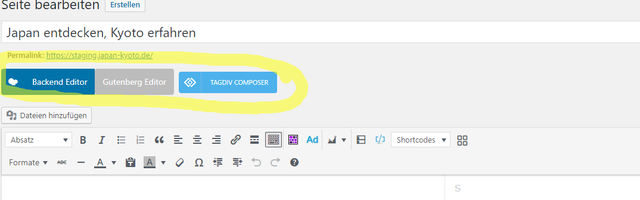
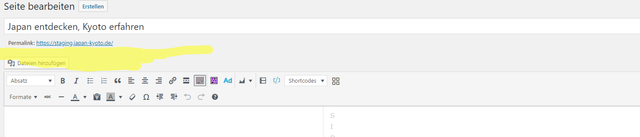
I’ve just bought Newspaper and set it up, but when I headed to my start page, I noticed that I can’t access WPBakery, the buttons are missing. I’ve narrowed it down to the plugin Yoast SEO. When it’s deactivated, the builder buttons show up.
Yoast deactivated:
Yoast activated:
Thanks for any help.
 villiamjit
Hi,
I purchased your newspaper theme. I like it very much it’s a very good theme for articles posting.
But Now I have a query I need to use the theme in a single WordPress for the multi-region articles. As in backend I create a custom meta for the post that has the region options. And in frontend I need to switch the articles base on the user selected region for all the categories means the data is filtered on every block in frontend base on the region.
I want to know would it possible in your current theme with custom coding and your help.
Thanks,
Villiam
 llucson
 I have done what you say, but the problem persists. On the homepage, the 3 blocks (specially Nuestros Proyectos and Laboratorio de Periodismo) that I integrated from the cloud library load very slowly. They do not appear until a while has passed.
 Simion C.
 Hi,
Is that the Gutenberg element media and text block? If it is, you can use the option it provides for mobile – http://prntscr.com/nmq7ud
That will stack the image and the text on mobile.
Thanks
Calin Hi,
The mobile theme is a plugin that provide you a better speed then responsive version of theme, but in order to achieve that speed you’ll need to create a new content for pages because in the most of cases those were made with builders ( tagDiv Composer, WPBakery ) and you need to use only the mobile editor ( you need to set the content for pages in mobile editor and this content will be display on mobile theme)
-> https://www.screencast.com/t/ebUIzt4se
If you want the responsive version and amp you should use this opinion -> https://www.screencast.com/t/jZct5ueBqOrb but if you have amp activate on pages you’ll need to create in Mobile editor a content for AMP version of page.
Mobile Theme: Automatic Optimization for Mobile with Newspaper Theme -> https://tagdiv.com/mobile-theme-automatic-optimization-for-mobile-newspaper-theme/
Also for the 3 blocks, you’ll need to have set same feature posts (that have set feature category) -> https://forum.tagdiv.com/featured-posts-2/ -> https://www.screencast.com/t/QsJ6ppY4
If you do not have the featured category, you’ll need to add some posts in feature category -> https://forum.tagdiv.com/featured-posts-2/ if you do not have this category you can create it, just make sure that you set the category name to be
Featured
Let me know if you have more questions!
Calin Hi,
Indeed, in Newspaper v9.7 the only files that can be set in child theme are functions.php and style.css , but the most parts of customization can be made now using tagDiv Composer and elements from tagDiv Cloud Library, the changes make on modules/blocks can be achieve using flex blocks , in your case you can set a footer page made by you or form cloud with all the elements/widgets you need ->https://forum.tagdiv.com/footer-templates/
Thank you for your understanding!

