
- TutorialsDefault Block Settings Guide
- NewspaperWP Rocket and Newspaper Theme: Optimization Guide
- TutorialsFrom WPBakery to tagDiv Composer
- TutorialsOffset Feature
- TutorialsWhat is Ajax preloading?
 Simion C.
 Hi,
Predefined blocks don’t have such settings. They will always looks as they were designed
– https://demo.tagdiv.com/newspaper/block-12/
Modifying the thumbnail is not possible by a setting, each module has it’s thumb size created by the theme, Block 12 (module 11) uses this size – http://prntscr.com/me48f9
– http://prntscr.com/me492f
Only flex blocks available in the tagDiv composer have options to load a bigger thumbnail and modify it’s height and width – http://prntscr.com/me4bo6
For example these block examples are made with flex blocks, you can preview and even edit them here – https://affiliate.tagdiv.com/#/load/Blocks
Each can be imported through the cloud library plugin – https://forum.tagdiv.com/tagdiv-cloud-library-plugin/
Thanks
 Calin
Calin Hi,
Ad codes for AMP will have to be entered in the dedicated AMP section, be sure to use the proper codes, for example for Adsense
– https://support.google.com/adsense/answer/7183212?hl=en
– https://www.screencast.com/t/vc3VzKSIEHTi
If you want to use another brand of Ads other than AdSense, notice that you need to access the header section of AMP and add the code of your Ad provider.
The amp header is found here: https://www.screencast.com/t/eSsRZ3cItk7u
AMP will work properly for pages created with the default WordPress editor if you want to use it for pages, not with page builder content. The main purpose of AMP is speed, not loading heavy pages with blocks and grids.
Of course, our plugin is optional, you can use other AMP plugins if needed. We will try however to improve it and add more options for it in future updates. Let me know if you have more questions.
Hope this helps!
Thanks.
Calin Hi,
I think you want to change the space between menu and first block on the page if is so then you’ll need to set on the first row the margin top ‘-48’ https://www.screencast.com/t/fWpleU759Jw
Using css -> https://www.screencast.com/t/poM2zmAyHJ
Thanks.
Calin Hi,
So if I’m right you want to change the center center for the image -> https://www.screencast.com/t/rLBl9wLSPio you can check in Newspaper>theme panel>Block settings > thumbs on modules/blocks there are all the thumbs size for all blocks, all you need to do is to look on what block you want to crop the image center center , for example big grid 1 -> https://www.screencast.com/t/tDXDeTSfdwyI after that set in td_config.php in td_265x198 and/or td_534x462 and set crop center center
Hope this will help you better!
Thanks.
Simion C. You could use a flex block instead, like flex block 1. This can be customized to look in many ways. It has an option for the module padding, image customization options, show/hide post meta and many styling options.
So you can achieve different results with the same block, for example here it looks like block 5 – http://prntscr.com/me3b21
And here it looks in a different way – http://prntscr.com/me3cim
Here are some block designs available through the cloud library plugin, based on flex blocks, you can preview and even edit them to see how they are made
– https://affiliate.tagdiv.com/#/load/Blocks
Let me know if you have more questions.
 esemmel
 My webhost was looking into it, and said to ask you about this error that it showed in the error logs.
[Tue Jan 29 15:44:25.273406 2019] [lsapi:error] [pid 8687:tid 140388804560640] [client 208.100.3.216:54329] [host http://www.oilpaintingwithethan.com] Backend fatal error: PHP Fatal error: Uncaught Error: Cannot use string offset as an array in /home/insidemy/domains/oilpaintingwithethan.com/public_html/wp-content/themes/Newspaper/includes/wp_booster/td_remote_cache.php:102\nStack trace:\n#0 /home/insidemy/domains/oilpaintingwithethan.com/public_html/wp-content/plugins/td-social-counter/td_social_api.php(62): td_remote_cache::set(‘td_social_api’, ‘facebook_oilpai…’, 878, 10800)\n#1 /home/insidemy/domains/oilpaintingwithethan.com/public_html/wp-content/plugins/td-social-counter/shortcode/td_block_social_counter.php(172): td_social_api->get_social_counter(‘facebook’, ‘oilpaintingwith…’, ”)\n#2 /home/insidemy/domains/oilpaintingwithethan.com/public_html/wp-content/plugins/td-social-counter/shortcode/td_block_social_counter.php(112): td_block_social_counter->get_social_network_meta(‘facebook’, ‘oilpaintingwith…’, Object(td_social_api), ”)\n#3 /home/insidemy/domains/oilpaintingwithethan.com/public_html/wp-content/themes/Newspaper/includes/wp_booster/td_block_widget.php(424): td_block_social_count in /home/insidemy/domains/oilpaintingwithethan.com/public_html/wp-content/themes/Newspaper/includes/wp_booster/td_remote_cache.php on line 102\n
 binusuudi
How do i increase block 12 thump size.
(Featured image), in home page
 pete@e-production.net
 Simion,
Block 5 looks good, but I was concerned that if we had a special event I’d like to use something different temporarily, thus my question. The real problem turns out to be that I’d like some article text below the title, and module 3 doesn’t give me that option. http://newsite.greatcompanions.info/
 nmavro73
 I input the block again and it is fixed.
 centreforce
Hi, I am using the header ad to open a new window at a specific size which contains my html5 audio player (the site is for a radio station). You can view the site here: https://centreforceradio.com/ the banner says ‘click to listen live’, onclick it opens a window at the specific size I want.
This is all working fine, however if a visitor is using an ad blocker they are unable to see the header ad and link to the audio player is not visible. I want to include the same link on the nav bar just to be sure it will be visible.
I’ve been searching for a couple of days for a solution to include a window.open script in the standard wordpress nav but have not had much success.
Is it possible?
Here’s the script I’d like to use.
<a href="//centreforceradio.com/site/popup/centreforce.html');"></a>

<script type="text/javascript">
// Popup window code
function newPopup(url) {
	popupWindow = window.open(
		url,'popUpWindow','height=650,width=370,left=0,top=0,resizable=no,scrollbars=no,
toolbar=no,menubar=no,location=no,directories=no,status=yes')
}
</script>
 maik_789
The tagFDiv AMP plugin of yours does not read the index made by the Easy Table of Contents plugin, and also your AMP tagDiv plugin does not read the adsense codes by HTML block in the middle of the AMP post.
 Fausto
Hello!
I don’t know if this an expected behavior or a possible bug in Visual Composer block settings.
Under Filter tab, I selected category “movies” from “Category filter” dropdown.
Then I set filter type by categories and selected some categories IDs for the ajax dropdown, like “news” and “reviews”.
So I got a stream of my latest “movie” posts only, as expected. However, clicking in any of the ajax dropdown filters does not return the double filtering.
For example, when I clicked “news”, it returned ALL posts under “news” category, even the ones that aren’t on “movies” category, like posts categorized as “news” and “tv shows”.
So, what I’m trying to do is set a block filtered by one category (movies) and then filter it again with the ajax dropdown filters for another categories (news, reviews…), showing only posts marked in those two categories (movies AND news, movies AND reviews…) – is it possible?
Simion C. Hi,
Seems the top grid is the last to load indeed. Does the same happen if you deactivate all plugins excerpt theme plugins? This is worth a try, a plugin could cause this problem. Then test again to see if there is a difference.
Also consider to regenerate the thumbnails, seems the full size of the image is used in the theme modules, they should e thumbnails. This will lead to bigger page sizes and slow loading times (the homepage has almost 10 MB – http://prntscr.com/mdqqx7). Here is a guide
– https://forum.tagdiv.com/thumbnails-fix-strange-looking-images-on-blocks/
Thanks
Calin Hi,
If you have the mobile theme plugin all you need to do is to go in Plugins > Installed Plugins and click on deactivate -> https://www.screencast.com/t/rmMHVnAT
In mobile theme only the posts will appear in the mobile theme, the pages that you make for desktop you need to recreate them without composers/builders because it need to be a classic page, without blocks and shortcodes.
If there is still a problem please provide a link were I can take a closer look at this.
Thank you.
nmavro73The website is temporarily at kidsnschools.anastasiadesigns.gr
If you go to the most popular section, and you click on the top filters, the featured images do not show. If you go and click on the arrow under more, then you can see that on some categories the images show and on others they do not.
 Stillwater
 E-mail to contact@tagdiv.com was returned with an error. Can’t tell if the server at our web hotel blocks.
Kind regards
Jimmy Rehak
Calin Hi,
1. Please provide some more details and some screenshots or a link were I can inspect this problem.
2. If this is what you need -> https://www.screencast.com/t/HpEsFQQh
You can use this custom css
.wpb_text_column p  {

    text-align: center;

}

.wpb_wrapper .tdm_block_icon  i {

    width: 100%;

    text-align: center;

}
Set the css in Newspaper>Theme panel>Advanced css>Phones
-> https://www.screencast.com/t/GfyeT7Faw
Thanks.
 miglimpo
Hi,
Since few days and after an update, i have this problem:
Warning: A non-numeric value encountered in /homepages/24/d315860610/htdocs/wordpress/wp-content/themes/Newspaper/includes/wp_booster/td_block.php on line 997
appear just before the related articles block on Newspaper.
It disappears when I disable the “More articles box” MORE ARTICLES
Enable / Disable.
How to fix this problem?
Best regards,
Miguel
Calin Hi,
If the both blogs have the same theme then yes, all you need to do is to open the page
-> https://www.screencast.com/t/JvTq1zIhu0P and copy all content, after that just past it in the new page block ( but be note that the content of post will be set from the new blog, also if you have some static image you need to import theme too, to be more clear will be like a template ).
Thank you.
Simion C. Hi,
Those are the thumbnail sizes the theme creates from the images you use as featured
– https://forum.tagdiv.com/featured-image-or-video/
– https://forum.tagdiv.com/theme-thumbs/
– https://forum.tagdiv.com/thumbnails-vs-featured-image-size/
– https://forum.tagdiv.com/featured-image/
The theme will crop the thumbnails center top. Using thumbnails instead of the original images has a major positive impact on page size. So you can use images that are bigger than the sizes of the thumbnails as they will not be displayed in full. Depending on the original image aspect ratio and the module/block/grid used, the results will be different.
Let me know if you have more questions.
Thanks
 Edward
 @WebMasterhi, also read here: https://forum.tagdiv.com/post-formats-for-tinymce/
Quotes – This option lets you set up your quotes with style. There are 8 types of formatting options to make your quotes eye-catching.
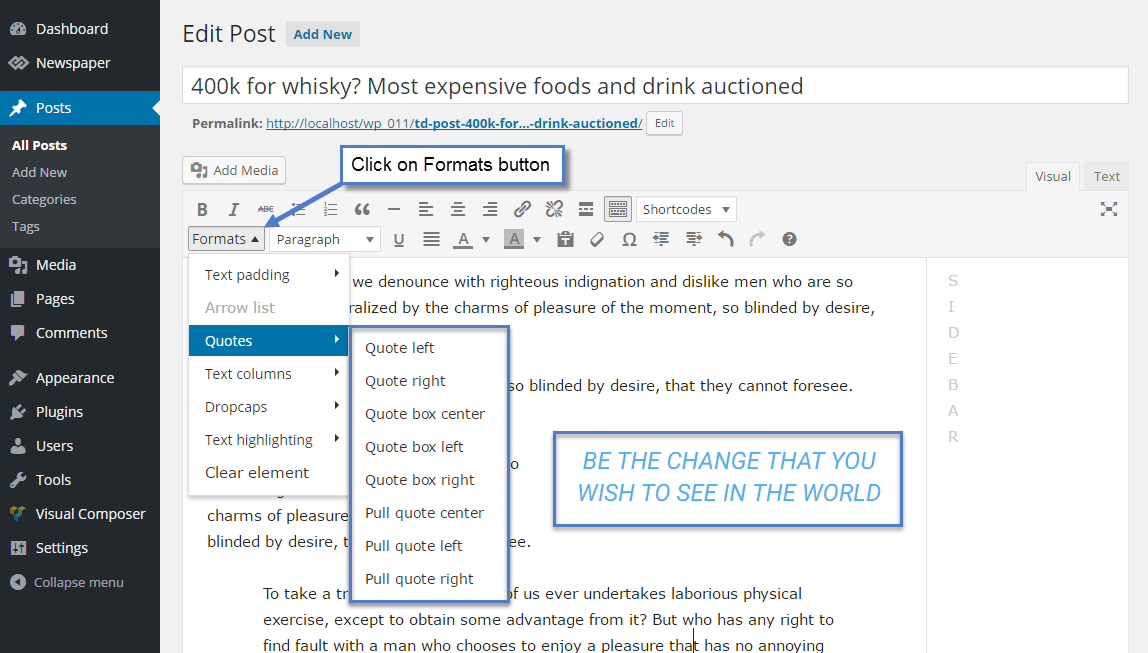
Live examples: https://demo.tagdiv.com/newspaper/blockquotes-pullquotes/
Calin Hi,
Unfortunately flex block 1 was designed in this way, the height is change in function of
title/excerpt length, for the moment this is the only way to set manually the height, sorry!
Thank you for your understanding!
Simion C. Hi,
You mean the demo content when you install the demo with content? Start from the top for example, with the header. Set your own log and menu, configure the header with your own data. The homepage which is provided when the demo is installed with content can be edited with the tagDiv composer, each element in it can be customized
– https://forum.tagdiv.com/tagdiv-composer-tutorial/
– https://forum.tagdiv.com/block-settings-guide/
Then move on the footer, replace the demo data with your own there as well. Here is the theme documentation – https://forum.tagdiv.com/newspaper-theme-documentation/
If you need help or have more questions, please let me know. Provide as many details about it as possible, screenshots are also helpful or a link to the website.
Thanks
Simion C. Hi,
That is a customization specific to the travel demo – http://prntscr.com/mdlhrb Some demos when installed will import an additional stylesheet containing various customizations for theme elements.
I could try and adapt it to the elements in your website, please post a link to the page where you want to do this modification. The solution will be more accurate this way. Or specify the type of block used so I can try it on my end.
Thanks
Calin Hi,
I made some investigation and is possible to be the robots.txt
-> https://productforums.google.com/forum/#!topic/webmasters/EjH7sfnr4h8
-> http://forums.seochat.com/new-user-seo-questions-answers-123/googlebot-couldnt-get-all-resources-page-488600.html
-> https://www.quora.com/What-is-the-solution-of-this-message-Googlebot-couldnt-get-all-resources-for-this-page-blocked-by-robots-txt
-> https://webmasters.stackexchange.com/questions/83755/googlebot-couldnt-get-all-resources-for-this-page
Thank you!
