
- NewsmagBlock settings tutorial
- NewsmagCategory tag on modules/blocks
- NewsmagtagDiv Composer Tutorial
- NewsmagWeather Widget
- NewsmagExchange widget
- NewsmagInstagram widget
- NewsmagHow to use the Visual Composer plugin
- NewsmagIntroduction
- NewsmagFooter templates
- NewsmagCustom ad spots
- NewsmagLoading image effects
- NewsmagSmart sidebar
- NewsmagFeatured images
- NewsmagGeneral settings
- Newsmag7 days post sorting
- NewsmagTheme thumbs
- NewsmagExcerpts introduction
- NewsmagTheme colors introduction
- NewsmagtagDiv slider gallery
- NewsmagVideo playlist
 Simion C.
 Hi,
If you would like to reduce the space between those blocks
– https://www.screencast.com/t/jxjjMcuM0MU
You could set a negative top margin for the block below, or a negative bottom margin for the top block, with the composer
– https://www.screencast.com/t/VRyhnmOgMO
Or try some Custom CSS, like this for example
– https://www.screencast.com/t/eJU6ZHzfZ
.home .td_block_21 {

margin-top: -48px;

}
Thanks
 mihajlovmaksim
Hi. How to remove the comments block from all pages of the site (how to completely disable comments so that no one has seen them)? Sorry for bad English
 Catalin
 Hello Fausto,
Unfortunately, the theme does not have any such an option that allows you to do this with block filtering, sorry! If you want to achieve this functionality, notice that you have to implement it yourself because does not seem to be a simple task and it involves doing such a custom work and we cannot provide this type of services at the moment, sorry! Another alternative for you would be to find such a plugin with has this functionality and try to see how it will work for you. Also, if you do not find something like this which helps you and if you are not aware of the steps which are needed to take in this case, please consider hiring a freelancer/developer to help you!
Thanks for the message!
 indro
indroHi!
I’m having a little trouble on decreasing dhe block space here: https://drive.google.com/open?id=0B0kbj5CETpoNOUE4QTY4Zk16SGM in this page http://www.shije.life, in Visual Composer I set padding marging to 0px and still the blocks appear distant to each other, I would like to decrease further more the space between them (vertically)! Please help me on this, how can I control this parameter…
Thank you!
Indro
Catalin Hello,
Notice that you can only change or adjust the Size & Style for the modules which compose the Big Grids and Blocks, from here -> https://www.screencast.com/t/4Z8jJyX9d3MR If you want to change anything else, notice that you can do it only via such a bit of custom CSS code. For more information about how you can know what kind of module is used for Big Grids or Blocks, please check here -> https://forum.tagdiv.com/theme-thumbs/
Hope this helps!
Thanks for your understanding!
 bwredesign
Hi,
I’m getting error using block 1, I use block 16 on the same category and its working fine.
wp booster error:
td_api_base::mark_used_on_page : a component with the ID: td_100x75 is not set.
here is the link http://bworldonline.com/homepage-crissy/
I’m getting error on the default image in block 1, the other blocks was working fine.
thank you.
 Fausto
Hello!
I have a tricky question. I’d like to filter a Block with the latest posts by two different taxomies:
1 – The first filter already exists, by categories terms.
2 – The second filter would be by several custom taxonomies (not the terms).
The better example I have for this is IGN Portugal home page: http://pt.ign.com/
First row: Videos | Reviews | News (These would be the category terms).
Second row: Xbox | PS4 | Nintendo (These would be the whole custom taxonomies each).
I know it would be a complex job and out of support scope, but it would be possible to point me to the right direction at least? Like, which files should I look for.
 dennisjpitocco
Outstanding Theme! Apologies, but I’ve been through the Block Settings and Font Settings and can’t seem to find where/I to adjust the Size & Style of the TYPE within the Grid Style 4 (large Featured Post box below Trending Now) at the Top of our Home Page and the two Grid Style 1 boxes immediately below. My Site is https://www.bizcatalyst360.com/
Thanks in advance!
dennisjpitoccoOutstanding Theme! Apologies, but I’ve been through the Block Settings and Font Settings and can’t seem to find where/I to adjust the Size & Style of the TYPE within the Grid Style 4 (large Featured Post box below Trending Now) at the Top of our Home Page and the two Grid Style 1 boxes immediately below. My Site is https://www.bizcatalyst360.com/
Thanks in advance!
 meri
meri Hi again, there’s an additional thing I don’t understand: I create a post, write my text and add a picture in the “featured image” block. But, after publishing, I see the featured image in the post (top left of the text). There’s obviously something I’m missing or doing wrong. Could you kindly help?
 jchcity
 Thanks for replying. I was expecting the home page to look more like the (default) demo theme home page, with blocks etc — as it, the main part of the home page (excluding footer and the twitter sidebar) is simply a series of (the start of) stories. Screenshot here: https://www.evernote.com/l/AAuDq4fckk5Mr7MUyvt7UjCdEycbAQdPwn0
Doesn’t a demo theme (without content) apply the structure/formatting/layout to existing content?
Am I missing something here?
thanks
Catalin Hello,
Please notice that footer templates use the Block 7 which is the first element from the left side and this block, by default is set up to display the firsts their posts from Featured Category. Most likely, you do not have any such a posts in that category and that’s why you bring nothing. You should see here -> https://www.screencast.com/t/lKNhzDLwgcP
Thanks for your understanding!
Catalin Hello,
You can try using the code below and place it in Theme panel -> Custom CSS area,
The code is ->
.td-footer-wrapper div .td_block_template_4 .td-block-title > * {

    background-color: blue;

}

.td-footer-wrapper div .td_block_template_4 .td-block-title > *:before {

    border-color: blue transparent transparent transparent;

}
The result is here -> https://www.screencast.com/t/ysqPvZuTbl4
Thanks.
Simion C. Hi,
The ajax filter used on blocks can filter by categories, authors, tags or popularity
– https://www.screencast.com/t/tTVktITpG
– https://forum.tagdiv.com/block-settings-guide/
The Visual composer tabs are not related to this filter. The sections you create can only have a custom name and icon. I though you wanted to make the tabs similar to the ajax filter design, that is what the above code does.
Thanks
 lettogsunn
 Hi and thanks for your reply.
I deleted all cache files and still have same issue, so I was maybe not clear when explaining: to include the revolution slider at the bottom of every post I edited the post template .php file and added a php echo shortcode. The result is that the slider is shown just above the footer on all posts, but the sidebar will NOT stay above the slider when I scroll down to the bottom of the page. You will see the issue in the image I linked to (you see 2 posts from the block widget overlap the slider above the footer). You should also see the same issue if you go to any post/article on the website.
Any solution for this? I want to force the sidebar to not scroll further down than the actual post content.
 mkmk007
 Hi there,
My site is: https://glos.blog
I managed to change the colour with this custom code:
#td-header-menu {
min-height: 48px;
background-color: #f77f16;
}
[class*=”td-icon-search”] {
line-height: 1;
text-align: center;
display: inline-block;
background-color: #f77f16;
}
Though I wonder if there is an option for it in ‘Theme Color’.
Thanks.
-
This reply was modified 9 years by
mkmk007.
 khaledsa
 I am using footer style 2
and I wwant to change block´s title background color from black to blue
and this is a screenshoot
http://prntscr.com/gvj7my
and this is website url
http://bashapower.com/new/
Simion C. Hi,
That image will be displayed on block or grid modules, when there is no featured image set and the placeholder is enabled in the theme panel
– https://www.screencast.com/t/e2FwxtouO
I cannot seem to find many posts with no thumbnail, on the website. Did find these, so it is working
– https://www.screencast.com/t/KRW6KDyBwoRo
The post template files are located in the main theme folder, each template has a corresponding single and loop-single file
– https://www.screencast.com/t/X91jeg38H077
Thanks
 Edward
 https://forum.tagdiv.com/category-tag-on-modulesblocks/
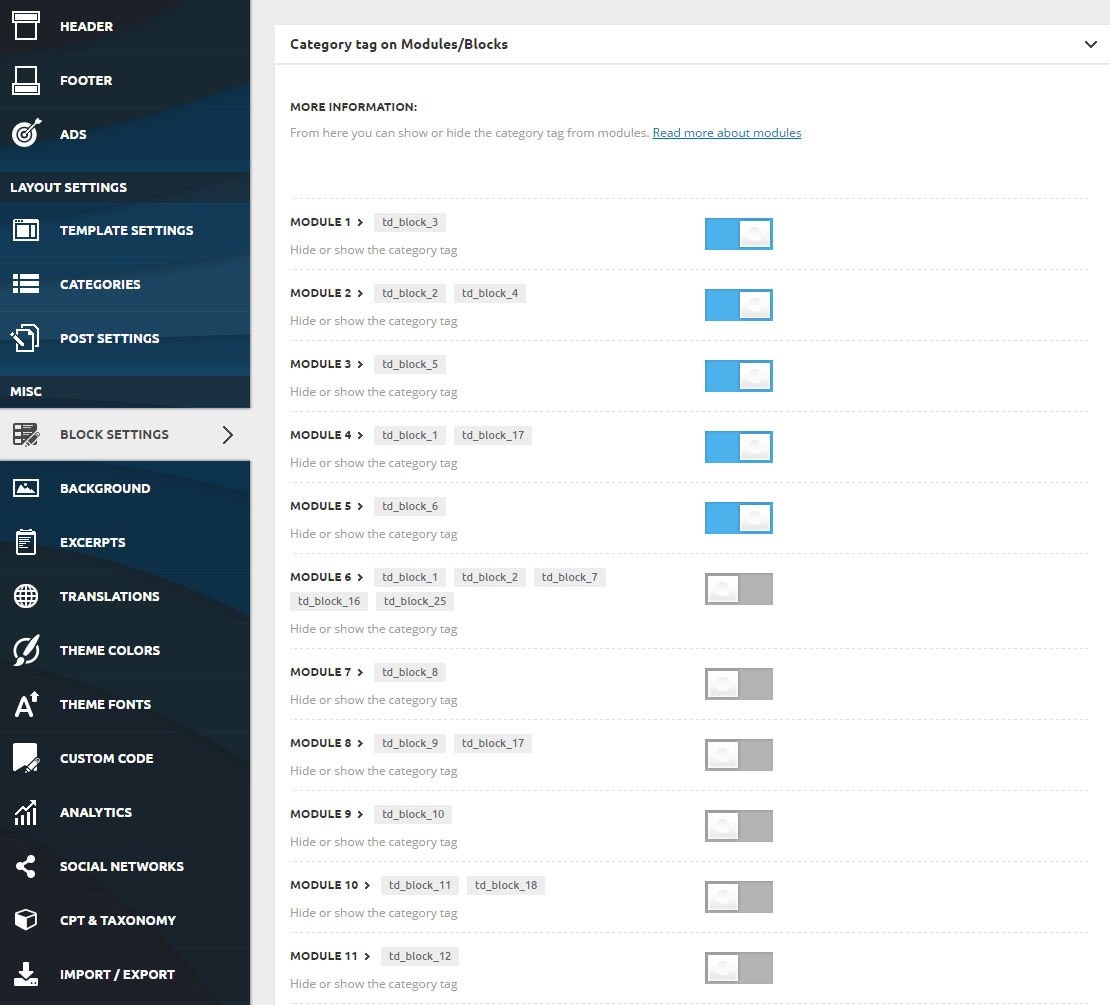
To enable or disable the category tag on any module use the switches included in Theme Panel > Block Settings > Category tag on Modules/Blocks
Catalin Hello Vegasrenie,
Please notice that our theme was fully tested with the smart sidebar functionality and it seems to work as expected on my side, sorry! Notice that functionality comes from Jave Script and this can be corrupted if you are using some untested plugins which can cause this effect. Try to disable all of them, leave just only bundled plugins to be active, clear all the caches and check the results. For more information about smart sidebar, please check the following documentation here -> https://forum.tagdiv.com/smart-sidebar-2/
The simplest way to achieving the Gadgets demo is to import the demo at your website and using it with your data/posts/pages. If you do not like this way, you should inspect our demo preview with the Inspector browser because in that way you can identify what kind of blocks element is used. For more details about this, please check here -> https://forum.tagdiv.com/create-custom-code-using-the-browsers-inspector/
Hope this helps!
Thanks for your understanding!
Catalin Hello,
I’m sorry but please notice that all of the settings which can be made for our Big Grids can be found here -> https://forum.tagdiv.com/block-settings-guide/
Hope this helps!
Thanks for the message!
Catalin Catalin Hello svharishtech,
Please notice that you can only use the text in the mobile theme editor because the theme does not recognize using any other blocks, sorry!
Hope this helps!
Thanks for your understanding!
Simion C. Hi,
The theme uses a center-top cropping system, this is believed to be the best in general. Each theme module has a predefined thumbnail size, so results may be different for the same featured image used
– https://forum.tagdiv.com/thumbnails-vs-featured-image-size/
It is a matter of finding the most optimal blocks and grids to display your content, with the best results.
Here you can see how all the blocks, grids and full grids look
– https://demo.tagdiv.com/newspaper/block-1/
– https://demo.tagdiv.com/newspaper/big-grid-1/
– https://demo.tagdiv.com/newspaper/full-big-grid-1/
Thanks
Simion C. Hi,
Please provide a link to your website is possible so we can inspect it and see the issue you describe, for a better understanding and solution.
Blocks will display posts based on filtering and sorting options chosen. If there are enough posts in the category/categories and you increased the limit, they will be displayed.
This does not include Big Grids, these elements do not have the option for a limit.
Thanks
