
- NewsmagRequirements for Newsmag
- NewsmagHow to update the theme
- NewsmagtagDiv Social Counter tutorial
- NewsmagTop bar templates
- NewsmagAjax view count
 Anamaria
 Hello,
Disconnect your Instagram and Facebook, please execute these steps:
1. disable tagDiv Composer and tagDiv Social Counter
2. uninstall(delete) tagDiv Composer and tagDiv Social Counter
3. clear cache (if cache plugin exists)
4. install tagDiv Composer and tagDiv Social Counter
5. activate tagDiv Composer and tagDiv Social Counter
6. clear cache (if cache plugin exists)
Reconnect the Instagram and Facebook account again -> https://forum.tagdiv.com/tagdiv-social-counter-tutorial-2/
If this problem is not solved after that, then we need to take a look and see what happened there.
Please contact us via email at contact@tagdiv.com and provide the following:
– wp-admin URL and credentials
– a link to this topic in order to identify you
Our team will take a look!
Thank you!
 Calin
Calin Hi SAMYTHEBIGJUICY,
Yes, I was referring to some cache plugins, cache on host or cloudflare.
The WP Super cache plugins is the one that we tested with our theme and we made a guide for it, but you can use other cache plugins, all that needs is to find the right settings.
About the ads, it is possible to have some ads left on some pages or cloud templates, on those were are display, use tagDiv Composer and replace/remove them-> https://forum.tagdiv.com/ads-adsense-overview/ also this is still compatible and can be downloaded https://i.imgur.com/akfvnKC.png
Thank you!
Anamaria Hello,
Please make sure you don’t have an object cache on the server.
Also, make sure the plugin is activated.
Thank you!
Anamaria Hello,
This is a strange situation because I made a test, and for me works well -> https://i.imgur.com/89AIW7x.png please if you can do a test using the theme plugins, clear all cache and see if the issue persists.
Let me know the results!
Thank you!
Anamaria Hello,
Do you use the theme for multisite?
Also, please if you can do a test using the theme plugins, clear all cache and see if the issue persists.
In case that the problem is persisting, please make a full backup and contact us at contact@tagdiv.com, make a full backup for your website and provide wp-admin and cPanel access. Also, include the link to this topic to identify you. We’ll check it as soon as possible!
Thank you!
 allmyself
 I had the same problem but with WP Fastest Cache plugin, thank you!
 pavel@earnware.com
What is td_011_remote_cache in the db options?
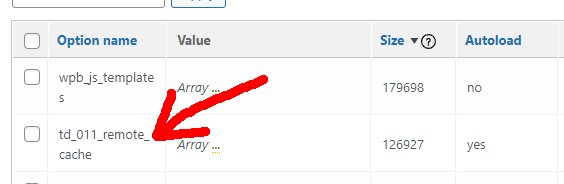
How it is generated? From a theme option?
 boris.prado
 Hello, im here to report the same problem, i clear cache, and do all steps, and nothing.
 SAMYTHEBIGJUICY
 One more point – I understand the cache purge at the host is done by FTP or SSH but clearly wordpress supports neither of these – the cache solution on the Newspaper forum is to use WP Super Cache which is no longer downloadable as it is incompatible on the plugins site. Hence I would appreciate being told what to do here as I have no idea what else I can try to get rid of these tagdiv ads.
SAMYTHEBIGJUICY Although I appreciate the ongoing help I’m not really sure what this means:
“you can make a test disable all cache you have on your website and check again”
How do I do this? I don’t have any cache plugins and I cleared my chrome cache for sure because I had to log back into all my accounts, also given I’m browsing from incognito which has no local cache doesnt this prove its not a caching issue?
SAMYTHEBIGJUICY Cache clear worked thank you!
 andreaskas
Hi,
I purchased and installed newspaper theme but i am facing an issue with the CSS.
On the first load of the page, without any cache for example in icognito mode, i see a white page with just the text and after a while the css is being loaded. See attached image for reference.


Also, when trying to generate the critical CSS, i am seeing the following console errors and the generate button does nothing.
Error: <svg> attribute viewBox: Expected number, "\\\"0".
xe @ jquery.min.js?ver=3.6.0:2
He @ jquery.min.js?ver=3.6.0:2
append @ jquery.min.js?ver=3.6.0:2
u @ js_files_for_plugin_analyze_css.min.js?ver=381db5cebf26144e1b1ab5f0477be694:3
u @ js_files_for_plugin_analyze_css.min.js?ver=381db5cebf26144e1b1ab5f0477be694:6
(anonymous) @ js_files_for_plugin_analyze_css.min.js?ver=381db5cebf26144e1b1ab5f0477be694:24
z @ js_files_for_plugin_analyze_css.min.js?ver=381db5cebf26144e1b1ab5f0477be694:21
(anonymous) @ js_files_for_plugin_analyze_css.min.js?ver=381db5cebf26144e1b1ab5f0477be694:34
dispatch @ jquery.min.js?ver=3.6.0:2
v.handle @ jquery.min.js?ver=3.6.0:2
c @ rocket-loader.min.js:1
load (async)
t.addEventListener @ rocket-loader.min.js:1
add @ jquery.min.js?ver=3.6.0:2
s.event.add @ jquery-migrate.min.js?ver=3.3.2:2
(anonymous) @ jquery.min.js?ver=3.6.0:2
each @ jquery.min.js?ver=3.6.0:2
each @ jquery.min.js?ver=3.6.0:2
Ee @ jquery.min.js?ver=3.6.0:2
on @ jquery.min.js?ver=3.6.0:2
success @ js_files_for_plugin_analyze_css.min.js?ver=381db5cebf26144e1b1ab5f0477be694:34
c @ jquery.min.js?ver=3.6.0:2
fireWith @ jquery.min.js?ver=3.6.0:2
l @ jquery.min.js?ver=3.6.0:2
(anonymous) @ jquery.min.js?ver=3.6.0:2
load (async)
send @ jquery.min.js?ver=3.6.0:2
ajax @ jquery.min.js?ver=3.6.0:2
s.ajax.s.ajax @ jquery-migrate.min.js?ver=3.3.2:2
(anonymous) @ js_files_for_plugin_analyze_css.min.js?ver=381db5cebf26144e1b1ab5f0477be694:32
dispatch @ jquery.min.js?ver=3.6.0:2
v.handle @ jquery.min.js?ver=3.6.0:2
c @ rocket-loader.min.js:1
jquery.min.js?ver=3.6.0:2 Error: <circle> attribute cx: Expected length, "\\\"50\\\"".
xe @ jquery.min.js?ver=3.6.0:2
He @ jquery.min.js?ver=3.6.0:2
append @ jquery.min.js?ver=3.6.0:2
u @ js_files_for_plugin_analyze_css.min.js?ver=381db5cebf26144e1b1ab5f0477be694:3
u @ js_files_for_plugin_analyze_css.min.js?ver=381db5cebf26144e1b1ab5f0477be694:6
(anonymous) @ js_files_for_plugin_analyze_css.min.js?ver=381db5cebf26144e1b1ab5f0477be694:24
z @ js_files_for_plugin_analyze_css.min.js?ver=381db5cebf26144e1b1ab5f0477be694:21
(anonymous) @ js_files_for_plugin_analyze_css.min.js?ver=381db5cebf26144e1b1ab5f0477be694:34
dispatch @ jquery.min.js?ver=3.6.0:2
v.handle @ jquery.min.js?ver=3.6.0:2
c @ rocket-loader.min.js:1
load (async)
t.addEventListener @ rocket-loader.min.js:1
add @ jquery.min.js?ver=3.6.0:2
s.event.add @ jquery-migrate.min.js?ver=3.3.2:2
(anonymous) @ jquery.min.js?ver=3.6.0:2
each @ jquery.min.js?ver=3.6.0:2
each @ jquery.min.js?ver=3.6.0:2
Ee @ jquery.min.js?ver=3.6.0:2
on @ jquery.min.js?ver=3.6.0:2
success @ js_files_for_plugin_analyze_css.min.js?ver=381db5cebf26144e1b1ab5f0477be694:34
c @ jquery.min.js?ver=3.6.0:2
fireWith @ jquery.min.js?ver=3.6.0:2
l @ jquery.min.js?ver=3.6.0:2
(anonymous) @ jquery.min.js?ver=3.6.0:2
load (async)
send @ jquery.min.js?ver=3.6.0:2
ajax @ jquery.min.js?ver=3.6.0:2
s.ajax.s.ajax @ jquery-migrate.min.js?ver=3.3.2:2
(anonymous) @ js_files_for_plugin_analyze_css.min.js?ver=381db5cebf26144e1b1ab5f0477be694:32
dispatch @ jquery.min.js?ver=3.6.0:2
v.handle @ jquery.min.js?ver=3.6.0:2
c @ rocket-loader.min.js:1
jquery.min.js?ver=3.6.0:2 Error: <circle> attribute cy: Expected length, "\\\"50\\\"".
xe @ jquery.min.js?ver=3.6.0:2
He @ jquery.min.js?ver=3.6.0:2
append @ jquery.min.js?ver=3.6.0:2
u @ js_files_for_plugin_analyze_css.min.js?ver=381db5cebf26144e1b1ab5f0477be694:3
u @ js_files_for_plugin_analyze_css.min.js?ver=381db5cebf26144e1b1ab5f0477be694:6
(anonymous) @ js_files_for_plugin_analyze_css.min.js?ver=381db5cebf26144e1b1ab5f0477be694:24
z @ js_files_for_plugin_analyze_css.min.js?ver=381db5cebf26144e1b1ab5f0477be694:21
(anonymous) @ js_files_for_plugin_analyze_css.min.js?ver=381db5cebf26144e1b1ab5f0477be694:34
dispatch @ jquery.min.js?ver=3.6.0:2
v.handle @ jquery.min.js?ver=3.6.0:2
c @ rocket-loader.min.js:1
load (async)
t.addEventListener @ rocket-loader.min.js:1
add @ jquery.min.js?ver=3.6.0:2
s.event.add @ jquery-migrate.min.js?ver=3.3.2:2
(anonymous) @ jquery.min.js?ver=3.6.0:2
each @ jquery.min.js?ver=3.6.0:2
each @ jquery.min.js?ver=3.6.0:2
Ee @ jquery.min.js?ver=3.6.0:2
on @ jquery.min.js?ver=3.6.0:2
success @ js_files_for_plugin_analyze_css.min.js?ver=381db5cebf26144e1b1ab5f0477be694:34
c @ jquery.min.js?ver=3.6.0:2
fireWith @ jquery.min.js?ver=3.6.0:2
l @ jquery.min.js?ver=3.6.0:2
(anonymous) @ jquery.min.js?ver=3.6.0:2
load (async)
send @ jquery.min.js?ver=3.6.0:2
ajax @ jquery.min.js?ver=3.6.0:2
s.ajax.s.ajax @ jquery-migrate.min.js?ver=3.3.2:2
(anonymous) @ js_files_for_plugin_analyze_css.min.js?ver=381db5cebf26144e1b1ab5f0477be694:32
dispatch @ jquery.min.js?ver=3.6.0:2
v.handle @ jquery.min.js?ver=3.6.0:2
c @ rocket-loader.min.js:1
jquery.min.js?ver=3.6.0:2 Error: <circle> attribute r: Expected length, "\\\"50\\\"/". Edanur
 Hello,
I followed the steps Wrong display for Mobile, Tablet or Desktop. Although the computer view is normal now, the mobile theme is not active in the mobile view. After disabling the mobile theme, I enabled it and cleared the cache. But still the problem was not solved. Mobile view has computer view.
Thanks, Happy year!
Anamaria Hello,
Please make sure you have enabled the mobile cache for wp rocket ->
https://docs.wp-rocket.me/article/140-wrong-display-mobile-tablet-desktop
Happy new year!
Calin Hi,
This situation depends on the cache plugin/tool that is used, please check the settings from it is possible to have some specific options and clear the cache when a page/post is published or updated.
For the moment we have only one cache plugin guide https://forum.tagdiv.com/cache-plugin-install-and-configure/
Thank you!
Calin Hi Stanford Nix, this situation can be solved by checking the cache options, most of cache plugin have options to clear the cache when a post is publish/update, for example we made a guide for WP Super Cache https://forum.tagdiv.com/cache-plugin-install-and-configure/
Thank you!
Anamaria Hello,
If you have made any settings, and after saving it are not saved are usually caused by the object cache.
We have a guide on how to check the Object Cache if is applied on Backend -> https://forum.tagdiv.com/general-options-may-interfere-newspaper-theme/
Also, please provide the link to your website.
Thank you!
Anamaria Hello,
Usually, this happens with cache plugins. If the cache plugin does not have mobile support then the mobile theme version can be delivered instead. The solution would be to use the recommended WP Super Cache plugin instead and activate these settings (especially the mobile device support): https://forum.tagdiv.com/cache-plugin-install-and-configure/
I hope this helps.
Thank you!
 Stanford Nix
Everytime I make a post, I have to clear cache to publish the edits. Right now it seems the only place there is an issue is the homepage. When I update a post, I have to clear cache to make the title and article go live on the site. I need to be able to make edits to the theme on tagdiv, and edit posts and they automatically push to the live site when I save. Why do I keep having to clear cache everytime I make edits anywhere?
Stanford NixEveryime I make an edit to a page on the site using tag div or anything, it doesn’t push to the website. I have to go to siteground and clear my cache everytime I want an edit to push to the live site. I need to get this fixed. I cant clear cache everytime I make an edit. I need to be able to use tagdiv composer, make an edit, and when I click ‘save’ it goes to the live site. Any help?
 JKLFab
 Hi, I gave my credentials on December 3rd. The response from support after they logged into my site was:
“Hi,
The problem was resolved! I restored the tagDiv Composer and the links for instagram were regenerated.
Thank you!
Calin N.”
It was fixed for about a week, and I thought everyone else would get the fix with the next update; however, it broke for me again shortly after, and then I updated two days ago, and the update did not fix the issue.
Do they need my credentials again? Did they not actually discover the problem, because it was fixed for a bit, and now it’s broken again, including after an update and delete cache.
EdanurHello, I am using the mobile theme actively in my newspaper theme. But I am having some problems. Most of the time, mobile theme is active in computer and tablet view, and computer view is active in mobile view. It works the opposite way. I clear the cache to fix this but it doesn’t help. It goes back to past after 1-2 minutes. Can you solve this problem?
I share photos and videos
site name: guzellikbirikimi.com
Anamaria Hello,
Seems you have the mobile theme plugin activatedhttps://i.imgur.com/8GcalWE.png, please deactivate it, clear all cache and check after the mobile version.
Also, please check this topic where I explained each mobile version -> https://forum.tagdiv.com/topic/mobile-version-not-working-properly-2/ and choose what mobile version you want.
Hope this helps you!
Thank you for your kind words!
Anamaria Hello,
Usually, this happens with cache plugins. If the cache plugin does not have mobile support then the mobile theme version can be delivered instead. The solution would be to use the recommended WP Super Cache plugin instead and activate these settings (especially the mobile device support): https://forum.tagdiv.com/cache-plugin-install-and-configure/
If the issue is still present you can try deactivating all non-theme plugins and check again in order to rule out a plugin conflict.
I hope this helps.
Thank you!
Anamaria Hello,
@sensahin,
Please make a test using only tagDiv plugins and make sure that all cache has been cleared.
@sanjeevkk ,
Please make a full backup and contact us at our email address contact@tagdiv.com, please provide wp-admin and cPanel access. We’ll check this problem as soon as possible. Also, please include the link to this topic to identify you.
Thank you!


