
No search results were found in Documentation!
 Anamaria
 Hello,
Please do these steps
1. disable tagDiv Composer
2. uninstall tagDiv Composer
3. clear cache (if cache plugin exists)
4. re-install tagDiv Composer it again from Newspaper plugins => https://www.screencast.com/t/WLy01lbc
5. activate tagDiv Composer
6. clear cache (if cache plugin exists)
Also, make sure your WordPress and plugins are up to date.
Sometimes, the issue can be from a plugin conflict, that’s why, please deactivate ALL plugins except tagDiv ones, also if you are using a cache plugin, deactivate it, clear all cache and try again.
Thank you!
Anamaria Hello, Oli,
Please make sure you have the tagDiv Standard Pack plugin activated, also clear your cache.
Let me know the results!
Thank you!
Anamaria Hello,
In most cases, this problem occurs because you have the latest version of WordPress with an older version of the theme.
Please check if you use the last version of WordPress 5.7.1 with the last theme version Newspaper 10.4 (if you have a theme version older, than NewsPaper 10.4 and you have the latest WP version 5.7.1, tagDiv Composer not work) and check to see if the problem persists.
If you need to make an update, before please make a full backup to all files and the database, in case something goes wrong. => https://forum.tagdiv.com/how-to-update-the-theme-2/
Also, make sure that all the settings are like in our requirements, please follow the guide carefully: https://forum.tagdiv.com/requirements-for-newspaper/
and please increase all requirements that are lower, and follow all steps.
Also, if the problem persists please check if you do not have a plugin conflict, please deactivate ALL plugins except tagDiv plugins, also if you are using a child theme or cache plugin, deactivate them, clear all cache (also from your browser) and try again.
Let me know the results!
Thank you
 Calin
Calin Hi,
Normally, the mobile theme plugin should work on mobiles without problems. Indeed some times it can be problems from cache plugins if those do not have mobile support (to be able to separate the mobile cache from desktop cache).
Usually, we recommend to use WP Super Cache with the settings from this guide https://forum.tagdiv.com/cache-plugin-install-and-configure/
Thank you!
 Neil264846
Hello,
As you can see on the picture on the link WeTransfer below, I can’t display the elements from Tagdiv Composer on my page but only their name. It seems to be alt text.
Actions already done :
– cache cleared
– re-installation of theme and Tagdiv plugins
– Deactivation of all other plugins
– Verification of Php settings
– No other page builder installed
Please can you help me ? I can’t continue the website building.
Thank you in advance.
 aaheath1976
https://www.successcentral.com
This is what the corrupt homepage displays like:
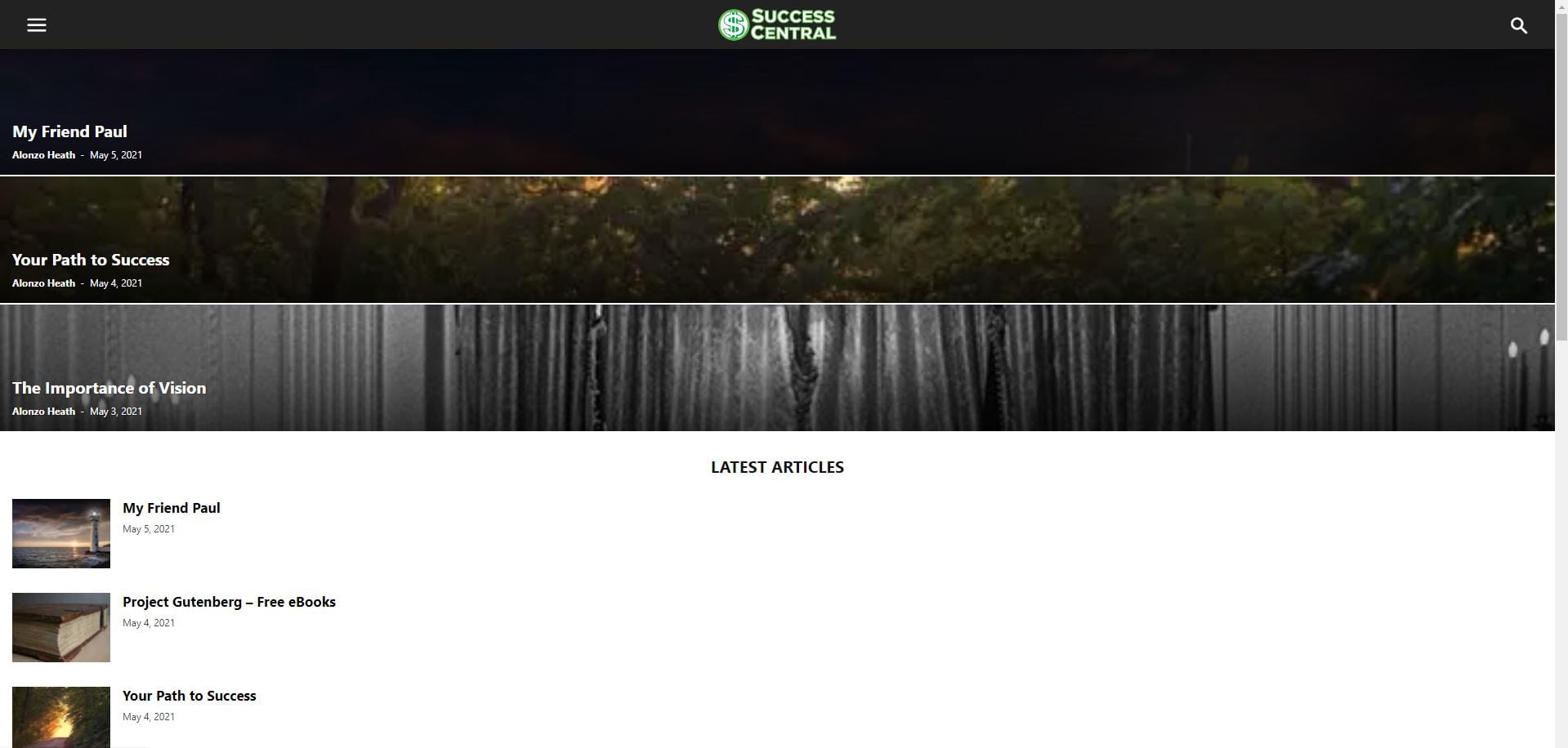
The home page should look like this:

I’ve cleared the cache and it is currently displaying correctly. However, somehow it goes back to the corrupt homepage by itself, even when no changes are made to the site. Any help would be appreciated.
 Paulo Nóbrega
Good afternoon Support,
I recently updated my client’s website to the latest version of the theme and plugins and now the CPU Usage is always at 100%.
The website audience is able to browse the website due to the cache, but working in the back office has become almost impossible. There are also numerous “Resource Limit Is Reached” errors when my client tries to add articles or photos (or users try to search for something no the front office).
Initially I thought there could be some incompatibility between plugins, but after deactivating them all I found that CPU Usage only goes up dramatically ONLY when the tagDiv Composer plugin is activated. Deactivating this plugin, the values all return to normal.
Where can I send the access credentials to the backoffice and CPANEL for you to check?
Thanks for the help in this urgent situation.
Anamaria Hello,
Please do these steps
1. disable tagDiv Composer
2. delete tagDiv Composer
3. clear cache (if cache plugin exists)
4. re-install tagDiv Composer from Newspaper plugins => https://www.screencast.com/t/WLy01lbc
5. activate tagDiv Composer
6. clear cache (if cache plugin exists)
Let me know the results!
Thank you!
Anamaria Hello,
@kevinperry, I just checked your website and now the featured image displays => https://www.screencast.com/t/s9xJgQGf
Did you manage to solve the issue?
@Styleitaliano, The issue can be from a plugin conflict, that’s why, please deactivate ALL plugins except tagDiv ones, also if you are using a child theme or cache plugin, deactivate them, clear all cache and try again.
Let me know the results!
Thank you!
 Bettina
 Hello!
In our theme files there is no caching module, except for social network elements. For example, pages, JS and CSS files are not cached by the theme.
Thank you!
Anamaria Hello,
That’s weird! The issue could be from a plugin conflict, that’s why, please deactivate ALL plugins except tagDiv ones, also if you are using a child theme or cache plugin, deactivate them, clear all cache and try again.
Also, if the problem persists, please make a full backup to all files and the database and contact us via email at contact@tagdiv.com.
Provide:
– wp-admin URL and cPanel URL and credentials
– a link to this topic in order to identify you
Thank you!
Anamaria Hello,
To clear your database you can try a plugin => https://kinsta.com/blog/wordpress-database-plugin/
Regarding buffering, please make sure you don’t have a plugin conflict, also, maybe you have a security module that blocks this, as an object cache on the host.
Please verify the console for error when you try to save, usually, it displays a 403 or 404 error.
Thank you!
 besmelejack
 Hello, I am using the wp rocket cache plugin on my website. My first message is a discrepancy like in the image. Does the theme have a cache module that comes automatically in itself? Even though I haven’t installed any plugins, the td_cache folder automatically comes with the theme.
Is there a cache module that is auto-loaded with the theme? If so, how can I disable it?
Bettina Hello!
First of all, try to do these steps as quickly as possible, so your visitors do not notice the process:
1. disable TagDiv Composer
2. uninstall(delete) TagDiv Composer
3. clear cache (if cache plugin exists)
4. install TagDiv Composer
5. activate TagDiv Composer
6. clear cache (if cache plugin exists)
Also, make sure your WordPress and plugins are up to date.
If this problem is not solved after that, then we need to take a look and see what happened there.
Please contact us via email at contact@tagdiv.com and provide the following:
– admin url and credentials
– a link to this topic in order to identify you
Our team will take a look!
Thank you!
Bettina Hello!
First of all, try to do these steps as quickly as possible, so your visitors do not notice the process:
1. disable TagDiv Composer
2. uninstall(delete) TagDiv Composer
3. clear cache (if cache plugin exists)
4. install TagDiv Composer
5. activate TagDiv Composer
6. clear cache (if cache plugin exists)
Also, make sure your WordPress and plugins are up to date.
If this problem is not solved after that, then we need to take a look and see what happened there.
Please contact us via email at contact@tagdiv.com and provide the following:
– admin url and credentials
– a link to this topic in order to identify you
Our team will take a look!
Thank you!
Bettina Hello!
I just tested this demo and it seems to work just well.
First of all, try to do these steps as quickly as possible, so your visitors do not notice the process:
1. disable TagDiv Composer
2. uninstall(delete) TagDiv Composer
3. clear cache (if cache plugin exists)
4. install TagDiv Composer
5. activate TagDiv Composer
6. clear cache (if cache plugin exists)
Also, make sure your WordPress and plugins are up to date(specially Standard Pack installed and active if you use default templates).
Sometimes, the issue can be from a plugin conflict, that’s why, please deactivate ALL plugins except tagDiv ones, also if you are using a cache plugin, deactivate it, clear all cache(also from your browser) and try again.
If this problem is not solved after that, then we need to take a look and see what happened there.
Please contact us via email at contact@tagdiv.com and provide the following:
– admin url and credentials
– a link to this topic in order to identify you
Our team will take a look!
Thank you!
Anamaria Hello,
Can you send me a screenshot where you try to publish the page?
Have you checked for a plugin conflict? You will have to first start looking for a plugin conflict. please deactivate ALL plugins except tagDiv ones, also if you are using a child theme or cache plugin, deactivate them, clear all cache and try again to disable the mobile theme.
Also, you can find more tutorials on our channel on youtube =>https://www.youtube.com/user/tagdiv which can help you to design.
Hope this helps you!
Thank you!
Bettina Hello!
We recommend using WP Super Cache plugin with these configurations: https://forum.tagdiv.com/cache-plugin-install-and-configure/
If the issue is still there, then please send an email at contact@tagdiv.com and provide wp-admin, so we can investigate this issue. Also paste a link to this topic so we can easily identify you.
Let us know and we will gladly assist you.
Thank you!
besmelejackHello, is there an automatic cache system or plugin that comes with the theme? The person who optimized my website stated that the theme has its own cache structure, which causes some conflicts. You can also see it in the screenshot.
How can we turn off or delete the theme’s cache system, can you help me please. Thanks.

 qph9697
 Hi there, I have disabled all plugins and theme, cleared up the cache, but still I am facing the issue.
Bettina Hello!
First of all, please make sure you have a backup done and then you can update the theme and the TagDiv plugins also.
Please take a look for this advice before updating: https://forum.tagdiv.com/topic/action-required-please-read-how-to-update-to-the-newspaper-theme-v-10/
I recommend you to make a backup and update plugins and the theme via file transfer, so that you don’t face any error: https://forum.tagdiv.com/how-to-update-the-theme-2/
I recommend you after update to try these steps:
1. disable TagDiv Composer
2. uninstall(delete) TagDiv Composer
3. clear cache (if cache plugin exists)
4. install TagDiv Composer
5. activate TagDiv Composer
6. clear cache (if cache plugin exists)
Also, make sure your WordPress and plugins are up to date(specially Standard Pack installed and active if you use default templates).
Sometimes, the issue can be from a plugin conflict, that’s why, please deactivate ALL plugins except tagDiv ones, also if you are using a cache plugin, deactivate it, clear all cache(also from your browser) and try again.
Thank you!
 heitoradines
 Hey Anamaria,
I’ve tried doing what you asked but even when I upload the new image the footer doesn’t update for some reason.
I’ve tried purging my cache but it still doesn’t work.
https://www.screencast.com/t/eqo5q1tvwvX
Thanks!
-
This reply was modified 5 years by
heitoradines.
Bettina Hello!
That’s strange. Sometimes, the issue can be from a plugin conflict, that’s why, please deactivate ALL plugins except tagDiv ones, also if you are using child theme or cache plugin, deactivate them, clear all cache and try again.
Try to see if you can find those by accessing Newspaper -> Theme panel -> Translations -> Translations. There you can find a list with some words that you can translate in the right side of every words.
Thank you!
 channeld
Hi. I have this website channeldoubler.co.uk which has some issues with Core Web Vitals.
The issues are mostly related to legacy scripts (js, css).
Also, I tried running the CSS analyzer but nothing meaningful happens. I mean, the analyzer runs in a loop constantly checking desktop browsing again and again…
Check: https://developers.google.com/speed/pagespeed/insights/?url=https%3A%2F%2Fwww.channeldoubler.co.uk%2F
So, we want to know how to eliminate the issues related to remove unused css/js AND the DOM elements. How are so many and where they come from? We’ve solved all other issues.
Before you reply, please:
1. Do not “send us” to your page speed optimization posts. I mean, we’ve gone beyond these. We also have wprocket which does far better work than supercache.
2. Do not direct us to your “customizations team”. What we ask is very specific.
3. Understand that we are clients of yours for years. We’ve bought many licenses for your theme.
Bettina Hello!
The issue can be from a plugin conflict, that’s why, please deactivate ALL plugins except tagDiv ones, also if you are using child theme or cache plugin, deactivate them, clear all cache and try again.
If this problem is not solved after that, then we need to take a look and see what happened there.
Please contact us via email at contact@tagdiv.com and provide the following:
– admin url and credentials
– a link to this topic in order to identify you
Our team will take a look!
Thank you!
