
- NewsmagRequirements for Newsmag
- NewsmagHow to update the theme
- NewsmagtagDiv Social Counter tutorial
- NewsmagTop bar templates
- NewsmagAjax view count
 Gekkies
 Hi Bettina,
I only have the problem on mobile. Please check again because is does not work. I have no cache plugin.
 Bettina
 Hello @Gekkies !
I’ve checked and it works as it should. Please try to uninstall the cache plugin and check if the problem is solved.
Thank you!
Bettina Hello @ludyma !
Did you hide the ads for visitors from the settings? Make sure this is not a caching issue.
Deactivate all the cache plugins that you have and try again.
Thank you!
 Calin
Calin Hi Alex,
Normally if all settings from our guide for wp super cache – https://forum.tagdiv.com/cache-plugin-install-and-configure/ – https://i.imgur.com/qpqCRAF.png there should be no problems.
Also, you can use the guide for making the website faster – https://forum.tagdiv.com/how-to-make-the-site-faster/
Thank you!
 lacim.eth
Hello, im again stuck on the same problem of the composer not working. First time i fixed it by resetting the site to a new installation and made it from the beginning with the Tech News demo imported. Now the problem appeared again. I pulled out my backup with UptdraftPlus but the composer is still not working and i lost all the settings and translation from theme panel.
So i again reset the site and imported the main default pro demo. Composer not working. I´m only left with a blank page when i try to edit with the composer.
Plugins for optimalization and cache are used and set up like in the theme documentation. Cache we´re cleard and Disabling all the unnecessary plugins did not help. I really don´t know what to try out anymore.
site: https://lacim.sk
 Anamaria
 Hi,
Please go to the theme panel -> block settings -> inline css and enable the option to minify the css and js and clear the cache.
Thank you!
 vallartamirror
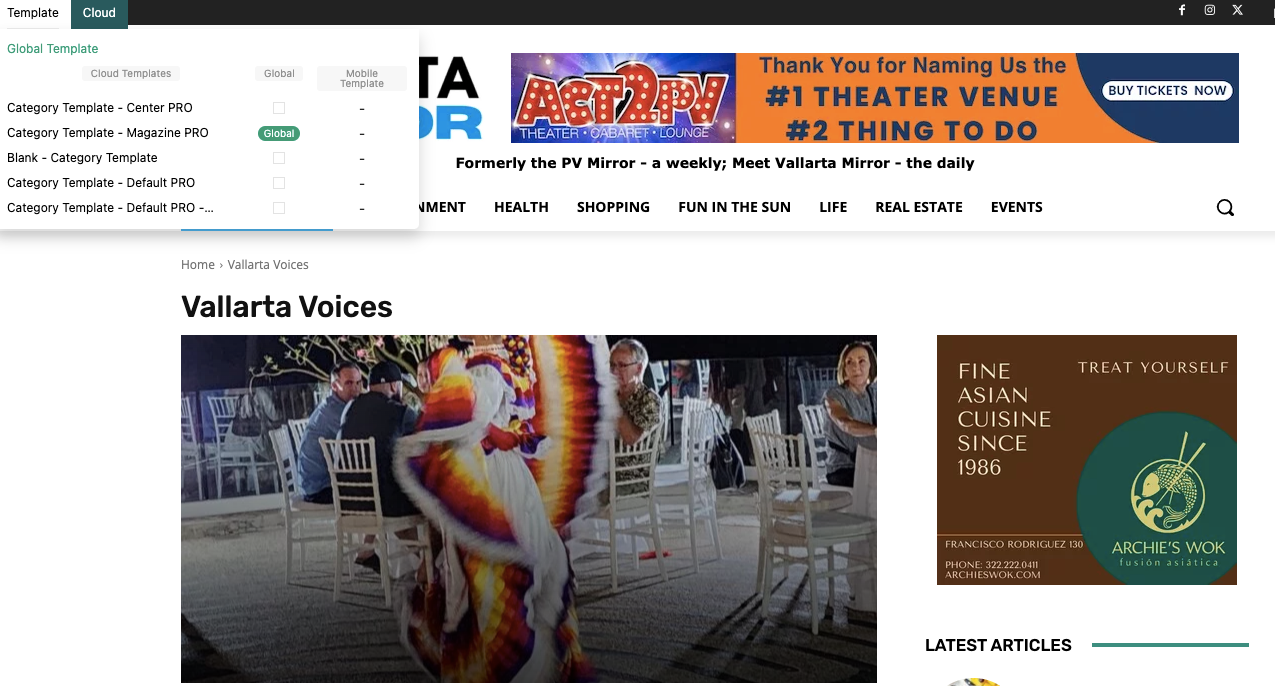
My homepage template is set to “Homepage – Magazine PRO” (globally). My category template is set to “Category Template – Magazine PRO” (globally). Everything is displayed correctly for my home. However, my category pages do not always display correctly outside of edit mode.
Sometimes the page displays correct and other times I receive an old layout. Could this be a cache issue? I have cleared my browser cache, and it does not fix the problem. Is there a cache setting that I need to look at in WordPress?
I have double checked each individual category, and they are all correctly marked as “Category Template – Magazine PRO”
 nitrofox
 Hi Anamaria,
Thank you for helping me, I also suspected that it may be a cache problem, but it turns out that I already use Super Cache, as I have always used, with the settings you have indicated.
By chance, I remember that there was an update to the super cache, I don’t know if it’s related, I’ll try to do some tests by rolling back the version or redoing the settings, but if you can give me more indications of what it might be or other tests to find out, please let me know, I’ll get back to you when I have my tests done.
Thank you!
 mick7227
 Thanks
yes your right it is a 403. but I have no idea how to fix it.purge all cache. and I don’t use the plugin they are suggesting to turn off. it is hosted with GoDaddy
Anamaria Hello,
Please check the console when you open edit content; if there is an error like this, please go to the Network tab, select the error, and select Preview -> https://i.imgur.com/iiBOHwP.png
Maybe the problem is caused by the server host
I think you will have a 403 or 404 error, so please check this topic -> https://forum.tagdiv.com/topic/wp-editor-for-text-with-title-and-column-text-not-updating-content/ and try the suggestions. Also, please check the cache, clear/purge all cache.
Thank you!
Anamaria Hello,
Usually, this happens with cache plugins. If the cache plugin does not have mobile support then the mobile theme version can be delivered instead.
The solution would be to use the recommended WP Super Cache plugin instead and activate these settings (especially the mobile device support): https://forum.tagdiv.com/cache-plugin-install-and-configure/
Also, please let me know what plugin for the cache you use now.
I hope this helps.
Thank you!
 kylevorbach
 I’m now seeing from the import prebuilt website dialogue that this is supposed to import homepages. So far when I do this, no matter what I do, zero home pages are imported.
I do get a “server configured incorrectly” error while doing this, although it says it will continue installing everything. The only thing that the system status says is not configured is the cache plugin (which I am waiting to install until after I get the demo imported).
EDIT: I installed the recommended caching plugin and it still says that it’s configured incorrectly. It says to check my upload folder permissions (which are normal) and to contact you.
I got this theme because I thought the installation of the demo would be the easy part. No idea why this is rocket science.
-
This reply was modified 2 years by
kylevorbach.
 syriawise
 Javascript is disbaled and the cache is now clear. Still the same.
Thank you!
Anamaria Hi,
Didsable also, the js and clear the cache.
Thank you!
 Sergey
 FYI, I also contacted WPML support. We did the below exercise with them. But the issue persisted with minimum set of plugins. So they advised to contact TagDiv support.
I kindly ask you to follow these steps in order to isolate the cause of the issue:
– Create a full backup of the site
– Update any outdated plugins or themes
– Flush any cache memory that might exist
– Deactivate all plugins, including the WPML ones
– Activate a default WordPress theme, like Twenty Twenty
– Activate the WPML plugins
– Create a test page in Russian and check if there is any error
– If there is no error, then activate tagDiv Composer
– Create a new test page in Russian
– If the issue disappeared, start by activating the theme and then the rest of the plugins, one by one, until the issue appears again and you find the culprit
 idove
idove Solved,
it was internal cache problem + this script loading last, so you must wait few seconds to be “active”.
 stefanoroma
Hi,
I migrate the website from https://www.cestaysetas.com/dev/ url to https://www.cestaysetas.com/ and it is a nightmare.
It’s really a very bad bad experience with this theme.
If you try with chrome smartphone simulation all is fantastic but if you try with real mobile (cache is deleted and it the same in new mobile) begin the nightmare.
– The header in mobile don’t work, it charge the theme default header
– Categories and post page are the dafault, it don’t load the CloudTheme
So please help because it is very noising problem.
I can’t undestand how you have 4.8 rating in Themeforest.
The website is: https://www.cestaysetas.com/ please check with your mobile.
 news9
news9 Hello
Thanks for your response
Sorry but this code is not working. I have purged the cache and checked in private windows also. There is still showing nine square menu icon.
 toppersworld
 My website is optimized with Litespeed Cache plugin. Previously, I had publication Pro theme installed and it worked perfectly fine with very good speed. Since I liked the design of Urban Observer theme I switched to it and then speed went down.
I think it is not the problem from my end. It is the theme problem especially with Urban Observer theme.
I want to know why only your demo of Urban Observer has lowest score in the below tests.
Below are the Speed tests of demo theme
NewsPaper Publication Pro
https://prnt.sc/vwW0Fxx-x4ue
Newspaper Echoverse Pro
https://prnt.sc/P6pGl6-0nkCX
NewsPaper UrbanObserver Pro
https://prnt.sc/EyDHwR_zfVKi
-
This reply was modified 2 years by
toppersworld.
-
This reply was modified 2 years by
Anamaria Hi,
I suggest using WP Rocket plugin.
There are many optimization guides provided by our users here in the forum, some made by us; you could check some of them
– https://www.infophilic.com/get-almost-100-pagespeed-newspaper-theme/
– https://forum.tagdiv.com/cache-plugin-install-and-configure/
– https://forum.tagdiv.com/how-to-make-the-site-faster/
– https://forum.tagdiv.com/topic/high-number-of-ajax-request/
– https://forum.tagdiv.com/topic/score-100100-pagespeed-with-newspaper-wordpress-theme/
– https://www.andraware.com/wp-rocket-for-newspaper-theme/
– https://forum.tagdiv.com/topic/page-speed-guide-for-2023-beginners-and-advanced/
– https://forum.tagdiv.com/topic/newspaper-theme-speedify-your-website/
– https://forum.tagdiv.com/topic/tutorial-chriss-custom-optimizations-for-functions-php-etc/
– https://forum.tagdiv.com/cloudflare-cdn/
– https://forum.tagdiv.com/topic/theme-causing-high-cpu-usage-2/
– https://forum.tagdiv.com/topic/sql-querys-high-cpu/
– https://forum.tagdiv.com/topic/newspaper-theme-slow-to-respond/
– https://premium.wpmudev.org/blog/optimizing-your-wordpress-database-a-complete-guide/
– https://underconstructionpage.com/optimize-wordpress-database/
– https://crunchify.com/better-optimize-wordpress-database-all-in-one-guide/
Also, pagespeed is not covered by support -> https://forum.tagdiv.com/newspaper-theme-support/
To be able to optimize and to remove CLS and LCP please check these guide => https://developers.google.com/web/tools/lighthouse/ -> https://www.sqlpac.com/en/documents/google-pagespeeds-lighthouse-6-new-features-lcp-cls.html -> https://web.dev/lighthouse-whats-new-6.0/ -> https://web.dev/lcp/ -> https://web.dev/cls/
Thank you!
 walidjk
Hi,
Currently setting up site and have tried changing the logo without any success.
I’ve tried through both the theme panel and tagDiv Composer, regnenrating thumbnails, clearing cache and different files. Though nothing seems to work.
Would appreciate the help.
URL: https://bullsgazette.com
Thank you.
Anamaria Hello,
It is not recommended to edit the files, because the js files are minified.
Please go to the theme panel -> block settings -> inline css and enable the option to minify the css and js and clear the cache.
Thank you!
Bettina Hello!
Sometimes, the issue can be from a plugin conflict or a cache issue. That’s why we recommend first deactivating ALL plugins except tagDiv ones; if you are using a cache plugin, deactivate it, clear all cache (also from your browser), and see the results.
Thank you!
 masterabbott
 I are running into a very strange issue with td_review_key in my test environment on Local using mySQL. Saving a review score in WordPress will correctly update meta_value for td_review_key. However, if I update the score using the td_review_key’s meta_value, nothing happens. When I checked the database queries using Query Monitor, I noticed the post with the review is not querying the td_review_key meta_value at all.
You can see the updated value in this image, but no change in WordPress in this screenshot.
I have cleared the browser cache multiple times, used a new browser, and incognito mode to confirm updating database scores are not being reflected on the posts.
Please let me know how I should proceed
Anamaria Hi,
If the featured image is blurry, then please upload it full-size https://www.screencast.com/t/Oxue274e and clear the cache
Thank you!


