
- NewsmagRequirements for Newsmag
- NewsmagtagDiv Social Counter tutorial
 Calin
Calin Hi,
The new path top that file is – wp-content/plugins/td-composer/legacy/Newspaper/includes/shortcodes/td_block_mega_menu.php but this will work only for a standard header, if is a cloud header the path is a different one wp-content/plugins/td-cloud-library/shortcodes/header/tdb_header_mega_menu.php unfortunately this file can not be set in a child theme, it will be need to be edited after each theme update or it will be need to make a plugin with a similar shortcode in tagDiv Composer.
Thank you!
 birkasi
 Hi Calin,
Hi Calin. I have the same situation, but I only see it from my mobile phone. Can the exclusion you suggested solve the problem for me? I switched to Cloudflare on Friday, also to speed up the website. Apparently – although I know it’s part of the support, but I’ll give it a try because I failed to solve it – after minifying the javascript and css files, one of my important ads (the javascript code is placed in the footer because it’s displayed as a bottom ribbon ad by a third party) doesn’t show up. Even after I turned off the minifying, I still couldn’t get it to revert. Do you know what could be the conflict? Thank you very much!
 booomcha
Hi there! I hope you’re having a great day!
I’m using the Urban Observer demo, and where the newsletter sign-up is, I put the WordPress subscription widget.
The problem with this is the top and bottom margins are too big.
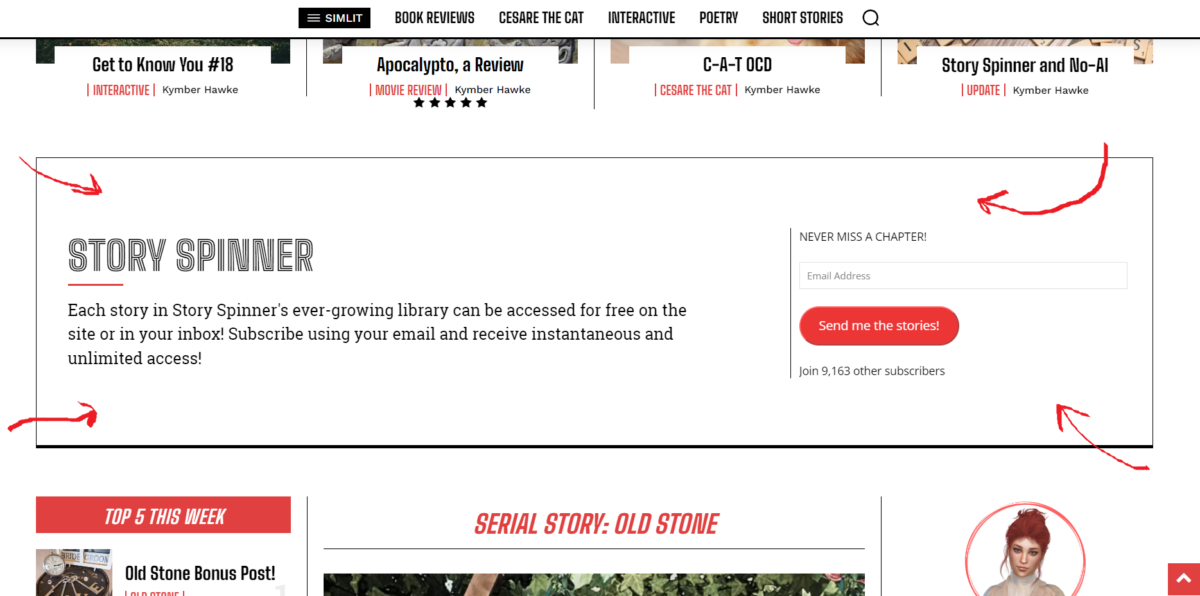
I’ve tried adjusting the margins in the cloud templates for the home page to no avail. I’m thinking the issue is to do with using a sidebar widget there, but I wondered if you had any suggestions to reduce the top and bottom margins?
Thank you.
My site is https://booomcha.com/
 Ishola
I think I’m getting mixed up. To use the responsive version of the Newspaper template, do you need to:
1) Create and assign a global mobile template in CLOUD TEMPLATES (which you then edit with TDC)? Do you have to create anything at all?
or
2) Do you just edit the responsive version that is in the Viewport, and you’re done? Your mobile look is done?
 Anamaria
 Hi,
Please let me know what template you use for the header. If I checked seems there you have a standard template, but somehow the header template if also loaded, so you need to edit the header template from the cloud template with tagdiv Composer, and delete the bookmark also, for mobile -> https://i.imgur.com/YW7NjRJ.png
Thank you!
Anamaria Hello,
You can not change the color from the database. Check our documentation here: https://forum.tagdiv.com/how-use-tagdiv-cloud-library-templates/
You can change that color in the tagdiv composer: https://app.screencast.com/Zeot2ydVHgKZg
Edit your article with the TagDiv Composer; click on that element, and you can see those settings.
Also, you can global colors -> https://forum.tagdiv.com/tagdiv-composer-website-manager/
Thank you!
 mande
mandeHello,
We are setting up Newspaper theme and found that the search page is not working.
We tried to import the fresh Search Template – Week PRO template using Cloud library but the search result is not loading correctly.
Can you please help?
Thanks
 navuho
Hi there
I have custom cloud templates for my website, i clone the site including settings and i want to find/replace certain color in all of the templates, how can i do that, i didn’t find it in the DB?
Anamaria Hello,
You can import whatever template you like from the cloud template for header, footer, homepage, etc.
Check our documentation here: https://forum.tagdiv.com/how-use-tagdiv-cloud-library-templates/
You can change that color in the tagdiv composer: https://app.screencast.com/Zeot2ydVHgKZg
Edit your article with the TagDiv Composer; click on that element, and you can see those settings.
Also, you can global colors -> https://forum.tagdiv.com/tagdiv-composer-website-manager/
Please follow the video to see where you can find and build your sticky header on mobile and desktop too: https://www.screencast.com/t/l6v2Belt
Thank you!
Anamaria Hi,
I recommend using a cloud template, and this way, it is easier to design the header template https://forum.tagdiv.com/header-manager/
Thank you!
 Bettina
 Hello @eman!
We have 3 options for mobile versions that you can use:
1. Responsive version: A responsive version of your website looks similar to the desktop version. TagDiv Composer is used to edit the page.Click on the mobile viewport: https://www.screencast.com/t/XDQJedlggSB. There, you can see your mobile version and edit or adjust the elements to look better.
2. Mobile pages: https://tagdiv.com/newspaper-10-3-7-update-brings-customizable-and-fast-mobile-pages
3. Mobile theme plugin: The Mobile Theme is a performance-optimized theme included in the main Newspaper theme that only loads on mobile devices. It comes with its own templates and designs for pages, posts, categories, etc., so your current templates from the desktop theme will get converted to the mobile theme layout. Please see https://forum.tagdiv.com/the-mobile-theme/ and https://forum.tagdiv.com/mobile-theme-introduction/ for more information.
A full explanation is here: https://www.youtube.com/watch?v=SpGkOnJeNZY
If you need to use mobile version 1 or 2, then you need to uninstall the Mobile Theme plugin and AMP.
From my point of view, if you don’t use the Mobile Theme plugin, then there is no reason or benefit to AMP. Unfortunately, AMP is not working with the cloud templates because the AMP’s layout is not fully customized.
The AMP version works best with default templates and not cloud templates. That’s why we integrated it with the Mobile theme plugin.
The feedback from our clients about AMP was negative and it is not used anymore, that’s why we didn’t add more customization options.
Thank you!
Anamaria Hello,
When you have shortcodes on the pages and template, you need to check if you have the tagdiv plugins activated, like Composer, Cloud Library, Standard Pack and so on.
Thank you!
Bettina Hello @Chris269!
You should change the color for every element for this demo: https://app.screencast.com/Re7TE33dV8GIC
You can install a blank single post template from the Cloud Library: https://app.screencast.com/0PlOIgx198LtE edit it and paste this code in Gutenberg: https://www.transfernow.net/dl/20240301IFF1tLvj/aSsSfFZR
The easiest part is to change the color on the entire website.
Thank you!
Anamaria Hi,
You can use singlecloud templates, and in this way, you can add the shortcode to the single post template using the column text element.
A shortcode can be inserted by using the element called “Column text” or “Text with title”. “Column text” and “text with title” elements have a button called “edit content” and if you click on that button, the WP Editor will open, and you can add some text/code/shortcode there. Close the WP Editor from X, save the changes from Composer and view the page to see the changes.
If you want to use template from theme panel, then you need to edit the template that is used for the template and set it in the child theme.
Thank you!
Bettina Hello @peters1964!
Edit it with the tagdiv composer from here: https://app.screencast.com/QAHStujBIzq5f
Start customizing it as you like. You can import from the Cloud Library sections, blocks, etc. already designed: https://app.screencast.com/XmXeN3Cf760TK
The page templates can’t be global on each page, and it is not working as a single template, for example.
Thank you!
 haipo
haipo Resolved by reloading the header template again from the cloud template and customizing again
 STARSonTV
Hello everyone,
I have a big problem and the attachment page on my website is not working.
Whenever I enter https://www.starsontv.com/?attachment_id=100756 in the browser line, I am taken directly to the image, but not to the attachment page. It looks like this.
https://www.starsontv.com/wp-content/uploads/2022/04/3_744739.jpg
What can I try now? I really have tried everything.
The attachment page is also set to global in the cloud templates.
I really don’t know what to do.
Can anyone help me with my problem, that would be really great.
Thank you in advance.
By the way, I use RankMath as a seo plugin, if that helps.
Greetings Sebastian
Calin Hello,
1. This situation is because there are some elements that still have the text set to be center or left align and it will be need to edit each of them in part, but this will take a lot of times, so if you want a quick solution, try this custom css:
body .td-container-wrap .td_block_wrap {

    text-align: right;

}
Just set this code in the theme panel > custom code > custom css and the results should be – https://i.imgur.com/HLn9m59.png
2. A part of fonts indeed can be set from the theme panel, but using cloud templates you’ll need to apply the font on those too, for this you’ll need to edit each cloud template and select the manager then the Global font and replace there all fonts with Persian – https://i.imgur.com/7MqBLe4.png (this can be done on pages and cloud templates).
I hope this will help you!
Thank you!
 davect
I have created a cloud category template and assigned that to a category. I have also created a cloud header template that I want to use for that category. How do I assign it to that category? There does not appear to be any options eiether in categories or the category templates to do this.
 chaywood0896
 The issue is extensively detailed above. I will not provide cpanel access unless you can provide a very specific reason why what would be necessary. The first step should be for you to review all the details I have provided and see the problem for yourself on your own mobile device. Once you have confirmed we agree on the problem, and you still cannot tell why your theme is doing this without direct access to the website, then I will consider providing access the WordPress instance. Thanks.
To recap (although I have provided screenshots above), sometimes when viewing a page on mobile, on different browsers, the formatting is wrong (it extends beyond the edge of the page). This does not occur on all pages. It is usually, though not always, fixed by a refresh. It happens to pages that have just been published, so therefore there is no caching problem. Pages revert to this problem later. I use CloudFlare, but it is not a caching problem there either; I regularly purge the entire cache.
Calin Hi,
I understand, so if there is no difference with default post title style, will need to find a different approach, maybe the problem is related that on mobile the title is on 2 lines and seems to be the largest element at first load.
I made some test locally and seems to can get the problem resolved only if the post title appears on one line, but I think that most of articles display on mobile the title on 2 lines. I also made the same test using a default WordPress theme and the results were similar, but the LCP was smaller (from 4, to 3ms).
Normally if you have a dedicate cache plugin (example WP Rocket) and Cloudflare (CDN), it is possible to be some settings on those that can help to resolve this situation.
I will continue to check and if I find something I will let you know!
Thank you!
Bettina Hello Yaron!
Yes, check these settings for infinite scroll: https://app.screencast.com/QkxdFOzJKe08m on a single cloud template.
Thank you!
Anamaria Hi,
sing our theme, you can choose from 3 mobile versions
-> mobile responsive => https://www.screencast.com/t/oJ2ShOp47
-> mobile theme plugin => https://forum.tagdiv.com/the-mobile-theme/
-> mobile page => https://tagdiv.com/newspaper-10-3-7-update-brings-customizable-and-fast-mobile-pages/ The option that you need to use.
Suppose you created the mobile pages with tagDiv Composer. In that case, when you install the Mobile Theme plugin, your pages will be overwritten by the plugin (the mobile theme comes with its templates for page, post, category, etc, so your current templates from the desktop theme will get converted to the mobile theme layout, the page content is made without builders in mobile editor => https://www.screencast.com/t/xbgZG8kH also, the options that are provided to edit the mobile theme version are limited (this keeps the things simple)).
This is a video about Responsive Newspaper Theme, AMP & Mobile Theme, Mobile Pages & Templates -> https://www.youtube.com/watch?v=SpGkOnJeNZY.
So, the mobile responsive is what you see when that you select the viewport on phone => https://www.screencast.com/t/matV17hH, so some settings may apply for each viewport(where is the border blue), and others are not(where the border is black).
The mobile page has the mobile templates from Cloud Library => https://www.screencast.com/t/YCcZ8rL8
The Mobile responsive version of the theme and the mobile page editor can be edit with tagDiv Composer, the mobile theme plugin cannot.
For example, you can have the mobile theme plugin activated and use the mobile page/mobile responsive version for the homepage/pages, but for the categories pages/404 page, you can’t use the mobile page/mobile responsive version if you have the mobile theme plugin activated.
So, if you want to design the pages with tagDiv Composer, you can use the mobile page or mobile responsive version.
Also, please check this topic https://forum.tagdiv.com/topic/amp-pages-not-working-well-with-this-theme/
If the cache plugin does not have mobile support, then the mobile theme version can be delivered instead on the desktop and vice versa.
The solution would be to use the recommended WP Super Cache plugin instead and activate these settings (especially the mobile device support): https://forum.tagdiv.com/cache-plugin-install-and-configure/
Thank you!
Bettina Hello @mubbi !
In the cloud templates, you can add the ads when you edit the post with TagDiv Composer in the element called “Single Post Content” in the tab ADS. Documentation here: https://forum.tagdiv.com/article-ads/
Or you can use the element called “Ad Box” from TagDiv Composer, and there you need to add the ads: https://forum.tagdiv.com/ads-adsense-overview/
You can set the ad to display in posts after X paragraphs, please check this topic: https://forum.tagdiv.com/topic/google-adsense-in-articles/
You can specify also the Par.(Paragraph) in the tagdiv Composer.
Thank you!
Bettina Hello!
If you install the demo with content, then, of course, it will replace all your content and design as well. If you install the demo with no content, then it will replace the previous design. You can import only some sections or templates of your current-designed pages from those demos. The template’s manager is in Cloud Templates.
Do you have custom CSS code for your homepage?
Thank you!



