
- TutorialstagDiv Social Counter Tutorial
 leonardovalle
 Hello Bettina,
I don’t have a mobile page, as you can see in this screenshot: pic 1 https://app.screencast.com/A13Cvz4Mav6UY
However, when I attempted to create one using the cloud library, it didn’t provide the “Newspaper Default Mobile Theme.” Instead, it offered a different theme which caused misconfigurations throughout the site.
Here’s how the mobile page currently looks: https://app.screencast.com/42sCvOFuR0PuP
I’d like to change it to a responsive design, similar to what’s displayed in this Div Tag when viewed on a desktop: https://app.screencast.com/A0Z9QQgrIQPrZ
Could you guide me through the process step-by-step?
Best regards,
Leonardo
 RobyDadd
 Hi Anamaria,
Thanks for your quick reply.
I do not have any footer template either but it is displaying correctly.
If I had a cloud header template before it was the one connected to my website theme (Entertainment).
By the way, even if I select a cloud header template (for example, I downloaded Header Template 60 – Black Pro just to try) it does not display correctly (it is white instead of black), and even if the theme panel seems to accept my edits (background, font, etc.) they are not applied to my website header.
What can I do?
Best,
Roberta
 Anamaria
 Hi,
I checked, and it seems you have the mobile theme plugin installed. You should create the content with the Mobile Editor https://forum.tagdiv.com/the-mobile-theme/
The mobile theme comes with its own templates for page, post, category, etc so your current templates from the desktop theme will get converted to the mobile theme layout, the page content is made without builders in mobile editor => https://www.screencast.com/t/xbgZG8kH also, the options that are provided to edit the mobile theme version are limited (this keeps the things simple)).
So, if you want to use the cloud templates, then you need to disable the mobile theme and AMP plugins, and then use the responsive version.
You can disable the mobile theme plugin on the pages from the Gutenberg editor using the following option => https://www.screencast.com/t/axXRJsWby
Also, please check this topic where I explained each mobile version -> https://forum.tagdiv.com/topic/mobile-version-not-working-properly-2/ -> https://forum.tagdiv.com/topic/amp-pages-not-working-well-with-this-theme/ and choose what mobile version you want.
Thank you!
 Bettina
 Hello Dennis!
Please set the cloud header template as global and check if you assigned the right header for articles as well.
Thank you!
Anamaria Hi,
The cloud templates are custom post types, and these can be an index or not, therefore you can use Yoast SEO to control the SEO for cloud templates, for example https://i.imgur.com/6BRLmIs.png after that you need to reindex your website on Google (or you can reindex only that link).
Thank you!
Anamaria Hi,
I think that you had before a cloud header template, so please check in the cloud templates and assign it, because now you have a standard header template and maybe that is why the header is not the same.
Thank you!
Anamaria Hello,
You need to go to the Theme Panel -> Header/ footer and assign the cloud templates https://i.imgur.com/COsz8eS.png, you can edit them with tagdiv composer -> https://i.imgur.com/CLfc37b.png https://forum.tagdiv.com/header-manager/ -> https://forum.tagdiv.com/footer-templates/
Thank you!
Anamaria Hello,
The page loading speed can depend on many factors, and each website is unique from this point of view. Let me explain some of these factors and maybe they give you some starting points for optimizing your website. A good choice for the page speed, could be the mobile layout which contains fewer elements because it can improve a bit your page speed.
There are many optimization guides provided by our users here in the forum, some made by us; you could check some of them
– https://www.infophilic.com/get-almost-100-pagespeed-newspaper-theme/
– https://forum.tagdiv.com/cache-plugin-install-and-configure/
– https://forum.tagdiv.com/how-to-make-the-site-faster/
– https://forum.tagdiv.com/topic/high-number-of-ajax-request/
– https://forum.tagdiv.com/topic/score-100100-pagespeed-with-newspaper-wordpress-theme/
– https://www.andraware.com/wp-rocket-for-newspaper-theme/
– https://forum.tagdiv.com/topic/page-speed-guide-for-2023-beginners-and-advanced/
– https://forum.tagdiv.com/topic/newspaper-theme-speedify-your-website/
– https://forum.tagdiv.com/topic/tutorial-chriss-custom-optimizations-for-functions-php-etc/
– https://forum.tagdiv.com/cloudflare-cdn/
– https://forum.tagdiv.com/topic/theme-causing-high-cpu-usage-2/
– https://forum.tagdiv.com/topic/sql-querys-high-cpu/
– https://forum.tagdiv.com/topic/newspaper-theme-slow-to-respond/
– https://premium.wpmudev.org/blog/optimizing-your-wordpress-database-a-complete-guide/
– https://underconstructionpage.com/optimize-wordpress-database/
– https://crunchify.com/better-optimize-wordpress-database-all-in-one-guide/
Also, pagespeed is not covered by support -> https://forum.tagdiv.com/newspaper-theme-support/
If you use Wp Rocket, you can try to exclude the following files
/jquery-?[0-9.](.*)(.min|.slim|.slim.min)?.js
/jquery-migrate(.min)?.js
/wp-content/plugins/td-composer/legacy/Newspaper/js/tagdiv_theme.min.js
tdBlocksArray
To be able to optimize and to remove CLS and LCP please check these guide => https://developers.google.com/web/tools/lighthouse/ -> https://www.sqlpac.com/en/documents/google-pagespeeds-lighthouse-6-new-features-lcp-cls.html -> https://web.dev/lighthouse-whats-new-6.0/ -> https://web.dev/lcp/ -> https://web.dev/cls/
Thank you!
Bettina Hello @genfinity !
If you use default features on a cloud template, then you can see them in the tagdiv composer, but you can’t edit or customize them.
Thank you!
 newshindi24
Hi
The customisation option for Copyright Text is Not Coming
neither without a template not in cloud template.
My website is https://hungrypreneur.com
 Archerix
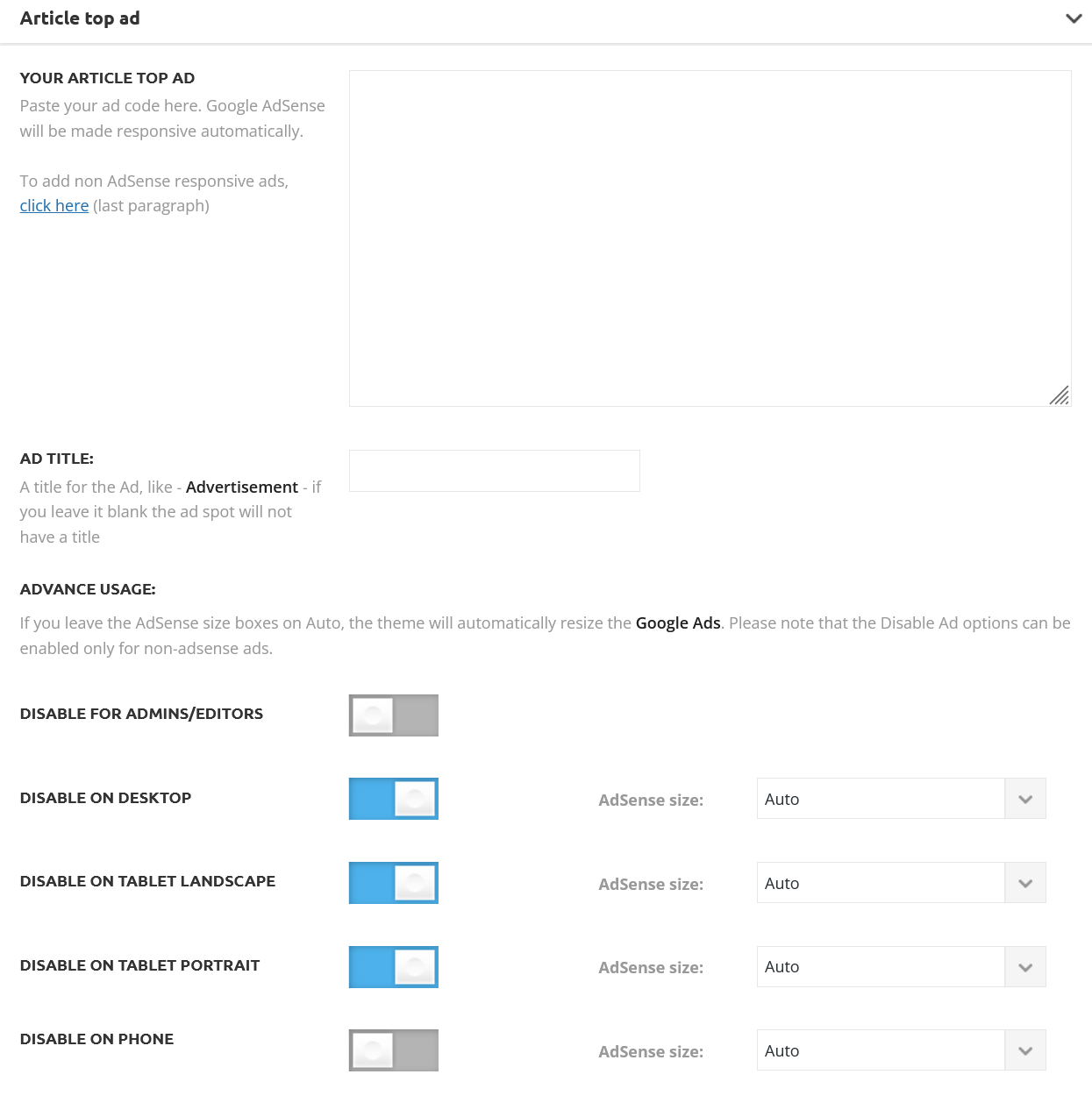
Without using a separate mobile theme, is it possible with a cloud template achieve the same ad control that we have with de default “post templates” of “Standard Pack”.
With the Magazine Pro I want to have this control shown in the screenshot. How to achieve this?
 dxx26379
Hi, I just have one header template in the cloud templates, but it looks like the homepage has two ways to interpret this header.
1. version (on pages): https://www.behoerden-spiegel.de/
2. version (on articles): https://www.behoerden-spiegel.de/2023/09/29/digitalisierung-souveraen-und-sicher-gestalten/
The ad should be on the right side like on the start page. I do not know why the ad is under our logo at the article pages.
Thanks
Dennis
 aroldomarmo
We are experiencing a very high CPU overload on our server.
We detected that the MySQL database process is running much higher than expected https://www.atribunamt.com.br/a2hosting_cpanel_terminal_CPU_over_banco_de_dados_mariadb_mysql_30-09-23.jpg.
We closed all external access to analyze what could be happening.
To our surprise, the database execution persists in an exacerbated manner, showing an intermittent execution of the database even without external access.
We are currently able to provide access to users, thanks to Cloudflare’s caching resources, but with great difficulty and several operational complications.
I really need help. I have been using TagDiv’s Newspaper theme for many years and have never had to open a ticket on the forum or with TagDiv’s support area.
URL:
atribunamt.com.br
Details:
https://www.atribunamt.com.br/newspaper_tagdiv_status_part_1_30-09-23.jpg
https://www.atribunamt.com.br/newspaper_tagdiv_status_part_2_30-09-23.jpg
 lintas17
Hi,
How do I make a bullet list post like is being shown in the demo https://demo.tagdiv.com/newspaper_insightai_pro?
I have tried to import it from the cloud templates but it doesn’t work for my website.
Thanks.
 rafalucena
I’m trying to optimize my blog according to the previous guidelines.
I used WP Super Cache, I have a Cloudflare pro plan and followed the other recommended settings, but the score didn’t improve.
Can you help me?
The blog is manualdeorquidea.com
I’m from Brazil, my hosting is Hostinger cloud.
leonardovalle Another information: The cloud libray is active, but its icon doesn’t apear in my menu
 MattiaVe
 hi Bettina, I solved, just tell for others:
in cloud theme, if you change “global font” in “Manager”,
don’t change nothing in blocks, in blocks you need “default font”.
If you have (example) Roboto in Manager and you put Robot in block’s title =
do not change nothing…
thank you
—————————-
clarification: everything is ok everywhere but not in “single post Content”, that remains Sans-Serif, it cannot be transformed into Roboto
-
This reply was modified 3 years by
MattiaVe.
 genfinity
 I was able to get the theme installed and activated with all of the plugins installed, but when I go to edit my newly created homepage the edit page the “edit with tagdiv” and cloud library buttons along the top do not show. It appears that I can only edit the raw code of the page. Any suggestions?
Bettina Hello Leonardo!
This should be green if you select it: https://prnt.sc/IfEsHtzdEvrk
That’s all. Clear your cache and you can check your responsive version.
The responsive version: A responsive version of your website looks similar to the desktop version. TagDiv Composer is used to edit the page.Click on the mobile viewport: https://www.screencast.com/t/XDQJedlggSB. There, you can see your mobile version and edit or adjust the elements to look better.
More documentation about the cloud templates is here:
– https://forum.tagdiv.com/cloud-library-templates/
– https://forum.tagdiv.com/design-post-pages-using-cloud-library-templates/
– https://forum.tagdiv.com/cloud-library-category-templates/
I hope that helps you!
Thank you!
Bettina Hello @genfinity !
You can import a template from here: https://prnt.sc/AP-93yjLSd6O and you can customize it as you like, rename it.
Read more about the TagDiv Composer: https://forum.tagdiv.com/tagdiv-composer-tutorial/
More documentation about the cloud templates is here:
– https://forum.tagdiv.com/cloud-library-templates/
– https://forum.tagdiv.com/design-post-pages-using-cloud-library-templates/
– https://forum.tagdiv.com/cloud-library-category-templates/
I hope that helps you!
Thank you!
 commandeleven
 Hello Calin,
In terms of plugins, we have the following running:
Cloudflare
WP Super Cache
EWWW Image Optimizer
SWIS Performance
Auto Optimize
Interestingly, I don’t have the Inline CSS option in my theme panel. Again, we downgraded to 12.5.1 from 12.6 because of the layout and design issue that happened after the upgrade.
 sweetgunner
 Ok, but when you gonna check this? my whole site is based on audio I host on soundcloud and I need to have an estimate date.
Bettina Hello Isaac!
You cannot assign a single cloud template to a page. For pages, we have page templates.
All the cloud templates can be found in Dashboard – > Cloud Templates.
If you have a default template on a post, then you need to edit the post with Gutenberg, scroll down, and manually assign the cloud template, which is global.
Thank you!
Bettina Hello @jurishour !
Did you properly install the demo without any errors?
Make sure the cloud templates are set as global.
Thank you!
 Jimmy_X
Hello guys!
I know we, users of this theme, don’t have the right to make requests, but i make a proposition: what about an Day/Light Switch on Newspaper Theme for visitors to use?
With possibility to be scheduled to change at certain periods of time (ex. Morning at 6 AM for Day, and 8 PM for Night). Or to be sincronized with global regions.
It is important to visitors and it is very popular and implemented to websites. I know there are already builds/samples to use for night versions of themes in Newspaper cloud, but this Day/Night Switch can pe used for all of them. It is important to visitors and we want for themn the best experience with Newspaper Theme and to return, right?
Please take this in consideration TagDiv! Regards from Bucharest, Romania!
(Mulțumesc și sper să ne auziml cu bine!)



