
- NewsmagRequirements for Newsmag
- NewsmagtagDiv Social Counter tutorial
 joel_1017
Parse error: syntax error, unexpected ‘?’ in /home/admonline/public_html/wp-content/plugins/td-composer/legacy/Newspaper/includes/td_config.php on line 33581
tagDiv Composer
Ajax error
tagDiv Cloud Library
Ajax error
 codmon_uemori
I am using the Footer Template – Default PRO.
How do I remove the background image and change the background color?
Please let me know because I am unable to change it by editing the cloud template.
 Carel
CarelHi
I still have the missing “aggregateRating” field in GSC.
I tried to uninstall and reinstall the plugins Tagdiv composer and tag div cloud…but it wont work.
Is there anything to add in the elementor template ?
Thanks
 metacoach
 OK…
No console errors on https://capture.dropbox.com/UsT3NUFm2AJuhMf5 (with Cloud Template set to global) but no content is showing as in my initial video
And no errors with Cloud templates global deactivated https://capture.dropbox.com/G4CkzEUQo8VKx5p3
So still getting having the same issue
 Anamaria
 Hello,
I answered you on this topic -> https://forum.tagdiv.com/topic/sidebar-disappeared-4/, and the problem is that you have different templates for posts, it is not the same template, on some posts you use single post templates from tagDiv Cloud Library and on other posts you are assigned standard templates from Theme Panel, ie tagDiv Standard Pack.
Thank you!
 arungoyal
Hello,
I am using the Crypto Gaming Pro template from cloud templates and have done layout (color & spacing) changes. AMP is not working correctly. I am using the transitional mode and /amp/ as URL suffix.
Getting plugin compatibility issues in the backend: https://prnt.sc/_5IFhC6i6-9C
You can have a look here:
https://g2g.news/mpl-tweaks-pay-structure-after-layoffs-report/amp/
https://g2g.news/gaming/amp/
Anamaria Hello,
If you want to use the most popular, then you need only hide it ->
If you have a Single Template from tagDiv Cloud Library, you can try to hide the Single Post Views from the tab called “CSS” -> https://i.imgur.com/IyOYDHq.png for post template from Theme Panel, you need to use a custom code CSS to hide it .td-post-views
{
display: none;
}
If you have Single Post Template, to remove you need to edit with tagDiv Composer, select the element and with a right-click, you can delete => https://www.screencast.com/t/6WnNGq6NFx or select the element with drag & drop place into the deleting red zone from the bottom right of the page.
If you have a standard post template, you need to go in Theme Panel -> Post Settings -> Post and Custom Post Types => https://www.screencast.com/t/TftzSAfTWtC and disable the option comment count.
Thank you!
 Bettina
 Hello!
We recommend to use cloud/PRO templates in order to have the possibility to edit them with the TagDiv Composer which contains a lot of functions and features, please check our tutorial here: https://forum.tagdiv.com/tagdiv-composer-tutorial/
Documentation here:
– https://forum.tagdiv.com/cloud-library-templates/
– https://forum.tagdiv.com/design-post-pages-using-cloud-library-templates/
– https://forum.tagdiv.com/cloud-library-category-templates/
Check also our video tutorials here: https://www.youtube.com/c/tagdivThemes/videos
Thank you!
Anamaria Hi,
Please edit the page normally and change the setting for the page into Template: Default template because I think you have there the setting: Pagebuilder + Latest articles + Pagination and these are not editable by the tagDiv Composer plugin.
The standard pack plugin became deprecated, so I recommend using cloud templates.
Thank you!
Anamaria Hello,
I checked now the website and you have set the logo and favicon.
Also, you can use a cloud header from tagDiv Cloud Template, and set the logo like in this article https://forum.tagdiv.com/add-logo-newspaper/
Thank you!
 Abbaz
AbbazHi,
I’m using a Cloud template for my categories, the problem is, whenever I select a filter on my category template on the composer, it applies to all category pages. I want the same template for all categories but do not want the same content. Here are my categories.https://metaverseunpacked.com/category/metaverse/, https://metaverseunpacked.com/category/nft/
 etison
 Hi,
I read a lot of articles about website performances troubles.
For me, solving my problem was to reload/import the header template with the cloud templates module and replace the one that was installed with the demo (NewsWeek).
Hope it helps,
Anamaria Hello,
Please deactivate, delete and reinstall tagDiv Composer and tagDiv Cloud Library from Newspaper plugins => https://www.screencast.com/t/OrzLvR2j and clear all cache.
Thank you!
 sejpost
Lately, my site is loading more and more slowly. My host investigated and said this:
Using a query analyzer, it’s stating the tagdiv composer plugin the cause of many slow queries. You can email them the following screenshot. When the pages are cached, it loads quite quickly. However, when they are uncached and being loaded for the first time, it takes a long time for the pages to load. Even uncached, it should not be taking that long to load.
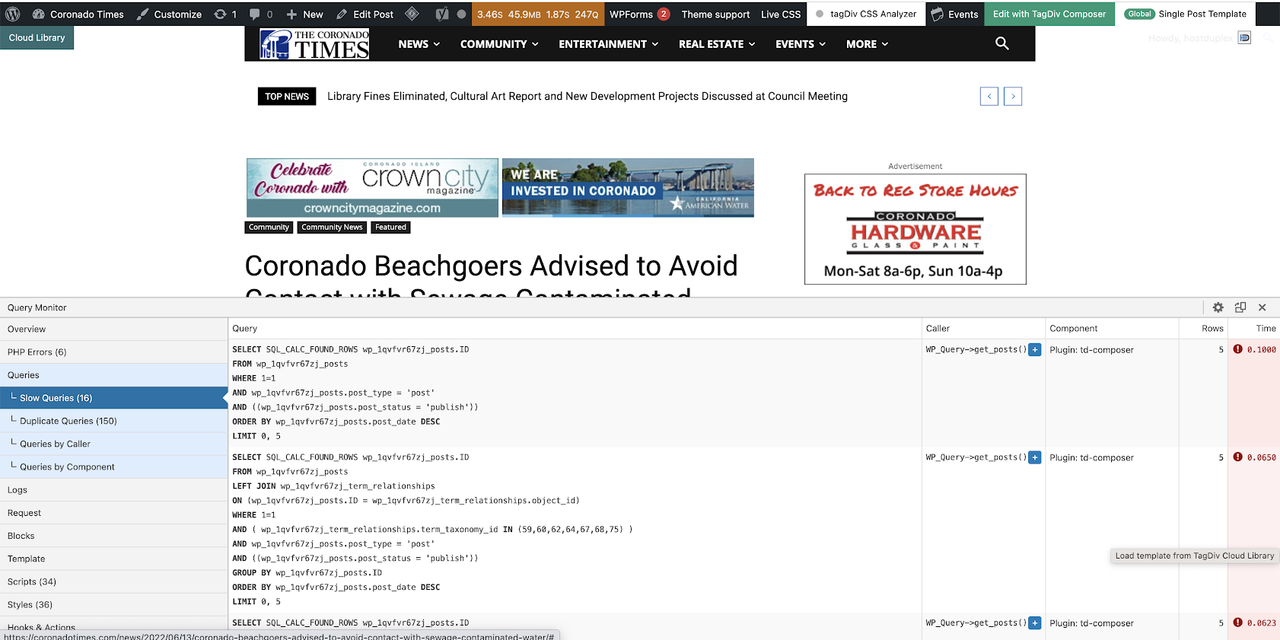
Any help? We have caching plugins to help with speed and we are on Cloudflare as well.
Bettina Hello!
You can import a cloud template/section for that post or build it from scratch with the TagDiv Composer.
Please read all about it here: https://forum.tagdiv.com/design-post-pages-using-cloud-library-templates/
Thank you!
 ian909
Latest version of Newspaper installed.
I have an issue when using a Cloud template for the single post view on mobile devices. When using a Cloud template the content beneath the featured image isn’t centred correctly and appears to have padding added to the right side of the screen. The footer appears correctly.
If I remove the Cloud template the issue is resolved.
No cache on and I’ve removed plug inns to see if it’s a conflict but no success.
Any ideas ?
 ecorep
 Thank you for your commitment – as we prefere to have CF enabled we have managed to disable rocket loader AND exclude https://ecoreporters.pl/wp-json/td-cloud-library* so the posts loads normally and devtools doesnt throw 403 forbidden ERROR.
BUT as we can see (please check by yourself) it always loads 3 or 4 post and no more- why? Could you help to investigate? example url: https://ecoreporters.pl/2022/orange-energia-ma-nowe-pomysly-na-fotowoltaike/
 gwk
gwk Hi Bettina!
Thanks for answer 🙂
I tested now on Google Chrome and Safari on MacBook Air and this same problem. When I update template, I must all the time hide share text.
I use only this plugins: AMP, Contact Form7, Disqus for WordPress, Font Awesome, tagDiv Cloud Library, tagDiv Composer, tagDiv Mobile Theme, tagDiv Newsletter, tagDiv Opt-In Builder, tagDiv Social Counter.
Where clean all cache?
Anamaria Hello,
Please let me know if you have any auto-update options for the theme or plugins.
Also, please make sure you have the tagDiv Composer, tagDiv Cloud Library plugins activated.
Thank you!
Bettina Hello!
Please check this guide: https://forum.tagdiv.com/using-theme-translations-together-wpml/
You can import our RTL templates for Arabic from Cloud Templates, also you can duplicate the template like this https://prnt.sc/g4ZvZzMW-3tK and assign the one you like.
Thank you!
 Calin
Calin Hi MauricioLuque,
I see that you are using the Newspaper theme and not the Newsmag theme, so this can be easily done by setting a duplicate of header and footer cloud templates on 404 cloud template (you need to set them as individual and without the ad box element, like this -> https://i.imgur.com/AUooONd.png -> https://i.imgur.com/XvadC7Q.png)
I hope this will help you!
 Yazz
YazzHi there,
We are working on the bilingual blog, Turkish and Arabic lang option by using WPML plugin and we are using London News PRO as the base template. We have a problem with Arabic styling such as for single post template, the sidebar still stick on the right and the header title looks weird.
1. How to duplicate single post template and make it specific for arabic version when visitor switch the lang to arabic.
2. How to duplicate others cloud template (Header, footer etc) and and assign it to only specific lang version. For the example, we have to footer template, footer template A for Turkish and footer template B for Arabic.
Here is some links for your reference.
https://blogtrstg.wpengine.com/ar/qnet-أفضل-جودة-كشركة-بيع-مباشر/
– This is Arabic content, sidebar should be on the left. Title area and sharing button looks weird. And we want a different set of header and footer template where we can edit without affecting the Turkish version.
https://blogtrstg.wpengine.com/qnet-en-quality-dogrudan-satis-sirketi-odulunun-sahibi/
– This is the Turkish version of the same content.
Thank you.
Anamaria Hello,
Please check this topic -> https://forum.tagdiv.com/topic/please-fix-the-review-schema/page/2/
Please deactivate the tagDiv Composer and tagDiv Cloud Libra plugins, delete and re-install tehn again from Newspaper plugins => https://www.screencast.com/t/WLy01lbc and after go into the theme files in those paths -> wp-content/plugins/td-cloud-library/state/single/tdb_state_single.php -> wp-content/plugins/td-composer/legacy/common/wp_booster/td_module_single_base.php and uncomment those lines of code -> https://i.imgur.com/ZbzhdAm.png -> https://i.imgur.com/HrqwKjQ.png
Thank you!
 NickDeBaerdemaeker
Hello,
we are experiencing massive difficulties since the theme got updated, caused especially by the td composer and/or cloud plugins.
Our website enola.be is falling flat on it’s back day after day, and the culprit seems to be this:
Over 50.000 requests are made to the database by the wordpress core.

Furthermore, the delay that it takes for the site to load, is caused by the td composer

I have lookind in the sql database, and a healthy wp_options table is about 1 MB big, ours is over 10 MB.
When looking for the largest, the td_011 and td_011_settings pop up.

We would like to know what we can do to help solve this issue ?
 GuillaumeGuersan
Hi, I hope the support will be able to help me 🙂
I created a page with the Tagdiv builder, I updated it many times without any problem. But since yesterday, every time I make a change and save, my changes are not saved.
– I tried to deactivate all plugins except the Tagdiv plugins but the problem is the same.
– I also tried to deactivate the Tagdiv plugins and then reactivate them but the problem persists.
– I have tried to clear the WP Rocket server cache but the problem is still there.
When I save I see in the top right corner that the header and footer save well. I wonder if this is not the problem because I manage the header and footer with Cloud Template, they should not update normally when editing a page. I tried to disable them on the page, then update it, but the problem persists.
I recorded the problem on a GIF: https://drive.google.com/file/d/1CwGTPGy_p32EEh42lgrjE-WCvYKGwm1n/view?usp=sharing
Could you help me? I have tried everything but nothing works. I also tried to duplicate the page but its “sister” has the same problem.



