
- TutorialsFrom WPBakery to tagDiv Composer
- TutorialsDefault Block Settings Guide
- TutorialsOffset Feature
- TutorialstagDiv Social Counter Tutorial
- TutorialsHow to Update the WPBakery Page Builder plugin
 Simion C.
 Seems I misunderstood the question, I was referring to the search form provided by the theme in the composer.
The text in the search widget which is provided by WordPress could be translated like this
– https://presscustomizr.com/snippet/changing-the-search-string-in-wordpress-search-forms/
Enter that code in the theme or child theme functions file, after you change it to the text you want. Example – http://prntscr.com/o6sxs8 – http://prntscr.com/o6sxyx
 kaptanst
merhaba composer edit bende çalışmıyor yardımcı eklentiyi yükledim fakat eklenti çalışmıyor
 etinos
Hi, the upper tab for my main domain has disappeared, it works with inner pages, so i cant edit the Tag Composer, there is any other way to access that panel? https://ibb.co/crZYz10
 Calin
Calin Hi,
Now I understand what you mean, in order to achieve that you need to create a new page and edit it using tagDiv Composer -> https://www.screencast.com/t/b5FyLIyPDmb you’ll get the header and footer of your website and an empty column in the middle, hover the column and click on the row, after that change the layout from general tab to 2/3+1/3 -> https://www.screencast.com/t/Wif4RZZU after that all you need to do is to set the blocks from the sidebar in the right empty column and the content in the left column without to set other row -> https://www.screencast.com/t/riJd0Fjq
Hope this will help you!
Thanks.
Calin Hi,
Please make sure that you have activate the tagDiv Composer in Newspaper > Plugins or in Welcome -> https://www.screencast.com/t/jLSZVlEwu -> https://www.screencast.com/t/NkXWCBCjAROu -> https://www.screencast.com/t/GRLspA1SrVB
You can find more details about how to activate the theme plugins in dis article:
Updating the Core of the tagDiv Themes for Envato WordPress Requirements -> https://tagdiv.com/updating-the-core-of-tagdiv-themes/
Thank you!
 irisdesign
 Help please.
on the outside, my site is beautiful. But I can not edit anything else, I’m having the same error on several pages!
Error at rows: 2(models) : 3(dom). The model does not match the content
My site is http://www.amazonianativa.org.br
the cover allows template editing, but internal pages with different templates no longer accept editing. there is no new plugin, there was no editing outside the TD composer.
irisdesign Hi! Help. I have a BIG PROBLEM, finish my site, but i have an error in several pages!!!
Error at rows: 2(models) : 3(dom). The model does not match the content
This happens when I click edit template.
ok, BUT:
I did not make any kind of editing or installed plugin, it just stopped working from one day to the other.
and…
how can I make these recommendations if there was nothing unusual to be undone?
This support page say:
The most frequent cases are: the page was modified in the backend by adding code or scripts directly through the TinyMCE editor or if you’ve inserted HTML code with missing tags. This error is also be caused by specific plugins that insert code into pages. You should not use such plugins.
Solution:
You can fix this in two different way:
Clean the code. Recreate the element with the tagDiv Composer. If you need to add other items that are not present in the tagDiv Composer elements list, please use a “Column text” element.
If you already added custom HTML code inside a “description” section inside a tagDiv Composer item, make sure it’s clean and correct (no missing tags). Also, please consider removing it. We recommend you to do not insert HTML code in the page builder as it may cause issues and affect the way tagDiv Composer is functioning.
-
This reply was modified 7 years by
irisdesign.
 jamiesharpe
Hello – I imported block 66 from the TagDiv composer templates. I’ve removed all the information from the block, but there remains text in the background that reads “continue to the category” that I can’t get rid of – https://www.screencast.com/t/PFlJl2l2.
Please let me know how to proceed? My site is in maintenance mode so I will send an email to TagDiv support with my WordPress login information and a reference to this request. Thank you for your help.
 somehowww
 I can not save content in tagDiv composer. I try to save it many times, but it just shows that “Header Successfully Saved!”, but the content I want to save is not saved. What should I do.
 worldnews
I installed the theme and when I install TD composer it crashes
somehowwwI can’t add any Element by tagDiv Composer. It can’t be saved. I try to make any contents, tagDiv Composer react “Header Successfully Saved!”, even I never touch header. Please help!
kaptanstMerhab birden denememe ragmen composer eklentisi çalışmıyor sayfayı düzenleyemiyorum yardımcı olurmusunuz
 kallaikoi
Hello, I’ve created some custom posts types, taxonomies and custom fields using Pods and I want to show them in my templates created with TD Composer, i.e. in Author pages.
I’ve tried using sidebars and the Pods’ widget , which shows the custom fields related to each user/post. However, it doesn’t work when using TD Composer.
Have you plans on creating new widgets with this purpose?
All best
Calin Hi,
Please make sure that the CDN is set as in our documentation -> https://forum.tagdiv.com/cloudflare-cdn/
Please make sure that you do not have a plugin conflict with untested plugins, please deactivate all plugins and child theme ( if you are using ) and let only the tagDiv Composer , clear all cache, deactivate the cache plugin and try again.
Also please check with some banner to see if the ads are working properly, for the moment I can see only 2 ads on your mobile posts ( the header ads and bottom ads ).
Let me know the results!
Thank you!
Calin Hi,
Indeed there is no option in our theme to set the rel to nofollow on button s and images, sorry; maybe this will be implement in coming updates.
For buttons with rel=”nofollow” you can check this similar topic -> https://forum.tagdiv.com/topic/button-with-nofollow-attribute/
In order to set the rel=”nofollow” to image on column content element, you need to go in wp-content/plugins/td-composer/td-multi-purpose/shortcodes/tdm_block_column_content.php
-> https://www.screencast.com/t/0IqC9kbgiZfK -> https://www.screencast.com/t/m7zfVtOch
Thank you!
Calin Hi,
Please make sure that you do not have a plugin conflict with untested plugins, please deactivate all plugins and child theme ( if you are using ) and let only the tagDiv Composer , clear all cache, deactivate the cache plugin and try again.
Please make sure that all the settings are like in our requirements, please follow the guide carefully
– https://forum.tagdiv.com/requirements-for-newspaper/
and please increase all requirements that are lower, and follow all steps.
There can be some errors in the console related to that font
– https://webmasters.stackexchange.com/questions/71630/font-blocked-from-loading-by-cross-origin-resource-sharing-policy-no-access-co
– https://www.gomahamaya.com/fix-access-font-origin-blocked-access-control-allow-origin-policy/
If there is still a problem, please provide me a link where I can inspect this issue.
Thank you!
Calin Hi,
Please make sure that you do not have a plugin conflict with untested plugins, please deactivate all plugins and child theme ( if you are using ) and let only the tagDiv Composer , clear all cache, deactivate the cache plugin and try again.
Please make sure that all the settings are like in our requirements, please follow the guide carefully
– https://forum.tagdiv.com/requirements-for-newspaper/
and please increase all requirements that are lower, and follow all steps.
If there is still a problem, please provide some more details and some screenshots or a link where I can inspect this problem.
Thank you!
Calin Hi,
I’ve checked this option and for me is working properly -> https://www.screencast.com/t/0RcAproK -> https://www.screencast.com/t/DRoB8So6TqA
Please make sure that you do not have a plugin conflict with untested plugins, please deactivate all plugins and child theme ( if you are using ) and let only the tagDiv Composer , clear all cache, deactivate the cache plugin and try again.
Please make sure that all the settings are like in our requirements, please follow the guide carefully
– https://forum.tagdiv.com/requirements-for-newspaper/
and please increase all requirements that are lower, and follow all steps.
If the problem persist, please provide some more details and a link.
Thank you!
 Vlad S
 Hello !
Please make sure that you do not have a plugin conflict with untested plugins, please deactivate all plugins and child theme ( if you are using ) and let only the tagDiv Composer , clear all cache, deactivate the cache plugin and try again.
If there is still a problem, please provide me a link where I can inspect this issue.
Thank you!
Calin Hi,
You can set the ads using the theme panel ads -> https://www.screencast.com/t/yTUAIBQ6Tfs and you can set an ad in footer top section ( is closer to what you need to achieve ) or you can use a single post template from tagDiv Cloud Library, edit it using tagDiv Composer and set an ad box where you want to have that ad -> https://www.screencast.com/t/Z6ItOfvH -> https://www.screencast.com/t/7ZJ7oAO2c
Thank you!
Calin Hi,
If you want to change the html post title you can try to us a single post template from tagDiv CLoud Library, edit it using tagDiv Composer and change the title, after that set the single post template on the posts that you want to have the title change.
-> https://www.screencast.com/t/hVTrqqBIW
If this is not what you mean, please provide some more details about what you want to achieve.
Thank you!
 mx41
mx41At random places in TagDiv Composer i have problem with unicode-bug: randomly russian symbols changed on unicode-symbols.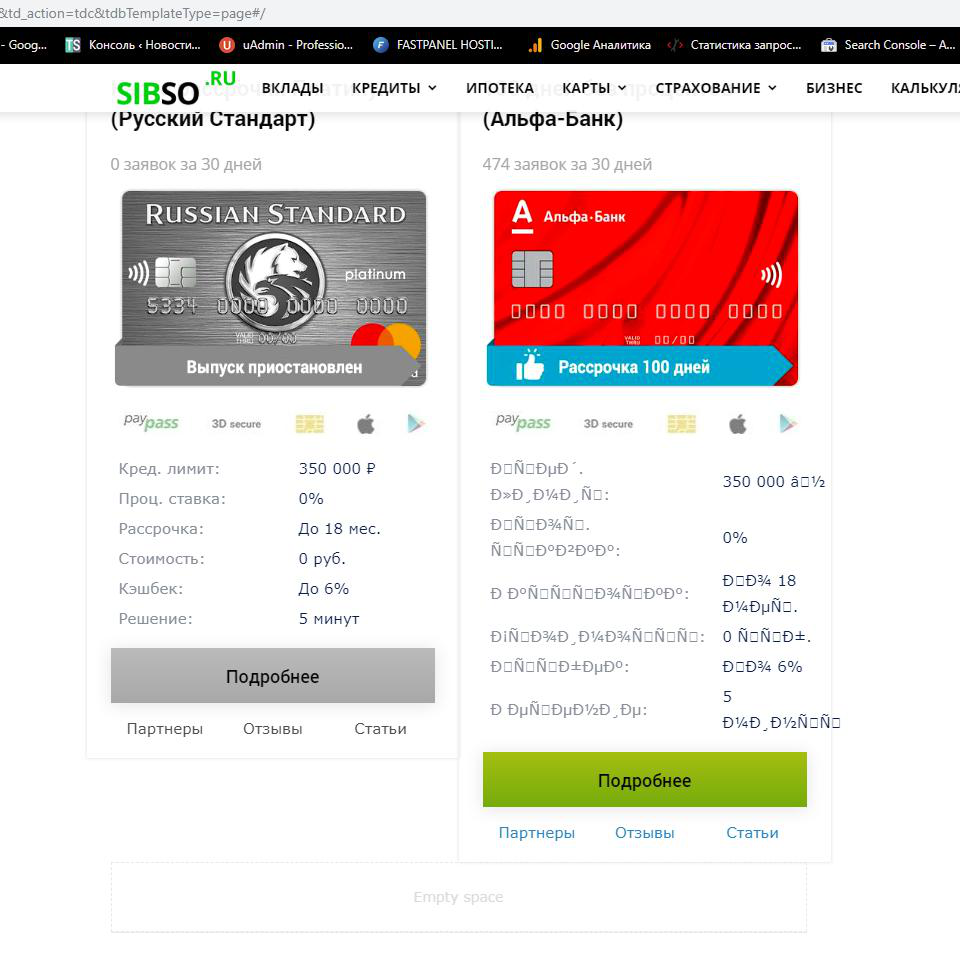
 Artemide
 Hi Simion,
see this link in Chrome and Internet Explorer 11:
http://braintestnotlocal.azurewebsites.net/
We are using Newspaper 9.7.3 and an Header downloaded from Cloud Templates, Blank Header. We created a custom header with td composer adding mega menu component.
I hope is enough.
Please answer to all questions that we have written, I’m writing again:
We want the text under the image.
Another thing:
How to navigate the mega menu with keyboard? How to expand the item with sub-items?
Thank you
Calin Hi,
Then you need to edit those files -> wp-content/plugins/td-composer/mobile/woocommerce/archive-product.php and single-product.php
and for an old version, please check this path wp-content/Newspaper/mobile/woocommerce/archive-product.php
Hope this will help you!
Thank you!
 blukid
 Did you take a quick look at my site and test the search functionality?
It’s the standard Newspaper Theme with no custom code.
I have not added any additional plugins to my site since it launched… at that time the search functionality was working correctly.
Deactivated/reactivated Plugins, Flushed Cache from SuperCacher (server based, not plugin) but site search is still returning external links…
Any additional assistance would be appreciated.
Any code to force search to my domain only… although that should be the default functionality.
Current Plugins:
– Calendarize it! for WordPress
– Classic Editor
– Contact Form 7 (Tested)
– Envato Market
– tagDiv Cloud Library (OK)
– tagDiv Composer (OK)
– tagDiv Social Counter (OK)
– Thrive Leads
– WPML Multilingual CMS
– WPML String Translation
– WPML Translation Management
Thanks.
