
- NewsmagtagDiv Composer Tutorial
- NewsmagHow to use the Visual Composer plugin
- NewsmagHow to update a plugin
- NewsmagWhat’s included in Newsmag theme package
- NewsmagRequirements for Newsmag
- NewsmagInstall via WordPress
- NewsmagInstall via FTP
- NewsmagBlock settings tutorial
- NewsmagtagDiv Social Counter tutorial
- NewsmagHow to update the WPBakery plugin
- NewsmagPage Menu
- NewsmagCustom ad spots
- NewsmagSmart sidebar
- NewsmagVideo playlist
- NewsmagPage templates
- NewsmagHomepage – How to build and set it
 Calin
Calin Hi,
This is our list with tested plugins with our theme -> https://www.screencast.com/t/cmPkh9jba4sZ
You can add the search bar using tagDiv Composer also using tagDiv Cloud Library you’ll have some more elements -> https://www.screencast.com/t/HDLlswGK
Thank you!
Calin Hi,
In order to fix the error at rows: n(models): m(dom) please make sure that all the settings are like in our requirements, please follow the guide carefully
– https://forum.tagdiv.com/requirements-for-newspaper/
and please increase all requirements that are lower, and follow all steps.
WP_MEMORY_LIMIT try to increase it at least to 256mb.
Also please check the php version to be 7/7.1/7.2
Please add this code in the .htaccess , file at the end of the file:
<IfModule mod_substitute.c> SubstituteMaxLineLength 10M </IfModule>
When tagDiv Composer is not working -> https://forum.tagdiv.com/tagdiv-composer-not-working/
Please make sure that you do not have a plugin conflict, please deactivate all non theme plugins, also if you are using child theme please deactivate it, clear all cache and try again.
Thank you for your understanding!
 Simion C.
 Hi,
You could design the header as needed with the header builder, there are some headers designed by us which you can modify – http://prntscr.com/mzg27b or you can design your own by using a blank template – http://prntscr.com/mzg3qq
So you can build it with the tagDiv composer and place the elements as you wish.
This will require the cloud library plugin – https://forum.tagdiv.com/tagdiv-cloud-library-plugin/
Let me know if you have more questions.
Thanks
 Catalin
 Hi,
Unfortunately, I do not exaclty understand what’s your targetted section. If you are referring to this one -> https://www.screencast.com/t/Md9TkTqoG notice that can be changed when you edit your page with TD Composer or simply, change the element from Widgets section area. If is not what you mean, provide more details about your desired section and also, provide your website URL so I can take a closer look at it.
Thank you!
Catalin Hi Kaino,
You can always check our documentation for When tagDiv Composer is not working -> https://forum.tagdiv.com/tagdiv-composer-not-working/ Also, disable all of the untested plugins, clear all the caches, purge CDN files and check the results. If the problem is still there, please send us an email at contact@tagdiv.com with your log-in information (wp-admin) so we can further investigate it closer your setup page. Provide there the link to this topic so we can quickly identify you.
Thank you!
 Bintmusic
 Simion this error is due to WPBakery Page Builder…
who uses js composer displays it…
you need to adjust js composer or the mobile theme to solve…
Thanks!
Calin Hi,
What parts of homepage content are not compatible with tagDiv Composer? please provide some more details and some screenshots with this problem!
Thank you!
 malangtoday
pls help me for fix it header has gone http://prntscr.com/mzf7ou
ill try tagdiv composer but not working stuck in load http://prntscr.com/mzf8fd
Bintmusic Simion,
now is ok because I have turned off ‘SHOW ON AMP’ in the mobile plugin…
to avoid penalisation by google…
in this way however the page amp is without css
The problem is caused by js_composer (wp Bakery plugin).
I’ve been writing the problem for over a week.
Please solve
Thanks!
-
This reply was modified 7 years by
Bintmusic.
Catalin Hi,
1)If you will check each of our element, using the TD Composer, you will see that exists some options regarding changing colors, like this -> https://www.screencast.com/t/x18NwtJ6img
2),3)If you want to change the position of this Scroll to Top button, you need to do it yourself through some custom CSS code. I have added to our list of improvements and we will consider our future updates.
Thanks.
 jensgrabble Calin
 Hi @tedslater reply in another topic -> https://forum.tagdiv.com/topic/missing-visual-composer-and-homepage-latest-articles-page-building-options/
Simion C. Hi,
What setting are you referring to exactly? Some more details would be helpful. The general setting that I mentioned in the theme panel is required to be active in order to have sticky sidebars.
In the composer there is a setting than has to be active for the columns you want to be sticky – http://prntscr.com/mzdjd5 but this will only work if the general setting is also active.
Regarding the post views I don’t quite understand what you want to do with them. Some more details would be helpful here as well.
Let me know.
Thanks
Calin Hi,
This plugin need to be in the theme folder that you get from themeforest -> https://www.screencast.com/t/kICdziqEv -> https://www.screencast.com/t/5GkBlW13r
Please check our documentation for visual composer ( the new WPBakery ) -> https://forum.tagdiv.com/how-to-use-visual-composer/
Thank you!
Simion C. That looks like the hero element, you can change the font of the title in the composer directly – http://prntscr.com/mzdaeo
Or in general in the theme panel, for example – http://prntscr.com/mzdao5
– http://prntscr.com/mzdaxl
Calin Hi,
So if I understated correctly you want to integrate that player in your website in top bar, this can be possible if you are using the Newspaper them v9.5 or v9.6, you need to use the header builder and set with tagDiv Composer the shotcode/code for that player in top bar.
https://tagdiv.com/whats-new-in-newspaper-theme-9-5-update/ -> https://tagdiv.com/whats-new-in-newspaper-theme-9-5-update/
Thank you!
Calin Hi,
This plugin need to be in theme folder that you get from themeforest -> https://www.screencast.com/t/kICdziqEv -> https://www.screencast.com/t/5GkBlW13r
Please check our documentation for visual composer ( the new WPBakery ) ->https://forum.tagdiv.com/how-to-use-visual-composer/
Thank you!
 redneats
Hi, I have a problem with the tagDiv Composer. Unfortunately, he does not open completely on the right side. so that I can not really work with it because I do not see everything. can you help me?
http://musical.sonnenklar-weimar.de/wp-content/uploads/Bildschirmfoto-2019-03-18-um-08.59.10.png
Calin Hi,
The multi-purpose plugin was removed and included in the tagDiv composer plugin, this happened in theme update 8.7.5, please check the changelog at the bottom of this page
– https://themeforest.net/item/newspaper/5489609
– https://www.screencast.com/t/cql6czdT
So no need to keep trying to activate the plugin if you use a theme version newer than 8.7.5, the multi-purpose plugin and the tagDiv composer were combined. All the multi-purpose options are now part of the tagDiv composer.
Please check the system status parameters and increased all of these according to our guide from here -> https://forum.tagdiv.com/requirements-for-newspaper/
Also you can make a full backup to your website an make a theme update -> https://forum.tagdiv.com/how-to-update-the-theme-2/
If there is still a problem, you can send us an email at contact@tagdiv.com and provide admin login, as well as cPanel or FTP if possible. We will take a look. Include a link to this topic in the email.
Thank you for your understanding!.
 rjdtramirez
Hi,
I stumbled upon this issue at TD Composer, I wanted to edit a Column Text and add my shortcode but the editor is only loading.. See screenshot below:
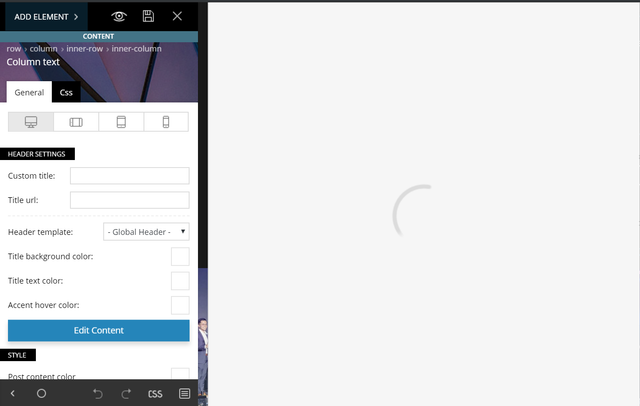
Let me know what else can be done to solve this. Thanks!
 charles.kiss@gmail.com
 Also, please explain why all the following is commented out from the file …\Newspaper\includes\plugins\td-composer\includes\tdc_main.php:
//// Add external shortcodes
//if ( tdc_state::is_live_editor_iframe() || tdc_state::is_live_editor_ajax() ) {
// register_external_shortcodes();
//
// // Change the callbacks of the shortcodes not registered in TagDiv Composer
// // Important! Here it’s too late to map these shortcodes, the mapping should be where the ‘$tdc_admin_settings’ is set (@see ‘admin_head’ action)
// add_filter( ‘the_content’, ‘tdc_on_the_content’ );
// function tdc_on_the_content( $content ) {
//
// $mappedShortcodes = tdc_mapper::get_mapped_shortcodes();
//
// //var_dump( $mappedShortcodes ); die;
//
// global $shortcode_tags;
//
// if (empty($shortcode_tags) || !is_array($shortcode_tags))
// return $content;
//
// // Find all registered tag names in $content.
// preg_match_all( ‘@\[([^<>&/\[\]\x00-\x20=]++)@’, $content, $matches );
// $tagnames = array_intersect( array_keys( $shortcode_tags ), $matches[1] );
//
// if ( empty( $tagnames ) ) {
// return $content;
// }
//
// foreach( $tagnames as $tagname ) {
// if ( ! array_key_exists( $tagname, $mappedShortcodes ) ) {
// add_shortcode( $tagname, ‘tdc_external_shortcode’ );
// }
// }
//
// global $vc_shortcodes;
//
// foreach( $vc_shortcodes as $vc_shortcode ) {
// add_shortcode( $vc_shortcode, ‘tdc_external_shortcode’ );
// }
//
// return $content;
// }
//}
//function tdc_map_not_registered_shortcodes($postId) {
// $currentPost = get_post($postId);
//
// $mappedShortcodes = tdc_mapper::get_mapped_shortcodes();
//
// //var_dump( $mappedShortcodes ); die;
//
// global $shortcode_tags;
//
// if (empty($shortcode_tags) || !is_array($shortcode_tags))
// return;
//
// // Find all registered tag names in $content.
// preg_match_all( ‘@\[([^<>&/\[\]\x00-\x20=]++)@’, $currentPost->post_content, $matches );
// $tagnames = array_intersect( array_keys( $shortcode_tags ), $matches[1] );
//
// if ( empty( $tagnames ) ) {
// return;
// }
//
// foreach( $tagnames as $tagname ) {
// if ( ! array_key_exists( $tagname, $mappedShortcodes ) ) {
// add_shortcode( $tagname, ‘tdc_external_shortcode’ );
// }
// }
//
// global $vc_shortcodes;
//
// foreach( $vc_shortcodes as $vc_shortcode ) {
// add_shortcode( $vc_shortcode, ‘tdc_external_shortcode’ );
// }
//}
[…]
//global $vc_shortcodes;
//
//$vc_shortcodes = array(
// ‘vc_btn’,
// ‘vc_icon’,
// ‘vc_tta_tabs’,
// ‘vc_tta_section’
//);
//
//
//
//function map_not_registered_shortcodes() {
//
// global $post;
//
// if (!isset($post)) {
// return;
// }
//
// $mappedShortcodes = tdc_mapper::get_mapped_shortcodes();
//
// //var_dump( $mappedShortcodes ); die;
//
// global $shortcode_tags;
//
// //var_dump($shortcode_tags); die;
//
// if (empty($shortcode_tags) || !is_array($shortcode_tags))
// return;
//
// // Find all registered tag names in $content.
// preg_match_all( ‘@\[([^<>&/\[\]\x00-\x20=]++)@’, $post->post_content, $matches );
// $tagnames = array_intersect( array_keys( $shortcode_tags ), $matches[1] );
//
// if ( empty( $tagnames ) ) {
// return;
// }
//
// foreach( $tagnames as $tagname ) {
// if ( ! array_key_exists( $tagname, $mappedShortcodes ) ) {
//
// tdc_mapper::map_shortcode(
// array(
// ‘map_in_visual_composer’ => true,
// ‘base’ => $tagname,
// ‘name’ => $tagname,
// ‘params’ => array(
// array(
// ‘type’ => ‘textfield’,
// ‘heading’ => ‘Extra class name’,
// ‘param_name’ => ‘el_class’,
// ‘description’ => ”,
// )
// )
// )
// );
// }
// }
//
// global $vc_shortcodes;
//
// foreach ($vc_shortcodes as $vc_shortcode) {
// tdc_mapper::map_shortcode(
// array(
// ‘map_in_visual_composer’ => true,
// ‘base’ => $vc_shortcode,
// ‘name’ => $vc_shortcode,
// ‘params’ => array(
// array(
// ‘type’ => ‘textfield’,
// ‘heading’ => ‘Extra class name’,
// ‘param_name’ => ‘el_class’,
// ‘description’ => ”,
// )
// )
// )
// );
// }
//}
/**
* edit with td composer
*/
Thank you.
Perhaps there are some admin settings I need to change to get shortcodes from excerpts to work on category pages, again.
 jamiesharpe
Hello – I’m looking to replicate several blocks from the templates provided on TD composer. For example I’m looking at Block 11 – Full 2 (by TagDiv). I’d like to replicate the article meta info block that extends into the article image in the example but when I import the section, it only slightly extends into the article image. I’ve tried to change the article meta info details in TD composer but no luck. Could you let me know what to do?
charles.kiss@gmail.com Hi Simion,
I’m getting the same error:
\td-composer\css-live\css-live.php
LINE 31: $get_action = @$_GET[‘td_action’];
Exception has occurred.
Notice: Undefined index: td_action
And my TablePress shortcodes aren’t working like they used to.
-
This reply was modified 7 years by
charles.kiss@gmail.com.
 basmamagazine
When I try to delete anything in TD Composer, the modal doesn’t show up. I get a black overlay & that’s it.
Tried different browsers & incognito mode too. Same. So I can’t delete anything from the composer right now, which is limiting me from doing my required customizations.
 Vairao
Hello,
I’m using the tagdiv composer to edit my header template.
I’d like to change the background color and opacity of the header zone, and the sticky header zone.
Please see this capture : https://ibb.co/k6cyHGN
I think i’m doing this propoerly however it doesn’t work.
Could you please help me ?
Regards,
Nicolas

