- NewsmagtagDiv Composer Tutorial
- NewsmagHow to use the Visual Composer plugin
- NewsmagHow to update a plugin
- NewsmagWhat’s included in Newsmag theme package
- NewsmagRequirements for Newsmag
- NewsmagInstall via WordPress
- NewsmagInstall via FTP
- NewsmagBlock settings tutorial
- NewsmagtagDiv Social Counter tutorial
- NewsmagHow to update the WPBakery plugin
- NewsmagPage Menu
- NewsmagCustom ad spots
- NewsmagSmart sidebar
- NewsmagVideo playlist
- NewsmagPage templates
- NewsmagHomepage – How to build and set it
 Simion C.
 Hi,
You could update it if you wish, or simply leave it as it is. There should be no problem caused by the child theme itself, the code you have inside it may not work properly and may require to be adapted. Elements form the theme may have been subject to change.
Make the theme update, and see if everything works properly. Please note that the tagDiv composer will be activated by default after you update the theme
– https://forum.tagdiv.com/tagdiv-composer-tutorial/
This editor could cause issues with specific Visual composer elements. Deactivate it if that is the case.
As always please make a backup before updating
– https://forum.tagdiv.com/how-to-update-the-theme-2/
Thanks
Simion C. Hi,
Please deactivate the tagDiv composer and check if the website displays as before. This composer could affect specific Visual composer elements, and cause the issues you are describing.
If you deactivate it everything should appear as before.
Thanks
 garya
garyaGreat theme, and after 2 weeks I think I have answered most of my newbie questions!
A couple of things escape me though. On our newspaper theme site, below the ‘Must watch’ section on the righ hand side, there is a duplicate ‘follow us’ box and below it a ‘latest news’ box/ block which kind of duplicates the latest articles one to its left.
Try as I might I have not been able to remove or amend these boxes/ blocks. Even in TD Composer you cannot click on them, and whilst the Twitter account is linked for the ‘Follow us’ box at the top of the page, the one at the bottom below the ‘must see’ box remains in demo mode.
Ideally we would like to remove the second follow us box and amend the latest news to make it into a specific category.
Any one any ideas how we do this (apologies if it is relatively easy – as I said I’m a newbie!)
Thanks
 xbass
xbassI would like to change the hard black tags in a lighter shade of the Theme Accent Color, for a more balanced look.
They are not in Tagdiv Composer > Theme colors. Should this be done somewhere in CSS perhaps?

Thank you.
 lemads
 Non of that is working. I still get the message:
Errors happened during tdcIframeData.init() -> bindViewsModelsWrappers()!
My page: http://byroetistruer.dk/struernyhed/
My plugins are only: Contact Form 7, Facebook Widget, Simple Facebook Plugin and tagDiv composer.
Please correct it. I can’t get any further before this error is corrected
-
This reply was modified 8 years by
lemads.
 news.zapoved.ru
Hi,
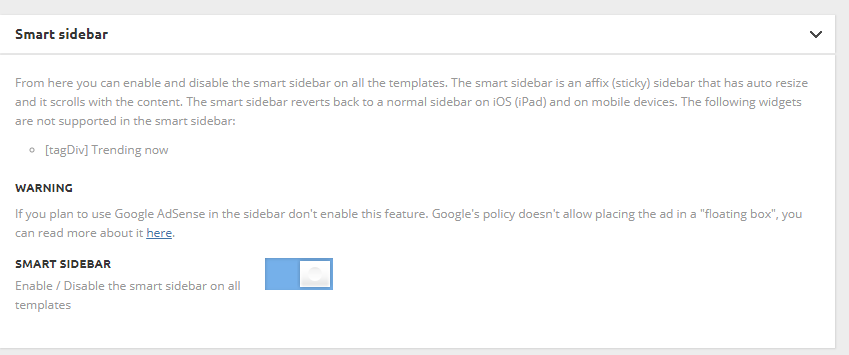
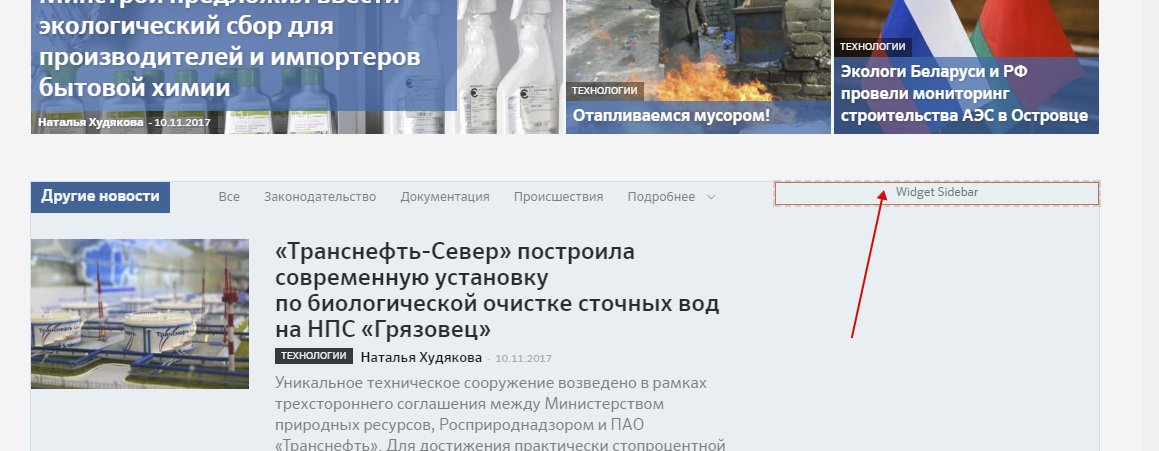
I turned on ‘Smart Sidebar’ option in template setting (screenshot: http://c2n.me/3Po2uhK.png), made sidebar and inserted it on the home page by the means of TD Composer (screenshot: http://c2n.me/3Po2BaR.png). But sidebar is not scrolling with content as intended. What I did wrong?
The page address is http://ecomag.zzkk.ru/
 snowsbest
Hello
My site is http://www.snowsbest.com at the bottom of each block there is a prev/next arrow but it is in a feint grey and I want to change the colour to a darker grey almost black. I can change the colour of the prev/next arrow in the mega menu but I can’t find the way to change it on a block through tagdiv composer on the home page.
Any ideas please?
Rachael
 jadmac
I’m trying to create a page with visual composer that centralises the H1 title. So how would I do this?
 Samuel
The playlists of youtube videos in the visual composer video player do not appear in thumbnails as in this example: https://www.screencast.com/t/tvnMNz1OSO
I put the url as in this example: https://www.screencast.com/t/bNQDvsW4I9
But the result was this: 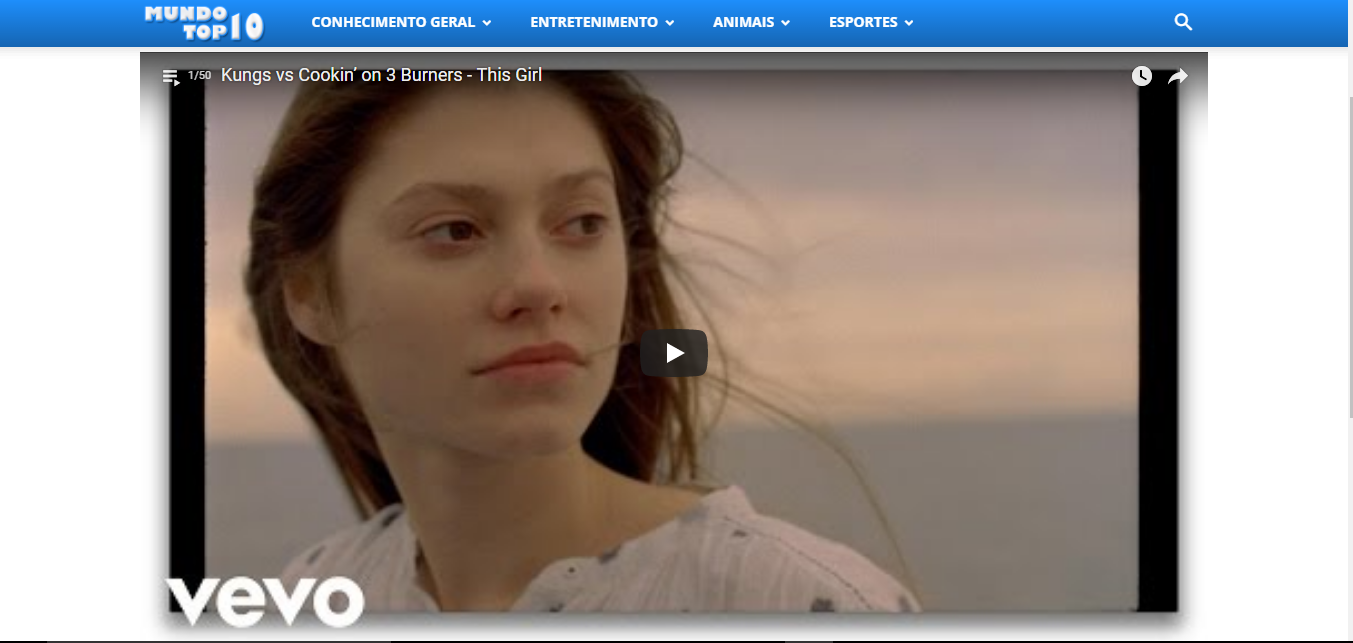
 Cosmic
Greetings team,
I have a small issue regarding the Left Border of the theme.
It is always different then the rest of the grid line as you can see in the screenshot. Last time I know you guys gave me a CSS code to hide it, but with the latest major .4 version it does not work anymore.
I tried also to modify it from the TD Composer (Border Style – none and Border Color – transparent) – no success.
I don’t know what’s the cause for this (it’s been like this for a long time) but I was wondering if you can help me.
This is the screenshot: https://ufile.io/eg8ch
You can also visit the site: https://revistacosmos.com
Thanks so much!
Andrei
 Athanasios
 Hi Catalin,
Thank you for your prompt and very explanatory reply.
Indeed you had absolutely right! Exactly as you told me, the theme I want is already installed! However allow me a few more queries.
The installed theme doesn’t looks like the same as the demo I saw.
Maybe in order to work I need a visual composer because at the moment is broken while loading with some JS errors. Probably this could be happen because I didn’t activate the theme?
Τhe situation is a little bit more complicated because I hired a developer to make some modifications to my site. The developer works online in his own enviromment.
So the following issues arise:
1. Is is possible, in order the theme, to looks like the same as the demo, first need to activate the theme?
2. how much domains can I use with it? Only one domain is valid for one key? Would be a problem if the developer install the key in his enviromment and when he finish, uninstall it and transfer it to my server?
3. Did you offer such services of installation of the theme? Could you give me a quote please?
Thanks and Kind regards,
Athanasios
 ZTWP
ZTWP Before, I could easily update the theme and visual composer using Envato Toolkit since you provided an auto-installer. Now, I have to download the complete (!) theme manually from Themeforest and upload ONLY visual composer. This is ridiculous.
 frasercarly89
 I had to back-up to my site before the Newspaper 8 update. The TagDiv composer doesn’t seem to work that well – all my images are messy and the font is way too big, or doesn’t show at all because the images overlay the titles. I wanted Big Grid 6 as the main homepage, and major issues. I tried all of the grids, too, and still looks very off.
 Bogdan B.
 Hello,
Please make sure you have the latest version of the theme: https://forum.tagdiv.com/how-to-update-the-theme-2/
And then use this guide to update visual composer: https://forum.tagdiv.com/how-to-update-visual-composer-plugin/
Thank you!
 Alin [tagDiv]
 Hi,
Please set again you static page if you want to display tagdiv blocks to your homepage – https://forum.tagdiv.com/homepage-how-to-build-and-set-it/
You can edit your homepage and configure any block using tagdiv composer – https://forum.tagdiv.com/tagdiv-composer-tutorial/ Please check also block settings tutorial – https://forum.tagdiv.com/block-settings-tutorial/
Thanks!
 Dmitry_Lupich
 Simion, hello!
With “tagdiv composer” I can’t make background ad clickable. Background ad click doesn’t work on main page (site: https://galagram.com). On other pages it works correct. How can I fix it? Thank You!
Simion C. Hi,
Please provide a link to your website so we can inspect the mobile issue. If you updated the theme, please update Visual composer as well
– https://forum.tagdiv.com/how-to-update-visual-composer-plugin/
Maybe make a backup in case something unexpected happens.
If you decide to switch to the tagDiv composer, you will have to recreate all your pages with it
– https://forum.tagdiv.com/visual-composer-tagdiv-composer-transition/
Thanks
 pedroarmindo1
I update to the file.zip in new update 8.1.2 but don’t came a new version.
Simion C. Hi,
It should not be so hard to get used to the composer. It will take some practice however, as with all things. There is this guide that you can read and and a video tutorial
– https://forum.tagdiv.com/tagdiv-composer-tutorial/
And here are all the available block settings
– https://forum.tagdiv.com/block-settings-tutorial/
Thanks
 laillah
Hello,
I used image box from TD composer and I have this black/grey overlay (on left): https://imgur.com/a/z2sRC . I would like to use my own color (blue) but combined with that black overlay it is too dark..
Please tell me how to remove that layer or edit from black to blue overlay.
Thank you!
Simion C. Hi,
If you have Yoast SEO installed please disable this option
– https://www.screencast.com/t/n8Cc35EofLh
It has been identified to cause issue with the composer. Disable it and check the results.
Thanks
Simion C. Hi,
The tagDiv composer is a required plugin, while Visual composer is considered optional. You should use this composer for the website, because we will add a considerable amount of options only for this page builder
– https://forum.tagdiv.com/tagdiv-composer-tutorial/
You can preview the theme demos here, to see how each looks
– https://demo.tagdiv.com/select_demo/select_demo_newspaper
Choose the one you like and simply install it
– https://forum.tagdiv.com/demos_introduction/
– https://forum.tagdiv.com/installing-demos/
Thanks
Simion C. Hi,
The tagDiv composer can only be used for pages, at the moment. Category pages can be customized through the theme panel only
– https://forum.tagdiv.com/how-category-settings-work/
Thanks
frasercarly89 I updated the theme to the most recent version. I also updated wordpress. I hadn’t done both in quite some time. Do you think if I switch to TagDiv composer, that it will work better? I still haven’t updated visual composer, because it seems to always crash my website when I delete it.
xbassrediculous who invented that horrible thing, where do I find some easy guides written by outsiders?