- NewsmagtagDiv Composer Tutorial
- NewsmagHow to use the Visual Composer plugin
- NewsmagHow to update a plugin
- NewsmagWhat’s included in Newsmag theme package
- NewsmagRequirements for Newsmag
- NewsmagInstall via WordPress
- NewsmagInstall via FTP
- NewsmagBlock settings tutorial
- NewsmagtagDiv Social Counter tutorial
- NewsmagHow to update the WPBakery plugin
- NewsmagPage Menu
- NewsmagCustom ad spots
- NewsmagSmart sidebar
- NewsmagVideo playlist
- NewsmagPage templates
- NewsmagHomepage – How to build and set it
 simchris
 If you’re running WordPress 4.1, make sure you have Visual Composer 4.3.5 installed, and if not you will need to get the latest version of the theme via your themeforest account and update your site. WordPress 4.1 “broke” the visual editor, hence the theme update.
Some plugins conflict – so nothing for the TagDiv folk to “fix” on your end; try turning off all plugins except Visual Composer, then turn each one on until you find the “bad” plugin. You would then need to either not use that plugin, which might not have been updated to work with WP 4.1, or get a fix from that plugin developer.
The VC works perfectly on tens of thousands of websites, and so the “fix” is to determine which plugin is causing the problem 🙂
 clearwood
Hi,
for some reasons the frontend editor isn’t working on my website. (derstreber.de)
It would be wonderful, if you could find a way to fix this problem.
simchris try disabling all your site plugins, except for Visual Composer.
If you are using a caching system, or you see a big [clear cache] button in your admin (as with GoDaddy), you need to clear that.
With only the theme active and Visual Composer active. Hit refresh [F5] on one of your post pages; the “view counter” should increment by 1 when you do so. Did that work?
If so, then turn on your other plugins one by one and re-test until you find the plugin which is breaking the theme.
Only you can do this, as you need to learn to manage your own website.
If you are using a caching system/plug-in you need to use an advanced setting in the theme to enable “ajax counter” capability; where the theme attempts to use javascript (JS) to increment the counter, since the caching would normally preclude or block that from working (e.g., the idea of caching is to serve up a page which does not change; so how can the counter change on the page if it’s cached and not actually being served as new page – logical, right?).
This is the best way to “debug” why your particular instance does not work.
Then post an update here with a sample page link to one of your posts, if you can’t get it working. 🙂
 Lucian
 Hi,
Thanks Chris, that’s right! We first have to test it, we will release an update with the new version of VC as soon as they will fix issues that apparently they have with the current version: http://screencast.com/t/MhULCZhfr
You can see their forum for more info: http://codecanyon.net/item/visual-composer-page-builder-for-wordpress/242431/comments?page=332
Thanks
 daimpa
 For your information, I’ve the same problem when I insert a link to a “tab” in a page, created with the visual composer. If I put this link: http://mysite.com/page-url/#tab-1421466619-2-66 in the menu, this link doesn’t work. Not sure if the things may be related.
 adelgazarbadajoz
I can, see frontend editor button in my newsmag theme.
anybody helpme?
Lucian Hi,
I have also tested your site and found that the div container for related articles is added just no posts are loaded: http://screencast.com/t/wwbxWdYc
This means that after your posts go trough the query filers there aren’t any posts left to display and no post is loaded or the code is broken.
Either way I suggest you download and update your theme to the latest version which is 4.6.1 then check again. To update your theme please make sure that you make a backup of your current theme installation then use the FTP method from this guide: https://forum.tagdiv.com/how-to-update-the-theme/ and also update the VC plugin within the /plugins folder following this guide: https://forum.tagdiv.com/update-the-visual-composer-plugin-wpbakery/
Please let me know if you still have this issue afterwards.
Thanks
Lucian Hi,
We will release an update with the new version of VC as soon as they will fix issues that apparently they have with the current version: http://screencast.com/t/MhULCZhfr
You can see their forum for more info: http://codecanyon.net/item/visual-composer-page-builder-for-wordpress/242431/comments?page=332
Thanks
Lucian Hi,
As Chris stated you need to update your VC plugin from the /plugins folder that was provided with the theme files and use this guide to install/update it: https://forum.tagdiv.com/how-to-update-visual-composer-plugin-wpbakery/
Please also note the following:
-
The theme includes a license for this plugin so you don’t have to buy it.
You don’t have to activate the plugin license, it’s already activated.
You can’t update the plugin directly from the it’s producer.
You don’t have to worry about the plugin update warnings.
We provide updates on a regular basis, after we test the plugin for theme compatibility we include it in the latest theme update, inside the ../plugins folder
Also please note that we will release an update with the new version of VC as soon as they will fix issues that apparently they have with the current version: http://screencast.com/t/MhULCZhfr
You can see their forum for more info: http://codecanyon.net/item/visual-composer-page-builder-for-wordpress/242431/comments?page=332
Thanks
Lucian Hi,
@Teejoow Please let me know if you refer to theme’s activation or VC plugin activation provide more details about this. If you refer to theme’s activation key then you can use your purchase code for each project without receiving an error for the VC plugin though you need to update following this guide: https://forum.tagdiv.com/how-to-update-visual-composer-plugin-wpbakery/ as we include the VC plugin within each theme update if there is an available update for it so you don’t need to buy it or you don’t need any license key: https://forum.tagdiv.com/topic/how-to-update-visual-composer-2/
Thanks
Lucian Hi,
I believe you refer to the Visual Composer issues which appears with older versions of VC when updating WordPress to 4.1
I have noticed while checking your site that you use the latest theme version (1.4) and the 4.3.4 version of VC which can cause this.
This issue appears because of the Visual Composer plugin when updating to WordPress 4.1. We have included the fixed version of the plugin(4.3.5) within the latest theme version so please make sure you update the Visual Composer plugin from the /plugins folder using this guide: https://forum.tagdiv.com/how-to-update-visual-composer-plugin-wpbakery/
Please let me know how it goes!
Thanks
 Emil G
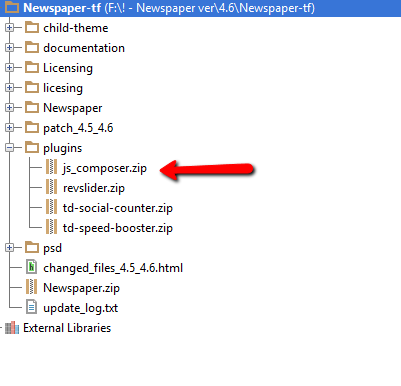
The Visual Composer plugin that comes with the theme is licensed to the theme, the license specifies that only we can provide the updates and you don’t have to buy it or register it. We provide updates on a regular basis, after we test the plugin for theme compatibility the plugin is included in the latest theme update, inside the Plugins folder:
https://forum.tagdiv.com/wp-content/uploads/2015/01/visualc_newspaper.png
Here is the guide on how to update the plugin – https://forum.tagdiv.com/update-the-visual-composer-plugin-wpbakery/
Conclusion – We’re testing the plugin latest version, if everything is ok we will include it in the next update and only then you can update the plugin by downloading the theme latest version and following the procedure presented in the plugin update guide.
Emil G.
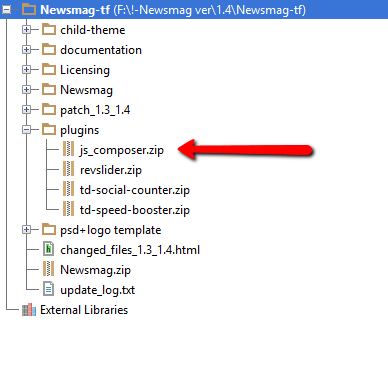
Emil GThe Visual Composer plugin that comes with the theme is licensed to the theme, the license specifies that only we can provide the updates and you don’t have to buy it or register it. We provide updates on a regular basis, after we test the plugin for theme compatibility the plugin is included in the latest theme update, inside the Plugins folder:
https://forum.tagdiv.com/wp-content/uploads/2015/01/visualc_newsmag.png
Here is the guide on how to update the plugin – https://forum.tagdiv.com/how-to-update-visual-composer-plugin-wpbakery/
Conclusion – We’re testing the plugin latest version, if everything is ok we will include it in the next update and only then you can update the plugin by downloading the theme latest version and following the procedure presented in the plugin update guide.
Emil G.
 Alin [tagDiv]
 Hi,
I have checked your site and found some javascript errors in console: http://screencast.com/t/1lJFBw4JMnFy
I have also tested using the latest theme version(4.6.1) and haven’t found any issues with this.
Please make sure that you download the latest theme version and update your theme using this guide and the FTP method: https://forum.tagdiv.com/how-to-update-theme/ After you update the theme please try without any plugins active(leaving just the Visual Composer plugins active), then empty cache and also purge files if you use any CDN host services and check again.
Let me know if you still have issues with this.
Thanks!
 jk
jk yep, new update of WPBakery Visual Composer is available…19.1 2015
 AriansyahIT
 send value API Key , Visual Composer License Key to me at ariansyah2211@gmail.com, now please
simchris You need to use the version of visual composer included with the theme.
AriansyahIT I’ve bought wpbakery latest visual composer so I can process my web page. But I still can not process the page is blocked, there is a message that appears as “license expired”. I’ve uploaded many times over 10 hours until now there is still no solution. send the reply please to ariansyah2211@gmail.com
 12familyde
 Hi Lucian,
sorry for my late reply. I have reinstaled the visual composer – and also I deactivated some addons for it, which were not in une so far. And it seems, that things are okay right now.
Thank you for your support on this …
Best regards
Torsten
simchris Try using Chrome; since IE on Windows sucks with Ajax stuff. If using Mac, make sure Safari is updated to current version.
It does work; being used by tens of thousands of websites.
Try using with just Visual Composer running v 4.3.5 and WP 4.1, and no other plugins.
simchris Yup:
from the theme docs:
How to Update Visual Composer plugin (WPBakery)
•The theme includes a license for this plugin so you don’t have to buy it.
•You don’t have to activate the plugin license, it’s already activated.
•You can’t update the plugin directly from the it’s producer.
•You don’t have to worry about the plugin update warnings.
simchris from the theme docs:
How to Update Visual Composer plugin (WPBakery)
•The theme includes a license for this plugin so you don’t have to buy it.
•You don’t have to activate the plugin license, it’s already activated.
•You can’t update the plugin directly from the it’s producer.
•You don’t have to worry about the plugin update warnings.
 André
AndréHello
Show me this today
” To receive automatic updates license activation is required. Please visit Settings to activate your Visual Composer.”
And now?
simchris from the theme docs:
How to Update Visual Composer plugin (WPBakery)
•The theme includes a license for this plugin so you don’t have to buy it.
•You don’t have to activate the plugin license, it’s already activated.
•You can’t update the plugin directly from the it’s producer.
•You don’t have to worry about the plugin update warnings.
simchris You don’t need a visual composer license key — again!
Please see the theme docs, right side of page.
https://forum.tagdiv.com/update-the-visual-composer-plugin-wpbakery/
You have a “bundled” version of the plugin, not a paid individual license version.
You can ignore “nag screen” in WordPress panel saying there is an update. You cannot automatically update the bundled version from WordPress; only with a new THEME update.
———-
docs
———-
How to Update Visual Composer plugin (WPBakery)
•The theme includes a license for this plugin so you don’t have to buy it.
•You don’t have to activate the plugin license, it’s already activated.
•You can’t update the plugin directly from the it’s producer.
•You don’t have to worry about the plugin update warnings.