
- TutorialsFrom WPBakery to tagDiv Composer
- TutorialsDefault Block Settings Guide
- TutorialsOffset Feature
- TutorialstagDiv Social Counter Tutorial
- TutorialsHow to Update the WPBakery Page Builder plugin
 Anamaria
 Hi,
Normally, there the name of the template should not appear in the URL -> https://i.imgur.com/Gn8vNKP.png
You can edit the template with tagDiv Composer, select the title and change it https://i.imgur.com/jV0vtK2.png
Thank you!
 Murrone90
hello everyone, the social counter widget doesn’t work as it should http://www.salentodiscovery.it , facebook followers always remain at zero, from the control panel the facebook account is correctly connected and shows the right count, i tried uninstalling and reinstalling the tagdivcomposer and the social counter as proposed on other posts but nothing still doesn’t work. Your help would be appreciated!
 Bettina
  danna
danna I just deactivated all Plugins but the pages were still there.
But i think i know now, where these pages come from. When i deactivated the Tagdiv Composer, the Category page turned to this: And there you can see this 9 pages: 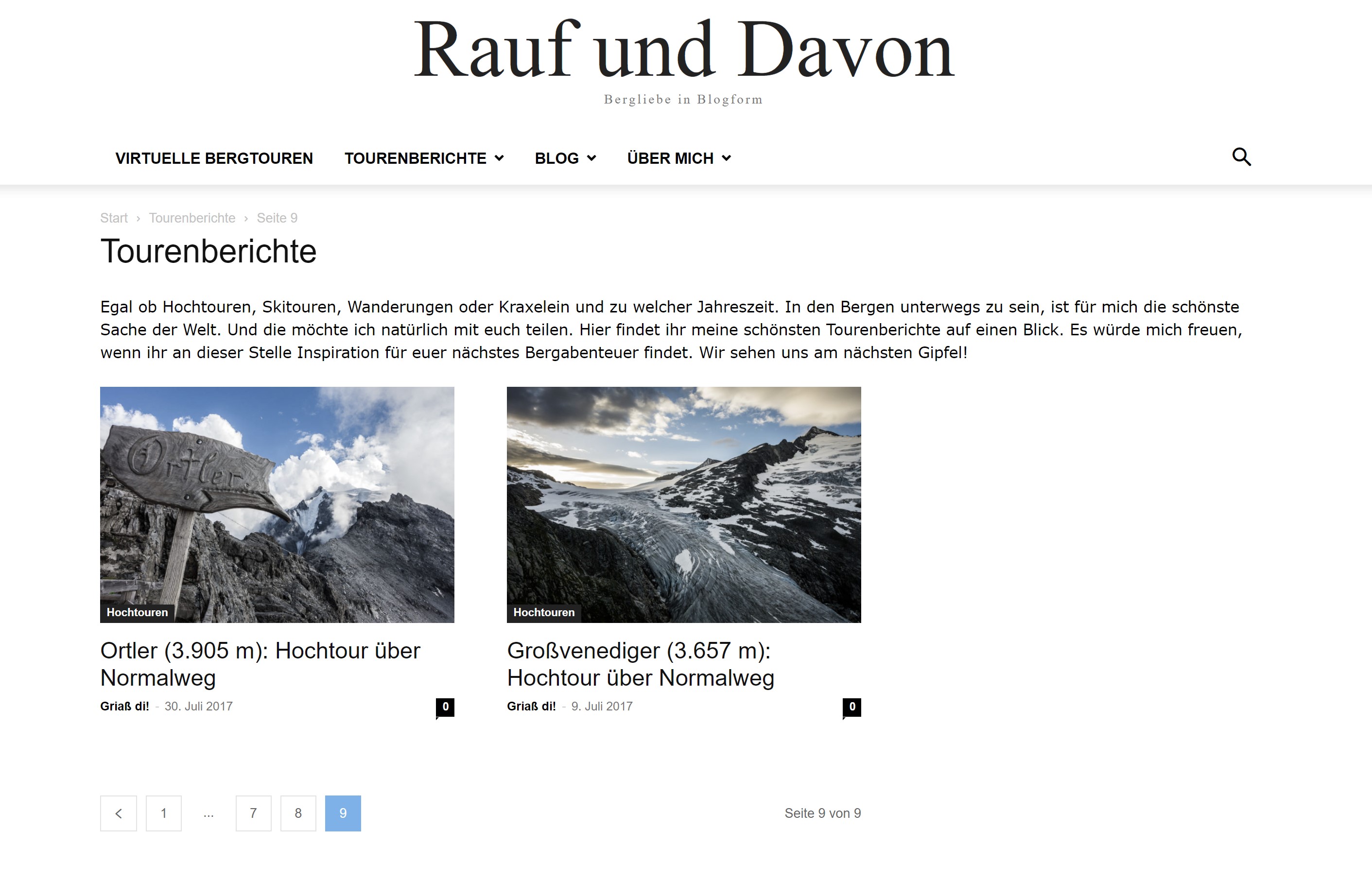
So does this help to get rid of them? 😀
All the best,
Daniel
Bettina Hello @herbal!
Edit the page with Gutenberg, and choose the right format for that page: https://prnt.sc/dZrvKF9vJmrH
You can choose to edit it with the TagDiv Composer and build the sidebar like:
1. Insert one new row (or delete an existing one).
2. Divide into two columns (2/3 + 1/3).
3. You can add whatever element you want into the second column and consider it a sidebar.
And the text can be added in “Column text” or “text with title” elements.
Thank you!
Bettina Hello @platamun47 !
We have 3 options for mobile versions that you can use:
1. Responsive version: A responsive version of your website looks similar to the desktop version. TagDiv Composer is used to edit the page. Click on the mobile viewport: https://www.screencast.com/t/XDQJedlggSB. There, you can see your mobile version and edit or adjust the elements to look better.
2. Mobile pages: https://tagdiv.com/newspaper-10-3-7-update-brings-customizable-and-fast-mobile-pages
3. Mobile theme plugin: The Mobile Theme is a performance-optimized theme included in the main Newspaper theme that only loads on mobile devices. It comes with its own templates and designs for pages, posts, categories, etc., so your current templates from the desktop theme will get converted to the mobile theme layout. Please see https://forum.tagdiv.com/the-mobile-theme/ and https://forum.tagdiv.com/mobile-theme-introduction/ for more information.
A full explanation is here: https://www.youtube.com/watch?v=SpGkOnJeNZY
Make sure you do not use Mobile theme plugin, if you use the mobile option 1 or 2.
Thank you!
Bettina Hello!
In the tagdiv Composer, the element Single Post Content contains all the paragraph https://prnt.sc/_r75RlmBAjOp from your text and there is no setting for only one paragraph.
“Column text” and “text with title” elements have a button called “edit content” and if you click on that button, the WP Editor will open, and you can add some text/code/shortcode there. Close the WP Editor from X, save the changes from Composer and view the page to see the changes. You cannot add custom text to each page as you can with single post content.
Thank you!
 hadharm
 Yes, the theme has an option for parallax. I got that in the row settings of tagDiv composer.
Yes, I use js and I set the js in the Theme Panel body of analytics/js settings.
It shows for some users and it doesn’t for others. I think it should be cross-browser compatibility issues. But do you notice any effects/animations apart from the bubbles from your end at hiideemedia.com?
 Calin
Calin Hi,
If you want to manually set them, then you can set it in the theme files, for this you can edit the post template (an example for post template 1 path – wp-content/plugins/td-composer/legacy/Newsmag/parts/single/loop-single-1.php) or the related articles block (path – wp-content/plugins/td-composer/legacy/common/wp_booster/td_module_single_base.php -https://i.imgur.com/0vVjTMR.png).
Thank you!
dannaHello,
I use the tagdiv composer to generate my category and tag templates. As pagination I use the Load more button. Anyway, my website creates archive pages with duplicate content. F. ex.:
https://rauf-und-davon.at/tourenberichte/page/2/
https://rauf-und-davon.at/tourenberichte/page/3/
https://rauf-und-davon.at/tourenberichte/page/4/
https://rauf-und-davon.at/tourenberichte/page/5/
https://rauf-und-davon.at/tourenberichte/page/6/
https://rauf-und-davon.at/tourenberichte/page/7/
https://rauf-und-davon.at/tourenberichte/page/8/
https://rauf-und-davon.at/tourenberichte/page/9/
Each link shows the same page. Do you know why this is happening and how i can prevent that / delete these pages?
All the best,
Daniel
PS: I use the mobile theme as well. There, i want these pages of course. But there each page has different content.
 ritughai
Hi,
I am using Newspaper theme on a couple of websites but I keep hitting errors either with Jetpack, or TagDiv mobile or AMP plugins on two of them.
This is the message that displays when I try to activate the plugin on “maverickfoundation.ca” and then AMP also fails to work.
Plugin could not be activated because it triggered a fatal error
Warning: require_once(/var/www/wp-content/plugins/td-composer/mobile/includes/td_block_editor_assets_mob.php): Failed to open stream: No such file or directory in /var/www/wp-content/plugins/td-mobile-plugin/td-mobile-plugin.php on line 490
I have deleted the plugins and then uploaded them again from the theme downloads, but no it doesn’t work.
I manage to activate AMP, but the website throws up issues in appearance and image sharing (my social shares of posts fail to grab the Featured Image).
Is there anything that I am doing is not right? I can’t figure that out.
Please help.
TIA
Anamaria Hello Adam,
Yes, you can update the theme directly. You can try to do the update on a staging website to not affect the live website.
Also, please try to update the theme without extra plugins activated during the installation, as this may interfere with the installation process.
Also, after the update please make the tagDiv plugins are installed, like tagDiv Standard Pack, tagDiv Composer.
Thank you!
Anamaria Hello,
This prebuilt website was made with an RTL language uploaded in Theme Panel.
Also, some elements need to be edited with tagDiv Composer, to change the text to English.
I’m glad you figured it out.
Have a nice day!
Anamaria Hello,
Please try to use our elements for checkout, cart and after you can edit them with tagDiv Composer.
Thank you!
 laurenskok
Hello,
I noticed that the pagination with the posts loop module in tagdiv composer doesn’t work. When I click on number 2 or next button, the page is loading and returns to the number 1.
Is there an option to activate this functionality?
Here is an example about the design : https://pasteboard.co/iESe6Dlg3uMP.png
The prebuilt theme is sport.
Thank you
Bettina Hello!
Yes, I reported again. The problems and the bugs are discussed on the forum.
A simple workaround for the category list is to create a menu in Appearance -> Menus: https://prnt.sc/w1MrA8C8U3-R and add the product categories there. Anywhere you can add a menu in Composer is by using the list menu element, for example.
Thank you!
Bettina Hello!
It is possible to be a conflict. You can use our table of contents shortcode We’ve added the Single Post Table of Contents shortcode. This can be found in the TagDiv Composer while you edit a post template.
Thank you!
 seircon
I use tagdiv composer to change or edit the header of romania news but unable to change the background, please help.
 coinedition
 The content is added like normal. Just copy and paste the content on the block editor. Thats it. We don’t use any extra fields or composers to add the content.
PFA:- https://imgur.com/a/ThCJQpP
We normally add the content to the block editor itself and it shows in the front end. But for the mentioned post the content is showing on the front end but not showing on the block editor. You can check the screenshots that I shared before.
Anamaria Hi,
For mobile please edit with tagDiv Composer, select the viewport on phone, select the header logo and change it => https://i.imgur.com/cR7F0v4.png https://www.youtube.com/watch?v=HXQQygkCCJo -> https://forum.tagdiv.com/add-logo-newspaper/
Thank you!
 ezioboy
hello
I have a question about the login and checkout pages again.
Is the login provided by the theme different from the login provided by WooCommerce?
https://ibb.co/0KBfVSD
https://ibb.co/vBDvG27
1)
Is the login screen shown at checkout the login/registration provided by WooCommerce? How can I clear this and go to the theme’s login screen?
2)
I want to change the English and contents of the theme’s login and membership registration to Korean, and write only one “email” for “name or email”. Is it possible to adjust the text in the theme?
I connected to TagDiv Composer, but can’t I edit it in the builder?
How can I do in the theme to fix and design this?
thank you
 mcdv01
Hi,
I can’t edit anything on TAGDIV COMPOSER
When I open anything on TAGDIV Composer it shows:
Error at zones: 6(models) : 1(dom). The model does not match the content Current state has involved an issue. You could try an UNDO operation (CTRL+Z / CTRL+SHIFT+Z)
I create an EMPTY NEW PAGE – click edit with TAGDIV COMPOSER and the error above shows.
1. Fresh WP install
2. Plugin activated is only Tagdiv Composer and Tagdiv Cloud
3. Theme is latest version Newspaper 12.3
PHP Version
8.1.2-1ubuntu2.11
WP Memory Limit
256 MB
PHP Execution Time
86400
PHP Max Input Vars
2000
This is on local server as this is a staging site.
Can you help me to resolve this issue? There are no errors in the error.log. No PHP error. No error in console.
Only this error:
Error at zones: 6(models) : 1(dom). The model does not match the content Current state has involved an issue. You could try an UNDO operation (CTRL+Z / CTRL+SHIFT+Z)
 cenkerinan
I cannot see a featured image box when I edit posts.
https://prnt.sc/0VVa3ASP-o5R
Is there a setting in the theme or td composer that disables this?
 mcneillmedia
 I checked and permalinks are set to plain.
We are using the newspaper theme. Plugins are the ones that game with it:
Genesis Blocks, tagDiv Cloud Library, tagDiv Composer, tagDiv Counter. Authors were set up in the “Users” area. Only one author per post. The commas after the names are industry designations. So it is just one author set up as a user. https://imgur.com/65Ve3GW
Other articles with no designations like this: https://floriologydm.wpengine.com/?p=1014 are also going blank. When using Chrome we get a 403 error: Access to floriologydm.wpengine.com was denied. You don’t have authorization to view this page. HTTP ERROR 403
Bettina Hello!
The content was added in Gutenberg and not in the TagDiv Composer with the help of the “column text” or “text with title” elements, right?
Check if you do not have the Classic plugin installed.
Deactivate ALL plugins except tagdiv ones; also, if you are using a cache plugin, deactivate it, clear all cache, and try again.
Let me know the results!
Thank you!



