
 Bettina
 Hello Antonio!
It seems that you use the Mobile Theme and AMP plugin.
I can see your hamburger menu, which is displaying well on your mobile version. Delete your cache and try again in an incognito window in your browser.
We have 3 options for mobile versions that you can use:
1. Responsive version: A responsive version of your website looks similar to the desktop version. TagDiv Composer is used to edit the page.Click on the mobile viewport: https://www.screencast.com/t/XDQJedlggSB. There, you can see your mobile version and edit or adjust the elements to look better.
2. Mobile pages: https://tagdiv.com/newspaper-10-3-7-update-brings-customizable-and-fast-mobile-pages
3. Mobile theme plugin: The Mobile Theme is a performance-optimized theme included in the main Newspaper theme that only loads on mobile devices. It comes with its own templates and designs for pages, posts, categories, etc., so your current templates from the desktop theme will get converted to the mobile theme layout. Please see https://forum.tagdiv.com/the-mobile-theme/ and https://forum.tagdiv.com/mobile-theme-introduction/ for more information.
A full explanation is here: https://www.youtube.com/watch?v=SpGkOnJeNZY
If you need to use the mobile version 1 or 2, then you need to disable the Mobile Theme plugin.
Thank you!
Bettina Hello Torsten!
After selecting the global footer in the website manager, you should save the settings (in composer). This is working as it should.
Thank you!
 xteaun
I updated my Newspaper theme today to version 12.1.1. Now it does not work anymore because I cannot install the tagdiv composer. Neither the installation via the Theme Panel nor the manual installation by uploading the plugin via the wordpress dashboard works. Please fix this since my website is now not operational.
Here is the error message:
Herunterladen des Installationspakets von https://cloud.tagdiv.com/td_plugins/td-composer/e815948e5c9ec5801de67b92a1d5a59fxx/td-composer.zip …
Entpacken des Pakets …
Die Datei konnte nicht kopiert werden. td-composer/legacy/Newspaper/includes/demos/the_rimont/td_media_8.php
 Anamaria
 Hello,
Please edit the Single Post Template with tagdiv Composer, and you can set the color -> https://i.imgur.com/4gHE16H.png
Thank you!
Bettina Hello @aurelienmatte !
Unfortunately, you cannot have a page template assigned to all your pages. However, you can copy and paste the elements to have the same design on all of your pages. Or, you can save elements or sections so you can import them easily on the other page. If you need text on a page template, then you should use column text or text with title element. “Column text” and “text with title” elements have a button called “edit content” and if you click on that button, the WP Editor will open, and you can add some text/code/shortcode there. Close the WP Editor from X, save the changes from Composer and view the page to see the changes. You cannot add custom text to each page as you can with single post content. You need to create each page with its own text in Composer.
Thank you!
Anamaria Hello,
If you have WP Bakery, this plugin conflicts with our page builder, tagdiv Composer; please do a test using o nly tagdiv plugins. Please disable the extra plugins.
Thank you!
Anamaria Hi,
The AMP works better only with the Mobile Theme plugin. From my point of view, if you don’t use the Mobile Theme plugin, then there is no reason or benefit to AMP. Please read all about AMP here: https://forum.tagdiv.com/tagdiv-amp-plugin-tutorial/
It comes with its own templates/design for page, post, category, etc so your current templates from the desktop theme will get converted to the mobile theme layout. Documentation here:
– https://forum.tagdiv.com/the-mobile-theme/
– https://forum.tagdiv.com/mobile-theme-introduction/
Please read all about AMP here: https://forum.tagdiv.com/tagdiv-amp-plugin-tutorial/
Note that you can not customize AMP so much, because it comes with its own design.
There are some settings in the Theme panel -> Mobile Theme and Dashboard -> AMP only.
You can not add a shortcode as in the TagDiv Composer. Please note that you can’t customize the AMP pages with the TagDiv Composer.
Make sure the redirect mobile visitors to amp option is disabled.
Please check this topic where I explained each mobile version -> https://forum.tagdiv.com/topic/mobile-version-not-working-properly-2/
Thank you!
Anamaria Hello Ravi,
If you get the “Invalid reply from server endpoint error” is caused by insufficient WP_Memory_limit, if you’ll set it to 256M, and is still not working, please check the rest of the settings from our guide -> https://forum.tagdiv.com/requirements-for-newspaper/
A working alternative for that situation is to open the cloud library from the front end. For example, you need a cloud category, go on a category and click on cloud -> https://i.imgur.com/rtOlQ9K.png also the cloud can be opened from tagDiv Composer -> https://i.imgur.com/tSMIb9e.pngYou can use a license key for one single product, but if you want to move the theme to another website or change domain/migrate, you’ll need to reset the license key from that website: https://www.screencast.com/t/Zt12bpyX and remove the theme (delete), in this way the license will be available for the new website and you can use the theme without any problems.
Thank you!
Anamaria Hello,
Please edit the logo with tagdiv Composer, select the logo and go into the tab SVG and delete the code.
Thank you!
Anamaria Hello,
Please try to edit the page with tagdiv Composer, select the row where the background color is set and go into the tab CSS, and change the color.
Thank you!
 Ljunganbladet
 damir78
 this file is totally unnecessary.
td-composer/legacy/Newsmag/assets/css/td_legacy_main.css
It loads over 600Kb unnecessarily.
Most of that CSS is in the upper part of the site, which should be critical css.
The template knows a lot of problems for users who do not maintain pagespeed…
In the google search console, the website can get a rating of poor instead of good.
And then the ranking and the number of visits start to drop.
my new pagespeed result:
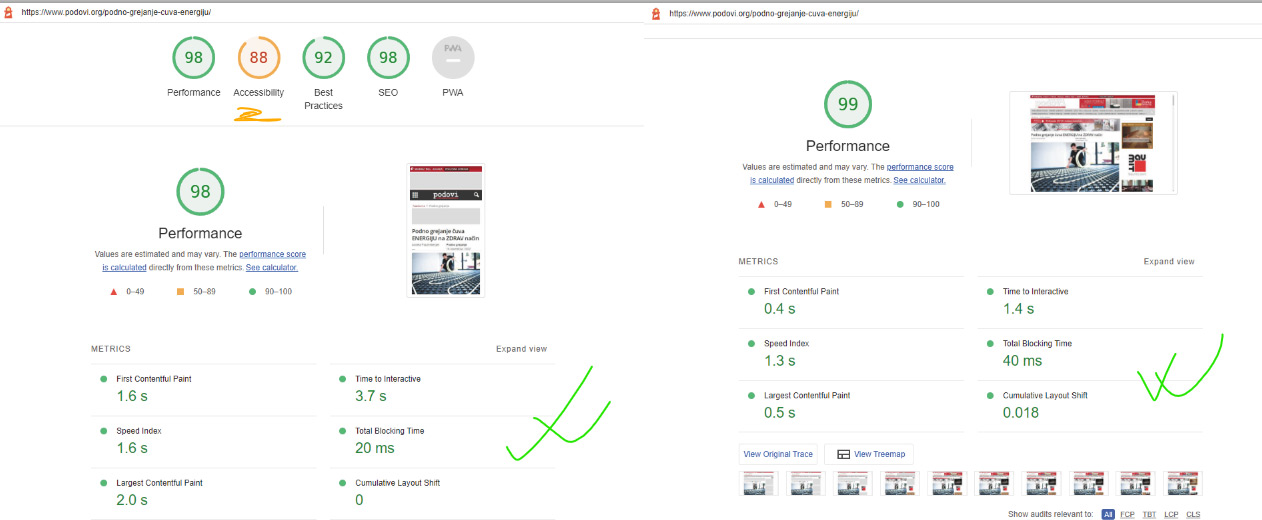

 lindoma
Hello
Ich kann im Tagdiv Composer keine Templates in meine Seite laden. Wenn ich ein Header Template laden will, wähle ich eines auf der Templateseite aus und klicke auf importieren. Die Auswahlbox Importieren Ja oder Nein erscheint jedoch nicht und ich kann den Import nicht bestätigen. Können Sie mir weiterhelfen?
Greetings
Michel
 Renu Bakshi
I can’t open any of my site’s posts. It gives the following error:
wp_booster error:
td_api_base::mark_used_on_page : a component with the ID: single_template_2 is not set.
/home/customer/www/justfitnesshub.com/public_html/wp-content/plugins/td-composer/legacy/common/wp_booster/td_api.php
Display backtrace
wp_booster error:
td_api_base::get_key : a component with the ID: single_template_2 Key: file is not set.
/home/customer/www/justfitnesshub.com/public_html/wp-content/plugins/td-composer/legacy/common/wp_booster/td_api.php
Display backtrace
 kodro
kodroI’ve just uploaded the last version of the theme, and a big problem appears with the tagDiv Composer.
I can’t upload, a message appears on the screen after the installation:
tagDiv Composer
Failed
An error occurred and we could not finish the process.
Please manually update the plugins.
I’ve checked the plugin on the Plugins lists and doesn’t appear. I’ve entered inside the FTP and yes, exist. So weird problem. Can you help me please?
SOLUTION: I’ve erased the plugin, and I reinstalled.
 GanaAdhikar
 Hi,
ok. thats fine.
Can you please let me know if I can add blocks to tag div composer directly without plugin?
Also, on theme update, will the new blocks work?
thanks
 nearview
 Okay, I just found your patch, and it is NOT a patch. It’s a bandaid at most. In td-composer/legacy/common/wp_booster/wp-admin/panel/panel_core/td_pannel_data_source.php:610 you have simply added in
			// don't allow eval( / String.fromCharCode( as option value
	        if ( td_util::strpos_array( $option_value, array( 'eval(', 'String.fromCharCode(' ) ) !== false ) {
		        $option_value = '';
	        }
this does not fix the core problem of an unauthenticated user being able to use admin-ajax.php and your td_ajax_update_panel action and td_magic_token to inject anything they want. What if they just change their method and obfuscate their code, it will pass right by this “check” and sites will once again be infected.
 walshcreative
 This continues to be an ongoing issue. Per this post your patch is not sufficient. This needs to be fixed as it’s a critical security threat impacting all of your customers, even those on the latest version.
This patch is not sufficient and this is very poor support:
https://forum.tagdiv.com/topic/sql-injection-in-tagdiv-composer-again/#post-458150
nearview Okay, I just found your patch, and it is NOT a patch. It’s a bandaid at most. In td-composer/legacy/common/wp_booster/wp-admin/panel/panel_core/td_pannel_data_source.php:610 you have simply added in
// don't allow eval( / String.fromCharCode( as option value
if ( td_util::strpos_array( $option_value, array( 'eval(', 'String.fromCharCode(' ) ) !== false ) {
$option_value = '';
}this does not fix the core problem of an unauthenticated user being able to use admin-ajax.php and your td_ajax_update_panel action and td_magic_token to inject anything they want. What if they just change their method and obfuscate their code, it will pass right by this “check” and sites will once again be infected.
-
This reply was modified 3 years by
nearview.
nearview Is there a changelog for which files were updated? Is this a security issue in TD Composer or Theme itself?
 mod
modHi there,
For some reasons the columns and rows aren’t diving and showing up wrong.
Is this an easy fix? When I got to edit it with TagDiv composer it’s fine.
 yagiz
yagizHi,
I added a element called AD BOX to my page using the tagdiv composer.
I have 2 languages installed, so when I added the a text to this ADBOX element for a specific language needed to be added to another language as well. So how can I add a value to all different languages when I used this tag composer?
Thanks
 Lucavlw
Hello, on this website : https://www.cript-bretagne.fr after every theme update, my home page is broken, I especially have to manually re-activate the tagDiv Composer plugin which is deactivated, I don’t know why.
Do you know why ?
 Antonio53_Lido
Hi there, thank you back! I have also an issue with my mobile menu. I can’t see hamburger menu anymore. It’s all related to plugin issue. Can you investigate further more?
Anamaria Hello,
Please let only tagdiv plugins be activated, and try after to delete the row with right-click or with drag & drop, place into the deleting red zone from the bottom right of the page => https://i.imgur.com/vkQVCjn.jpg -> https://i.imgur.com/SSxLy2j.png.
Thank you!



