Calin
Calin Hi gasthis,
Did you made the mobile page only for a page (homepage)? or you made for each pages and cloud template ? If you made for only a page, then the mobile page will be only when you are on that page.
The mobile page can be edited with tagDiv Composer like this -> https://prnt.sc/26byi6a on cloud templates -> https://prnt.sc/26byio6
I hope this will help you!
 Anamaria
 Hello,
You need to use the smart list from tagDiv Composer, inside Single Post Content ->
https://i.imgur.com/dbipPWQ.png according to the documentation https://forum.tagdiv.com/smart-lists/
Also, you don’t need to use the classic editor, you can use the Gutenberg editor, which is the default editor for WordPress and select/add the element classic https://i.imgur.com/9sWuCtW.png to add the smart list.
Thank you!
Anamaria Hello,
I verified your page and I don’t see the Sign In element -> https://i.imgur.com/WBoU5Dn.jpg
Also, to remove the sign-in/join from the header you can do it with tagDiv Composer => https://www.screencast.com/t/Y5j6ArY8Ug , select the element and with right-click, you can delete it => https://www.screencast.com/t/GshM3Q3nwDv
Thank you!
Anamaria Hello,
If you want to use the Post Templates which are in the Theme Panel, then please make sure you have the tagDiv Standard Pack plugin updated and activated.
Also, you can use a Single Post Template from tagDiv Cloud Library and you can customize the layout with tagDiv Composer.
Those styles/templates/blocks are from tagDiv Standard Pack, and this plugin is not required from version 10.4, because the new demos are using cloud templates.
Thank you!
Anamaria Hello,
If you referring you don’t find the settings for fonts, then you need to use tagDiv Composer for Flex Blocks to set the font also, for other elements from tagDiv Composer. -> https://www.youtube.com/watch?v=jQvA64uTLkI -> https://forum.tagdiv.com/font-customization/
Thank you!
 PoliticaMagazine
Kind assistance when I enter with my credentials this error occurs I close the tagdiv composer and it goes regularly to the home
https://www.politicamagazine.it/wp-content/uploads/2022/01/errore.jpg
 33ParkMedia
https://smallcapexclusive.com/
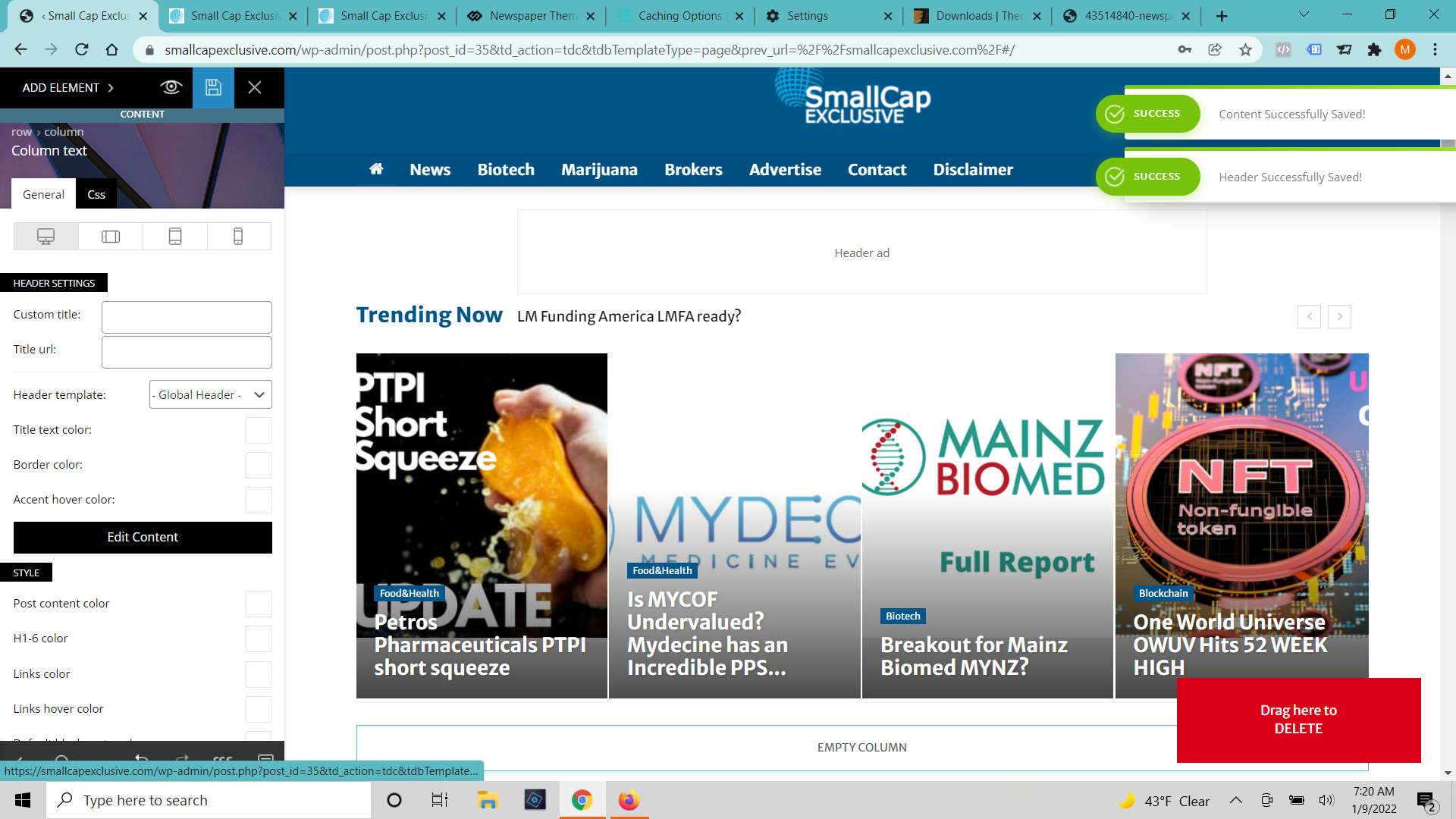
A few days ago our homepage started showing up out of sorts (built with tag div composer). I have edited it and got it looking correctly again (6 or 7 times). When I press save it says that the changes were successfully made but none of the changes show up. I’ve cleared cache on the browser and server. I’ve tried incognito windows and different browsers. I’ve waited 12 hours. (https://smallcapexclusive.com/wp-content/uploads/2022/01/Tag-Div-Saved-Changes.png)
When I click on the page to edit with TD Composer again It shows the old version of the page and gives an error message that the model doesn’t match the content and to press the undo button. (https://smallcapexclusive.com/wp-content/uploads/2022/01/Tag-Div-Saved-Changes.png) When I press the undo button it fixes the margins a bit but not any of the content and it still won’t save.
 knthdgd
Hi tagDiv.
Maybe this is not a part of your support, I don’t know. Maybe it is a quick fix anyway that you can help me with.
Take a look here: https://farsoavis.kennethhedegaard.com/
I need the header menu (the colored tabs) to be 100% width and responsive. So the tabs have to stretch from side to side.
I think I have tried everything in your composer, without luck 🙁 But it seems like a pretty default feature, right?
Thank you.
 gctbowls
I purchased Newspaper theme and then connected it to my website on my personal computer server so I could work on creating a newly updated website in the background without having the current website down.
Now that I am trying to put it onto the server to replace the old website, the theme works fine but tagDIV composer throws up an error 500 everytime I try to install it.
I even tried putting it on a new WordPress database with no other plugins etc and it still won’t install.
I am hoping that the theme isn’t broken and this can be fixed, I refuse to purchase the theme again as it is the same website as it was purchased for. This has been doing my head in for days now, everything is there but without tagDIV composer, my theme doesn’t work.
 Lane18
When using the TagDiv Composer to either add an “Add Box” or “Title with Text” element, the elements in the Composer display on all posts, instead of ONLY the one post. How can the elements display on only one post? Thank you.
 ChandlerBing1985
Hi,
I have created the mobile homepage from tagdiv composer (site http://www.contra-ataque.it) but if I log in from mobile it always shows the basic version of the mobile theme. How can I disable this to make the homepage created with tagdiv composer appear?
 k.nagesh
Hi,
I made a page through visual composer, and tagged it to show in menu to make it large menu. But hover effect on it is not working where links for navigation is active. How to resolve the same.
 Mercurial
Hi guys, there’s a bug in the latest update.
All the tabs in Search Appearence from Yoast SEO are not accessible anymore. They appear only if we turn off Tag Div Composer.
Any quick fix for this?
Best.
 Manha Com
Hello. I need to use Public Sans from Google Fonts (https://fonts.google.com/specimen/Public+Sans) but I can’t find it in the tagDiv Composer selector (https://imgur.com/a/ZsZoepe). Can you enable it? It is urgent. I have already imported other custom fonts in the 5 spaces given in the theme panel and I can’t import more (https://imgur.com/a/78BXw6y).
Anamaria Hello,
Please check this topic https://forum.tagdiv.com/topic/how-to-show-hidden-row-in-td-composer/
Thank you!
 roberto.srelz
 Thank you Anamaria, we already tried what you proposed and verified Cloudflare configuration, to no avail – even with TagDiv plugins only and correct Cloudflare configuration, we cannot make any edit or create a new page and then edit it with TagDiv composer. This is a real issue for us, since we continually need to make small changes to our sites. We also tried disabling the protections. The only information we may add, is that the problem started suddenly in the moment we tried to modify the Social channel links on one of your Cloud templates that we downloaded and included in a new test page for us. Could you offer additional support? (of course we can provide all the access links and of course we can pay this support)
 kanal1
 Hi again Calin.
The thing is, we are not using Tag Div Composer but Visual Composer in our theme.
Thanks, Thomas.
 sandeepbarouli
 Hi,
Thank you for your reply!
I tried all the ways you suggest but problem is still there.
When I activate tagDiv Composer, tagDiv Mobile Theme and AMP (that included in theme package) plugin together my mobile site content is showing blank. I have already try to set amp URL /?amp but website mobile version not redirected to /?amp. I have enabled the option Redirect mobile version to AMP.
Please Suggest
Thank you!
Anamaria Hello,
Please do a test using only tagDiv plugins -> https://i.imgur.com/j8q38If.png and see if you can make changes.
Also, please check the console when you try to save the changes made with tagDiv Composer maybe is possible to be from the firewall or security module which blocks the admin-ajax.php request, which usually displays a 403 or 404 error.
If you don’t use a security plugin, please ask your host about this, maybe you have a security module that blocks this.
If you use a plugin like Wordfence please set it in learning mode.
Also, if you are using Cloudflare, please make sure that is set as in our guide https://forum.tagdiv.com/cloudflare-cdn/, you need to disable the Rocket Loader.
Thank you!
Anamaria Hello,
I don’t understand where it says tagDiv Composer is not recommended, because tagDiv Composer is the main plugin.
Also, are you using another plugin for an amp or the one that is included in the theme package?
The amp implementation in our theme requires the ? to can check the amp version -> https://i.imgur.com/oWkUsVC.png -> https://i.imgur.com/sN5kHdZ.png -> https://forum.tagdiv.com/tagdiv-amp-plugin-tutorial/ so from the link provided above, you don’t have to set the amp like in our documentation.
Also, you can check this article https://forum.tagdiv.com/the-mobile-theme/
Thank you!
Anamaria Hello,
You need to use the smart list from tagDiv Composer, inside Single Post Content ->
https://i.imgur.com/dbipPWQ.png according to the documentation https://forum.tagdiv.com/smart-lists/
Also, you don’t need to use the classic editor, you can use the Gutenberg editor, which is the default editor for WordPress and select/add the element classic https://i.imgur.com/9sWuCtW.png
Thank you!
 mydigitalland
Hello,
I have checked the website in the mobile AMP version but it shows the wp_booster error in the tagDiv Composer plugin.
Please review a screenshot: https://i.imgur.com/I2AqHi1.png
So Can you please check this and help me to fix this issue.
Here is the page link: https://rojnikhabar.in/
Thank
roberto.srelzHello, the site with the problem is goriziaoggi.news. We suddenly have an issue with tagDiv Composer. Composer was working fine, also after update to latest version (we successfully edited and saved the modified pages), but now, without apparent reason and without any error message, it doesn’t save any changes anymore. We tested also creating new pages, with different browser version, and also completely cleared our caches – no success, if we add any element or try to modify an existing one, it loops forever without saving the change. We already tried to disable all other plugins. We have other sites, with the identical Newspaper version, and they are working fine. Could you please help? (we can provide full access).
Anamaria Hello,
So, if the template is the header template then you need to replace the images manually with tagDiv Composer because the header template is encoded -> https://i.imgur.com/Z4jClB1.png
Thank you!
Calin Hi,
I thin that the message you gat is do to others plugins -> https://i.imgur.com/Y5kNvx6.png -> https://i.imgur.com/q2dNVNd.png
The theme is using shortcode to build pages and cloud templates, and that it is way the ads are set in the page “code”, but is no need to delete them like you did, you need to edit the page using tagDiv Composer, and use the right click to delete an element -> https://i.imgur.com/qrwv64j.png also the ad box can be configurate using the tagDiv Composer -> https://forum.tagdiv.com/ads-adsense-overview/ so if you do like this, the ads will disappear from that page/templates.
If you tied like this and the ads were not displayed in composer can be because of some cache (this was the most case that we saw). I also just checked again on my install and for me everything is working normally and the ads are display in tagDiv Composer -> https://i.imgur.com/BlttnFl.jpg -> https://i.imgur.com/aStpTb9.jpg so maybe, if is not a cache it can be a browser extension or from an extra plugin. Please try it only with tagDiv plugins enabled. From what I can see here you use some extra plugins https://www.screencast.com/t/wnMUVFYR44 and some of them are even change the default WordPress.
To remove the ads from the pre-build website that you have installed, you’ll need to check each cloud template and page that was added when you install the pre-build website -> https://i.imgur.com/KYiGTic.png
If the problem persist, we can take a look at it, for this please send us an email at contact@tagdiv.com provide wp-admin access and include the link of this topic. We’ll check it as soon as possible.
Thank you!