
- NewsmagtagDiv Composer Tutorial
- NewsmagHow to use the Visual Composer plugin
- NewsmagHow to update a plugin
- NewsmagWhat’s included in Newsmag theme package
- NewsmagRequirements for Newsmag
- NewsmagInstall via WordPress
- NewsmagInstall via FTP
- NewsmagBlock settings tutorial
- NewsmagtagDiv Social Counter tutorial
- NewsmagHow to update the WPBakery plugin
- NewsmagPage Menu
- NewsmagCustom ad spots
- NewsmagSmart sidebar
- NewsmagVideo playlist
- NewsmagPage templates
- NewsmagHomepage – How to build and set it
 Arturooooooo
Hello Team,
I am having issues applying category templates to my pages using tagDiv Composer on my website https://www.anglertest.de
As a starting point I used the aniglobe category template renamed it to koedertest-category and adjusted it to my needs but the changes are not beeing applied.
1) There is no way for me to switch the category in the composer to preview it in the composer
2) When visiting a category the “edit in tagDiv Composer” button is not visible
3) Not a single category template is ever beeing applied to categories. I have set the template as global without success. Changing the template on-the-fly from the frontend did not work. Setting the template from the theme panel category settings did not work either.
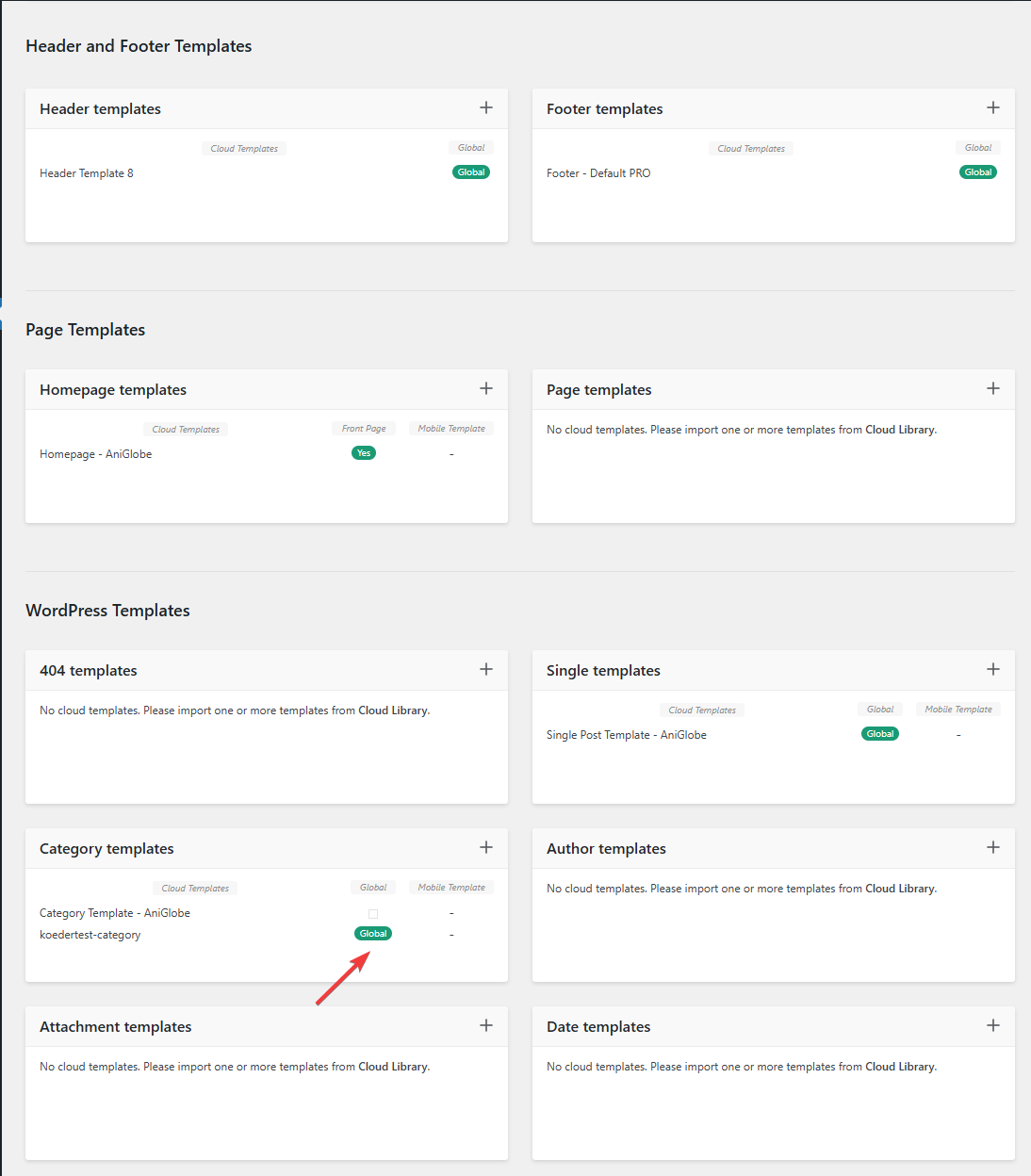
In this picture you can see that my template should be assigned globally
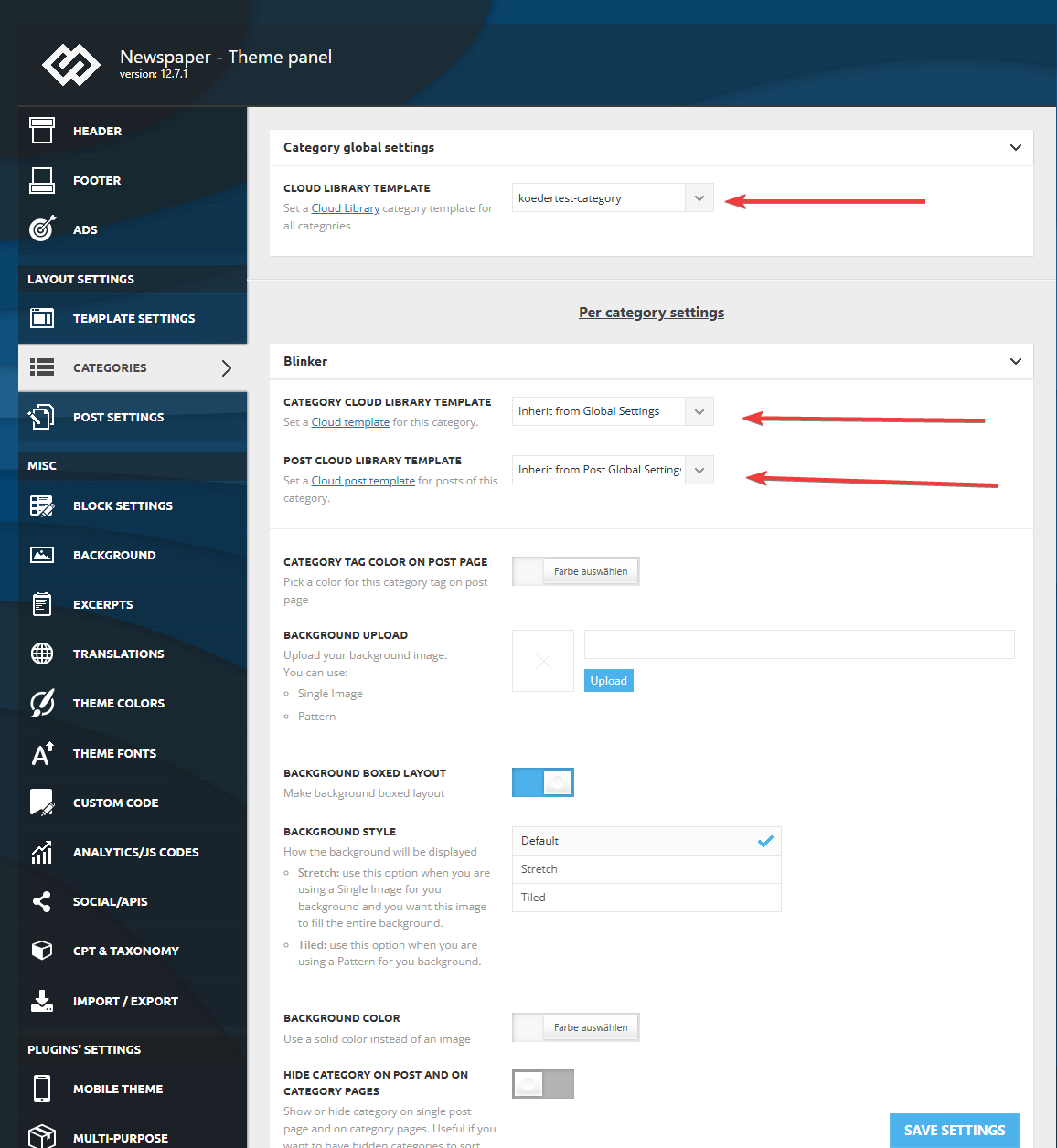
I made sure that in the theme panel under categories that the same template is globally set and checked every category underneath to inherit from global settings.
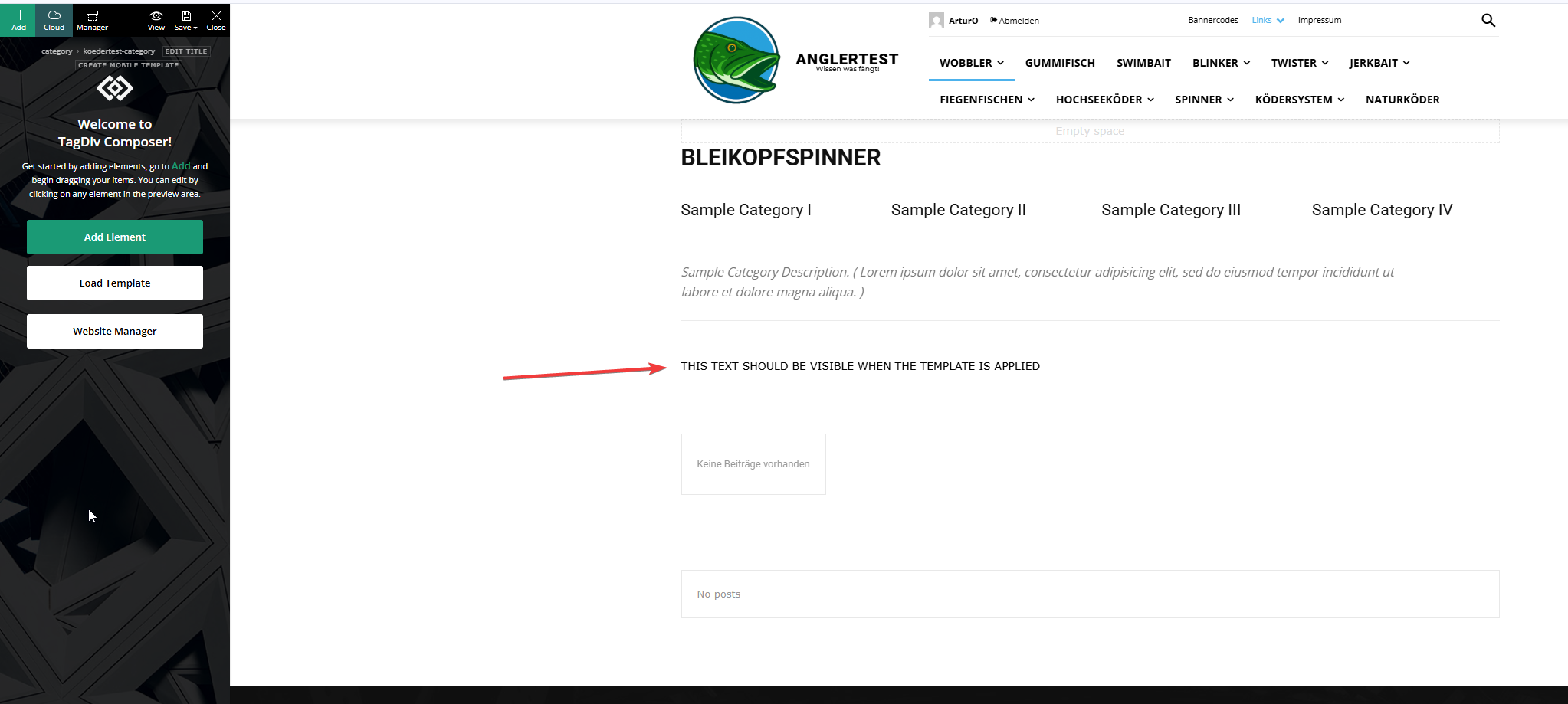
This is the actual template and I added an html block to verify if the template was assigned.
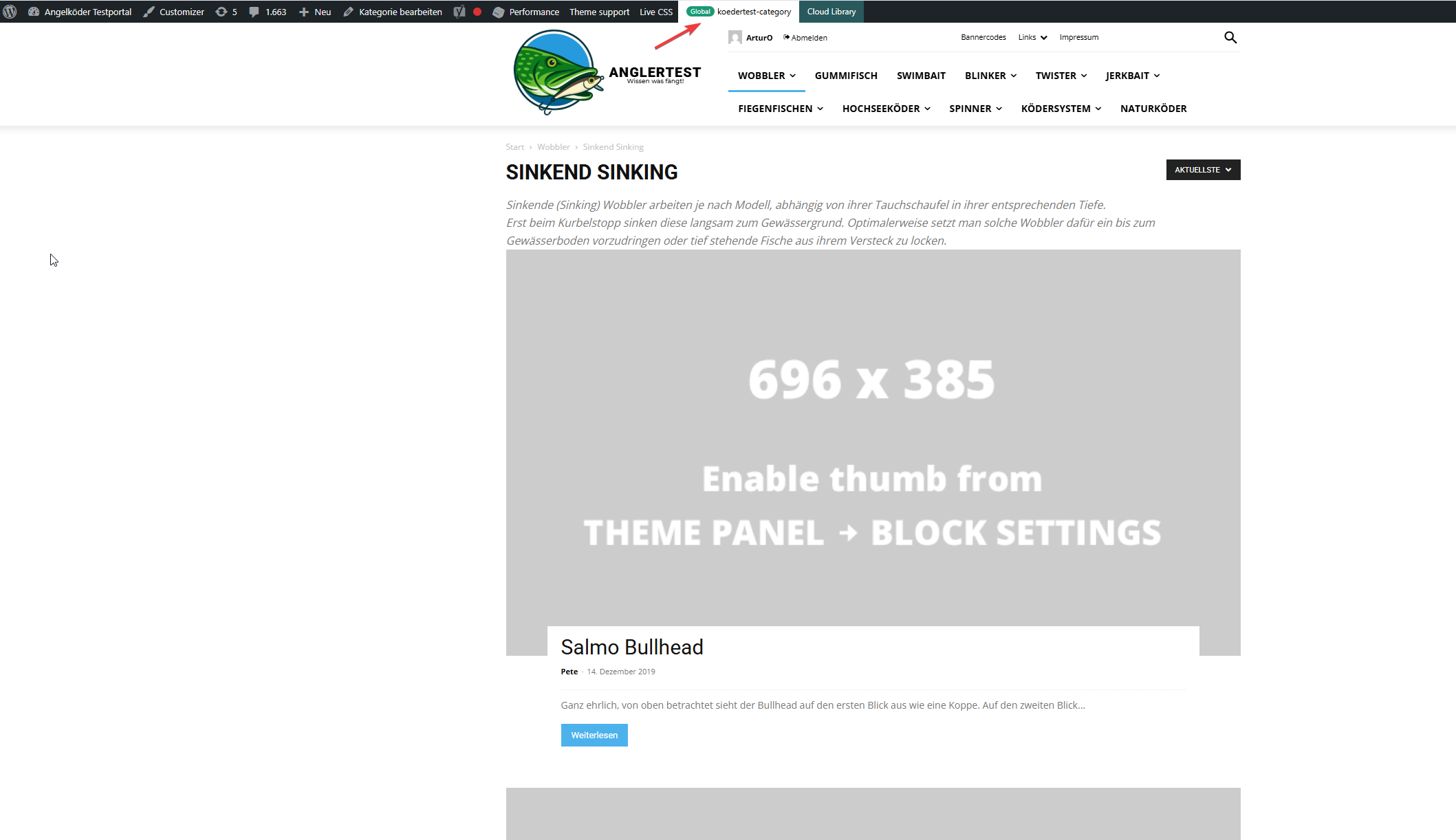
In this picture you can see that the template for the “wobbler” category looks completely different.
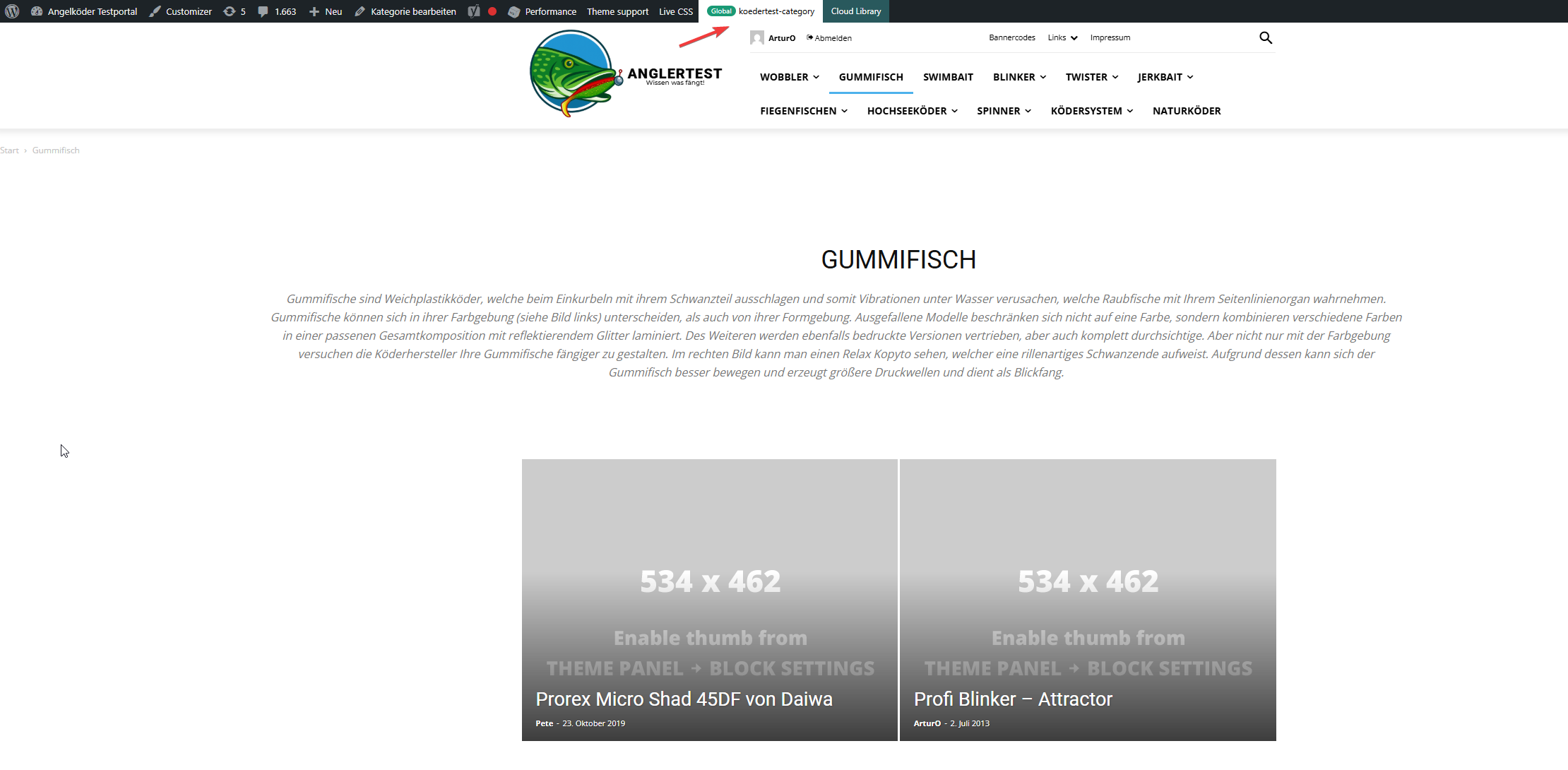
Strange enough, the template for the “gummifisch” category looks slightly different with the same theme applied (see arrow up top), the text I inserted to check was nowhere to be found (not even in source code)
In the very beginning I installed the aniglobe templates intially without demo content, but changed up the templates one-by-one. I did not find any option to disable or uninstall the prebuild website.
In my endless tries with different configurations I was not able to aplly the template, but I found something interesting which might explain the bugs I encounter.
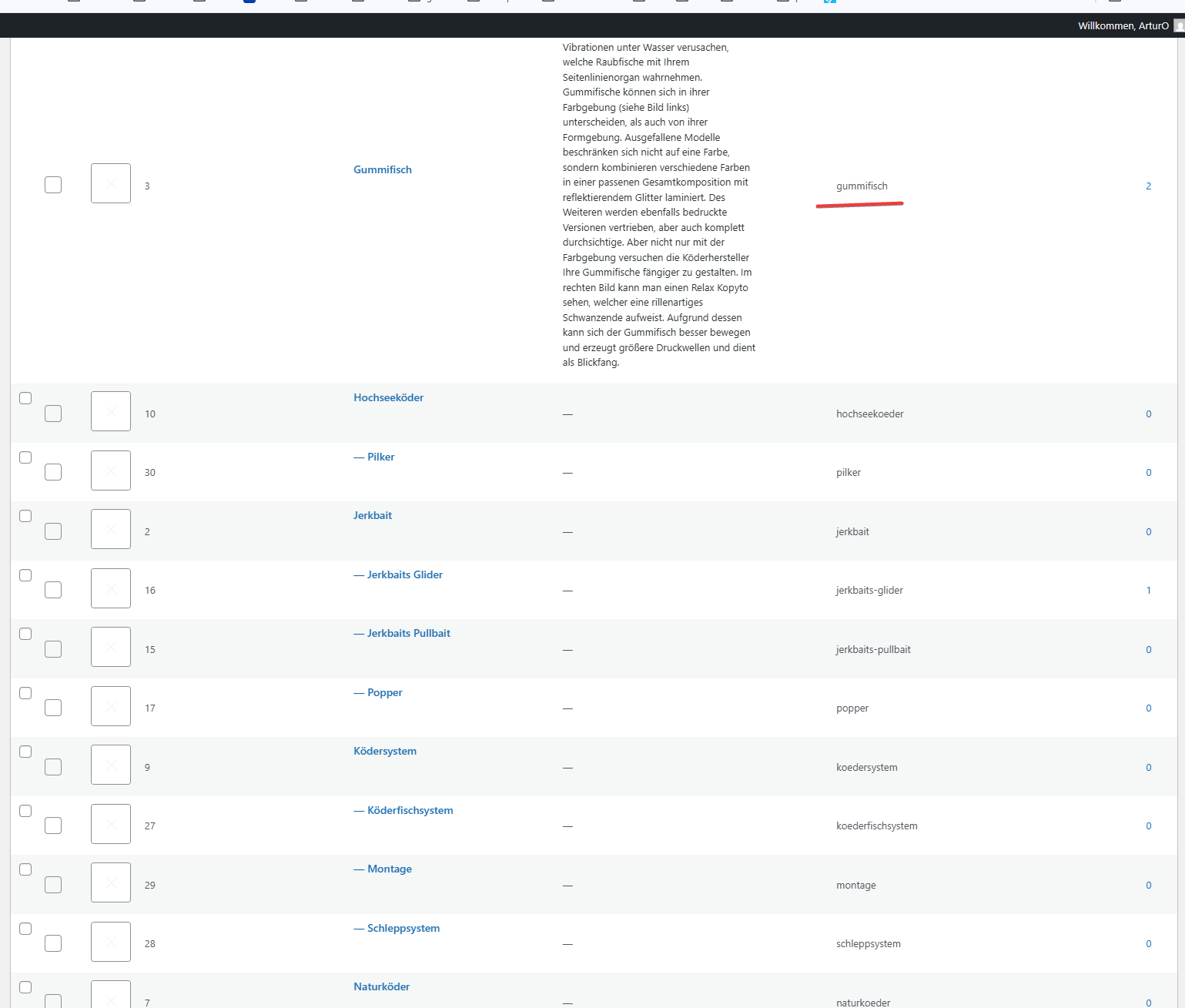
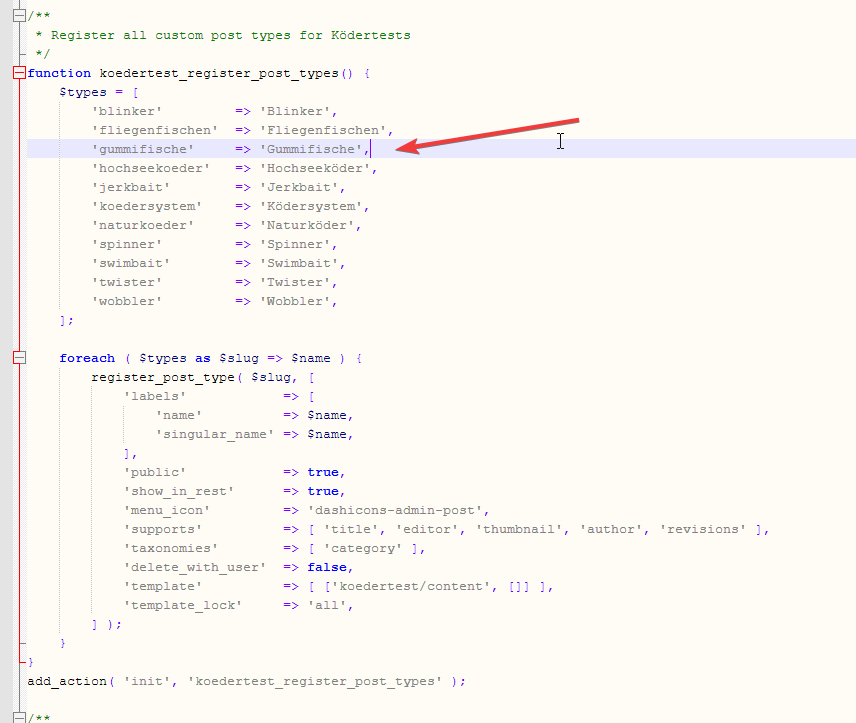
In those pictures you can see the categories I use and the post_types I register. The post_types are using those categories and I make sure that every post of those post_types has at least one category assigned. All post_types share the same categories (native category from wordpress).
The permalink structure is setup like /%category%/%postname%.html for every post_type. Category basis is set to “angelkoeder”.
Every category is named after a post_type. Nested categories are not named after post_types.
The only exception is the category “gummifisch” where post_type “gummifische” articles are categorized under. I might have missed the “e” when I set this up in 2013.
Somehow this category looks different as you can see in the above screenshot.
Furthermore I discovered that, when I change the template in the theme panel to “no template” (but do not save those settings) it reveals the settings I made previously with “Module 14” as article display view. You can see in the screenshot above for the “wobbler” category that this is the applied design even though the bar on top suggests my custom “kodertest-category” template is supposed to be applied.
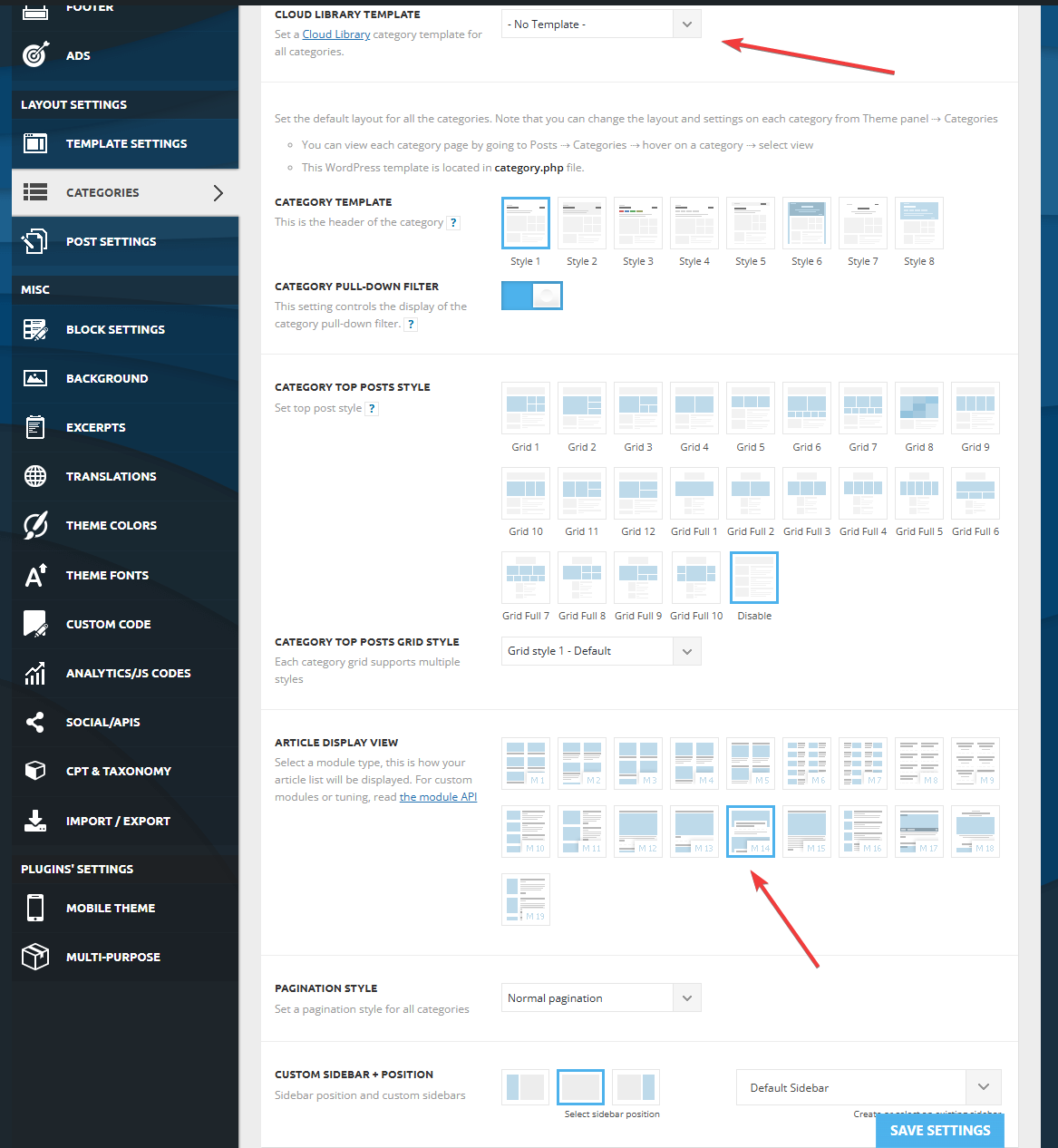
Any help is highly appreciated. If needed I can provide further screenshots.
Thank you for your help.
 Calin
Calin Hi,
The zones refer to the header/content/footer zone.
Most of the time, the problem is from a shortcode that is not compatible with our theme; therefore, after you set it with tagDiv Composer and save the page, the next time you try to edit it, you’ll get that error. The simplest and fastest way to resolve it is to use a page revision – https://wordpress.com/support/page-post-revisions/
Also, please check our guide from here at point 5 -> https://forum.tagdiv.com/tagdiv-composer-not-working/ also after trying the steps from our guide you do not get any good results, you can send us an email at contact@tagdiv.com and provide wp-admin login, as well as cPanel and credentials. We will take a look. Include a link to this topic in the email.
Thank you!
 Quorum SDL
Hi tagDiv team,
I’m facing a critical issue with the tagDiv Composer when trying to edit the homepage of my website, which uses the Newspaper theme version 12.7.1. The page was built entirely with Composer, but I can no longer open it in the visual editor.
The following error appears:
Error at zones: 6(models) : 5(dom). The model does not match the content. Current state has involved an issue. You could try an UNDO operation (CTRL+Z / CTRL+SHIFT+Z)
The page is displayed correctly on the front end — the problem occurs only when attempting to edit it in Composer.
Here’s what I’ve tried so far:
Cleared browser and site cache;
Deactivated and reactivated the Composer plugin;
Updated all plugins and the theme;
Manually checked and fixed duplicate el_ids and empty zones via the Classic Editor.
Even after cleaning up the code, the Composer still won’t load the homepage.
I’d appreciate help with the following:
What exactly causes this error in the Composer?
Is there a safe way to rebuild or re-sync the DOM model?
Is it possible to recover editing capabilities without recreating the page from scratch?
Thanks in advance for any guidance.
Affected page URL: https://ensaiodesi.com.br/
Calin Hi,
The code cna be accessed from live css https://i.imgur.com/wZ18rr5.png and from the Tagdiv Composer from css zone – https://i.imgur.com/Wa4uWOS.png
Thank you!
Calin Hi,
By default, the H1 is set on logo, if it is a cloudyou can use tagDiv Composer to disabnle the h1 (it is need to be done on all logo elements from bith mobile and desktop viewport) https://i.imgur.com/0BjZdOj.png, but when you get on an article the h1 will be set on article title, for pages to remove the h1 from logo you’ll need to set the page template on pagebuilder + page title -> https://i.imgur.com/ElmwJQR.png then the H1 will be set on page title. The H1 is an important element for SEO and it should be present on the page.
Thank you!
Calin Hi,
Hello,
Thanks for the clarification, I really didn’t understand how it works correctly.
If you assume that the situation may be from the template on the article, I suggest you do a test using the default template – https://i.imgur.com/My6fwMe.png https://i.imgur.com/mJP7w3i.png also if it were possible to test on a staging it would reduce the search area to detect what generates these problems. There it could be tested strictly with the theme plugins and possibly only with tagDiv Composer to see if it only works correctly with it.
Thank you!
Calin Hi GulfAiMagazine,
You need to use tagDiv Composer and from the manager yo need to go in settings and just n enable/disable the hidden elements option – https://i.imgur.com/Nx4qSW3.png
Thank you!
 simchris
 I’m not having this issue on our sites.
You might try
a) via FTP, delete theme folder; upload new copy (do not over write old)
b) delete TD composer plugin; upload new copy (do not overwrite old)
Login and make sure both activated. Test a page edit.
If using something like Pagespeed that compresses js files, consider disabling to debug.
(I don’t work here.)
 tafieb
My website based on the Newspaper theme is blank after Updating the theme plugins and I have tried disabling the plugins one by one by the solution is not working. The site is also spling raw code on the frontend when i deactivate the tagDiv Composer plugin.
Site displays a critical error message on the frontend with all the plugins activated
 Atithya
Hi I want to integrate getresponse form with Tag div Newsletter, but couldn’t find any integration except 3 settings mailchimp, feedburner and mailerlite. Can you help me in this case?
 vanniponziani
Hello, this is Carlo from the Altervista Hosting development team.
We identified that the website https://www.saluteperfetta.it/ and https://www.sportcultura.it hosted by us is having issues due to an incorrect usage of the hook the_post called by your plugin td-composer: in the file td-composer/includes/tdc_main.php on line 1174 your code calls the action the_post with just one argument, which is incorrect.
Starting from WordPress 4.1.0 (released in 2015) the action the_post always passes *two arguments*, please check also the official documentation https://developer.wordpress.org/reference/hooks/the_post/.
Could you please fix your code in order to always call the the_post action in a correct way? This would not only fix the incompatibility issue with our service but would also increase compatiblity with any other plugin or theme that expects to receive both arguments in the_post.
If you need more details, please contact us at basic_feedback@altervista.it
Thanks,
Carlo
Calin Hi,
This can be edited using tagDiv Composer. Select the mobile viewport and you can revert the row columns order – https://i.imgur.com/D1ottlk.png https://i.imgur.com/yZGWyLf.png Also, you can edit the column on each viewport. Currently, I think that on mobile, the width set for the desktop version is used.
Thank you!
 News Moto
 Hello Calin,
I have successfully installed td-Composer, but td-Couldliberyfix has declined (it indicates no plugins were found). So the problem is still there.
Kindly note that I have the latest version 12.7.1
Calin Hi,
1. With the Newspaper builder theme, you can create pages and cloud templates, but you can not create templates for pages. You create a page how you like it and if you want to use that one as a template you just duplicate the page and change in it the elements you want to be changed.
2. The “Single Post Author” element is used on post templates and this will be used as template element for authors on single post template https://i.imgur.com/BhZHHbJ.png https://i.imgur.com/ZfSV6nD.png
3. The colors can be changed using tagDiv Composer check the Manager and global colors – https://i.imgur.com/lwb7sNv.png
Thank you!
Calin Hi,
It will need to use the tagDiv Composer to edit the header on mobile view port – https://i.imgur.com/QR5Bcay.png https://www.youtube.com/watch?v=HXQQygkCCJo&list=PL6CsDkMaejhoHETIWoxnRB4zefz8L8PYg&index=11
Calin HI,
If you are using a single post template, then you need to use tagDiv Composer, edit the template and select the post content, then adjust the CSS size – https://i.imgur.com/EJyPnO3.png – https://i.imgur.com/1fdbsc5.png
Thank you!
Calin Hi,
Please make a full backup of your website and update the theme to the latest version, Newspaper v21.7.1 – https://i.imgur.com/qoKwDsn.png Composer version Version 5.4.1
Thank you!
 Greg
GregSubject: Mobile menu shows old background image + social icons, cannot find them in Composer
Hi tagDiv team,
I’m using your theme with the “Shop Audio” template and working with tagDiv Composer.
I’m having an issue with the mobile (hamburger) menu:
When I open the menu, it shows an old background image (with speakers) I didn’t add – and I can’t find it in the Composer to remove or change it.
Also, social media icons (Facebook, Instagram, etc.) appear at the top, but I can’t find them in any row/column in the Composer either.
I double-checked:
The correct header & mobile templates are assigned.
The elements are not visible in the structure panel.
I had to hide them using custom CSS, which works but isn’t ideal.
❓Question:
Where exactly can I edit or remove the background image and the social icons in the mobile menu, when they are not visible inside the Composer?
Thanks for your support and for providing such a great theme!
Best regards,
Greg


 jjgoi
jjgoiHi,
I recently bought the Newspaper template and used the Forest Beat theme and found the experience to be so extremely difficult-to-use and cumbersome.
It doesn’t come with a page template – which is fine – but clearly there’s no way for me to even create a tagdiv template at all that my non-post pages can use. A hacky way I did was to import any random template into “Page”, and copy-pasted the Base64-encoded source.
I went through your knowledgebase and there doesn’t seem to be any way to figure out how this can be used?
1. How do you even add your own template such that it can be used by pages? I only just need a simple page layout but seems to be an impossible task.
2. If I want to customise the “Single Post Author” component on a page, I noted the default Forest Beat overrides font-size as 16px, somehow I cannot replicate that via the tagDiv composer?
3. I wanted to change the theme colours of Forest Beat, from the theme colours tab, I can only change the primary accent and a bunch of other colours, but I cannot find these:
--light-green-forest-beat – where can I modify this?
The entire tbd-global-colors block (via view-source) is:
--mm-custom-color-4:#C2A25D;--mm-custom-color-5:#F7F9F9;--mm-custom-color-1:#053426;--mm-custom-color-2:#B79259;--mm-custom-color-3:#79847E;--accent-color:#fff;--accent-forest-beat:#5c6b28;--dark-green-forest-beat:#1D2110;--white-forest-beat:#FFFFFF;--transparent-white-forest-beat:rgba(255,255,255,0.25);--transparent-white-2-forest-beat:rgba(255,255,255,0.6);--transparent-white-3-forest-beat:rgba(255,255,255,0.7);--transparent-dark-green-forest-beat:rgba(29,33,16,0.8);--transparent-dark-green-2-forest-beat:rgba(29,33,16,0.25);--light-green-forest-beat:#F3F7EE;--transparent-dark-green-3-forest-beat:rgba(29,33,16,0.65)
Is the experience intended to be like that?
 Crw19
Crw19Hello,
The featured image on the single post template 12 will not resize correctly for mobile. I have changed every single option in the composer tab, custom CSS, and the image will not move or do anything.
What do I need to change to get the image to respond to mobile size?
Thanks
 giulionicolai
Hello, I’m using the Newspaper theme with the default Gutenberg block editor. In the editor, all H2 and H3 headings appear correctly styled and sized. However, when viewing the live post, those same headings are rendered extremely small—almost unreadable—on all devices and articles.
I haven’t made any CSS customizations or used a child theme. The site is running WP Super Cache, but clearing the cache doesn’t fix the issue. The problem seems to be related to the theme’s default CSS or its compatibility with Gutenberg heading blocks.
How can I restore proper heading sizes on the frontend without switching to tagDiv Composer? Any help would be appreciated!


 ruilavrador
WP Toolkit is reporting a high risk security vulnerability in TagDiv Composer on my website since 03.04.2025 throught Patchstack and Wordfence.
Current version is still on 5.2 on my current newspaper theme. Is this issue going to be addressed soon?

There is also a medium risk vulnerability report realted to Cross-Site Scripting.
Thanks in advance for the feedback.
Calin Hi,
In the past, similar issues have occurred when images were displayed using code and one of the HTML elements was not properly closed.
Typically, banners can be added using the Ad Box element in tagDiv Composer. Just select the Image tab, upload your image, and set the link.
Thank you!
Calin Hi,
Please replace the current tagdiv composer plugin and tagdiv option plugin with those from below:
– https://cdn.tagdiv.com/wp-content/uploads/2025/05/td-composer.zip
– https://cdn.tagdiv.com/wp-content/uploads/2025/06/td-cloud-libraryfix.zip
I hope this will resolve the problem.
Thank you!
Calin Hi,
If you are referring to this one https://i.imgur.com/pWZHwaM.png, this situation is because you use the logo element and the logo element uses a link on it, if a custom link is set, then it will go to that link, if no link is added, then it will link to the homepage. What you should do is to replace the logo element with an image element using tagDiv Composer.
Thank you!



