plotwit-team
Hello, I am new to newspaper theme. should i use tagdiv composer or Gutenberg to edit posts?
I tried with tagdiv composer but getting error
Error at rows: 3(models) : 2(dom). The model does not match the content Current state has involved an issue. You could try an UNDO operation (CTRL+Z / CTRL+SHIFT+Z)
Please Help
 vunt
vuntHello Support,
I’m currently using the Newspaper theme and noticed that view counts are working perfectly for posts — the popular post widget and view counters display correctly.
However, I have a special page created using tagDiv Composer that is expected to receive a lot of traffic. I would like to track how many views this specific page receives, similarly to how post views are tracked.
I tried using custom shortcodes to display view counts, but realized that the view count may not be recorded for page post types. Could you please clarify:
Does the Newspaper theme support view count tracking for Pages, or is it limited to Posts?
If it’s not supported by default, is there a recommended way (using theme hooks or filters) to enable view counting for Pages built with tagDiv Composer?
Is there a shortcode or function available in td_util or elsewhere to fetch view count for a page by slug or ID?
Thanks in advance for your help.
Best regards,
Vunt
 zaildaar
 here is the example – https://prnt.sc/s-bmXLArzrT3
first one is created with tagdiv and second is with raw html.
can we create table shown in rawhtml with tagdiv composer ?
 dimitrisv
Hello,
In our site we would like to allow non admins (shop managers and editors) to be able to change the pages using tagdiv composer.
Right now they have an inactive message, so they cannot edit the pages.
How can we enable them?
Thank you
 santiagocalaforra
 Hi Calin,
Thanks again for your reply!
I tried using the method you shared from StackExchange — I added this line to my child theme’s functions.php:
php
Copiar
Editar
add_shortcode( ‘output_post_excerpt’, ‘get_the_excerpt’ );
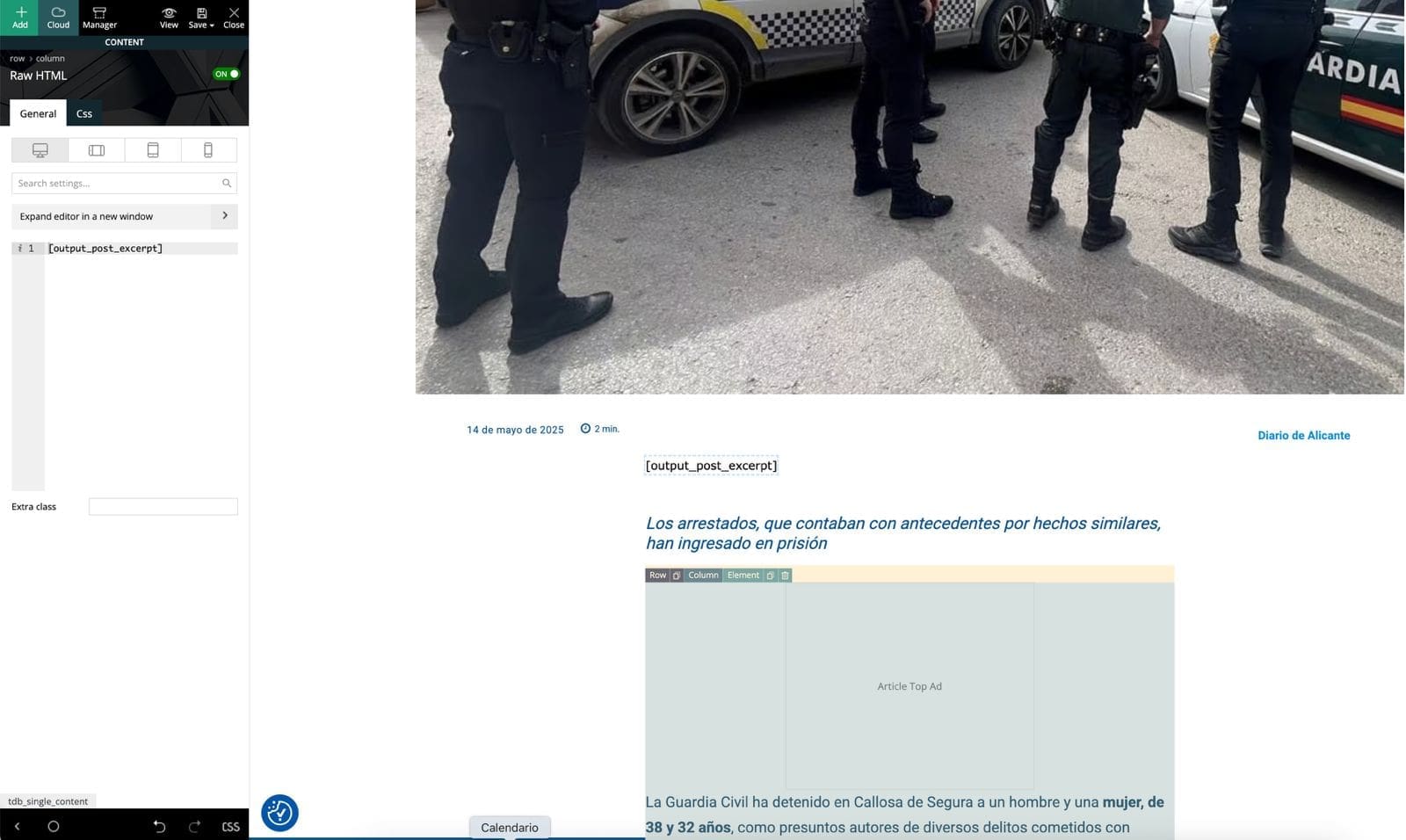
Then I edited my Single Post Cloud Template in tagDiv Composer, added a Text block, and inserted [output_post_excerpt].
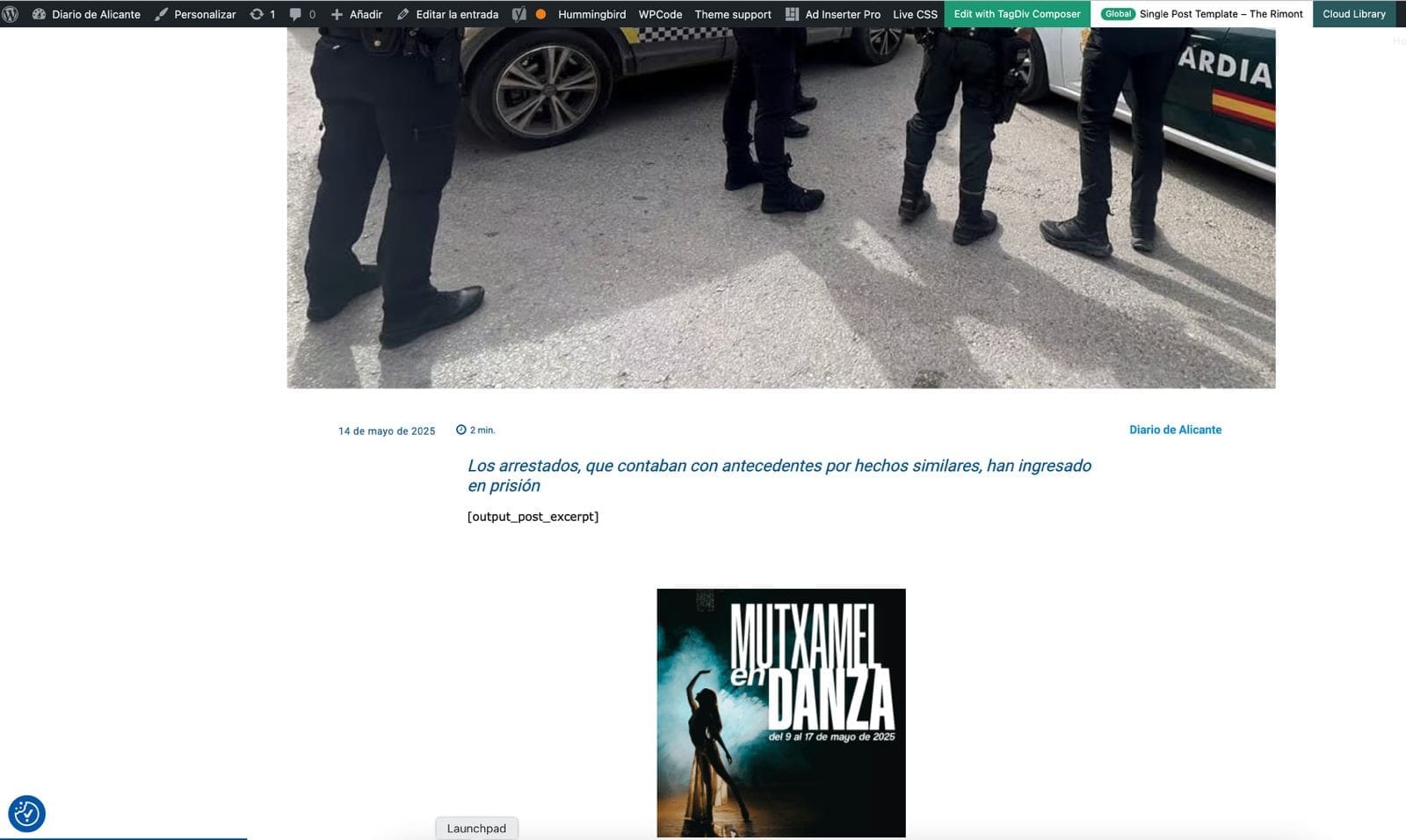
Unfortunately, the shortcode doesn’t render anything on the frontend. It just leaves a blank space where the excerpt should be. I’ve cleared all cache and reloaded everything, but still no result.
Is it possible that tagDiv Composer blocks don’t render shortcodes like this, or do I need a different type of block?
Any ideas or workaround would be greatly appreciated.
https://diariodealicante.net/wp-content/uploads/2025/05/editor.jpeg
https://diariodealicante.net/wp-content/uploads/2025/05/single.jpeg
Thanks!
 Avi1368
For some reason half the TD Composer screen is hidden in grey. Is there any option to remove it or is it a bug?
 sjwmobile
Hi there,
My hosting company has raised concerns that the Tagdiv Composer plugin on my website (https://www.hotelspeak.com) is being exploited via a vulnerability and this is causing a very high load on their servers. Multiple connections are causing this – I’ve copy/pasted an example at the foot of this support ticket, for reference.
It appears as though this is a known issue and I see that it was supposed to have been resolved in version 5.4 (see https://www.wordfence.com/threat-intel/vulnerabilities/wordpress-plugins/td-composer/tagdiv-composer-53-unauthenticated-arbitrary-php-object-instantiation) but I’m running 5.4 and apparently there are still issues.
Their solution is to disable the Tagdiv Composer plugin, but this is essential to the site and without it, the site doesn’t render correctly (just a lot of short codes).
Is this a known issue with the Tagdiv Composer plugin and will it be resolved in a future update? I really don’t want to have to a) move away from Newspaper (as it’s a great theme) or b) rebuild the site using a different page builder (assuming that’s even possibly within Newspaper).
Thanks
89.248.172.183 – – [13/May/2025:10:15:54 +0100] “POST /wp-json/tdw/save_css HTTP/1.1” 404 114 “-” “curl/7.68.0”
89.248.172.183 – – [13/May/2025:10:15:53 +0100] “POST /wp-json/tdw/save_css HTTP/1.1” 404 114 “-” “curl/7.68.0”
89.248.172.183 – – [13/May/2025:10:15:52 +0100] “POST /wp-json/tdw/save_css HTTP/1.1” 404 114 “-” “curl/7.68.0”
89.248.172.183 – – [13/May/2025:10:15:54 +0100] “POST /wp-json/tdw/save_css HTTP/1.1” 404 114 “-” “curl/7.68.0”
89.248.172.183 – – [13/May/2025:10:15:52 +0100] “POST /wp-json/tdw/save_css HTTP/1.1” 404 114 “-” “curl/7.68.0”
89.248.172.183 – – [13/May/2025:10:15:53 +0100] “POST /wp-json/tdw/save_css HTTP/1.1” 404 114 “-” “curl/7.68.0”
89.248.172.183 – – [13/May/2025:10:15:54 +0100] “POST /wp-json/tdw/save_css HTTP/1.1” 404 114 “-” “curl/7.68.0”
89.248.172.183 – – [13/May/2025:10:15:55 +0100] “POST /wp-json/tdw/save_css HTTP/1.1” 404 114 “-” “curl/7.68.0”
89.248.172.183 – – [13/May/2025:10:15:55 +0100] “POST /wp-json/tdw/save_css HTTP/1.1” 404 114 “-” “curl/7.68.0”
89.248.172.183 – – [13/May/2025:10:15:56 +0100] “POST /wp-json/tdw/save_css HTTP/1.1” 404 114 “-” “curl/7.68.0”
89.248.172.183 – – [13/May/2025:10:15:56 +0100] “POST /wp-json/tdw/save_css HTTP/1.1” 404 114 “-” “curl/7.68.0”
89.248.172.183 – – [13/May/2025:10:15:57 +0100] “POST /wp-json/tdw/save_css HTTP/1.1” 404 114 “-” “curl/7.68.0”
89.248.172.183 – – [13/May/2025:10:15:57 +0100] “POST /wp-json/tdw/save_css HTTP/1.1” 404 114 “-” “curl/7.68.0”
89.248.172.183 – – [13/May/2025:10:15:56 +0100] “POST /wp-json/tdw/save_css HTTP/1.1” 404 114 “-” “curl/7.68.0”
89.248.172.183 – – [13/May/2025:10:15:56 +0100] “POST /wp-json/tdw/save_css HTTP/1.1” 404 114 “-” “curl/7.68.0”
89.248.172.183 – – [13/May/2025:10:15:57 +0100] “POST /wp-json/tdw/save_css HTTP/1.1” 404 114 “-” “curl/7.68.0”
89.248.172.183 – – [13/May/2025:10:15:58 +0100] “POST /wp-json/tdw/save_css HTTP/1.1” 404 114 “-” “curl/7.68.0”
89.248.172.183 – – [13/May/2025:10:15:58 +0100] “POST /wp-json/tdw/save_css HTTP/1.1” 404 114 “-” “curl/7.68.0”
89.248.172.183 – – [13/May/2025:10:15:59 +0100] “POST /wp-json/tdw/save_css HTTP/1.1” 404 114 “-” “curl/7.68.0”
 vimal.roy
 Hello team,
Thank you so much for the quick response and for sharing the helpful screenshots. That’s exactly what I needed!
I’ll go ahead and try adding the reading time and progress bar using the tagDiv Composer as you suggested.
Appreciate your support!
Best regards,
Vimal
 olebm
olebmDear Support Team,
we are currently experiencing an issue with the Newspaper 12 theme (latest version) in a WordPress Multisite environment. On any post or page where the paywall is active, the burger menu also displays the paywall overlay. This is incorrect behavior — the navigation menu should remain accessible and unaffected by the paywall restriction, allowing users to browse the site structure even if the article content is restricted.
This issue is particularly noticeable on mobile devices and occurs consistently on all pages with active paywall protection. It seems that the paywall overlay wraps the entire page content, including the mobile navigation menu.
We are using the following setup:
• WordPress Multisite with separate instances per blog
• Theme: Newspaper 12
• Page Builder: tagDiv Composer (for all pages)
• Post Editor: Gutenberg (for all articles)
Relevant Plugins in use:
• tagDiv Cloud Library
• tagDiv Composer
• WooCommerce
• WooCommerce Memberships
• WooCommerce Subscriptions
• and others


 Calin
Calin Hi Vimal,
Yes, our them have those features you can add theme on single post template, go to a post and click on edit with tagDiv Composer – https://i.imgur.com/3tJy9LB.png then search for progress bar – https://i.imgur.com/aYgIgD7.png – https://i.imgur.com/01JaWdL.png and reading time -> https://i.imgur.com/QdAgj4k.png – https://i.imgur.com/d0QW8eH.png
Thank you!
zaildaar Mainly I want to create these on the homepage.
But I can’t find any element in TagDiv Composer that shows only post titles with bullet marks like shown in the screenshot.
 imkimc
We moved from WPDiscuz to Thrive Comments. Thrive comments depends on the default WordPress comments being used and replaces it with their own user interface. Because we’re using TagDiv composer, all of our pages are using the composer’s comment widget.
Is there any way to get Newspaper to use just plain WordPress comments and not use the widget from the composer?
Calin Hi,
I think that you are referring to this one – https://demo.tagdiv.com/newspaper_sports_pro/ what you should do is to edit the homepage using tagDiv Composer – https://i.imgur.com/dqjrNzF.jpeg select the row – https://i.imgur.com/t4tEST2.jpeg and check the css tab from there you can remove the image or replace it – https://i.imgur.com/9bA9OGs.jpeg
I hope this will help you!
 petar777
 Calin, I also wanted to ask something related to this. Sometimes when I update the theme it seems that the core plugins like the composer, social media counter etc get uninstalled and I have to install and activate them in order to fix this error.
Is this normal or?
If it isn’t normal – how can I troubleshoot why it happens?
Calin Hi,
If you are using a cloud header then you can adjust it with tagDiv Composer and you can achieve that type of menu – https://i.imgur.com/TU7vWn9.png
I hope this will help you!
Calin Hi,
If you want to use The Events Calendar to display events to tagDiv blocks – https://i.imgur.com/TJpL4uH.png you need to use tagDiv Composer, select the block and set the post type (in your case I think will be event or events).
Thank you!
Calin Hi,
This error can appear from more situations, we made a guide for most of the frequent -> https://forum.tagdiv.com/tagdiv-composer-not-working/
Also if is only on one specific page, then please use the revisions https://www.wpbeginner.com/beginners-guide/complete-guide-to-wordpress-post-revisions/ because it is possible that the problem to be from the last changed from that page/ cloud template.
If the problem persists, please take a full backup and provide a temporary wp-admin access.
Thank you!
Calin Hi,
The mentioned demo is using for mobile version a popup element that is displaying a page, if you want a simple menu, please use tagDiv Composer, select the mobile version and replace the popup element with mobile menu element (this will use one of the menus created in WordPress) -> https://i.imgur.com/moyiEMv.png – https://i.imgur.com/CwTQkAI.png
Thank you!
Calin Hi,
Unfortunately the link provide is not working for me – https://i.imgur.com/x3VCDYV.png but normally you should be able using tagDiv Composer and cloud template to achieve almost any layout, if you want you can check some of our demos – https://demo.tagdiv.com/select_demo/newspaper-prebuilt-websites/?demo-type=pro
Thank you!
Calin Hi,
1) For #3, Can you please let me know where did you saw that option? Also a screenshot can help (this is because it is possible to be a custom filed set with a plugin).
2) For #5, The theme has only the option to display the Author name, to add other 2 you can use the ACF plugin and and you can create 2 custom fields, one for Editors and one for Reviewer and display them on posts, then to display the on articles you can edit the single post template with tagDiv Composer and add the custom filed element where you want to have those elements and choose the source for them – https://i.imgur.com/mmSa6dm.jpeg – https://i.imgur.com/7KICfDS.jpeg – https://i.imgur.com/AvLTWZ5.png
3) For #8, please try as I mentioned above. Using that option will bring the categories you have like in the shown image.
Thank you!
Calin Hello,
Please let me know what you see in the social share section in the theme panel.
f you’re seeing only NAVER please make this adjustment in the tagDiv Composer plugin -> wp-content/plugins/td-composer/legacy/common/wp_booster/td_first_install.php
=> https://www.screencast.com/t/yO3iU8E5JhH
Then hit a save in the theme panel and then revert the code back to the original, this will make the social icons appear properly again -> https://forum.tagdiv.com/design-post-pages-using-default-templates/.
If you don’t have success you can send us an email at contact@tagdiv.com and provide
– wp-admin URL and credentials
– cPanel URL and credentials
We will fix the problem. Include a link to this topic in the email.
Let me know the results!
Thank you!
Calin Hi,
Based on your screenshot, some of the theme plugins appear to be disabled. Please go to Newspaper > Plugins and make sure that tagDiv Composer, tagDiv Cloud Library, and any other theme plugins you were using are installed and activated. This should resolve the issue.
Thank you!
Calin Hi Cloud Hosting,
1. The theme do not provide this option, therefore you’ll need to use an extra plugin to achieve multiple authors in a post, I hope our guide will help you – https://forum.tagdiv.com/adding-multiple-authors-articles/
2. Those can be added using the guide for ads inside post content – https://forum.tagdiv.com/article-ads/
3. If you are referring to the format, this can be set custom as you like – https://i.imgur.com/xOjndDn.jpeg
4. Use tagDiv Composer on single post element and add the reading element on the template – https://i.imgur.com/b6i9REe.jpeg – https://i.imgur.com/6dsjZ5L.jpeg
5. I believe this is best done directly in the post content at the end of start of the article, therefore will no need for extra options.
6. I believe this is related to an article list that can be done using the wordpress editor – https://www.google.com/search?q=lists+style+goutenberg+wordpress#fpstate=ive&vld=cid:c16f3c84,vid:AR4c3BhZr1M,st:0
7. There are a few options in the classic editor and a few in Gutenberg editor that can be used – https://wordpress.com/support/wordpress-editor/blocks/quote-block/
8. This is an option that can be set on theme blocks, for this you need to edit the page or the template using tagDiv Composer – select the block and check in filter tab the settings for ajax categories dropdown – https://i.imgur.com/k79i7H3.jpeg the results will be – https://i.imgur.com/aoOEyBa.jpeg
Thank you!
Calin Hi,
For that demo you need to check using tagDiv Composer – https://i.imgur.com/gZnuAOG.jpeg and look in all tabs from the ad box – https://i.imgur.com/kaIIbRD.jpeg – https://i.imgur.com/O7I0szC.jpeg normally on that demos are set some banners directly in the ad box element in all templates and pages.
Thank you!
Calin Hi,
The theme panel option for Sign in / join header will apply only if you are using an old header template style, if you are using a cloud header template, then you’ll need to add the element for Sign in / join using tagDiv Composer.
Thank you!