- TutorialsFrom WPBakery to tagDiv Composer
- TutorialsDefault Block Settings Guide
- TutorialsOffset Feature
- TutorialstagDiv Social Counter Tutorial
- TutorialsHow to Update the WPBakery Page Builder plugin
 Frydenborg
 How think I have found some of the answers here, I have found where to set text logo and mobile only shows the same as tagdiv composer if mobile theme is not enabled.
But in tagdiv composer, my title is “blank”, not there, and I cannot add it, any suggestions? Thanks.
 Vlad S
 Hello !
You will have to first start looking for a plugin conflict. please deactivate ALL plugins except tagDiv ones, also if you are using child theme or cache plugin, deactivate them, clear all cache and try again.
Also you can try and remove and re-install the tagDiv Composer plugin.
Let us know the results.
Thank you !
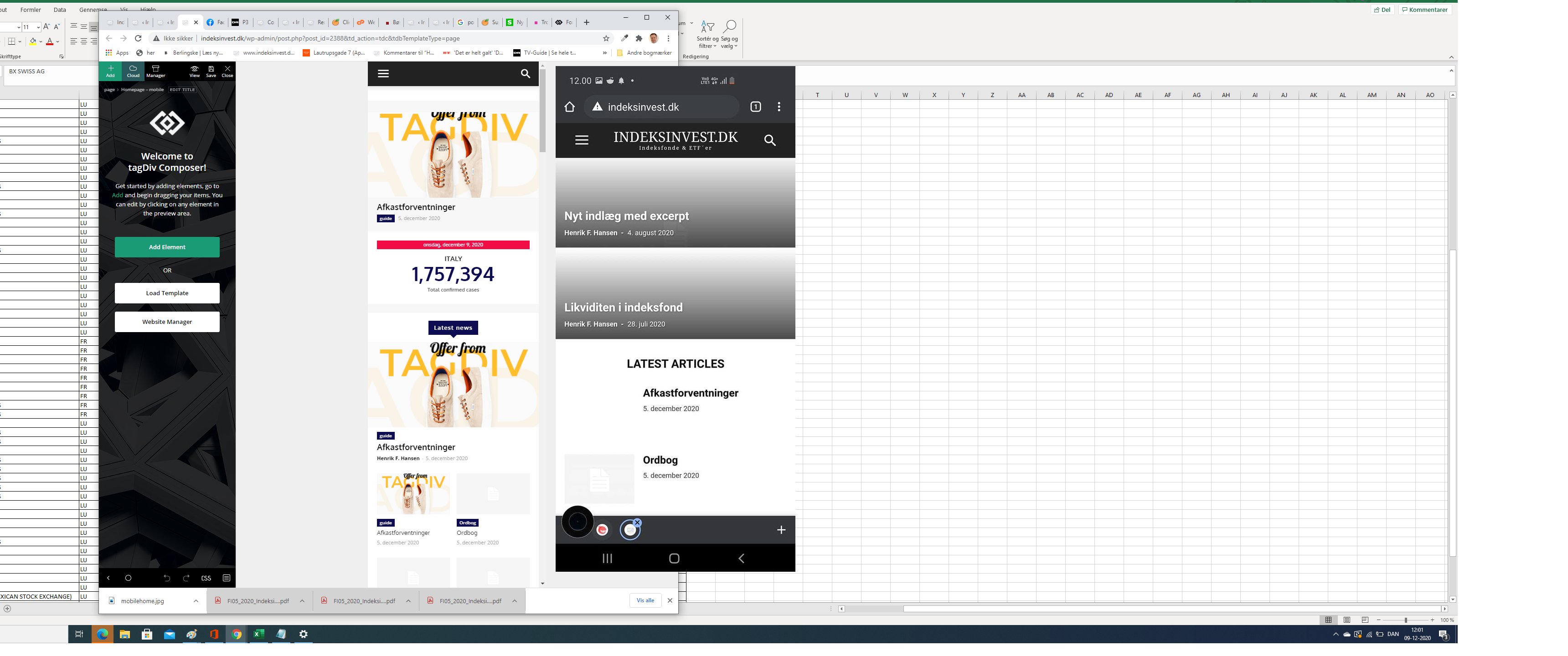
FrydenborgApparently, my site on my mobile (indeksinvest.dk) looks quite different from I see in tagdiv Composer when I edit mobilpage home (see screenshot), I have tried to delele cache.
1. How can I make the site looks the same at mobiles as the mobile home page template in tagdiv Composer?
2. How can I change text logo font at mobile pages?
 iwanrambe
I can’t find it in the composer tagDiv,
to remove the comment icon on the post
 regio-online
Hi there at tagdiv,
Since the latest update to version 10.3.9 the button for tagdiv composer disappeared when I want to edit a page.
I get the blockeditor, but am missing the blue button to switch to tagdiv composer for layout (see below screenshot). Is there a solution for this? Or is this an issue after today’s update of WordPress itself to version 5.6?

Any help is appreciated! Thanks in advance for your eforts.
Egbert
Vlad S Hello !
You are most likely using a tagDiv Composer created sidebar, you will have to open tagDiv Composer on your page, remove it or use that one: https://www.youtube.com/watch?v=fa7GenCHcBU
You can use the widget sidebar element in tagDiv Composer to render widgets from Appearance.
Thank you !
Vlad S Hello !
This will be possible if you are using a Cloud Library Header. Edit it using tagDiv Composer. Remove the existing search form and use a column text element in order to insert your shortcode. Simply copy the shortcode and insert it in the text area of the column text as you can see here: https://www.screencast.com/t/UEMEsVKog
Column text is an element from tagDiv Composer.
Thank you !
 priambododimas
 solved with deactived js composer and import from prebuilt
Vlad S Hello !
Please provide a link to your website in order to inspect. Also the footer does not have a button for this since it can be edited from any page using tagDiv Composer: https://www.screencast.com/t/28OyNMbr Simply select the footer and scroll to the bottom of your page.
Thank you !
Vlad S Hello !
Our suggestion is to go to full template layout and disable the standard pack plugin. All the pro DEMOS use cloud library templates meaning that they are fully editable using tagDiv Composer and also the theme will be lighter because the queries will be made only for the elements that are in the templates.
Let us know the result !
Thank you !
 ghoangit
 I turned off all plugins, but when creating a new page, TAGDIV COMPOSER still does not appear
 evros24
I make changes to the articles page using “Edit with tagdiv composer” and when I click save save only the header and footer

 Calin
Calin Hi,
For pages tagDiv Composer should look like this -> https://i.imgur.com/HJ179UR.png if for you is not the same, please make sure that tagDiv Composer is enable and you do not have a plugin conflict. Also this is displaying only for pages.
Thank you!
 pmguide
Dear support team
I’ve just upgraded wordpress and now post template style 7 ist not working, not showing the featured image.
for example: https://www.planet-mexiko.com/mexiko-stadt/paseo-reforma/
Besides the element “slide” from the tagdiv composer is malfunctioning.
for example: https://www.planet-mexiko.com/mexiko-stadt/
Any tipps? Thank you.
ghoangitI have an error not seeing Edit with TD Composer in the new page builder
Vlad S Hello !
You will have to first start looking for a plugin conflict. please deactivate ALL plugins except tagDiv ones, also if you are using child theme or cache plugin, deactivate them, clear all cache and try again.
Also you can try and remove and re-install the tagDiv Composer plugin.
Let us know the results.
Thank you !
 renzosm
Hi, i updated to the latest version and for some reason the tagDiv Composer is not available anymore in the page section. and when i click on the list page section on edit with TD Visual Composer the page just keeps loading.
Also the theme panel doesnt swith from tab. This is all happening after the update. I cannot even revert to the old one as when i click on install update (older verison) nothing happens
 sadviser
 I have been installing latest version, it still requests tagdiv composer activated yet on the plugin panel it has been activated. Is this the cause of my problems and what is the workaround?
 lyon
lyonHello,
We are on Newspaper Theme version 10.3 and are having issues with some of the elements in TagDiv Composer. When creating a new page and placing either a Column Text element or Text with title element, those items can’t be edited within the composer. If I click Edit Content the WP Editor window pops up but never finishes loading, it just sits on a blank screen with the loading wheel spinning around.
Other elements such as Inline Text work fine, but these aren’t ideal for our usage. If you could please help resolve this issue that would be great, thank you.
 Topfgartenwelt
When I start the tagdiv composer and try to make some changes, I get the following message:
_getDestinationModel Error: Container destination not available! Current state has involved an issue. You could try an UNDO operation (CTRL+Z / CTRL+SHIFT+Z)
What does that mean? What can I do?
Greetings Kathrin
 sudipto
The video playlist on my site stopped working suddenly one morning. (Video Playlist in Tagdiv Composer) Apparently no reason. Have not made any changes to the object or to the site. I tried changing video IDs, tried pulling videos through channel ID, playlist ID…but nothing worked. The error message is “Playlist doesn’t exist”/”Channel doesn’t exist or doesn’t have any uploads”
[NOTE: YouTube API has been set up long back. No changes made to it in recent days. Just to confirm, I cross-checked the API. It’s alright]
Vlad S Hello !
You will have to first start looking for a plugin conflict. please deactivate ALL plugins except tagDiv ones, also if you are using child theme or cache plugin, deactivate them, clear all cache and try again.
Also you can try and remove and re-install the tagDiv Composer plugin.
Let us know the results.
Thank you !
 mani24
Hi There,
I found that tagDiv Composer plugin restricts link on image to fire. So in a result image itself pops up.
The code is something as below
a href=”https://anypagelink.com”>img src=”https://anyimage.jpg” /</a
When I deactivate the plugin then link on image works perfectly fine.
As tagDiv Composer is a required plugin for Newspaper theme so I can’t deactivate it.
Please update the plugin or suggest a workaround.
Thanks
 Bettina
 Hello!
You could change the background of the footer by editing the footer with TagDiv Composer in CSS tab, near General tab.
Also for a youtube video you need to use the Youtube API key, take a look here: https://forum.tagdiv.com/youtube-api-key/
Thank you!
 Daniel Ed
 Heyy Vlad S thank you for answer me i reinstall everything once again an update the version a few minutos ago but the problem still the same localhost works, online does not so im not using child theme i desactivate an activate plugs unless divcomposer i will send you a link for you watch a little video and 8 screenshots this contex maybe help to fix this thank you again