
- NewsmagtagDiv Composer Tutorial
- NewsmagHow to use the Visual Composer plugin
- NewsmagHow to update a plugin
- NewsmagWhat’s included in Newsmag theme package
- NewsmagRequirements for Newsmag
- NewsmagInstall via WordPress
- NewsmagInstall via FTP
- NewsmagBlock settings tutorial
- NewsmagtagDiv Social Counter tutorial
- NewsmagHow to update the WPBakery plugin
- NewsmagPage Menu
- NewsmagCustom ad spots
- NewsmagSmart sidebar
- NewsmagVideo playlist
- NewsmagPage templates
- NewsmagHomepage – How to build and set it
 AndrewWc
First I ask for help in the forum regarding tagDiv composer, got a reply from the support to email personally, now email support doesn’t reply to my mail. Please solve my problem ASAP because I can’t do anything with my tagDiv composer. My previous thread https://forum.tagdiv.com/topic/tagdiv-composer-loads-to-infinity-2/
 stuartfurniss
When i try to edit my homepage using the TagDiv Composer option the page freezes and i have to close out of the browser window to continue.
I then receive an error message email that reads:
An error of type E_ERROR was caused in line 491 of the file /home1/footbbt6/public_html/wp-content/plugins/td-composer/includes/templates/frontend.tpl.php. Error message: Allowed memory size of 268435456 bytes exhausted (tried to allocate 28385280 bytes)
How do i resolve this ?
 Federico
Hello, A few minutes ago I had this error, which caused a total site crash, I had to uninstall td-composer and reinstall it.
AH01071: Got error ‘PHP message: PHP Warning: getimagesize(): php_network_getaddresses: getaddrinfo failed: Temporary failure in name resolution in /var/www/dib.com.ar/public_html/wp-content/plugins/td-cloud-library/shortcodes/header/tdb_header_logo.php on line 792PHP message: PHP Warning: getimagesize(https://dib.com.ar/wp-content/uploads/2020/01/logo.png): failed to open stream: php_network_getaddresses: getaddrinfo failed: Temporary failure in name resolution in /var/www/dib.com.ar/public_html/wp-content/plugins/td-cloud-library/shortcodes/header/tdb_header_logo.php on line 792PHP message: PHP Warning: getimagesize(): php_network_getaddresses: getaddrinfo failed: Temporary failure in name resolution in /var/www/dib.com.ar/public_html/wp-content/plugins/td-cloud-library/shortcodes/header/tdb_header_logo.php on line 792PHP message: PHP Warning: getimagesize(https://dib.com.ar/wp-content/uploads/2020/01/logo.png): failed to open stream: php_network_getaddresses: getaddrinfo failed: Temporary failure in name resolution in /var/www/dib.com.ar/public_html/wp-content/plugins/td-cloud-library/shortcodes/header/tdb_header_logo.php on line 792PHP message: PHP Warning: require_once(/var/www/dib.com.ar/public_html/wp-content/plugins/td-composer/legacy/Newspaper/includes/shortcodes/td_block_ad_box.php): failed to open stream: No such file or directory in /var/www/dib.com.ar/public_html/wp-includes/template.php on line 730PHP message: PHP Fatal error: require_once(): Failed opening required ‘/var/www/dib.com.ar/public_html/wp-content/plugins/td-composer/legacy/Newspaper/includes/shortcodes/td_block_ad_box.php’ (include_path=’.:/usr/share/php’) in /var/www/dib.com.ar/public_html/wp-includes/template.php on line 730′, referer: http://elfuertediario.com.ar/cuarentena-en-la-provincia-de-buenos-aires-en-que-fase-esta-cada-municipio/
It seemed strange to me, it is that the same thing happened to me in 3 different sites at the same time on the same server. In total I have 4 sites on this server, the error only happened on 3.
 Hofrey2
Hi,
I’m using tag div composer to create a series of new pages for our websites. A problem I’ve encountered – for which I need some help…
When I select an element (for example Hero or a single image, inline image, etc.) and want to replace the standard image in the template, I get an error message…. which states ‘Render failed – no image selected’.
I’ve followed the following procedure:
Open new page
Go to edit with TD composer
Add element (Does not matter which element; see above)
Remove standard picture
Click on the picture icon to upload a new picture from the gallery
Select picture from the gallery
Save page
Then an error message appears – “Render failed – no image selected”
I’ve also tried with URL; but both options failed.
I’m not sure why this process does not work anymore – until yesterday moring it worked without any problems. It stopped working on Monday afternoon.
Can someone help me?
Thanks.
 Topy
TopyHi, there’s no Tagdiv Composer in “Footer – Magazine PRO” template while other templates have. I want to change a background image of footer but cannot.
 Roularta
Hi There,
I have a big problem while creating blank template files with tagDiv composer. I’ve created a custom header, a custom footer, a custom category and a custom 404 (needed to do changes to my footer).
Header problem
I want to adjust the column widths of my header rows.
In my upper menu (black top menu), I’ve set the layout to a 9-3 columns width:
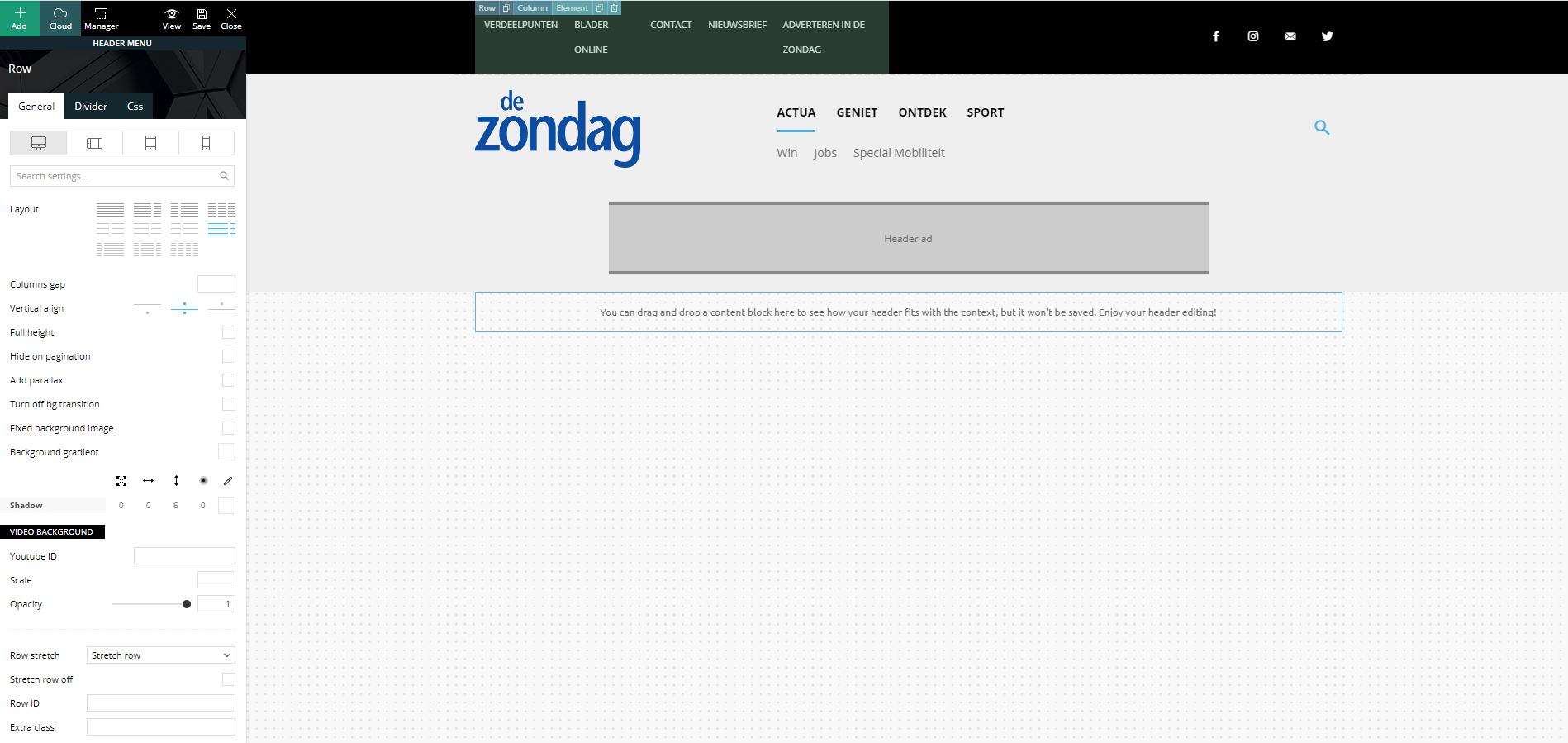
Strange but true, in the preview screen it shows a columns width of 6-6. I’m not able to change this (anymore)…
In my main menu, I’ve set the layout to a 3-6-3 columns width:
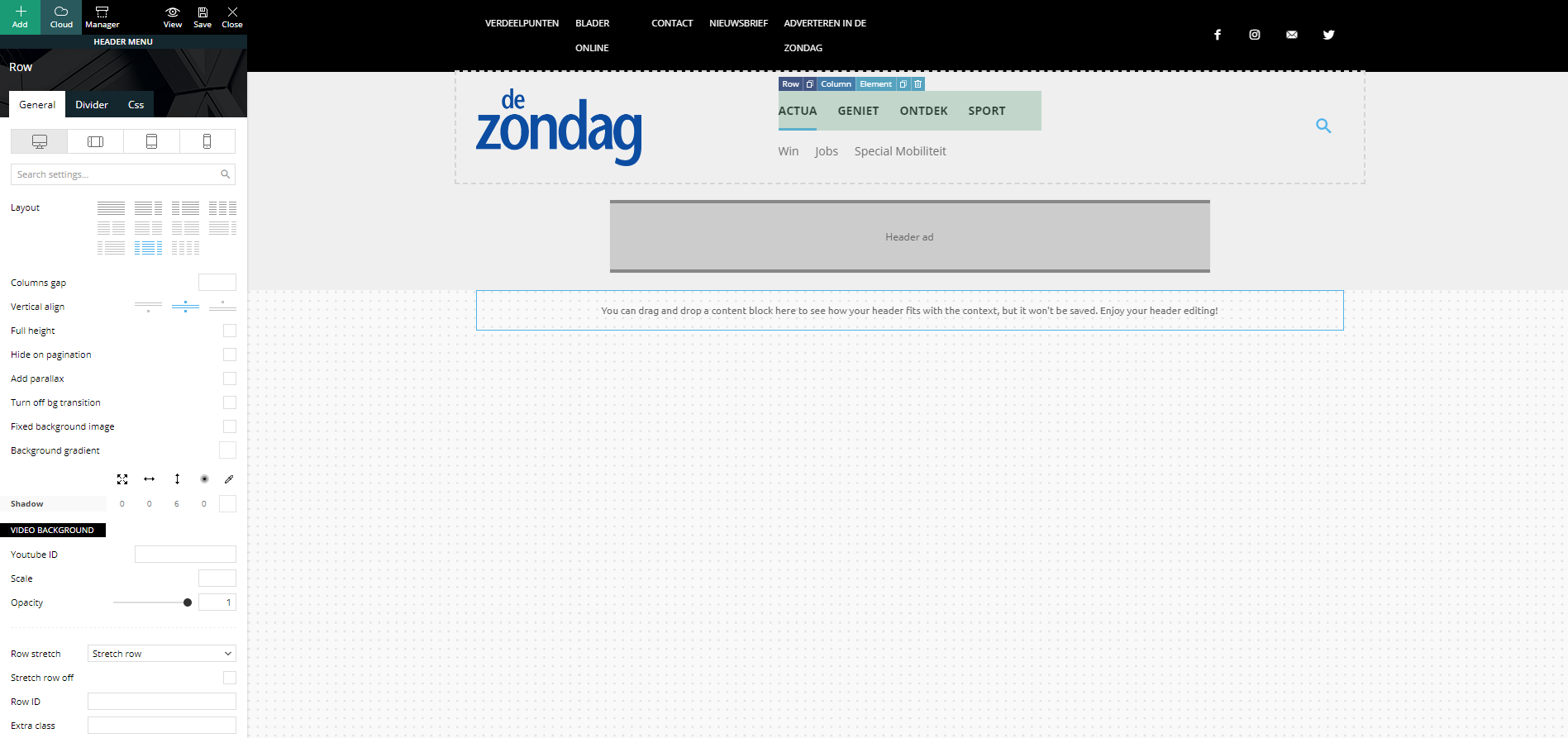
Strange but true, in the preview screen it shows a columns width of 4-4-4. I’m not able to change this (anymore)…
Footer problem
Same strange issues with my footer. Here I’ve set my footer columns (dark gray stroke) to a 4-4-4 width:
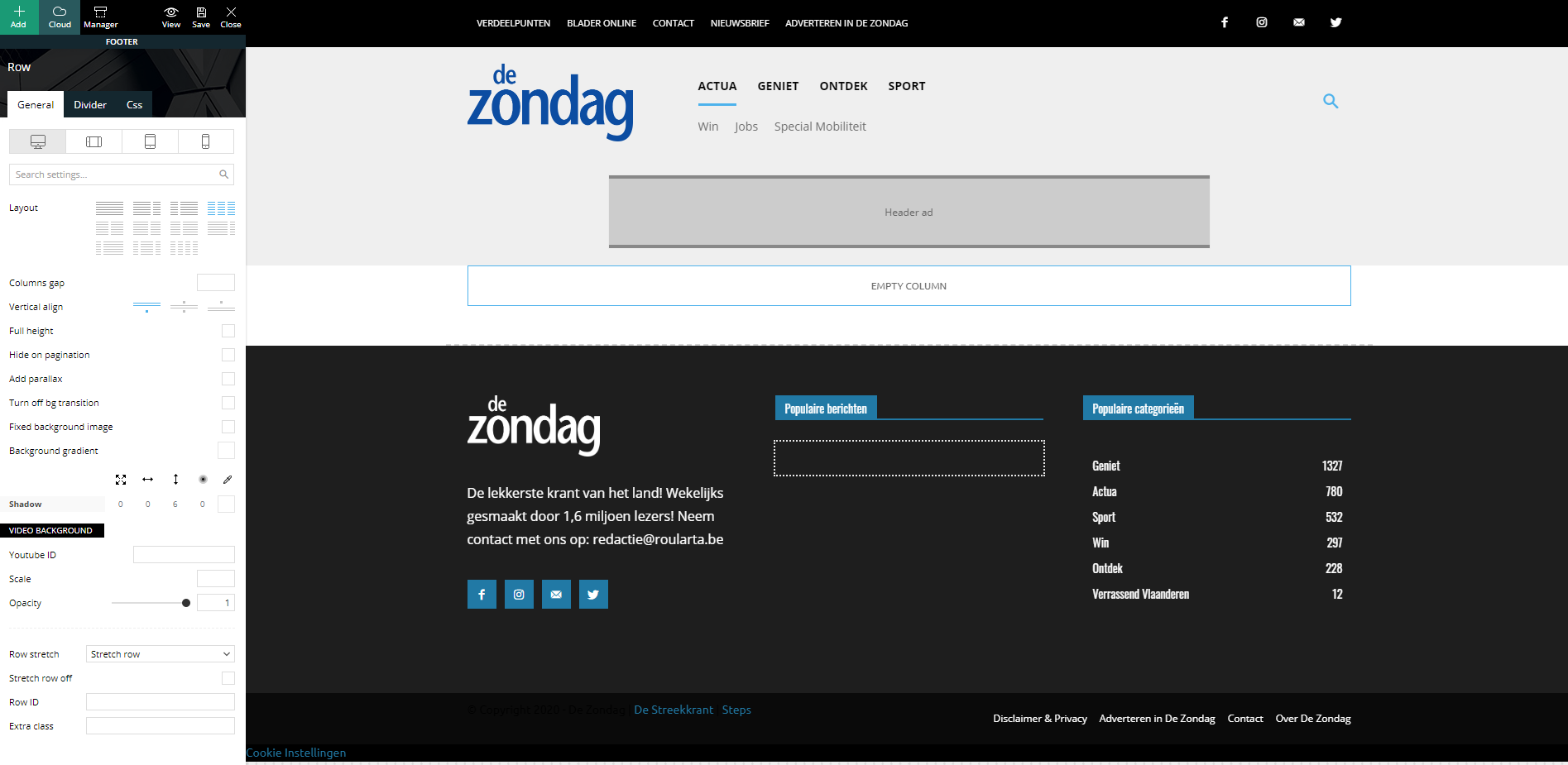
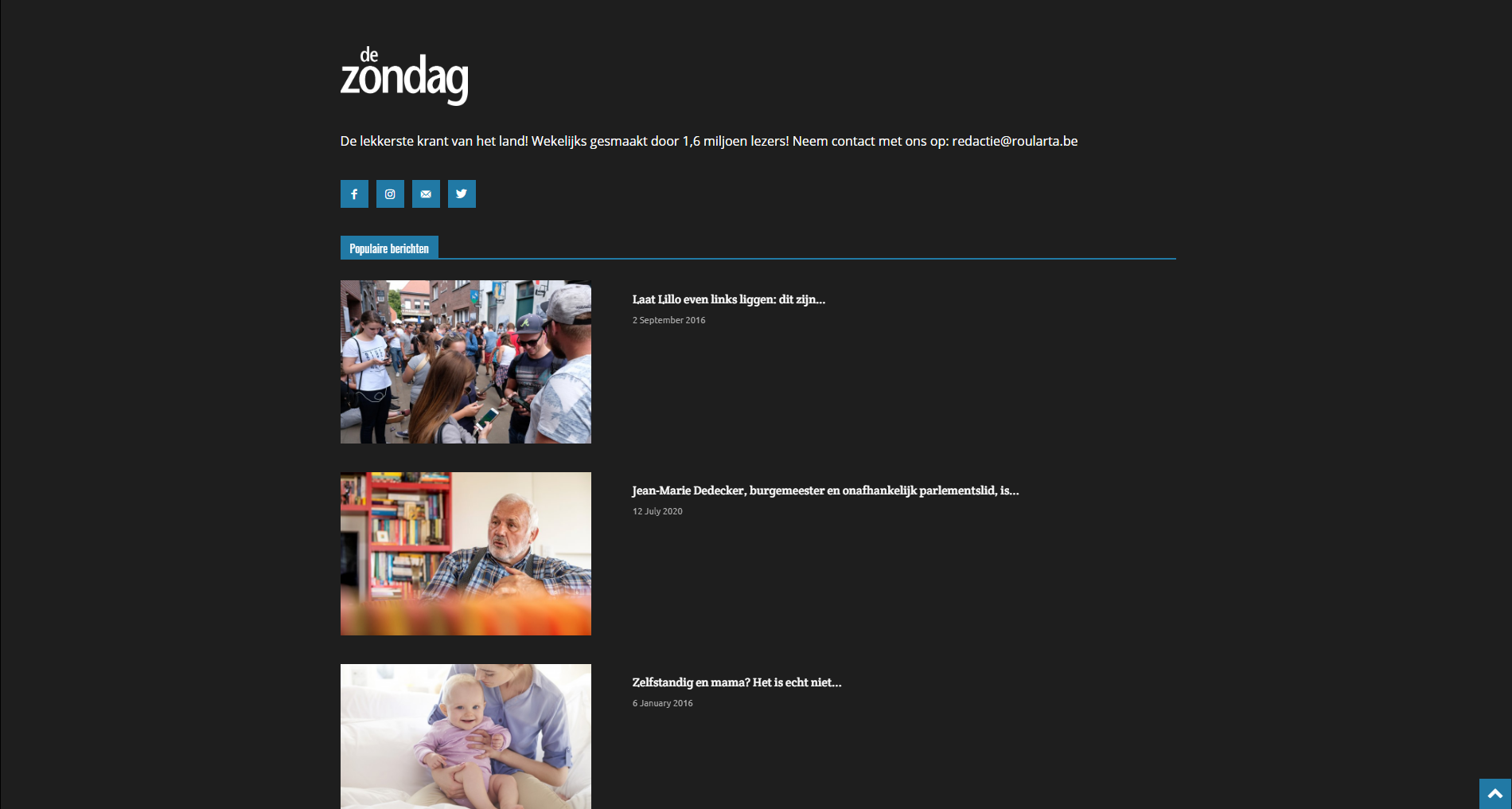
When I check my website, all columns are changed to a width of 12 and they are stacked under each other:
I have identical problems with my custom category pages.
Can you guide me how I can fix this please?
Kind regards,
Sam Clauw
 Calin
Calin Hi,
1. If you are using the Gossip Pro demo you can drag and drop the “latest article”, but grad it with the entire row not only the posts loop elements -> https://i.imgur.com/jTqsAYH.jpg
2. For the moment the modulus from the blocks do not have an option to display the sub-titles, only the excerpt, this can be done only if you make some changes in theme files.
3. The excerpt size can be set as general in theme panel for all modules that are display in theme panel -> https://i.imgur.com/VQk9lZM.png on individually using tagDiv Composer -> these are the only ways that you can change the excerpt size.
4. You can set the ads in ad box, in these ad box you can set banners ads that are set in theme panel, or you can set in them the code -> https://i.imgur.com/xJpVYl7.png you can check more about this in our guide from here -> https://forum.tagdiv.com/custom-ad-spots/
Hope this will help you!
Thank you!
Calin Hi,
If you are referring to infinite loading, you’ll need to edit the single post template with tagDiv Composer and disable the infinite loading.
-> https://tagdiv.com/infinite-loading-for-single-posts/ from post -> https://i.imgur.com/yIf6fA3.jpg -> https://i.imgur.com/KeclHLS.jpg -> https://i.imgur.com/4jHIHFY.png
Let me know the results!
Thank you!
Calin Hi Sophia_FACES, this option is still in tagDiv Composer, but most probably when you are using more then tagDiv plugins, this option can be block/removed. Please make a test let only theme plugins clear all cache and check to see if the right click is working in tagDiv Composer.
Let me know the results!
Calin Hi xrelmate,
The ctrl + z option can be use only if you made some changes in that page/template you saved the settings, but you do not close the composer, then you can use the undo and redo.
Also our Newspaper theme is a complex one, you can achieve almost everything, but for this you need to lean how to use it and how cloud templates and tagDiv Composer are working.
If you want you can send us an email at contact@tagdiv.com and provide admin login and the problems you are facing with our theme. We will take a look. Include a link to this topic in the email.
Thank you for your understanding and sorry for the inconvenience!
Calin Hi,
If you are referring to infinite loading, you’ll need to edit the single post template with tagDiv Composer and disable the infinite loading.
-> https://tagdiv.com/infinite-loading-for-single-posts/ from post -> https://i.imgur.com/yIf6fA3.jpg -> https://i.imgur.com/KeclHLS.jpg -> https://i.imgur.com/4jHIHFY.png
Let me know the results!
Thank you!
Calin Hi xrelmate,
We are sorry for the bad experience that you had with our theme!
Usually there should be no problems with our theme to change the templates without making any changes from theme panel or pages/templates or change the demo you have installed.
We try to answer to as many questions and problem we can in support hours, we are sorry that most of the time we can provide one or maybe two reply for the same user, sorry!
Also fr a better performance using our theme we recommend to set the theme requirements as in our guide from here -> https://forum.tagdiv.com/requirements-for-newspaper/ also you can check this topic for a better optimization of your website -> https://forum.tagdiv.com/topic/my-website-is-damn-slow/
As for the website custimization, if you are using a standard demo then you can use the options from theme panned to add/remove elements from your website. If you are using a pro demo you need to use tagDiv Composer to can edit the cloud templates.
We can provide a refund if you are not satisfied with the theme, you can request it here
– https://themeforest.net/refund_requests/new
Thank you for your understanding and sorry for the inconvenience!
Calin Hi Michico Oranga,
Please try the below steps:
1. Disable tagDiv Composer -> https://i.imgur.com/uzBdRB9.png
2. delete tagDiv Composer -> https://i.imgur.com/xGGfYE7.png
3. Reinstall tagDiv Composer -> https://i.imgur.com/Ay0zJHn.png or -> https://i.imgur.com/ZMgV9at.png
4. Clear all cache from your website, host and browser ( for browser use force refresh Ctrl Shift R ).
If the problem still persists, please make sure that you do not have a plugin conflict, please deactivate ALL plugins except tagDiv plugins (theme plugins), also if you are using child theme or cache plugin, deactivate them, clear all cache and try again.
Also you can use the Enable jQuery Migrate Helper in some cases this can help you to make tagDiv Composer to work.
Let me know the results!
Thank you!
Calin Hi,
I see that now, after you installed all theme plugins the articles are displaying -> https://i.imgur.com/KCfWH2G.jpg and the website is work -> https://i.imgur.com/f7WCpFG.png, and display properly.
Now you can edit the pages using tagDiv Composer and for standard templates you can use the settings from theme panel.
If there i still a problem let me know!
Thank you!
Calin Hi RMS, i think that you are referring to this -> https://i.imgur.com/a2NxPxH.png this is set by default only for layout design in tagDiv Composer, if the post do not have comments will be display like this -> https://i.imgur.com/cf7V6cR.png
If this is not what you mean, please provide me some more details and some screenshots or a link where I can inspect the problem.
Thank you!
 antonmh
Hi
I am trying to resolve some issues with my new site.
I am using the ‘Gossip’ demo which I have adapted. Please see the attached screenshots below to see how it is at the moment, for reference.
1) The section that is ‘Latest’ (under the ticker) needs to be the same width as the section below it. I have looked through the settings but there isn’t anywhere that needs adjusting. Originally this section was moved from the bottom of the site (in the Gossip demo it is called ‘Latest Articles’). I just dragged it up the page but it is not staying the same width. How can I make it the correct width?
2) In my setup, in the first section area I have excerpts show. I know these can be turned off, but is there a way to show the Subtitle from each post here instead? I can’t see a setting for it to be switched on, so wondered if it is possible to add it in any way?
3) With the excerpts in the above section, the universal setting should be at 25 words. But for some reason mine are all varied in the blocks. I have gone through the theme and also each block in the composer to change them to 25, however they are not changing. Is there a setting anywhere else that needs to be changed?
4) I am trying to add ads from my Google Ad Manager account. However nothing is appearing in the leaderboard area in the header, as you can see. I have read through your documentation but I can’t find information for Ad Manager. Can you give me instructions on how to add it and where to place the code specifically?
Please let me know, and thanks in advance for you support!
Anton


Calin Hi,
Is look that the problem is in them files for the wp-content/plugins/td-composer/legacy/Newspaper/includes/block_templates/td_block_template_18.php this code is still static -> https://i.imgur.com/gblC8zc.png as a quick fix replace the code from this file wp-content/plugins/td-composer/legacy/Newspaper/includes/block_templates/td_block_template_18.php with the code from here -> https://pastebin.com/VAcvLxb8 also make sure that you adjust the height for the block header -> https://i.imgur.com/WaHaphh.png
Hope this will help you!
Thank you!
Calin Hi SJB, you are editing the loop from the theme files and you need to edit the one from plugin files from wp-content/plugins/td-composer/legacy/Newspaper/loop.php -> https://i.imgur.com/TFBqVZo.png you can get there from here too:
-> https://i.imgur.com/bxcv2yk.png -> https://i.imgur.com/XuIUOdG.png
Hope this will help you better!
Let me know the results!
Calin Hi,
If I’m right you are using the responsive version on these pages that has a different menu, the mobile theme plugin has it’s own menu, that can be set and edit from here -> https://i.imgur.com/gAz2mVn.png for the responsive version that have a cloud header the mobile menu can be set from tagDiv Composer -> https://i.imgur.com/5FnxL8e.png and can be adjusted from here -> https://i.imgur.com/6s1eiKM.png
Thank you!
Calin Hi aassi,
If this is a cloud header, then it will be the best to edit it using tagDiv Composer and adjust it, you can do it by setting some margins in css tab -> https://i.imgur.com/J4IF2fc.png this can be done per row/column/element, also you can set on element a line height -> https://i.imgur.com/D2vXOnd.png
This will be better then using custom css.
Thank you!
 Pierre Graff
 Not working neither. and even more, i have now something strange with picture block, not showing anymore editable on td composer, and picture size get small now. so as i can not edit or find anymore block to edit these pictures, they have to stay there, smal. Please help to fix these bugs since update
here is link to see result. I finally deleted it with code,. but now, adding an inline image block, i have error message Invalid data Current state has involved an issue. You could try an UNDO operation (CTRL+Z / CTRL+SHIFT+Z) when replacing image from template with mine. hat a mess since update seroulsly….
https://madeincrete.com/olive-oil-and-wine-tasting-tour/
-
This reply was modified 6 years by
Pierre Graff.
 Sophia_FACES
Hi,
Is it just me, but the right click menu does not seem to show on the Tag Div Composer. I have used it before to save some elements but now its not showing. Please clarify.
Calin Hi,
You can translate/change that text using the translate section from theme panel ->https://i.imgur.com/9dzLVE5.png -> https://i.imgur.com/25ukGfO.png also if is a single post template from tagDiv Cloud Library, you can edit it’s layout using tagDiv Composer -> https://i.imgur.com/NLvoNR1.png
Hope this will help you!
Calin Hi xrelmate, if the options for these are missing from theme panel, then you are using cloud templates or a pro demo, this can be edited using tagDiv Composer and you can use the right click to remove the element you do not need -> https://i.imgur.com/LhIMoPZ.png
Also to can stretch the menu on full width, you need to make sure that this one is not set in the row that is holding the entire header and stretch it like this ->? https://i.imgur.com/I9f2Q8e.png -> https://i.imgur.com/LOEiVG5.png
Hope this will help you!
Calin Hi,
If you are referring to infinite loading, you’ll need to edit the single post template with tagDiv Composer and disable the infinite loading.
-> https://tagdiv.com/infinite-loading-for-single-posts/ from post -> https://i.imgur.com/yIf6fA3.jpg -> https://i.imgur.com/KeclHLS.jpg -> https://i.imgur.com/4jHIHFY.png
If there is still a problem, pleas provide some more details and a link to your website!
Thank you!



