
- NewsmagtagDiv Composer Tutorial
- NewsmagHow to use the Visual Composer plugin
- NewsmagHow to update a plugin
- NewsmagWhat’s included in Newsmag theme package
- NewsmagRequirements for Newsmag
- NewsmagInstall via WordPress
- NewsmagInstall via FTP
- NewsmagBlock settings tutorial
- NewsmagtagDiv Social Counter tutorial
- NewsmagHow to update the WPBakery plugin
- NewsmagPage Menu
- NewsmagCustom ad spots
- NewsmagSmart sidebar
- NewsmagVideo playlist
- NewsmagPage templates
- NewsmagHomepage – How to build and set it
 Bettina
 Hello!
The “Column text” and “text with title” elements have a button called “edit content.” If you click on that button, the WP Editor will open, and you can add text/code/shortcode there. Close the WP Editor from X, save the changes from Composer, and view the page to see the changes.
Check this thread to see a possible issue with the shortcode: https://forum.tagdiv.com/topic/wp-editor-stopped-working-in-column-text-block/
Make sure there is no plugin conflict or caching issue.
I hope that helps you!
Thank you!
 simchris
 usually means the td composer plugin not active
 jordanphilippe88
I want to select my AI category ( blog posts) in my post loop. I dont see an option to select different categories from the tag div composer.
I have 3 pages on my site. Crypto – AI – Web3. I want the proper category to display, currently the page that is working is (Crypto)
https://staysynced.io/category/blockchain/
Bettina Hello Dimitri!
You can not edit a default template with the tagdiv Composer. I was talking about cloud templates and events.
Thank you!
 urbandigital
 Thank you for what? 😅
The event calendar lets me choose the default WordPress template as a display mode for the event. Can you explain to me how I can adjust the default WordPress template for events using tagdiv composer?
-
This reply was modified 1 year by
urbandigital.
Bettina Hello!
You can go to the Dashboard -> Add new page, give it a name, and press the blue button edit with the tagdiv Composer. From here you will be able to customize it. Also, you can edit the page template you’ve created in a new tab and copy paste the element in your page edited with the tagdiv Composer(Click on the row right-click -> copy, go to the page click on the empty row, right-click ->paste.) Also, you can save elements and find them on the left side, where you can add any new element with the name you set (refresh page).
Unfortunately, the page template is different than the other templates. You can not set it as global.
More documentation about the cloud templates is here:
– https://forum.tagdiv.com/cloud-library-templates/
– https://forum.tagdiv.com/design-post-pages-using-cloud-library-templates/
– https://forum.tagdiv.com/cloud-library-category-templates/
About pages here: https://forum.tagdiv.com/page-templates-2/ -> https://forum.tagdiv.com/homepage-how-to-build-and-set-it/
Check out this video about how to create a website from scratch: https://www.youtube.com/watch?v=SoGQ0d5kIBg
Thank you!
Bettina Hello Vunt!
If you use a cloud template, you can edit it with the tagdiv Composer and delete that element. Otherwise, for default templates, there is an option in the theme panel settings: https://app.screencast.com/ogRXFHiglVjo5
Thank you!
Bettina Hello!
Do you have any article with this tag? Please edit the tag template with the tagdiv Composer, check the block where no posts are displaying, check the filter, and make sure you do not have any value in the offset field. Let the offset field be empty with no space or value, and see the results: https://app.screencast.com/o6aa6j75BHWn8
Thank you!
 josesanchezrey
I’m currently using the TagDiv Composer (Newspaper Theme) to create content on my WordPress site. However, I’ve noticed that Yoast SEO doesn’t recognize the content built with TagDiv Composer, and it keeps showing warnings like “The page does not contain any content”.
In the WordPress editor, the content appears as shortcodes, but I want to ensure that Yoast SEO can analyze this content properly to improve my site’s SEO.
Has anyone faced this issue before? If so, could you please share how you resolved it? I’m looking for a way to make Yoast SEO recognize the content created with TagDiv Composer so I can optimize it effectively.
Bettina Hello!
This situation appears when you are using the mobile theme plugin and the cache plugin that you have, which does not feature options for a separate mobile theme plugin, therefore do not know when to deliver the mobile version and when to deliver the desktop version.
We have 3 options for mobile versions that you can use:
1. Responsive version: A responsive version of your website looks similar to the desktop version. TagDiv Composer is used to edit the page.Click on the mobile viewport: https://www.screencast.com/t/XDQJedlggSB. There, you can see your mobile version and edit or adjust the elements to look better.
2. Mobile pages: https://tagdiv.com/newspaper-10-3-7-update-brings-customizable-and-fast-mobile-pages
3. Mobile theme plugin: The Mobile Theme is a performance-optimized theme included in the main Newspaper theme that only loads on mobile devices. It comes with its own templates and designs for pages, posts, categories, etc., so your current templates from the desktop theme will get converted to the mobile theme layout. Please see https://forum.tagdiv.com/the-mobile-theme/ and https://forum.tagdiv.com/mobile-theme-introduction/ for more information.
A full explanation is here: https://www.youtube.com/watch?v=SpGkOnJeNZY
If you need to use the mobile version 1 or 2, then you need to uninstall the Mobile Theme plugin and AMP.
Thank you!
Bettina Hello!
This Mobile Editor does not recognize a page builder so the tagDiv Composer shortcodes cannot be rendered.
We have 3 options available for mobile versions that you can use:
1. Responsive version: A responsive version of your website looks similar to the desktop version. TagDiv Composer is used to edit the page. Click on the mobile viewport: https://www.screencast.com/t/XDQJedlggSB. You can see your mobile version there and edit or adjust the elements to look better.
2. Mobile pages: https://tagdiv.com/newspaper-10-3-7-update-brings-customizable-and-fast-mobile-pages
3. Mobile theme plugin: The Mobile Theme is a performance-optimized theme included in the main Newspaper theme that only loads on mobile devices. It comes with its own templates and designs for pages, posts, categories, etc., so your current templates from the desktop theme will get converted to the mobile theme layout. Please see https://forum.tagdiv.com/the-mobile-theme/ and https://forum.tagdiv.com/mobile-theme-introduction/ for more information.
A full explanation is here: https://www.youtube.com/watch?v=SpGkOnJeNZY
If you need to use mobile version 1 or 2, then you need to uninstall the Mobile Theme plugin and AMP.
Thank you!
Bettina Hello!
If you change the colors on elements from a single post template, or any type of customizable page (category, homepage, author, search, & more) it will override the global settings made in the Theme Panel. For cloud templates, check this guide: https://forum.tagdiv.com/tagdiv-composer-website-manager/
Thank you!
Bettina Hello!
You can change the whole template for your posts and have different headers and footers as well. It works the same as any other template. You should have one global header and another header for your unique posts. More helpful info here: https://forum.tagdiv.com/tagdiv-composer-website-manager/
Thank you!
Bettina Hello!
Unfortunately, at the moment, no.
A shortcode can be inserted using the element “Column text” or “Text with title”. “Column text” and “text with title” elements have a button called “edit content” and if you click on that button, the WP Editor will open and you can add some text/code/shortcode there. Close the WP Editor from X, save the changes from Composer and view the page to see the changes.
We also have some elements called raw HTML or raw CSS.
I hope that helps you!
Thank you!
Bettina Hello!
This issue with the error from Composer has also been discussed here: https://forum.tagdiv.com/topic/errors-at-columns-elements-5/.
Please make sure you did all the steps that I mentioned here: https://forum.tagdiv.com/topic/errors-at-columns-1models-0dom-the-model-does-not-match-the-content-curr/
Thank you!
 JGL
JGL Thank you.
We have already checked based on your screenshot. However, SEO audit suggests that they have identified three H1 tags on hompepage but we still cannot locate them under tagdiv composer.
Do you know what might be causing this issue?
Regards
-
This reply was modified 1 year by
JGL.
 newspatron
 Hello Bettina!
Thanks for your reply.
Also please point out the best way to create paginated pages, and also how to employ powerful filters to sort the same.
Currently i am stuck here for example the below page.
https://paxpnr.com/tagdiv-composer-draft/
I want to employ more options to filter the posts based on custom fields, more tags and such.
Please refer screenshots and let me know where the guide could be found as to how to use all the fields to get the required paginations.
To View the site please use the below link
Here is a url that will allow you to view the site, while being in the maintenance mode.
https://paxpnr.com/?share=fc7008455d8e7cee5149bc4a01cb846cfb89410c7194b916286abf3c3188e6ab
https://paxpnr.com/?share=fc7008455d8e7cee5149bc4a01cb846cfb89410c7194b916286abf3c3188e6ab
Thanks
amit
-
This reply was modified 1 year by
newspatron.
 lubesngreases
 Hi Bettina,
Thank you for your response.
Upon reviewing the Newspaper theme’s changelog, I noticed the addition of the ‘new: Added a new shortcode Page Content Renderer;’ block in recent theme updates.
This new block, located in plugins\td-composer\legacy\Newspaper\includes\td_config_blocks.php at line 35935, utilizes the function td_config::get_pages_options_array(), which retrieves all pages regardless of their status.
The function itself is defined in plugins\td-composer\legacy\Newspaper\includes\td_config.php at line 7467. After activating the td composer plugin, we observed memory usage exceeding 550MB.
Our website contains 281 pages with substantial content. Consequently, when this block is loaded, we experience significant slow query issues. Please refer to the attached screenshots for details. When we modified the query to retrieve only 10 published pages per page, memory usage decreased to 50-55MB.
We attempted to override this method within our child theme, but were unsuccessful. Could you please advise if there is a method to resolve this issue through the child theme, or if a patch is planned?
Attachments:
Memory usage with all pages condition: https://prnt.sc/IZBUzIGel0fm
Memory usage with published and 10 pages counts condition: https://prnt.sc/5hJOSCjOLFEK
Thank You.
 yunie_
After installing the latest newspaper theme, I am unable to activate tagDiv Composer and tagDiv Cloud Library.
When activating cloud library, it says theme version does not support it.
When activating composer, it causes a critical error.
My wordpress version is WordPress 6.7.2
PHP Version – 7.2.34
WP Memory Limit – 40 MB
PHP Execution Time – 1000
PHP Max Input Vars – 1000
Bettina Hello!
You should edit the homepage with the tagdiv Composer, click on the logo and remove those text and image: https://app.screencast.com/GzlhC6XKWygKT
You can also delete the element and add another header logo. There is a recycle bin basket for every element: https://www.screencast.com/t/wFYdqgpo6pT
I recommend you uninstall the Mobile theme and AMP plugin.
Thank you!
Bettina Hello!
Unfortunately, I can’t see your screenshot: https://app.screencast.com/eAivuEMQ81Zvg
You can edit the homepage with the tagdiv Composer, scroll down to the footer, and check the links you have there. You can edit the elements there and delete them if you do not need them anymore. There is a recycle bin basket for every element: https://www.screencast.com/t/wFYdqgpo6pT
Thank you!
 antonmh
 Hi Bettina
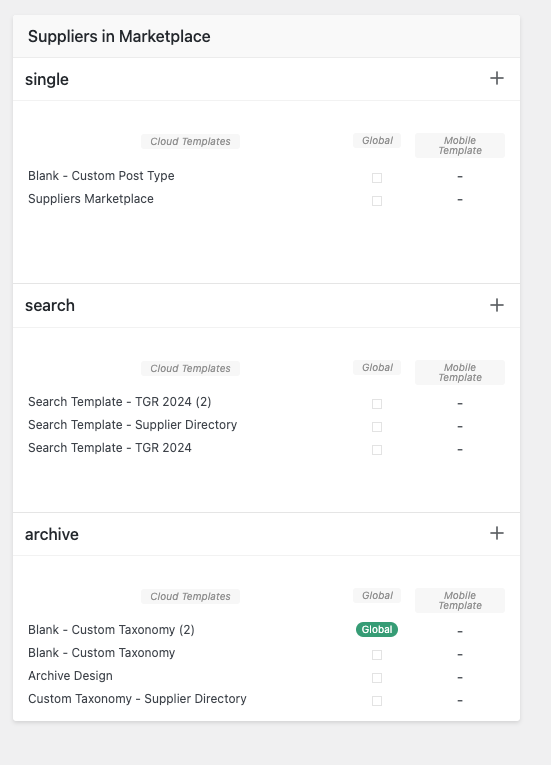
Ok, so I have pressed the + sign and added a Taxonomy template, I can only add it under the archive area, there is no other option:
Then I have added a loop 2 in the composer:
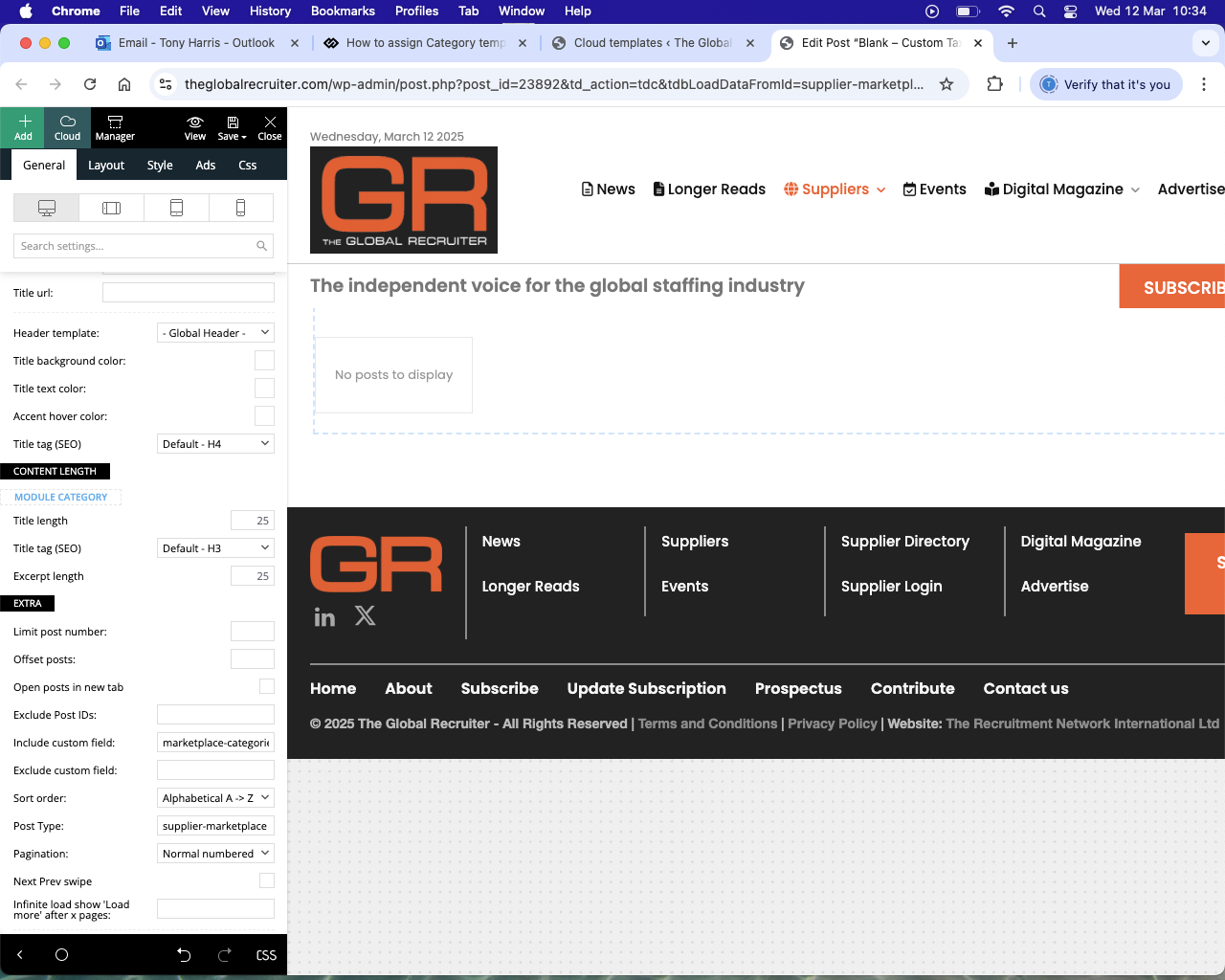
..but categories are not coming through.
Is it correct that the taxonomy template is in the archive area? There isn’t any other option showing, is that correct?
Thank you
-
This reply was modified 1 year by
antonmh.
Bettina Hello!
We have 3 options available for mobile versions that you can use:
1. Responsive version: A responsive version of your website looks similar to the desktop version. TagDiv Composer is used to edit the page. Click on the mobile viewport: https://www.screencast.com/t/XDQJedlggSB. You can see your mobile version there and edit or adjust the elements to look better.
2. Mobile pages: https://tagdiv.com/newspaper-10-3-7-update-brings-customizable-and-fast-mobile-pages
3. Mobile theme plugin: The Mobile Theme is a performance-optimized theme included in the main Newspaper theme that only loads on mobile devices. It comes with its own templates and designs for pages, posts, categories, etc., so your current templates from the desktop theme will get converted to the mobile theme layout. Please see https://forum.tagdiv.com/the-mobile-theme/ and https://forum.tagdiv.com/mobile-theme-introduction/ for more information.
A full explanation is here: https://www.youtube.com/watch?v=SpGkOnJeNZY
If you need to use mobile version 1 or 2, then you need to uninstall the Mobile Theme plugin and AMP.
Thank you!
Bettina Hello!
Anything you add to the global category template is displayed automatically in all your categories. If you want a menu to display differently on each page, you should have different category templates assigned to your categories.
Please follow the steps:
1. Go to the Cloud Templates and duplicate the category template: https://app.screencast.com/BNzUFeC6LowNM
2. Rename the duplicated template with the name of the category you wish to assign. https://app.screencast.com/xYkkdBFTeIF88
3. You can edit with the tagdiv composer each template to change it and add the elements you need for each category: https://app.screencast.com/GBXyRRA5lZMGH
4. You should assign them. So, the simple way is to go to the theme panel settings: https://app.screencast.com/mpuweTKi1QfH2
Thank you!
Bettina Hello!
You can find sound radar demo in the prebuild website: https://demo.tagdiv.com/select_demo/newspaper-prebuilt-websites/?demo-type=all
If you choose “All” and search about sound radar, then you can find it.
Unfortunately, this is an old demo, not a pro, and it’s not using cloud templates, that’s why it’s not available in the Cloud Library. So, you can not customize it with the tagdiv Composer.
Thank you!
