
 Bettina
 Hello!
The font used there is the Epilogue font. You can see it in the Website Manager: https://forum.tagdiv.com/tagdiv-composer-website-manager/
Thank you!
Bettina Hello!
Please edit the homepage with the tagdiv Composer, click on the logo and check the options from there. You should hide the SVG icon from there: https://app.screencast.com/K5gVCJLK2wXq9 You can also delete the current logo shortcode and add another one with no settings applied, so the logo from the theme panel should display on your website. Check the guide here: https://forum.tagdiv.com/add-logo-newspaper/
Thank you!
Bettina Hello Vunt!
Unfortunately, you can not edit with the tagdiv Composer the blog page generated by WordPress. Apply these changes: https://app.screencast.com/rd5HXhCY5MHne
When you access an article, it should be the single post template from the Default pro demo. You can upload another single cloud template from the Cloud Library to your posts for more customization options.
More documentation about the cloud templates is here:
– https://forum.tagdiv.com/cloud-library-templates/
– https://forum.tagdiv.com/design-post-pages-using-cloud-library-templates/
– https://forum.tagdiv.com/cloud-library-category-templates/
About pages here: https://forum.tagdiv.com/page-templates-2/ -> https://forum.tagdiv.com/homepage-how-to-build-and-set-it/
Check out this video about how to create a website from scratch: https://www.youtube.com/watch?v=SoGQ0d5kIBg
Thank you!
Bettina Hello!
You can see them in the tagdiv Composer: https://app.screencast.com/5ipPsRlVgEUWk
It depends on the settings you’ve added in that widget. In the tagdiv Composer we have the element widget sidebar that takes the widgets from Dashboard -> Appearance -> Widgets. Maybe it’s a problem there. If you want to add a shortcode from an extra plugin, you can use the column text or text with title shortcode.
Thank you!
 alejalme
when I use the live search, or the traditional wordpress search, it does not give me results.
Investigating with Chrome, I see that it is giving the following error: “Unexpected token”.
Newspaper 12.6.9
Template: Reel News PRO
When I disable the tdcomposer plugin , native worpdres search works correctly (?s=xxxx)
Thanks
Bettina Hello!
Try to clear all the cache from any tools you are using because I see that the issue is not in the tagdiv Composer or our theme, and we have never encountered this issue. Please disable and check each extra plugin that’s not tested with the theme you are using.
Thank you!
Bettina Hello!
Edit the page with the tagdiv Composer, click on the block and check the style tab options. There should be a color and change it.
Thank you!
 Babawomba
 Hi Bettina,
You currently can reproduce the problem when opening these two different pages directly from the Google SERPs, at least I can with incognito mode:
– https://tinyurl.com/4u83xw2r
– https://tinyurl.com/mpmtevue
I have attached two new full page screenshots for you for these two pages:
https://1drv.ms/i/s!AlQHsqtJGzeatY9lkO8LPT26n-sodg?e=wLnhz8
https://1drv.ms/i/s!AlQHsqtJGzeatY9mSXcAdYX9FRN83A?e=zaUWMr
Here is the tagdiv composer view for our posts template:
https://1drv.ms/i/s!AlQHsqtJGzeatY9kLtq2PHDsn4wmrQ?e=KE6lXv
The issue seems to be somewhat related to how “Googlebot smartphone” renders the pages and then stored some data which is now being used when users click on the Google SERPs.
This means the issue appears only for some pages when users come from Google, as some cached version or parts of the code (that had been served on a previous crawl) is being applied
If the user then reloads the affected page the problem disappears. All visits/loads that are not coming from Google appear to render the pages correctly – including from Bing SERPs
My assumption as of now is that some dynamically served image (container/element) code to “Googlebot Smartphone” sometimes produces a flawed cache result – which then affects desktop users when they visit the site from Google SERPs.
In the meanwhile I did some tests with the previously reported page:
– Doing a minor change on the affected article
– Reducing the featured image dimensions and saving the page
– Re-indexing it again manually via Google Search Console.
This removed the problem. But this could be just a random success as in general not all pages are affected.
Further changes I have implemented in an effort to fix things:
I added this custom CSS code to my wordpress theme to force a limit for maximum image size rendering on mobile devices, to target Googlebot smartphone which seems to have some rendering issues with the code it gets:
@media (max-width: 767px) { .tdb_single_featured_image img { width: 100% !important; max-width: 696px !important; height: auto !important; } }
Bettina Hello!
Is this the blog page generated by WordPress? If yes, please create another one.
We recommend using cloud/PRO templates to have the possibility to edit them with the TagDiv Composer, which contains a lot of functions and features; please check our tutorial here: https://forum.tagdiv.com/tagdiv-composer-tutorial/
More documentation about the cloud templates is here:
– https://forum.tagdiv.com/cloud-library-templates/
– https://forum.tagdiv.com/design-post-pages-using-cloud-library-templates/
– https://forum.tagdiv.com/cloud-library-category-templates/
About pages here: https://forum.tagdiv.com/page-templates-2/ -> https://forum.tagdiv.com/homepage-how-to-build-and-set-it/
Check out this video about how to create a website from scratch: https://www.youtube.com/watch?v=SoGQ0d5kIBg
Thank you!
 Anamaria
 Hello,
You have the mobile theme version now, so you can disbale the plugins to check the responsive version.
Using our theme, you can choose from 3 mobile versions
-> mobile responsive => https://www.screencast.com/t/oJ2ShOp47
-> mobile theme plugin => https://forum.tagdiv.com/the-mobile-theme/
-> mobile page => https://tagdiv.com/newspaper-10-3-7-update-brings-customizable-and-fast-mobile-pages/ The option that you need to use.
Suppose you created the mobile pages with tagDiv Composer. In that case, when you install the Mobile Theme plugin, your pages will be overwritten by the plugin (the mobile theme comes with its templates for page, post, category, etc, so your current templates from the desktop theme will get converted to the mobile theme layout, the page content is made without builders in mobile editor => https://www.screencast.com/t/xbgZG8kH also, the options that are provided to edit the mobile theme version are limited (this keeps the things simple)).
This is a video about Responsive Newspaper Theme, AMP & Mobile Theme, Mobile Pages & Templates -> https://www.youtube.com/watch?v=SpGkOnJeNZY.
So, the mobile responsive is what you see when that you select the viewport on phone => https://www.screencast.com/t/matV17hH, so some settings may apply for each viewport(where is the border blue), and others are not(where the border is black).
The mobile page has the mobile templates from Cloud Library => https://www.screencast.com/t/YCcZ8rL8
The Mobile responsive version of the theme and the mobile page editor can be edit with tagDiv Composer, the mobile theme plugin cannot.
For example, you can have the mobile theme plugin activated and use the mobile page/mobile responsive version for the homepage/pages, but for the categories pages/404 page, you can’t use the mobile page/mobile responsive version if you have the mobile theme plugin activated.
So, if you want to design the pages with tagDiv Composer, you can use the mobile page or mobile responsive version.
Thank you!
Anamaria Hi,
You should check the errors from the console (CTRL + right-click -> Inspect -> Console -> Network -> select the error and after select the preview) while it is loading so you can see which errors you encounter there. Maybe there is 403 generated by Wordfence, SiteGround, etc.
Please check the steps from here: https://forum.tagdiv.com/topic/unable-to-edit-text-with-title/ and also another possible issue as here: https://forum.tagdiv.com/topic/403-error-on-tagdiv-composer-when-trying-to-use-wp-editor-wpedito-php/
Please check your .htaccess file: https://www.screencast.com/t/MJ78SDZr4Gl -> https://forum.tagdiv.com/general-options-may-interfere-newspaper-theme/
Let me know the results!
Thank you!
 Zmruxtns
Cannot edit anything on page gives error on the page refering to td-menu.php from error log managed to draw this link. what should I do to fix this. By the way all side bar commercials have moved somewhere down
wp-content/plugins/td-composer/legacy/common/wp_booster/td_menu.php error line 204
website is zmrxut.com
 simchris
 In WordPress you can edit posts with td-composer, or the default gutenberg editor, and if you have the classic editor pluging installed, you can still use the old classic editor from old wordpress (what we do here).
When you go to edit a post, there are little links below the post in the posts menu, to choose how to edit.
(I don’t work here.)
 engage-media
WHen I try and edit text to columns contnet the WP Editor doesn’t load.
I get a 403 error that ths plugin failed to load.
I have tried resetting permissions on our hosting. Is there anything else I can try
Bettina Hello!
Unfortunately, you can not add a widget[shortcode] to a shortcode. In order to add a widget into the page, edit it with the tagdiv Composer and add the shortcode called Widget sidebar.
You can build a sidebar with the TagDiv Composer. Steps:
1. Insert one new row (or delete an existing one).
2. Divide into two columns (2/3 + 1/3).
3. You can add whatever element you want from the tagdiv Composer to the second column and consider it a sidebar
This shortcode is called flex block and uses the ajax categories dropdown option: https://prnt.sc/wOfdMnBNxEC8 -> More info here: https://forum.tagdiv.com/flex-block-settings-guide/
Thank you!
Anamaria Hello,
You need to edit with tagdiv Composer, select the element and you can change the color of the icons -> https://i.imgur.com/h93bYO0.png -> https://i.imgur.com/WDIYuvH.png -> https://i.imgur.com/dnDJmds.png
Thank you!
Anamaria Hi,
Please check if this code is missing from your .htaccess: https://www.screencast.com/t/iN0R93dD3p from our requirements https://forum.tagdiv.com/requirements-for-newspaper/ this requirement is not displayed in System Status. Also, add this code https://i.imgur.com/k44HWD5.png you can ask your host to help you https://forum.tagdiv.com/tagdiv-composer-not-working/
Thank you!
Anamaria Hello,
You have a header template from Cloud Library, then you need to edit with tagDiv Composer https://www.screencast.com/t/Y5j6ArY8Ug, select the logo and set there the image, make sure that is set to show and delete the logo text or SVG code-> https://imgur.com/ve11Fwt -> https://forum.tagdiv.com/add-logo-newspaper/ For mobile please edit with tagDiv Composer, select the viewport on phone, select the header logo and change it => https://i.imgur.com/cR7F0v4.png
Also, if the logo is in a modal popup, you need to edit that page to change the logo.
Thank you!
Anamaria Hello,
To set a page to full width, you’ll need to edit it with tagDiv Composer like this -> https://i.imgur.com/i5IUJ9E.jpg add or select a row and stretch it after your needs -> https://i.imgur.com/WKYebPX.jpg -> https://i.imgur.com/TO1BZ3M.png -> https://i.imgur.com/Yq8UCv3.jpg
If you want to make the layout full width, then to change the website width, you need to make sure that you don’t have set a background color/image in the Theme Panel because this makes your website boxed. Make sure this option is disabled => https://www.screencast.com/t/ejiNPCBF
Thank you!
Anamaria Hi,
You should check the errors from the console (CTRL + right-click -> Inspect -> Console) while it is loading so you can see which errors you encounter there.
Please check the steps from here: https://forum.tagdiv.com/topic/unable-to-edit-text-with-title/ and also another possible issue as here: https://forum.tagdiv.com/topic/403-error-on-tagdiv-composer-when-trying-to-use-wp-editor-wpedito-php/
Please check your .htaccess file: https://www.screencast.com/t/MJ78SDZr4Gl -> https://forum.tagdiv.com/general-options-may-interfere-newspaper-theme/
Let me know the results!
Thank you!
Anamaria Hello,
You have a header template from Cloud Library, then you need to edit with tagDiv Composer https://www.screencast.com/t/Y5j6ArY8Ug, select the logo and set there the image, make sure that is set to show and delete the logo text or SVG code-> https://imgur.com/ve11Fwt -> https://forum.tagdiv.com/add-logo-newspaper/ For mobile please edit with tagDiv Composer, select the viewport on phone, select the header logo and change it => https://i.imgur.com/cR7F0v4.png
Thank you!
 detlev
hello,
I can’t find the place where I can specify in the composer or in the page editor that I want to work on a page without columns. The main text should use the entire width of the layout. There are so many places where you can make adjustments that this is hardly manageable.
Can someone help me with this?
This is how the page should be filled out. And I want to achieve the same layout for this page. Here, however, another block is used on the right side. Thank you for your support. Greetings Detlev
 JackHeartBlog
My most recent Wordfence scan came up with the message that there is a plugin vulnerability in composer. I am running version 4.9. Is there an update? Here is the message from Wordfence:
Plugin Name: tagDiv Composer
Current Plugin Version: 4.9 | built on 15.05.2024 8:47
Details: To protect your site from this vulnerability, the safest option is to deactivate and completely remove “tagDiv Composer” until a patched version is available. Get more information.
 manishc
 I figured it out. It was a display problem. The “Save Settings” button was hidden off-screen. https://ibb.co/M5KZFCw5
I have another problem. I changed the logo, retina logo and the favicon. (https://ibb.co/fYLHvbrH) But it still shows me the default demo logo (https://ibb.co/wFvvshP5)
I don’t have any plugins active on the site, except the TagDiv composer, cloud library, and opt-in builder.
 archangelsk
As the title says, I can’t find this filter anywhere. I tried any Big Grid, Flex and not.
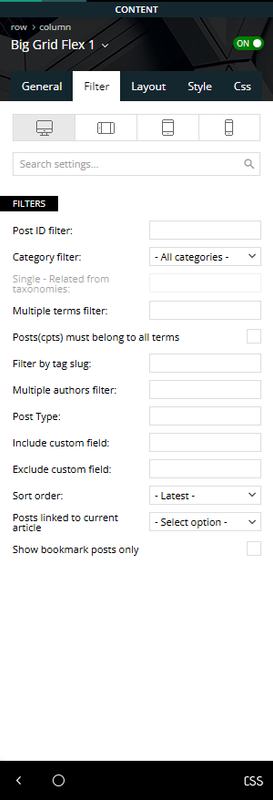
If this setting changed, how do I filter out categories?
Theme version 12.6.9
Composer version 5.3



