
- NewsmagtagDiv Composer Tutorial
- NewsmagHow to use the Visual Composer plugin
- NewsmagHow to update a plugin
- NewsmagWhat’s included in Newsmag theme package
- NewsmagRequirements for Newsmag
- NewsmagInstall via WordPress
- NewsmagInstall via FTP
- NewsmagBlock settings tutorial
- NewsmagtagDiv Social Counter tutorial
- NewsmagHow to update the WPBakery plugin
- NewsmagPage Menu
- NewsmagCustom ad spots
- NewsmagSmart sidebar
- NewsmagVideo playlist
- NewsmagPage templates
- NewsmagHomepage – How to build and set it
 AlmagroNoticias
He puesto un banner de publicidad a través de tag div composer y no me salen las casillas donde tengo que incluir la url donde va enlazado el banner
https://almagronoticias.com/
 Alexandros Bikas
good evening We are having an issue with the div composer tag not loading. You know what we should do?
 AndrewT
 For some reason td composer subcategries images are not working right.It only shows one image for all the sub categories listed. The image that is shown is the image of the main category.
In Admin > Newspaper > Theme panel > categories
Each category and subcategory has its own background image
In TagDiv Composer
For the main category I got the cloud template: Category Template 33 – Parent – Podcasts.
the Subcategories item (element) is part of the template.
It is working as it should, except for the image.
It shows all subcategories names and descriptions correct, but only the image of the main category is showing for all subcategories.
When the image of the main category is remove in Theme panel > categories
no image is showing.
How can this be fixed?
 camu
camuBuen dia, por favor podrían ayudarme, puedo instalar el tema newsmag, también instalar sus plugins, pero cuando los quiero activar, todos se pueden menor el td_composer, mi página da error.
 Bettina
 Hello!
To display that image on each category page, you need to edit the category with the tagdiv Composer and add the Category Background Image shortcode, where you need to display the image and customize it in the tagdiv Composer. Each category will display a different image based on what you upload in the theme panel.
Thank you!
Bettina Hello!
Make sure you have no extra code and that the ad code is placed in the shortcode from the tagdiv Composer.
Thank you!
 jrh
jrh Thank you . . . I don’t know why I did not think of revisions? I suppose I was thinking that the solution would be in tagDiv Composer ‘s interface.
Thanks again, all’s well.
 Anamaria
 Hello,
You can add the category sibling from composer in category template, not page. Category Siblings refers to categories that share the same parent category.
Thank you!
 Davidpinto
 Hi Bettina,
are you sure? I created the mobile page with Tagdiv composer.
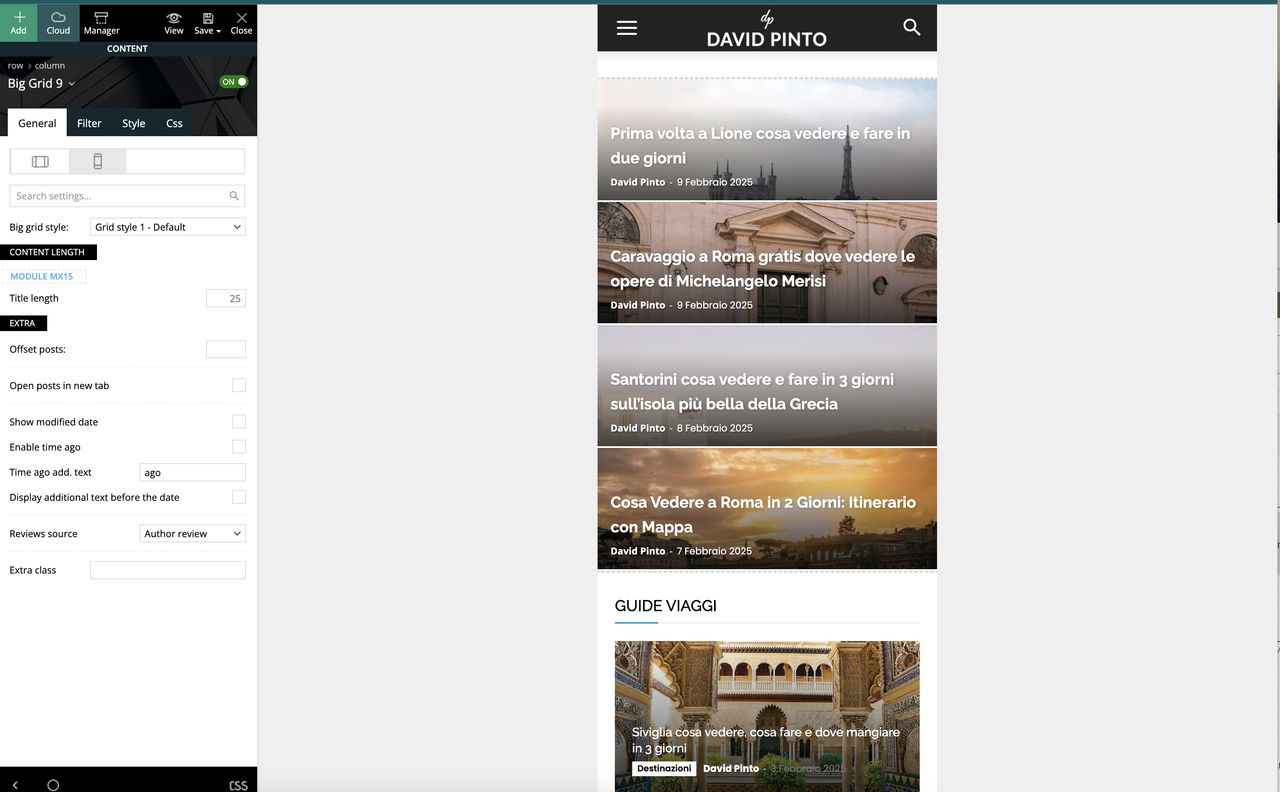
Anamaria Hello,
You have the mobile theme version now, so you can disbale the plugins to check the responsive version.
Using our theme, you can choose from 3 mobile versions
-> mobile responsive => https://www.screencast.com/t/oJ2ShOp47
-> mobile theme plugin => https://forum.tagdiv.com/the-mobile-theme/
-> mobile page => https://tagdiv.com/newspaper-10-3-7-update-brings-customizable-and-fast-mobile-pages/ The option that you need to use.
Suppose you created the mobile pages with tagDiv Composer. In that case, when you install the Mobile Theme plugin, your pages will be overwritten by the plugin (the mobile theme comes with its templates for page, post, category, etc, so your current templates from the desktop theme will get converted to the mobile theme layout, the page content is made without builders in mobile editor => https://www.screencast.com/t/xbgZG8kH also, the options that are provided to edit the mobile theme version are limited (this keeps the things simple)).
This is a video about Responsive Newspaper Theme, AMP & Mobile Theme, Mobile Pages & Templates -> https://www.youtube.com/watch?v=SpGkOnJeNZY.
So, the mobile responsive is what you see when that you select the viewport on phone => https://www.screencast.com/t/matV17hH, so some settings may apply for each viewport(where is the border blue), and others are not(where the border is black).
The mobile page has the mobile templates from Cloud Library => https://www.screencast.com/t/YCcZ8rL8
The Mobile responsive version of the theme and the mobile page editor can be edit with tagDiv Composer, the mobile theme plugin cannot.
For example, you can have the mobile theme plugin activated and use the mobile page/mobile responsive version for the homepage/pages, but for the categories pages/404 page, you can’t use the mobile page/mobile responsive version if you have the mobile theme plugin activated.
So, if you want to design the pages with tagDiv Composer, you can use the mobile page or mobile responsive version.
Thank you!
Anamaria Hello,
Do you want to remove it or only hide it for devices?
Usually, the ads in prebuilt websites are set in the element AD BOX, and you can remove it, edit with tagDiv Composer, select the viewport for phone and select the Ad box element and with right-click you can delete it => https://www.screencast.com/t/2GfCVx9BCAw7 or with drag & drop place it into the deleting red zone from the bottom right of the page
The ad box has 3 sections for ads: using theme panel ads -> https://i.imgur.com/KFa9ibl.png, using images/banners -> https://i.imgur.com/MfAPTaE.png and custom code -> https://i.imgur.com/2rh8SuD.png save it and will appear on the post (you can set a shortcode like a shortcode from adrotate plugin or other plugins).
Thank you!
Bettina Hello!
Go to the Newspaper -> Theme panel -> Social/Apis -> social share, scroll and activate the Print button: https://app.screencast.com/3OcliiJEFtRFs
Edit the article with the tagdiv Composer, add the shortcode Single Post Share, and save and view the results.
Thank you!
 andrea.turco
Hello,
after the last update of Newspaper theme, I’m experiencing a weird behavoiur with Center Magazine Pro.
If I’m logged in, I can see a correct mobile layout. If I’m not logged in, the mobile layout is totally broken.
Every time I update the theme, all the tagdiv plugins are automatically uninstalled. I need to manually install them again, but now everything seems ok. I mean I don’t think is a problem related to plugins.
– tagDiv Composer is active
– tagDiv Cloud Library is active
– tagDiv Social Counter is active
– tagDiv Newsletter is active
– tagDiv Opt-In Builder is active
The url is https://cronachedibirra.it/
Here can you see the layouts for logged (correct, left) and not logged (broken, right) users https://cdn1.cronachedibirra.it/wp-content/uploads/20250220184159/Senza-titolo-1.png
 stemalo
At composer I didn’t find the possibility to add a print button to a single post. This option don’t exist?
 moss8007
 Okay. I understand.
But I want to place ads above H2 or H3 headings in my post content. Could you please guide me on how to achieve this using TagDiv Composer or theme settings?
Thank you!
Bettina Hello!
In the cloud templates, you can add the ads when you edit the post with TagDiv Composer in the “Single Post Content” element in the ADS tab. Documentation here: https://forum.tagdiv.com/article-ads/
Or you can use the element called “Ad Box” from TagDiv Composer, and there you need to add the ads: https://forum.tagdiv.com/ads-adsense-overview/
If you have the same template(global) for all your posts, then the changes will apply to all posts. If you do not want this, you can duplicate the existing template (many times, it allowed results to have many post templates), make a special one, and assign it to each post.
You can add the ads in the theme panel and choose which one to display on the single cloud template.
Thank you!
Bettina Hello!
This issue with the error from Composer has also been discussed here: https://forum.tagdiv.com/topic/errors-at-columns-elements-5/.
Please make sure you did all the steps that I mentioned here: https://forum.tagdiv.com/topic/errors-at-columns-1models-0dom-the-model-does-not-match-the-content-curr/
Thank you!
Bettina Hello!
You can style it with the tagdiv Composer, but you can not edit the fields of the shortcode. Please create a new page, name it, and save it. Then edit it with the tagdiv Composer and add the shortcode called Woo Checkout(Make sure you have the tagdiv shop plugin active). The exact process is for the cart page. Those are the available shortcodes: https://app.screencast.com/oJR6b7xdenNCJ
Thank you!
Bettina Hello!
You can change it in the Newspaper -> Theme panel -> Theme fonts -> Modules and Blocks -Article Title: https://app.screencast.com/KhvrczQzrJbFD (you should have the Standard Pack plugin installed) or in the tagdiv Composer: https://app.screencast.com/wIuDVwB5MASU1
Thank you!
Bettina Hello!
We have 3 options available for mobile versions that you can use:
1. Responsive version: A responsive version of your website looks similar to the desktop version. TagDiv Composer is used to edit the page. Click on the mobile viewport: https://www.screencast.com/t/XDQJedlggSB. You can see your mobile version there and edit or adjust the elements to look better.
2. Mobile pages: https://tagdiv.com/newspaper-10-3-7-update-brings-customizable-and-fast-mobile-pages
3. Mobile theme plugin: The Mobile Theme is a performance-optimized theme included in the main Newspaper theme that only loads on mobile devices. It comes with its own templates and designs for pages, posts, categories, etc., so your current templates from the desktop theme will get converted to the mobile theme layout. Please see https://forum.tagdiv.com/the-mobile-theme/ and https://forum.tagdiv.com/mobile-theme-introduction/ for more information.
A full explanation is here: https://www.youtube.com/watch?v=SpGkOnJeNZY
If you need to use mobile version 1 or 2, then you need to uninstall the Mobile Theme plugin and AMP.
Thank you!
 jandevit1
 hello I have same problem
I cant even edit with tagdiv composer?
how can I edit checkout form?
 marijn390
 Hi Anamaria,
I already have the related section that you show in the screenshot on the website at the moment. These articles are matched based on tags/categories. However, this is not desirable because we use the tags and categories for multiple news items that have nothing to do with each other.
So I am actually looking for a way where I can link an article myself in a related articles section. Otherwise we have to create a tag for each topic and attach it to the flex block via TD Composer. I hope you understand me, it is difficult to explain.
marijn390 Hi Anamaria,
Thanks for the reply. How can editors link articles here without going to the TD composer? Our editors only write and don’t know anything about technical stuff. I want them to be able to do everything from Gutenberg in the post editor.
-
This reply was modified 1 year by
marijn390.
Anamaria Hello,
Please edit with tagdiv Composer, select the button and then remove the mobile menu with right-click like this https://i.imgur.com/F9dxeXx.jpeg
Thank you!
stemaloI gave up after a hour of search. I couldn’t find where to translate the “My account” page. All the terms are still in English. The only thing I was able to translate was title with composer.



