
- NewspaperCreate Custom Code with the browser’s Inspector or the Live CSS Box
- NewspaperScroll Animation
- NewspaperWP Rocket and Newspaper Theme: Optimization Guide
- NewspaperHow to setup Twitch for Social Counter
- NewspaperModal Popup
- NewspaperFlex Block Settings Guide
- NewspaperAutoptimize Plugin – install and configuration
- NewspaperAdding Multiple Authors to Your Articles
- NewspaperDesign your Post Pages using the Cloud Library Templates
- NewspaperBig Grid Flex Settings
- NewsmagtagDiv Composer Tutorial
- TutorialsFrom WPBakery to tagDiv Composer
- NewspapertagDiv Composer Tutorial
- NewspaperTheme modules and blocks
- TutorialsDefault Block Settings Guide
- NewspaperThe Mobile Theme
- NewspaperCompare theme files – Winmerge tutorial
- NewsmagBlock settings tutorial
- NewsmagLogo & Favicon
- NewsmagFooter templates
 Simion C.
 Hi,
Please provide some examples of this CSS you are referring to, also a link to the website would be helpful as well. We will take a look.
Thanks
 Calin
Calin Hi,
Please make a test go in Newspaper>Theme panel>Theme fonts Custom font files
https://www.screencast.com/t/o8Xbuftvc
And remove all custom fonts files, save, clear all cache and try again.
Also here you’ll found more details: -> https://developer.mozilla.org/en-US/docs/Web/CSS/@font-face/font-display
Thank you.
Simion C. I don’t understand what you are referring to unfortunately. Maybe with some more details, screenshots about the elements you are mentioning and what exactly you want to do with them, I could give it a try.
There is a guide I can provide you for making various customizations for the website, using the browser inspector tool
– https://www.screencast.com/t/keG4sdRXkHa
Some simple image effects here, maybe these will be useful for you
– https://www.w3schools.com/howto/howto_css_image_effects.asp
Calin Hi,
Please read this documentation for the problem with the http://
-> https://generatepress.com/forums/topic/ive-changed-to-https-problem-with-inline-css-background-images/
Please make a test with the plugin suggested in the above article.
Thank you.
 jcferns
How to center align the text of Block Header 10, in block setting menu currently its left align, can you provide custom css so that the custom title which I add from TD composer looks centered
Currently my site is on testing once everything looks fine will implement on main site
http://kuwaittimes.net/sample
Simion C. Hi,
Is the page build with the tagDiv composer? Rows and columns have options to set a color background
– https://www.screencast.com/t/OpD2v23DsBa
That would be one way to color the actual content, it would be possible with CSS as well. If you need help with this, please provide a link to this page if possible and I will take a look and identify the best solution.
Thanks
 Catalin
 Hi,
If you want to hide the sidebar for mobile, you need to use a bit of CSS code for that. Use the code below and place it in Theme panel -> Custom CSS area.
@media(max-width:767px){

.td-pb-span4{

display:none!important;

}

}
You can translate this string from Translation Section from Theme panel -> https://www.screencast.com/t/4gh3DYh8sL
Thanks for your understanding!
Simion C. Hi,
A class can indeed be added to blocks, this will allow more precise targeting by CSS. If you want to remove the post title for a specific block, you could do it like this
– https://www.screencast.com/t/9m2PFe6R
– https://www.screencast.com/t/XGIyrOa9
Code used in example here
.myclass .entry-title {

display: none;

}
If this is not what you wanted, please mention what exactly you want to, some examples with links or screenshots will be helpful.
Thanks
Catalin Hello,
Try the code below and place it in Theme panel -> Custom CSS.
The code is ->
.mfp-arrow-left:after,

.mfp-arrow-right:after {

display: none!important;

}

.mfp-arrow-right:before {

border-left:none;

}
Hope this helps!
Thanks for the message!
 ctoweett
 That colour can only be set through CSS if you are using default post templates. So check the custom code section or Appearance>Customize to see if you put it there. And you cannot find the code without using the browser inspector.
ctoweett Put it in the custom CSS section of the theme panel 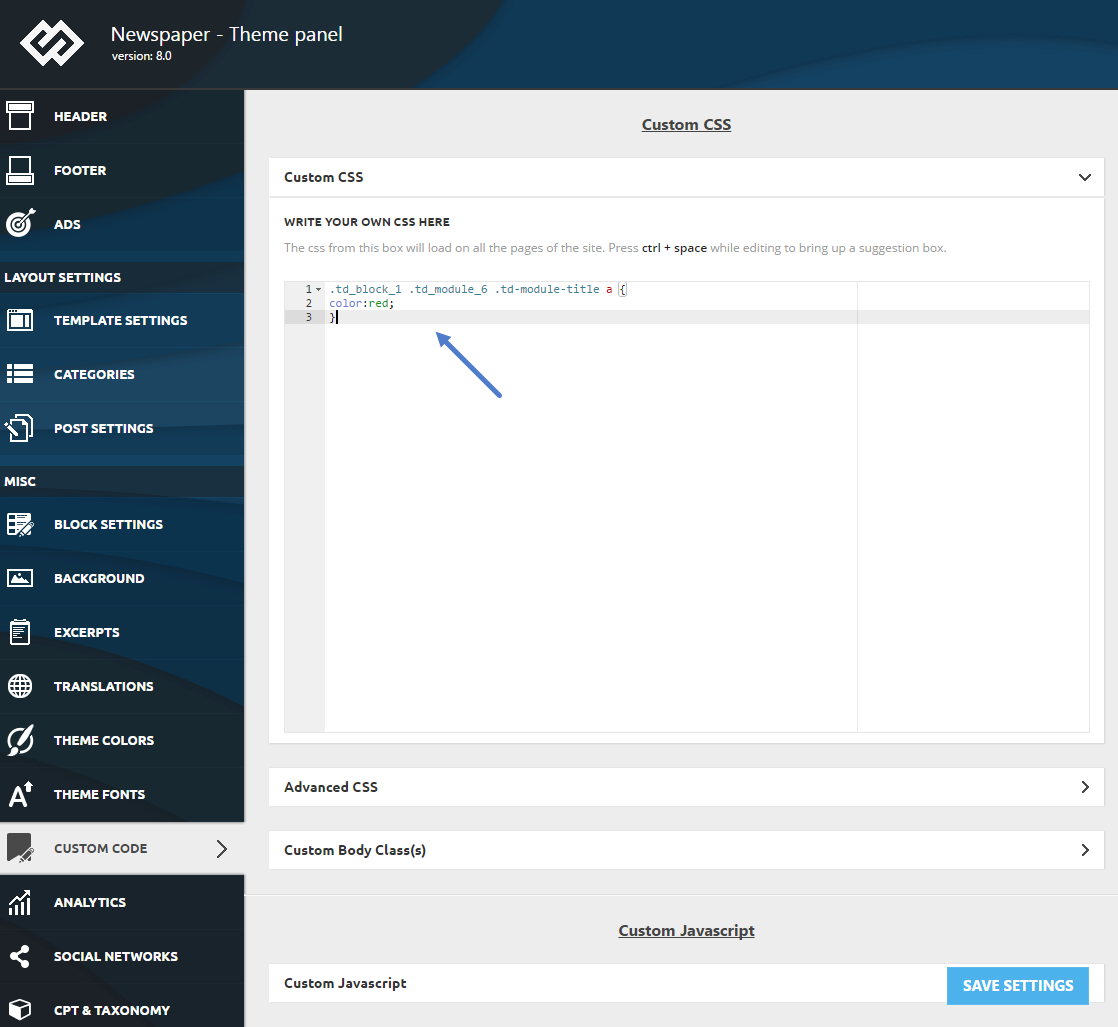
 ladotg
 I have same problem with horizontal scale, I put code above into addition css for mobile but problem is still there.
Screenshot: http://lado.com.hr/tcBigGrid1.png
I don’t need slide left or right. Can I see only post under first one?
Like this: https://ibb.co/nFxLme
Thanks!
 zekavr
 Where to add this code? I use child theme, to put in style.css or …?
 DKF
DKF Hi,
thanks!
I put all the settings in Newspaper theme panel on default. There are no plugins that changed my css. I can still see a lot of rules in index that I want to get rid of. Can I reach these rules to eliminate them?
 Xplodsports
I am getting this error:
Template is missing. Standalone themes need to have a index.php template file. Child themes need to have a Template header in the style.css stylesheet.
I have loaded the theme to wp themes but it keeps telling me it’s not there. I checked the file manager on my server and it is in the themes. Do you have a step by step guide?
I figured it out.
 gooma2
Hello,
The new Google AMP Paired/Native Updates Require 50KB or less CSS Or Site Breaks. I tried both versions that will help AMP pages have better navigation and incorporate your site’s theme, but Newspaper breaks in both. After talking to Google AMP developers and developers of the AMP plugin, they say it’s the theme that will have to change CSS so that users can get on board with AMP. Sadly, big G is the boss and we have to follow.
gooma2 That’ll be hard to say as WordPress 5 has got some conflicts with plugins, and now Google AMP has been updated which conflicts heavily with the Newspaper theme. Google now wants only 50KB or less of CSS code so many themes are going to conflict.
It’ll be a time will tell type thing for now.
 isghari
 Hi Simion,
Than’s for the reply.
1- Solution 1 with cloud library messed up all the formatting of my article ( i used smart list template 4) + the 2 ads disappeared. So I’m considering the solution 2
2- Deactivating the AMP plugin (I will redirect the ancient AMP pages with an Htaccess for google seo) , and NOT using the Mobile Theme. Does that configuration force the back/next buton to appear on both Desktop and Mobile and tablette? (using the smartlist number6)
3- How can I remove the sign “>” and “<” from the back/next button? … to show only “Next” or “Back” without the signs?
4- last question: Is there a way to remove the “back button” completely?
Sure we can hide it with css color White on White, but can we remove it all togheter?
Your code for changing the button on pages 3, 4, 5 .. is working great. Thank’s!
 vicafnan
 Thanks editing the demo css worked. You can close the topic.
 Diyar
DiyarHi,
I understand that Newspaper doesn’t support RTL, I am okay with that!. I have good CSS skills to deal with that either.
Anyway, I take a screenshot to the problem which I faced after turned my WordPress setting to the Arabic Language.
Site Link : https://www.iraqcoders.com
Simion C. Hi,
So you want to change the colors of the close icon and social icons from what I understand
– https://www.screencast.com/t/nXG33E7j0GP
I could give you some CSS for that, for example
– https://www.screencast.com/t/5ndKEYPQzSGL
.td-mobile-close .td-icon-close-mobile {

color: yellow;

}

#td-mobile-nav .td-social-icon-wrap i {

color: blue;

}
Change the colors as you wish, then enter the code in the Custom CSS section of the theme panel.
Thanks
 Bogdan B.
 Hello,
The rules from index are rules that do not come from the stylesheet. They can come from theme panel settings, custom css added in the theme panel or from plugins.
Thank you!
 NBak18
 Hi.
I’ll try to use common articles to post advertisements, but I need some help.
I don’t want the title to appear to block post. Can I add an extra class to the block and then add css for the title to hide?
If yes, what’s the css I have to use and what extra class should I add?
Thank you,
Nick.
DKFHi there,
I’m trying to change css for my blockquotes. Using chrome > inspect shows some css lines I want to change or get rid of. I must have overruled some existing css rules in my styles.css.
But I know how to find the lines in the styles.css. But where can I find css rules that are in (index):238 f.e. I don’t understand where these rules are. Can anyone explain? Thanks!
Simion C. Hi,
That happens because the mobile them has it’s own stylesheet and fixed values
– https://www.screencast.com/t/WBGH4CAucxA
It has no font settings where this could be changed, so this could only be modified in the mobile stylesheet directly or with CSS.
There would be a solution to this, it will require a cloud template and deactivated mobile theme plugin. Using cloud post templates font sizes for the post title can be set per device, so for example
– https://www.screencast.com/t/wCxG3jG9
– https://www.screencast.com/t/oYMM5mnc2
Thanks

