
- NewsmagInstalling pre-built websites
- NewsmagIntroduction
- NewsmagSmart Lists
- NewsmagTheme thumbs
 Calin
Calin Hi,
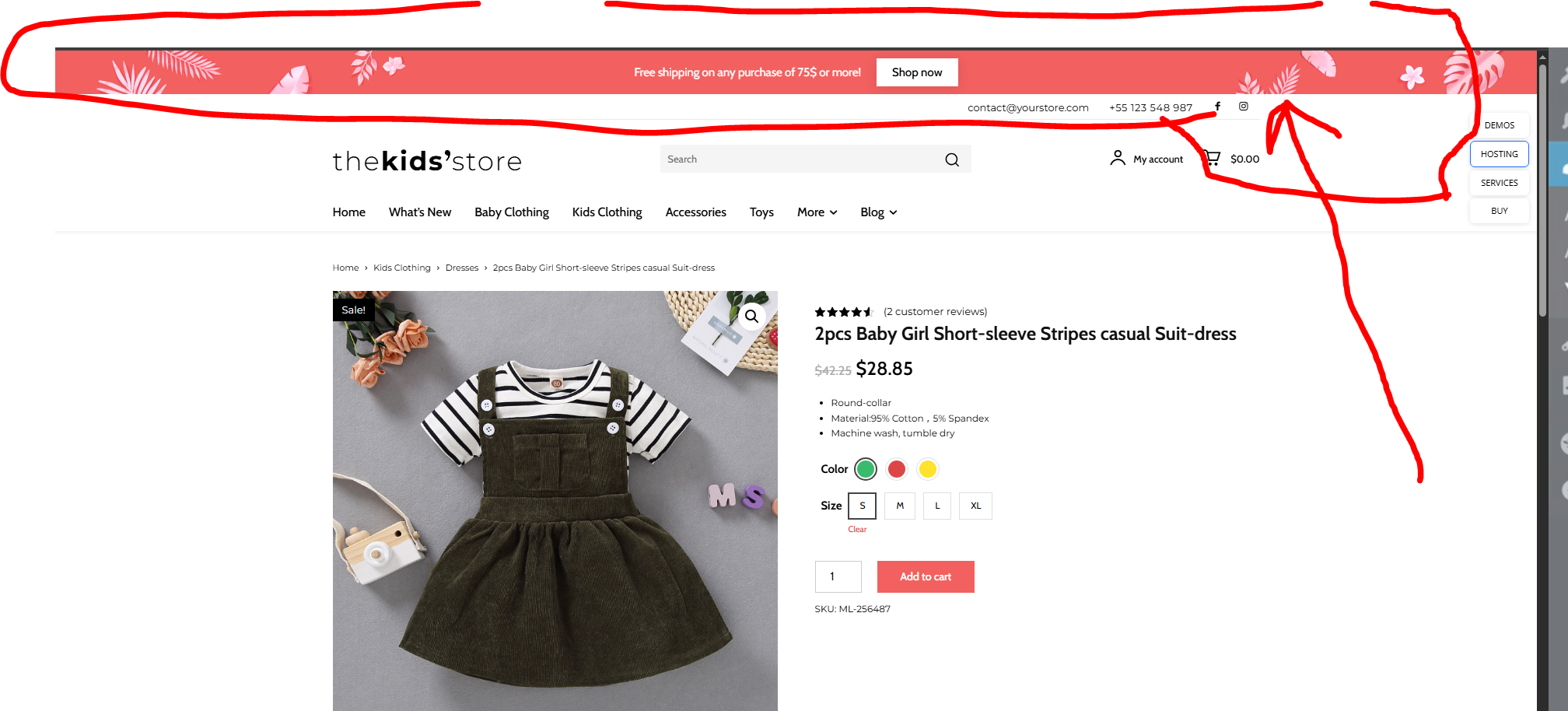
Unfortunately, the image is not working, but all elements can be get from the cloud, you can import from there any section you like that exists in the https://demo.tagdiv.com/newspaper_shop_kids_store/product/2pcs-baby-girl-short-sleeve-stripes-casual-suit-dress/
 boda
bodaHello, please, how to find this element in the newspaper elements ??
bodahello,
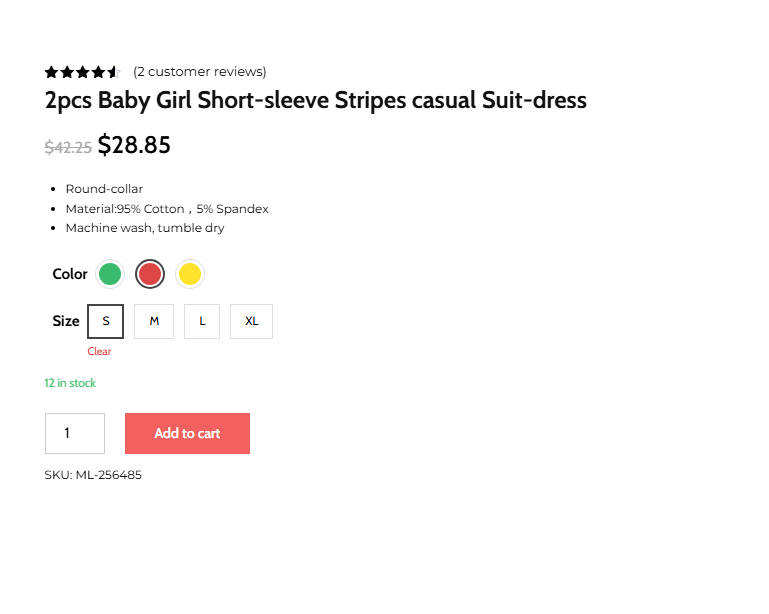
Please, how to make my color variation look like this demo instead of the colors list https://demo.tagdiv.com/newspaper_shop_kids_store/product/2pcs-baby-girl-short-sleeve-stripes-casual-suit-dress/
Calin Hi,
The cov-19 Italy Report demo has the footer in a light gray color – https://prnt.sc/zJHG4_mdROzw, so if you want to change it edit the page with tagDiv Composer, and go down to the footer section – https://prnt.sc/Jgt5cidUtwfd the background color can be chnaged by selecting the row and checking the css tab – https://prnt.sc/ai6SNJmohY8p after that you need to chnage the color on the elements from the footer, just select each element in part and look for the Style tab there you’ll have options to change the color.
Thank you!
 Kevin@hookedmagazine.ca
Loaded the basic demo and it only shows text for my logo, even though I uploaded logos & favicons in the settings. Also it’s not showing the demo theme or anything after the Header medu and when I click on the green edit with TagDiv button I get a red error on the right saying “Error at rows: 2(models) : 1(dom). The model does not match the content Current state has involved an issue. You could try an UNDO operation (CTRL+Z / CTRL+SHIFT+Z)”
Then I tried to load a template and it hangs on install
I’m missing something here.
hookedmagazine.ca is the website I’m trying to move over.
Calin Hi,
Unfortunately, the link to your website is not working or may be restricted in Romania. Could you please provide some screenshots of the issue?
It’s possible that the “More Stories / Category Tags” sections you mentioned are not part of our template and may have been added by an extra plugin.
For reference, the Single template for Free News looks like this:
https://demo.tagdiv.com/newspaper_free_news_pro/2023/12/14/td-post-fashion-finder-biggest-shows-parties-and-celebrity-for-new-years/
Calin Hi,
I’m not sure that I understand correctly, do you have problems installing the “coaching pro”? Or this is installed, but there are some sections like the blog that do not have the same layout as the rest of the website “coaching pro”? The articles when the “coaching pro” is installed should have this layout – https://demo.tagdiv.com/newspaper_coaching_pro/2023/05/22/td-post-the-growth-mindset-advantage-embracing-change-and-innovation-for-success/
Calin Hi,
The logo on mobile can be set using tagDiv Composer on each viewport. In part, set the image logo and make sure that you change the Show Image option from Hide to Show – https://prnt.sc/qjRA8UbjCCrt Also, in the mobile menu, the demo you have has a page set as a mobile popup that needs to be edited. First, select the mobile menu element and change the name under the Title section – https://i.imgur.com/xpNL6Wz.png – https://i.imgur.com/vyYMZtM.png Then edit the page set as the mobile menu; this can be accessed using this option – https://i.imgur.com/wM3OZrM.png After the page is open, click on Edit with tagDiv Composer and make the changes you need.
Calin Hi,
Can you please let me know for what demo do you face this situation?
Also, what could be done is to make sure that all the theme recommendations are set at least as in our guide https://forum.tagdiv.com/requirements-for-newspaper/
Thank you!
 dhagood
When I load one of the prebuilt websites, I get a error message and they have checked on the server and its all good,
Error says tagdiv imported detects that your server is not properly configured. Dont worry, the importer will continue the demo after you click the OK button.
My system status is good, no issues. Anyone seen this, or is there support on this?
 Jairo
Jairo Hi Calín,
Thanks for your quick reply.
The website is currently under development with maintenance mode active, so you wouldn’t be able to see it.
If you give me an email address where I can contact you privately, I’ll send you access with your WordPress user account so you can access it from the backend.
On the other hand, the CSS code applied to the block is the default one from the demo; I’ll copy the CSS file for you:
.tdm_block_image_info_box.td-image-info-box-style-2 .tdm-image-description {
padding: 0 48px 60px 0;
top: auto;
}
@media (max-width: 1018px) {
.tdm_block_image_info_box.td-image-info-box-style-2 .tdm-image-description {
padding: 0 30px 60px 0;
}
}
.tdm_block_image_info_box.td-image-info-box-style-2 .tdm-title-md {
padding: 12px 100px 20px 40px;
background-color: rgba(49, 67, 226, 0.4);
transition: background-color 0.3s ease;
}
@media (max-width: 1018px) {
.tdm_block_image_info_box.td-image-info-box-style-2 .tdm-title-md {
padding: 10px 30px 17px 20px;
}
}
.tdm_block_image_info_box.td-image-info-box-style-2 .tdm-image-meta {
position: relative;
margin-top: 0;
padding-left: 40px;
}
@media (max-width: 1018px) {
.tdm_block_image_info_box.td-image-info-box-style-2 .tdm-image-meta {
padding-left: 20px;
}
}
.tdm_block_image_info_box.td-image-info-box-style-2 .tdm-image-meta {
bottom: 0;
}
.tdm_block_image_info_box .tdm-image-wrap {
border-radius: 5px;
}
.tdm_block_image_info_box.td-image-info-box-style-2 .tdm-image-wrap.tdm-btn-sm-used .tds-button {
margin-top: 65px;
}
.tdm_block_image_info_box.td-image-info-box-style-2 .tdm-image-wrap:hover.tdm-btn-sm-used .tds-button {
margin-top: 65px;
}
.tdm_block_image_info_box.td-image-info-box-style-2 .tdm-image-wrap:hover .tdm-title-md {
background-color: rgba(49, 67, 226, 0.8);
}
@media (max-width: 767px) {
.td-stretch-content .tdm_block_image_info_box.tdm-mobile-full {
margin-left: 0;
margin-right: 0;
}
}
Calin Hi,
For this, you can choose the video format – https://forum.tagdiv.com/featured-image-or-video/, the results will be similar to those from the video news demo https://demo.tagdiv.com/newspaper_video_news_pro/, the video will be popping up on flex blocks when you’ll click on the featured image.
Calin The CPT from the mentioned demo is ‘tdcpt_app_listing’ and is added by the APP Find PRO Plugin plugin, but to display something, make sure that you have some APP listings – https://i.imgur.com/OD8KI0E.png
 dmforum
 What is the default CPT in the demo site for Apps directory to showcase the apps in horizontal order?
dmforum Hi,
As per your instructions, I have used the flex block builder and selected the module that I have downloaded “APP Listings – 2 from App Find PRO Demo” and used it in my website aiopscommunity.com but the module doesn’t list the posts from the app listings. You can check the same under the heading “AiOps Apps / Tools” in the url that I have given “https://aiopscommunity.com”
dmforumHi,
I have installed the module “Module Template – APP Listing – 2 – APP Find PRO” and am tring to use it in one of the pages of “Free News”. But still I am getting the error Requires Module Module Template – APP Listings – 2 from App Find PRO Demo. Before importing this template on your website, make sure to install it from your Admin Dashboard > Cloud Templates. Go to the Modules tab. Click on the plus icon and search for it using the tagDiv Cloud Library. After installing it, you can use any templates that requires it.
 icedge
 Why WordPress + Newspaper creates ~27 image sizes
Two things are happening at once:
1️⃣ WordPress core creates image sizes
By default WordPress generates:
thumbnail
medium
medium_large
large
plus retina variants (2x)
2️⃣ Newspaper theme (tagDiv) adds many custom sizes
Newspaper is optimized for:
blocks
sliders
modules
mobile / tablet / desktop
retina (2x)
So it registers 20+ custom image sizes, which is why every upload explodes into ~27 files.
👉 This is normal behavior for Newspaper — not a bug.
What image sizes does Newspaper REALLY use?
In practice, Newspaper mostly uses these core groups:
✅ Commonly used sizes
td_696x0 → main article featured image
td_1068x0 → full-width layouts
td_300x220 → small blocks
td_534x462 → medium blocks
td_80x60 → widgets / lists
Retina (2x) versions of the above
⚠️ Many other sizes are edge cases (rare modules, legacy layouts, demos).
Option 1 (Recommended): Reduce image sizes SAFELY ✅
Step A: Disable unused sizes via code
Add this to functions.php (or a custom plugin):
add_filter(‘intermediate_image_sizes_advanced’, function ($sizes) {
$allowed = [
‘thumbnail’,
‘medium’,
‘large’,
‘td_696x0’,
‘td_300x220’,
‘td_534x462’
];
foreach ($sizes as $key => $value) {
if (!in_array($key, $allowed)) {
unset($sizes[$key]);
}
}
return $sizes;
});
📌 This:
Keeps only important Newspaper sizes
Stops WordPress from generating the rest
Option 2: Disable Retina Images (Huge win 🚀)
Newspaper creates 2x images by default.
Turn them off:
Newspaper → Theme Panel → General Settings → Retina Display
➡️ Disable Retina Images
💡 This alone can cut image generation almost in half.
Option 3: Use a plugin (Easiest, no code)
Install Disable Media Sizes or Perfmatters.
Then:
Disable unused WordPress sizes
Leave Newspaper core sizes enabled
⚠️ Don’t blindly disable everything — Newspaper needs some sizes to avoid layout breaks.
Option 4: Regenerate after cleanup (IMPORTANT)
After changing sizes:
Install Regenerate Thumbnails
Regenerate
Delete old unused thumbnails (plugin or server cleanup)
❌ What NOT to do
Don’t disable all td_* sizes
Don’t edit Newspaper core files
Don’t rely only on CDN offloading (it hides the problem but doesn’t fix disk usage)
Best setup for Newspaper (my recommendation)
✅ Disable Retina
✅ Keep 6–8 essential sizes only
✅ Use Bunny / CDN for delivery
✅ Use WebP/AVIF
This keeps:
Layout intact
Disk usage low
CDN fast
 Cipher Comp
Hosting Server: LiteSpeed
Cache Plugin: LiteSpeed Cache
Theme: Newspaper by tagdiv
CDN: Cloudflare
WordPress: 6.9
PHP: 8.3
I have imported the “Newspaper Publication Pro” demo on my website. After clearing the cache, everything works well. However, after 24 to 36 hours, Ajax paginations such as “Load More” and “Next-Prev” cease working properly. The loader icon is spinning round and round. Here’s the video link.
I’ve included some screenshots of cache plugin settings in the links below. Please look into this.
https://ibb.co/BVQRPnsc
https://ibb.co/nMMWvPBJ
https://ibb.co/Gf1VGcZ5
https://ibb.co/KjP6L9MV
https://ibb.co/DH0GHFWh
https://ibb.co/N6Gvxmvn
https://ibb.co/xqY4qNGc
https://ibb.co/3yJ8Qk0d
Calin Hi,
I understand. The only elements that have similar options are the Slide and Big Grid Slide elements. However, I believe you can achieve this more easily by using Revolution Slider.
You can set the Revolution Slider (Import Revolution Sliders) to display the latest articles and choose a specific category, if you want to use a special one. After configuring the slider, simply add it in tagDiv Composer using the dedicated Revolution Slider element.
This approach should give you more flexibility and better control over the layout.
 Ling
Ling So, I cannot have on the same block a normal single post article and a custom post type,
correct?
I just wanted to have on the homepage, a block with all my last posts( articles, custom post type, review,…)
Like on the pro them: the first 4 pictures:
Fashion: ( WordPress News Magazine Charts the Most Chic and
Gadgets: Game Changing Virtual Reality Console Hits the Market
Travel: Discover the Most Magical Sunset in Santorini
Computer Filters Noise to Make You a Better Listener
For me it will be: https://demo.tagdiv.com/newspaper_pro/
Fashion: Last normal category article
Gadget: Last normal category article
Travel: Last Custom post type
Computer: Last Custom post type
 robinspaul
 Hi Calin,
We removed the image on the Home Page banner of the BlockChain Demo and then added the same image, it goes to the bottom of the banner and the size is really small. It looks like there is something else we need to set up to replace image on the homepage.
Thanks
robinspaulHi,
We are planning to use BlockChain Demo (Blue and Pink gradient banner):
https://demo.tagdiv.com/newspaper_blockchain_pro/
It loads on mobile phones, but when it loads first time there is a big space above “Invest In Crypto The Smart Way!”.
So, the top banner with logo, menu etc. appears then there is big space below the white top banner until the text – “Invest In Crypto The Smart Way!” After we refresh the site, the gap disappears, the text comes to the top and works fine.
This issue is only on mobile view. Could you please help us to fix this?
Thanks
 nbiga samir
Hello,
I recently purchased my **third Newspaper license**, and I’m facing an issue that I’ve never encountered before.
I installed the **Gossip demo**, then added my own articles and categories.
However, when I update the categories in the **Filter** section, it doesn’t work correctly — it displays **“No posts”**, even though there are posts assigned to that category.
Please find screenshot (https://ibb.co/fVKY8JL7) showing the issue.
Thank you in advance for your assistance.
Kind regards,
Samir
Calin Hi,
In case you want to have this functionality https://demo.tagdiv.com/newspaper_podcasts/ then you need to use audio formats for your articles, set the links for audio, and the featured image will be transformed into audio. Also, on your websites, you should use flex blocks to have the audio icon displayed. https://i.imgur.com/zceMuk7.png
Also, you can import from cloud the blocks you like for audio and video format and just adjust them using tagDiv Composer.
Also, for the single post template, make sure that you are using the Single Featured image, not the background one.
Thank you!
robinspaul We disabled tagDiv Mobile Theme and AMP plugins. It is loading on the mobile phone.
When the Blockchain Demo loads on the Mobile View first time, there is a gap between the header bar and the below text: “Invest in crypto the smart way! Making Blockchain & Crypto accessible and usable for everyone”
This happens only First Time it loads and if we refresh after that, it goes back to normal position. Could you please help us to fix this?
Also, the Blockchain Logo does not appear on the Mobile View. Could you please let us know how to fix it?
The other issue is with the Menu on the Mobile View: when we click on the 3 lines for menu on top on the mobile view it does not show the Menu, instead it is showing “Click here – to use the wp menu builder”. Could you please let us know how we can make the Menu visible on the mobile view?
Thanks,



