
- NewspaperHow to Make the Site Faster
- NewsmagUsing the theme translations together with WPML
- NewspapertagDiv AMP Plugin Tutorial
- NewspaperNewspaper Theme Support
- NewsmagRequirements for Newsmag
- NewsmagSmart sidebar
- NewsmagTheme thumbs
- TutorialsWhat is Ajax preloading?
- NewspaperCustom ad spots
- NewspaperRequirements for Newspaper
 Simion C.
 Hi,
I believe by default that menu setting is set to no preloading. Indeed disabling it will improve performance.
You can test your website with online tools, try gtmetrix for example or Google insights and check the results and suggestions provided there. Optimize as many as possible, results should follow.
There are many topics here on the forum in terms of speed improvements and optimization. Some of them here for example
– https://www.infophilic.com/get-almost-100-pagespeed-newspaper-theme/
– https://forum.tagdiv.com/topic/score-100100-pagespeed-with-newspaper-wordpress-theme/
– https://forum.tagdiv.com/topic/newspaper-theme-speedify-your-website/
– https://forum.tagdiv.com/topic/tutorial-chriss-custom-optimizations-for-functions-php-etc/
– https://forum.tagdiv.com/topic/tip-how-to-easily-minify-your-css-without-breaking-your-site/
– https://forum.tagdiv.com/cloudflare-cdn/
– https://forum.tagdiv.com/how-to-make-the-site-faster/
Also the theme requirements guide – https://forum.tagdiv.com/requirements-for-newspaper/
 simchris
 Yes, you can put at end of functions file, or make a custom plugin. Note that if your server is running http/2 it might actually work better to load locally since it will be ‘bundled’ together via https … but you’d need to speed test that. (Sometimes CDN is *not* faster, depending on locale and audience.)
 Bogdan B.
 Hello,
Indeed adding more features will result in a few extra queries. There were lots of features added since version 7. There were 2 major updates with lots of new features in between newspaper 7 and newspaper 9
Performance is still a concern to us ad we will not sacrifice the theme performance for adding new features but we do have to improve the theme functionality also. You cannot ad new features without some performance loss. We are working on optimization though so performance will see an increase in future releases. We are constantly working on new features but on performance optimization as well.
Until then, you can try to improve your page loading speed by optimizing your install. Try these few guides that will improve your loading speed:
– https://forum.tagdiv.com/cache-plugin-install-and-configure/
– https://forum.tagdiv.com/how-to-make-the-site-faster/
– https://forum.tagdiv.com/topic/score-100100-pagespeed-with-newspaper-wordpress-theme/
– https://forum.tagdiv.com/topic/newspaper-theme-speedify-your-website/
– https://forum.tagdiv.com/topic/tutorial-chriss-custom-optimizations-for-functions-php-etc/
We also recommend this Cloudflare configuration
– https://forum.tagdiv.com/cloudflare-cdn/
For speedbooster you can disable the compatibility check like so:
https://forum.tagdiv.com/topic/tinymce-advanced-and-other-various-disabling-speed-boster/
Thank you for understanding.
 samsuldhaka
 Dear Simon,
Greetings!!!!!
I have sent all the details to the mentioned email address. Please check from your end. Hope to get a solution faster.
Thanks
Sam
Bogdan B. Hello,
page speed is a very personal implementation for each specific host in particular. I can provide you with a handful of guides to help you on your quest for faster loading speeds:
please use these guides:
– https://forum.tagdiv.com/cache-plugin-install-and-configure/
– https://forum.tagdiv.com/how-to-make-the-site-faster/
– https://forum.tagdiv.com/topic/score-100100-pagespeed-with-newspaper-wordpress-theme/
– https://forum.tagdiv.com/topic/newspaper-theme-speedify-your-website/
– https://forum.tagdiv.com/topic/tutorial-chriss-custom-optimizations-for-functions-php-etc/
We also recommend this Cloudflare configuration
– https://forum.tagdiv.com/cloudflare-cdn/
For speedbooster you can disable the compatibility check like so:
https://forum.tagdiv.com/topic/tinymce-advanced-and-other-various-disabling-speed-boster/
Thank you!
 Catalin
 Hello aresglez,
Most likely, this is not the main reason to cause your website to be slow, sorry! Please check our useful guide from here -> https://forum.tagdiv.com/how-to-make-the-site-faster/
Thanks for your understanding!
 ctoweett
 Try these guides:
– https://forum.tagdiv.com/cache-plugin-install-and-configure/
– https://forum.tagdiv.com/how-to-make-the-site-faster/
– https://forum.tagdiv.com/topic/score-100100-pagespeed-with-newspaper-wordpress-theme/
– https://forum.tagdiv.com/topic/newspaper-theme-speedify-your-website/
– https://forum.tagdiv.com/topic/tutorial-chriss-custom-optimizations-for-functions-php-etc/
 Waraffiliate
Hello, I was wondering why the video demo is not available in the library? This one, I wanted to have similar homepage to my site. https://demo.tagdiv.com/newspaper_video/legacy-of-the-void-is-faster/
And how am I able to add the log in page?
Simion C. Hi,
There is a small margin bottom below the logo, 9px to be more exact
– https://www.screencast.com/t/gUus1ZdHMbx
Removing that margin bottom and increasing the top margin result:
– https://www.screencast.com/t/T8de9i4PHhRz
– https://www.screencast.com/t/nlQy4DdY
Code used (works for header style 1)
.td-header-style-1 .td-header-sp-logo {

margin: 37px 28px 0px;

}
I could take a look if this doesn’t work, for a more accurate and faster solution. If possible post a link to the website.
Thanks
Bogdan B. This is the only issue we detected regarding server load.
You could be facing a simple page speed optimization issue. In this case, please use these guides:
– https://forum.tagdiv.com/cache-plugin-install-and-configure/
– https://forum.tagdiv.com/how-to-make-the-site-faster/
– https://forum.tagdiv.com/topic/score-100100-pagespeed-with-newspaper-wordpress-theme/
– https://forum.tagdiv.com/topic/newspaper-theme-speedify-your-website/
– https://forum.tagdiv.com/topic/tutorial-chriss-custom-optimizations-for-functions-php-etc/
We also recommend this Cloudflare configuration
– https://forum.tagdiv.com/cloudflare-cdn/
For speedbooster you can disable the compatibility check like so:
https://forum.tagdiv.com/topic/tinymce-advanced-and-other-various-disabling-speed-boster/
Thank you!
 crazydiver
Hello,
I like the mobile plugin theme. It makes my site faster.
However, is it possible to have the mobile plugin theme ignore just the front page?
I like what it does to the posts and pages. I just don’t want the plugin to minimize the frontpage. That’sl all.
Thanks.
 cahpolli
 Hi!
No, It is the other way.
The backgrounds of the rows load slow while the content loads faster.
Sure, there is an example:
https://naturam.com.br/ubatuba/praias/
Thanks!
ctoweett Also do check this link on how to enable gzip for the theme https://forum.tagdiv.com/how-to-make-the-site-faster/
 wwasabi1007
 Hi, I managed to add the Login with Facebook button to the modal, but it doesn’t work on mobile, as I imagine it uses a different php file. Could you point me out where can I add this button to to make it work?
Also, I am using your plugin for mobile version as it’s faster than the responsive site for mobile- so you know if there is a different source for the mobile. I would like to add it to both responsive version (because of tablets) and the mobile version plugin.
Thanks a lot.
Example here: http://www.portalexplora.com
Bogdan B. Hello,
Every custom css will load after the original theme css. The only way to load your custom css faster (you cannot have it load first, sorry) is to add it in the style.css file.
Thank you!
Catalin Hello aloysiuspattath,
Unfortunately, notice that the optimization services at not covered by our support. We have a useful guide with essentials steps which have to be done in order to achieve a website faster. That’s all and the rest you should make it yourself.
Thanks for your understanding!
Bogdan B. Hello,
Please check these guides for proper page speed optimization:
– https://forum.tagdiv.com/cache-plugin-install-and-configure/
– https://forum.tagdiv.com/how-to-make-the-site-faster/
– https://forum.tagdiv.com/topic/score-100100-pagespeed-with-newspaper-wordpress-theme/
– https://forum.tagdiv.com/topic/newspaper-theme-speedify-your-website/
– https://forum.tagdiv.com/topic/tutorial-chriss-custom-optimizations-for-functions-php-etc/
We also recommend this Cloudflare configuration
– https://forum.tagdiv.com/cloudflare-cdn/
For speedbooster you can disable the compatibility check like so:
https://forum.tagdiv.com/topic/tinymce-advanced-and-other-various-disabling-speed-boster/
Thank you!
 Edward
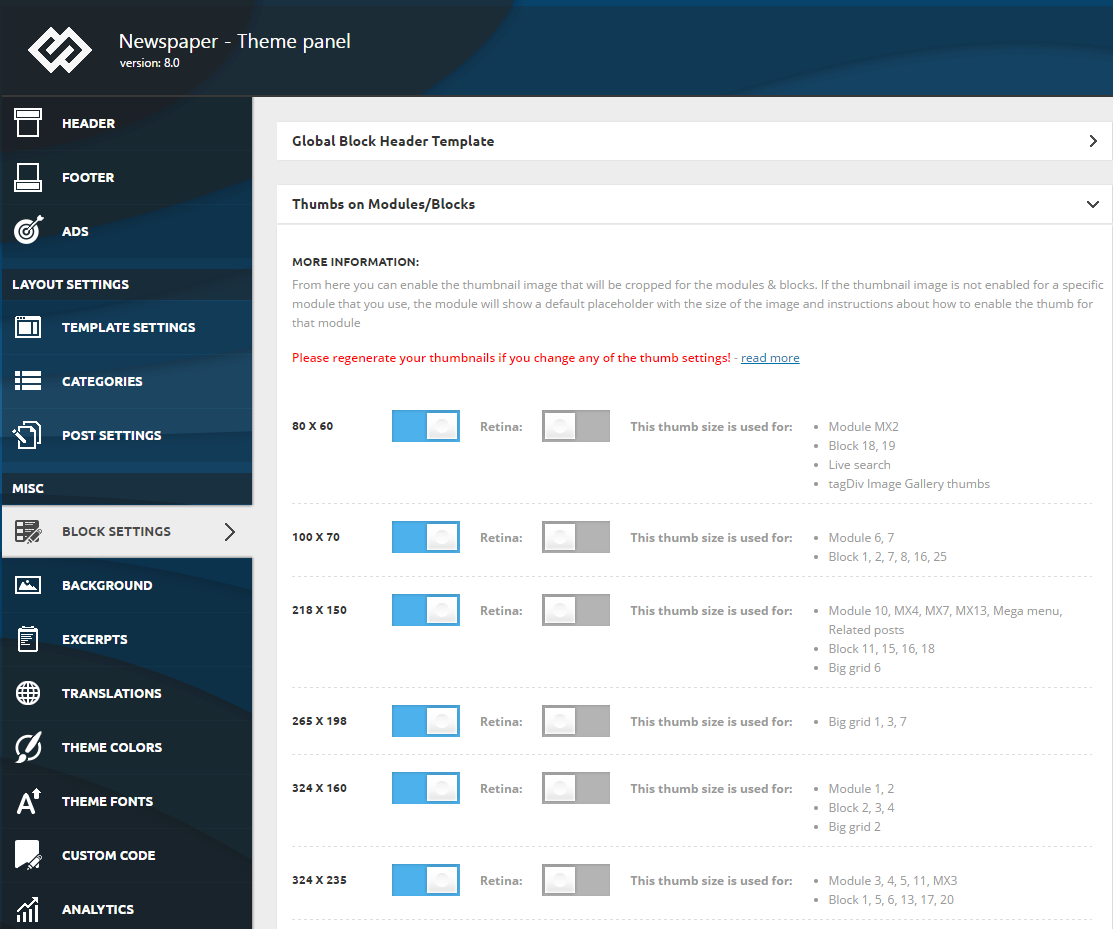
 To make your website faster, you can control which thumbnail is generated. To do this go to Theme Panel > Block Settings > Thumbs on Modules/Blocks and disable the unused ones to save space on your server:
Catalin Hello aloysiuspattath,
Please notice that the speed of your website depends on how well your site is optimized.
-> https://developers.google.com/speed/pagespeed/insights/?hl=ro&url=https%3A%2F%2Finsanertech.com%2F&tab=mobile
Notice that is not a simple task and if you do not have any experience in this regard you will do not bring good results for the theme. Also, notice that we have a speed optimization tutorial but this is addressed only to advanced users. So, if you follow the steps which are presented in this tutorial here -> https://forum.tagdiv.com/how-to-make-the-site-faster/ you can increase the page speed loading and if you are not aware of the steps in this regard, please consider hiring a freelancer/developer to help you because the speed optimization services are not covered by our support policy, as you can read here -> https://forum.tagdiv.com/support-policy-2/ Check our documentation here -> https://forum.tagdiv.com/requirements-for-newspaper/ regarding on dedicated server to fit our requirements.
Unfortunately, our theme does not have such an option to minify the style.css file and we cannot recommend any plugins with this functionality because is not tested with our theme. For minifying this file, we are using CloudFlare for our demo and works fine. If you want to read other views from our users, please check this topic -> https://forum.tagdiv.com/topic/tip-how-to-easily-minify-your-css-without-breaking-your-site/
Also, check all of your Ad Spots and if you have entered any suspicious code through them, remove all of them and check the results without them.
One of our top members here on the forum wrote his own optimization tutorial here:
https://forum.tagdiv.com/topic/tutorial-chriss-custom-optimizations-for-functions-php-etc/ and here -> https://www.infophilic.com/get-almost-100-pagespeed-newspaper-theme/
Basically, these are the theme requirements
– https://forum.tagdiv.com/requirements-for-newspaper/
Thanks for your understanding!
Simion C. Hi,
Simply installing the theme does not provide blazing fast loading speeds. Optimizations have to be made in order to improve the loading speed. Start with what the test suggests, fix as many as possible. Search the forum for user recommendations, also guides/tutorials
– https://forum.tagdiv.com/how-to-make-the-site-faster/
– https://www.infophilic.com/get-almost-100-pagespeed-newspaper-theme/
– https://forum.tagdiv.com/topic/score-100100-pagespeed-with-newspaper-wordpress-theme/
– https://forum.tagdiv.com/topic/newspaper-theme-speedify-your-website/
– https://forum.tagdiv.com/topic/tutorial-chriss-custom-optimizations-for-functions-php-etc/
– https://forum.tagdiv.com/topic/tip-how-to-easily-minify-your-css-without-breaking-your-site/
– https://forum.tagdiv.com/cloudflare-cdn/
Each optimization will contribute to the faster loading of the website. Of course it depends on the hosting as well.
Thanks
Catalin Hello,
Please notice that the speed of your website depends on how well your site is optimized.
-> https://developers.google.com/speed/pagespeed/insights/?hl=ro&url=https%3A%2F%2Fwww.lideremprego.com%2F
Notice that is not a simple task and if you do not have any experience in this regard you will do not bring good results for the theme. Also, notice that we have a speed optimization tutorial but this is addressed only to advanced users. So, if you follow the steps which are presented in this tutorial here -> https://forum.tagdiv.com/how-to-make-the-site-faster/ you can increase the page speed loading and if you are not aware of the steps in this regard, please consider hiring a freelancer/developer to help you because the speed optimization services are not covered by our support policy, as you can read here -> https://forum.tagdiv.com/support-policy-2/ Check our documentation here -> https://forum.tagdiv.com/requirements-for-newspaper/ regarding on dedicated server to fit our requirements.
Unfortunately, our theme does not have such an option to minify the style.css file and we cannot recommend any plugins with this functionality because is not tested with our theme. For minifying this file, we are using CloudFlare for our demo and works fine. If you want to read other views from our users, please check this topic -> https://forum.tagdiv.com/topic/tip-how-to-easily-minify-your-css-without-breaking-your-site/
Also, check all of your Ad Spots and if you have entered any suspicious code through them, remove all of them and check the results without them.
One of our top members here on the forum wrote his own optimization tutorial here:
https://forum.tagdiv.com/topic/tutorial-chriss-custom-optimizations-for-functions-php-etc/ and here -> https://www.infophilic.com/get-almost-100-pagespeed-newspaper-theme/
Basically, these are the theme requirements
– https://forum.tagdiv.com/requirements-for-newspaper/
Thanks for your understanding!
 extraordinarynicci
 Dalguima
Hello! I’m James, I’m having a very slow problem on my site https://www.lideremprego.com.
I’m using this “Voice Report” template I installed the demo to make it easier to use, and not having to configure everything, I’d like to know if possible make it faster. is running more than 2 minutes, gtmetrix can not analyze the project see the image below.
https://prnt.sc/kjmx3o
I use 7 plugins
Yoast SEO
TagDiv Social Counter
tagDiv Composer
Reveal IDs
Rel Nofollow Checkbox
kk Star Ratings
Contact Form 7
I have already tried using cache plugin and worsened slowed down.
I would like to resolve this please, I am initiating this project to work with it. and I need it to load fast.
How can I solve this problem?
I would also like to know how I can get these links from inside the site see the image: https://prnt.sc/kjmvti. how do i solve this problem too, due to a url this in “http” the ssl does not turn green, help me please.
the images on my site are small, I do not see anything wrong, but I would like to know about you subject matter expert, I am waiting very much.
 Arlink
I have got a problem with Buddypress plugin. After I click on some group, there is a very late response. I need to wait even 10 seconds before it opens. I have noticed that after switching off social counter plugin, the groups open faster. I would like to use both plugins. My site: https://mojejaslo.pl/ .
ArlinkHello, I have got a problem with Buddypress plugin. After I click on some group, there is a very late response. I need to wait even 10 seconds before it opens. I have noticed that after switching off social counter plugin, the groups open faster. I would like to use both plugins.
