
- NewspaperHow to Make the Site Faster
- NewsmagUsing the theme translations together with WPML
- NewspapertagDiv AMP Plugin Tutorial
- NewspaperNewspaper Theme Support
- NewsmagRequirements for Newsmag
- NewsmagSmart sidebar
- NewsmagTheme thumbs
- TutorialsWhat is Ajax preloading?
- NewspaperCustom ad spots
- NewspaperRequirements for Newspaper
 Bogdan B.
 You can try to remove the loading animation from here: https://www.screencast.com/t/2ucIztChklJU
Images are very slow loading by default. You can try to optimize images by following our official page speed guide: https://forum.tagdiv.com/how-to-make-the-site-faster/
Thank you!
 Catalin
 Hello mayaguez,
Please notice that our theme does not have a maximum limit of ads. You can use how many you want and the slowing of your website does not come from this regard.
Please notice that the speed of your website depends on how well your site is optimized.Notice that is not a simple task and if you do not have any experience in this regard you will do not bring good results for the theme. Also, notice that we have a speed optimization tutorial but this is addressed only to advanced users. So, if you follow the steps which are presented in this tutorial here -> https://forum.tagdiv.com/how-to-make-the-site-faster/ you can increase the page speed loading and if you are not aware of the steps in this regard, please consider hiring a freelancer/developer to help you because the speed optimization services is not covered by our support policy, as you can read here -> https://forum.tagdiv.com/support-policy-2/ Check our documentation here -> https://forum.tagdiv.com/requirements-for-newspaper/ regarding on dedicated server to fit to our requirements.
Please keep in mind that at the moment, we cannot provide optimization services because this task involve time-consuming and we do not afford to do this, sorry! We only can provide support for basic theme settings.
If you are not aware of these steps which are needed to take in this regard, please consider hiring a freelancer/developer to help you because we cannot provide custom work at the moment, sorry!
Hope this helps!
Thanks for your understanding!
Bogdan B. Hello,
1. We are not aware of any compatibility issues between the visual composer plugin and our theme. The js errors originate from an external source. That is why I suggested disabling plugins as they are the number one reason for js errors. This is not always the case though as js optimization and minification can also affect the theme js. A custom code as well or the child theme also if it’s not been updated properly. We assure you that visual composer is fully compatible with our theme as we are the ones providing it. It goes through rigorous tests before release. If you still cannot identify the source of the issue Please contact us on our email address at contact@tagdiv.com and provide a link to your site and wp-admin (login information and admin rights) so we can login and investigate. Please also include a link to this conversation.
2. As for the page speed I recommend using this guide: https://forum.tagdiv.com/how-to-make-the-site-faster/
3. Please make sure you turn on the author and date for posts. Google structure data requires an author and date to be present on each post. That is why you see the errors.
4. If the mobile theme is not working well for you, you can simply disable it and use the standard responsive version of the theme.
Thank you!
 ecase
ecase Thank you Jessie, really appreciate the effort… it is most welcomed
Firstly I’m not sure what’s up with that logo, I know I have changed it, to make sure it’s gone I just went ahead to rename it and upload it afresh, seems it got stuck on Google reading even if I changed it. But it’s sorted now… Good catch
========
I tried this script in the past but it keeps breaking my site… I cant remember I think in one of my settings I got this sorted with a plugin, can’t remember now as I have been trying different settings to get this theme to work
function _remove_script_version( $src ){
$parts = explode( ‘?ver’, $src );
return $parts[0];
}
add_filter( ‘script_loader_src’, ‘_remove_script_version’, 15, 1 );
add_filter( ‘style_loader_src’, ‘_remove_script_version’, 15, 1 );
===================
I’ve just added imagify on it and it’s running, lets see what it can do
===================
I’ve also added back our keycdn, and it does seem faster, but still not exciting google because of images
We have been able to reduce and compress some of the css, please test and see the settings I put back
========
What bugs me is that this is the third theme we are changing over time, and this is the only one that has this much issues:( and hardest to optimize
I hope they still address other issues as I see honestly no supprort from them which makes me concerned
 Fenix
FenixHi, I’m trying to move css and js from header to footer in the mobile version of Newspaper (I’m actually using the plugin tagDiv Mobile Theme) using the method here: https://forum.tagdiv.com/how-to-make-the-site-faster/
I have also tried to put the code inside the function.php of mobile theme but when i go to load the website in mobile version i don’t find the css and js file IDs that i need for move them. I don’t even know if i can move the css and js of mobile version with the speed booster plugin.
Here is the test of Google Page Speed where you can see the files i’m talking about: https://developers.google.com/speed/pagespeed/insights/?hl=it&url=http%3A%2F%2Fgamesquare.it%2Frecensione-steep%2F&tab=mobile
Can you help me? Thanks in advance
 Tericus
Hi – I’m working through the How To Make The Site Faster tutorial.
When I add the code to the functions.php file to get the list of registered css and js, do I add the code at the VERY end of the file – i.e. after all other code/tags/BRACKETS etc?
I wasn’t sure whether it needs to be added before the final ‘<?php’
Thanks
Bogdan B. Hello
All of the theme js is located in one file: https://www.screencast.com/t/kZsR4rcD
For page speed please use this guide: https://forum.tagdiv.com/how-to-make-the-site-faster/
As a note on the speedbooster plugin: https://forum.tagdiv.com/topic/tinymce-advanced-and-other-various-disabling-speed-boster/
Thank you!
ecaseHello
I am trying to get some help from you guys and I’m finding even more issues and the old requests have been shoved of as if they don’t exist
I’m not sure what to do to get help as we are now stuck and may just have to switch to old theme before we find a solution with a new theme.
We like the theme but these issues reported by others too are really of concern and I hope we can get some information if they will be looked into or not
PS; please dont’t say to deactivate plugins etc as it has already been done and doesnt solve the issue
1: Images do not load when lazy load is on, you said its javascript error, we have dozens of people experiencing the same thing and only solution we found was to turn off lazyload which only fixes images issues, and only solutuion that was better was to downgrade visual composer.
I believe you say its compaitble with visual composer, so are you looking into this or not?
2: Speed has always been an issue with the theme compared to others. We have switched to 3 others before, its just that we like your menu more than anything. We have followed your suggestions aboyut speed and even use https and cdn but we see significant bounce rate and google analytics is really not cool. Other themes have worked way better with minimum issues… Is there something you can look at or you still leave it up to our guess work?
3. After turning mobile theme on, we discovered this in our webmaster tools
Missing: author
Missing: entry-title
Missing: updated
Missing: author
Missing: entry-title
Missing: updated
Missing: author
Missing: entry-title
Missing: updated
Missing: author
Missing: entry-title
Missing: updated
Missing: author
Missing: entry-title
Missing: updated
Missing: author
Missing: entry-title
Missing: updated
Missing: author
Missing: entry-title
Missing: updated
Missing: author
Missing: entry-title
Missing: updated
Missing: author
Missing: entry-title
Missing: updated
Missing: author
Missing: entry-title
Missing: updated
What is the solution? how do we tag these as they are not visible in websmaster tools
===========
4. The mobile theme is not actually any faster either? so what’s holding it back… I know this is a vague question, but what I want to know is if you will look at our site to see as we are loosing traffic and so much bounce rate right from day one. I pasted all my stats to see and even you said it will stabilize it’s been almost a month and things are getting worse
I do hope to get a reply with solutions more than disable plugins and see speed test solution all that has been done, and nothing really works. I just feel I am trying to hold on to hoe that this is the best theme but am I wasting my time?
Bogdan B. No, it is not being ignored, it is just that we answer from oldest to newest and if you keep posting the topic will be newer. It is recommended for a faster reply to open one topic and stop posting until you get a reply. Posting will simply delay your answer.
OK, to the matter at hand.
The bounce rat has nothing to do with themes. It has but it does not matter which theme. When you switch themes, this will happen no matter the theme used but it will stabilize again shortly.
As for the page speed please read this guide: https://forum.tagdiv.com/how-to-make-the-site-faster/
Thank you!
ecaseHi,
So I am now on the edge of the bridge about to dump the theme and here is why… but I am reaching out to see if there is anything we can do
1: When we got this theme, we were excited about it because it promised super speed, it was neat, very modern and just really everything you dreamed of
2: After getting the theme, we are kind of finding out that we need to do a lot more work to make it happen… and by a lot more work I mean it is not really a fixed set of settings, meaning we have to keep trying and trying and trying and trying
so here is my dilema
Look at this stats
https://s30.postimg.org/9dluoe8zl/upset.jpg
Our old theme wasn’t that bad, we just wanted something more modern and better, so we switched to this
from day one of switching our bounce rate shoot through the roof , our traffic is dropping and as of yesterday even started getting issues with lazy loads where images no longer apearing
Google speed is even worst than before
We have switched to mobile site, that alone has caused confusion with our tagging on Google and I’m still yet to find out how to solve that as its throwing these errors
The mobile theme seems limited, no options to organise home page even with category links at least or something… its just plain and ok… lets say we want it to be faster, but I dont see it doing anything for our stats
============
Bottom line… I am now reaching out to the support and possibly members to guide me, reassure me with suggestions as its just not looking good
I didn’t have to work this hard with our old theme
Bogdan B. It works on mobiles as well but you will have to increase your loading speed a bit. It takes a bit until the css is applied. After the page is loaded completely, the css will work.
Please use this guide to increase your loading speeds: https://forum.tagdiv.com/how-to-make-the-site-faster/
Thank you!
Bogdan B. Hello,
You can follow this guide to compress images: https://forum.tagdiv.com/how-to-make-the-site-faster/ (point 3.)
Thanks.
Bogdan B. Hello,
You most likely have the thumbs disabled and your site loads the full image.s We see this happen lots of times. Please make sure the thumbs you use are active in this section: https://www.screencast.com/t/nXYukFGaNha and after that regenerate your thumbs using this guide: https://forum.tagdiv.com/thumbnails-fix-strange-looking-images-on-blocks/
For page speed in general, please use this guide: https://forum.tagdiv.com/how-to-make-the-site-faster/
Thank you!
Bogdan B. Hello,
In order to get a faster response time, you should only post ONCE. if you post again and again, the post will get fresher. We answer from oldest to newest. If you keep posting, your message will be new all the time and we won’t get to it until all the others before it are answered.
Now for the matter at hand.
For the header banner. you can add a banner in the header ad section here: https://www.screencast.com/t/b9dDJ575Url
It is an ad section so it is destined to show images, not text. You can try to create an image that contains text though if you want to show text there.
Thanks.
 rgomez
 Hi,
I installed the speed booster, and a Check and Enable GZIP compression, I’m not advance in how to install the rest of the plugin to make the site faster. Can you help me set it up. I can pay for the freelance work. my email is in this topic
Catalin Hello Deaf,
Please notice that the speed of your website depends on how well your site is optimized -> http://screencast.com/t/5m96x7WVMmt. Please notice that this is not a simple task and if you do not have any experience in this regard you will do not bring good results for the theme. Also, notice that we have a speed optimization tutorial but this is addressed only to advanced users. So, if you follow the steps which are presented in this tutorial here -> https://forum.tagdiv.com/how-to-make-the-site-faster/ you can increase the page speed loading and if you are not aware of the steps in this regard, please consider hiring a freelancer/developer to help you because the speed optimization services is not covered by our support policy, as you can read here -> https://forum.tagdiv.com/support-policy-2/ Check our documentation here -> https://forum.tagdiv.com/requirements-for-newspaper/ regarding on dedicated server to fit to our requirements.
Please keep in mind that at the moment, we cannot provide optimization services because this task involve time-consuming and we do not afford to do this, sorry! We only can provide support for basic theme settings.
If you are not aware of these steps which are needed to take in this regard, please consider hiring a freelancer/developer to help you because we cannot provide custom work at the moment, sorry!
Hope this helps!
Thanks for your understanding!
Bogdan B. Hello,
For page speed please use this guide: https://forum.tagdiv.com/how-to-make-the-site-faster/
As a note on the speedbooster plugin: https://forum.tagdiv.com/topic/tinymce-advanced-and-other-various-disabling-speed-boster/
Thank you!
 Simion C.
 Hi,
Here is a tutorial on how to set up WP Super Cache – https://forum.tagdiv.com/cache-plugin-install-and-configure/ Also take a look at this – https://forum.tagdiv.com/how-to-make-the-site-faster/
Thanks
Catalin Hello
I have tested your website on Pagespeed Insights and I get this score -> https://www.screencast.com/t/luqxbyaZS Please notice that the speed of your website depends on how well your site is optimized -> http://screencast.com/t/5m96x7WVMmt. Please notice that this is not a simple task and if you do not have any experience in this regard you will do not bring good results for the theme. Also, notice that we have a speed optimization tutorial but this is addressed only to advanced users. So, if you follow the steps which are presented in this tutorial here -> https://forum.tagdiv.com/how-to-make-the-site-faster/ you can increase the page speed loading and if you are not aware of the steps in this regard, please consider hiring a freelancer/developer to help you because the speed optimization services is not covered by our support policy, as you can read here -> https://forum.tagdiv.com/support-policy-2/ Check our documentation here -> https://forum.tagdiv.com/requirements-for-newspaper/ regarding on dedicated server to fit to our requirements.
Please keep in mind that at the moment, we cannot provide optimization services because this task involve time-consuming and we do not afford to do this, sorry! We only can provide support for basic theme settings.
If you are not aware of these steps which are needed to take in this regard, please consider hiring a freelancer/developer to help you because we cannot provide custom work at the moment, sorry!
Hope this helps!
Thanks for your understanding!
Bogdan B. Hello,
For page speed please use this guide: https://forum.tagdiv.com/how-to-make-the-site-faster/
As a note on the speedbooster plugin: https://forum.tagdiv.com/topic/tinymce-advanced-and-other-various-disabling-speed-boster/
Thank you!
Bogdan B. Hello,
Please contact us via email at contact@tagdiv.com and provide a link to your site, wp-admin with admin rights and ftp access. Also provide as many details to your problem as possible so we can come up with an answer faster. Thank you!
 Edward
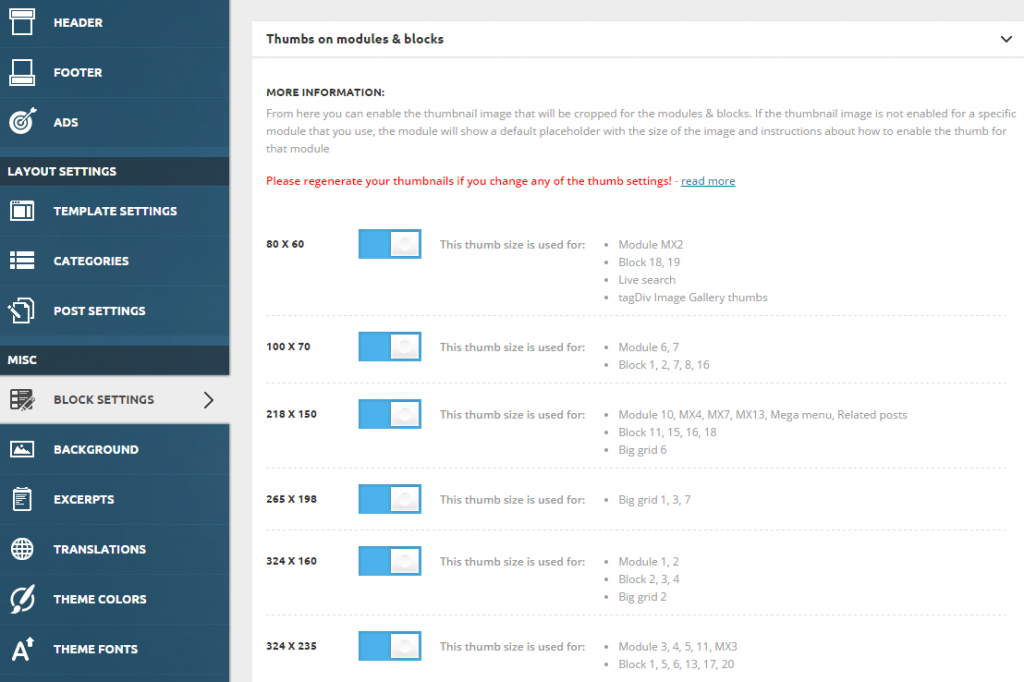
 When you decide to post content on your website, the theme automatically generates thumbnails from the featured image to display the content on your pages in an attractive way. To make your website faster, you can control which thumbnail is generated. To do this go to Theme Panel > Block Settings > Thumbs on Modules/Blocks and disable the unused ones to save space on your server:
 Freeman
 Unfortunately, I need to change the post template for posts in specific category.
Tell me where in the database to store information about the “post template” designated specific material?
I think to change the “post template” through MySQL will be faster.
Catalin Hello komsak,
Please notice that the speed of your website depends on how well your site is optimized -> http://screencast.com/t/5m96x7WVMmt. Please notice that this is not a simple task and if you do not have any experience in this regard you will do not bring good results for the theme. Also, notice that we have a speed optimization tutorial but this is addressed only to advanced users. So, if you follow the steps which are presented in this tutorial here -> https://forum.tagdiv.com/how-to-make-the-site-faster/ you can increase the page speed loading and if you are not aware of the steps in this regard, please consider hiring a freelancer/developer to help you because the speed optimization services is not covered by our support policy, as you can read here -> https://forum.tagdiv.com/support-policy-2/ Check our documentation here -> https://forum.tagdiv.com/requirements-for-newspaper/ regarding on dedicated server to fit to our requirements.
Please keep in mind that at the moment, we cannot provide optimization services because this task involve time-consuming and we do not afford to do this, sorry! We only can provide support for basic theme settings.
If you are not aware of these steps which are needed to take in this regard, please consider hiring a freelancer/developer to help you because we cannot provide custom work at the moment, sorry!
Hope this helps!
Thanks for your understanding!
 colgate
Hi there,
I hope you are well.
I have moved my site from http to https and I have noticed that I am unable to access the admin area when I login using the theme login pop up box. I can see that I am already logged-in but I can’t access the admin area, when trying to access it from the admin top bar. Also, I was unable to edit posts directly from the home page or admin top bar.
This is the message I kept getting: You must log in to access this area.
Interestingly though, if I login to the site using wp-login.php e.g https://www.website.com/wp-login-php , I can access the admin area from the top bar, edit posts from the home page, and everything seems to work fine. I have checked everything, all permalinks, settings, plugins look as they should be. The only thing that I am thinking of might be the login pop up box, it could be the issue when the site uses secure SSL.
When I reverted back to none secure access via http:// everything works fine.
I hope you can investigate the above issue and see if you encounter the same the issue when using a secure (SSl) connection. Please let me know if there is anything I need to do to get this issue solved and start using secure connection for the site.
Other findings I would like to share with you.
After moving the site to a secure connection, I have noticed that the site was really sluggish and slow, so maybe, that is some you can consider in your future updates, and make the theme faster in secure and none secure environments. I think you have done a fantastic job with the super-fast mobile theme and I hope you can do the same with the desktop version too.
Please let me know what you find.
Kind Regards

