
- NewspaperWP Rocket and Newspaper Theme: Optimization Guide
- TutorialsFrom WPBakery to tagDiv Composer
- TutorialsOffset Feature
- TutorialsWhat is Ajax preloading?
- TutorialstagDiv Social Counter Tutorial
 jobothan
 I think you misunderstood.
It’s when I press the link and land on the category “page/link” that I get a “page” with blocks that does not correspond to the category. If I change it in one page, then it changes for the other menu links to category pages.
I hope you understand.
Ex. I have a menu of Fish – Meat – Veggies
When I press either of those the browser opens the category link. In that page there are multiple category flex grids. But no matter what category link I press it will always be the same, no matter how I set it to sort.
Can you help?
Do I need to make individual pages for each link?
 Anamaria
 Hello,
Please make sure that you have filtered the block correctly. For each category, on the flex block there is a special filter for the current category, which dynamically displays the posts from that category within each category -> https://forum.tagdiv.com/flex-block-settings-guide/
The Posts Loop automatically filters the posts depending on the cloud template you set (for example, on the category page, there will be posted posts from that category) https://forum.tagdiv.com/posts-loop/
Thank you!
 babak.s.z
Hi
I have two subdirectories in my main domain where important posts are The main page is in the main WordPress in the host’s main space. I want to show the important posts in the Big Flex Grid on the main page, but in the elements’ filter section, I can’t find an option to enter the custom URL there, and the Big Flex Grid can’t show posts from subdirectories because they are actually in the subdirectorys’ WordPress and are not located in the main wordpress of the site. Is there a solution? Or should I put the image on the main page and link it to the posts in the subdirectory?
bsiminzar.com
 Romi
Romi Ok please now visit the link again because I have put the flex block element back to its place so you see the difference between the description font in Flex block and in single post, their thickness are different, the font in element si thicker than the single post.
Anamaria Hello,
I recommend using Flex Block blocks because they have more options https://forum.tagdiv.com/flex-block-settings-guide/
Thank you!
 Alex
AlexHi,
In version 12.6.6 you introduced new Column title shortcode that replaced old shortcode as a “simplified for a better structure”.
The new shortcode seems to have an issue.
1. Create a page with a new Column title shortcode
2. When logged as WP admin, test headings in SEO Pro Extension in Chrome, https://marketingsyrup.com/
– The column title will be shown like this:
< H2 >

/* custom css - generated by TagDiv Composer */ .tds-title-simplified{ margin: 0; transform: translateZ(0); }.tds-title-simplified > .td-element-style{ z-index: -1; }body .tdi_66{ text-align: left; }
– Other titles on the page (from flex blocks for example) are normal < h2 > Title name < / h2 > etc
See screenshot.
Thank you
jobothanI have set my menus to open and diplay the categories, but if you click the menu it opens the same page under each category… instead of openening stories only from the clicked category… how do I change that?
Do I need to make a page for each category and link to that? And wont that ruin the menu setup?
Anamaria Hello,
You need to use the Flex loop Block -> https://forum.tagdiv.com/filters-sorting-taxonomies/
Thank you!
 ale.jer
 no, I have used flex block 1.
is there a documentation part where I can read about filtering possibilities?
Anamaria Hello,
Do you use flex loop block in the search template?
Thank you!
ale.jerI try to use the Flex Loop Filters in the Search template, but it is not working.
Is there a way to add filter to search results (filter tags, authors, meta info …)
Anamaria Hello,
You can use the Flex block and set here the color of the title https://i.imgur.com/LQG5Nab.png
Thank you!
Anamaria Hello,
Unfortunately, you can not change the behavior of the big grid flex on the mobile. You can try to use another block on mobile.
Also, for this type of block, you can set limit posts.
Thanky ou!
Anamaria Hello,
Unfortunately, you can not change the behavior of the big grid flex on the mobile. You can try to use another block on mobile.
Also, for this type of block, you can set limit posts.
Thanky ou!
Romi And I use the same font style and set the font-weight the same as the Flex Block 4 to 400 but still the thickness is not the same.
 compiler
Hi. I really like the big grid flex 5 on pc, but mobile it forces you to scroll to the right and left for bottom posts. Any suggestions on how to have bottom mobile articles appear without a need to scroll right and left. Also can I limit the posts on the big grid flex 5 – I dont see any such option on tagdiv composer.
ty
RomiI want the font in the single post to be as black as in this. I have set the black color to #000000; but still the density of the letters in the single post is not the same as the density of the letters in the Flex Block 4 element, so can it be made the same?

And I also set the size of the font the same as the widget but still not luck.
Any solution?
Regards
Very happy user
Nagib Alaydrus
Anamaria Hello,
I recommend not using standard templates (header, footer, single, category, tag, author, search, 404) and avoiding blocks 1 to 25, or big grid blocks, as these can be replaced. I recommend using cloud templates and flex blocks, which have more options and are more flexible. Using a flex block, you can set the image width and height, ensuring the images will be the same size. Also, after replacing these templates and blocks, make sure to disable the tagDiv Standard pack plugin.
To change the color of the posts title on the standard block that you have now you need to use a custom code CSS
Thank you!
 msassanelli
 Hello,
my question was probably not expressed correctly.
The shortcode “Flex Loop Sorting Option” offers three sorting options that can be selected via checkboxes
1. oldest post
2. modified date
3. alphabetical A -> Z
My question is whether an additional sorting “By Relevance” can be offered here.
A hook for general customization of the search result could also be a solution.
I would also like to know whether plugins such as SearchWP work with the TagDiv Composer shortcodes.
Thank you
 vision4reality
Hello, I would like your help please!
I am using Flex Block 1 on the homepage. We use 2-3-4 different categories in a post, one of them sometimes is “News Line”, this particular category is to show the post in breaking news at the top. The problem is that we don’t want to show this category in the element but the main category that we use in the yoast seo plugin. If I try to hide this category from this element, it will hide all the posts that use this category as well!
Anamaria Hello,
Yes, you can edit the category template with tagdiv Composer, and apply whatever filter you want on the blocks https://forum.tagdiv.com/flex-block-settings-guide/
Thank you!
Anamaria Hello,
Yes, I recommend editing the posts with the Gutenberg editor. You don’t need to do them from scratch, but it depends on what you have added from Elementor in the posts.
You can not set the menu for mobile because you can not select the viewports https://i.imgur.com/k8dqa11.png, right? If yes, the issue is caused by a plugin conflict between Elementor and tagdiv Composer.
Yes, rebuilding your pages with tagdiv Composer only is safe. It should not impact the posts and pages you have made with Elementor.
Related to the categories, you need to set the social filter on the blocks. For example, on the category template, if you have the flex block, you must use this filer: https://i.imgur.com/NCqUt7g.png. The block will show the posts that are related to that category.
If you upload the translation from Theme Panel -> Translation -> Translation and some words don’t get the translation, then it is possible to change if you edit with tagDiv Composer => https://www.screencast.com/t/dlfnb0fnX5, for example for the search template, please edit it and select the elements -> https://i.imgur.com/emO3j5e.png
Unfortunately, I don’t speak Spanish, only if I use Google Translate.
Thank you!
Anamaria Hello,
For this, I recommend using this option cache on the blocks: https://forum.tagdiv.com/use-flex-blocks-cache-option/. I think this will help you with those queries.
Thank you!
Anamaria Hello,
To have this option to filter it, request custom work -> https://tagdiv.com/submit-a-request/ or you can try to filter using a custom field https://forum.tagdiv.com/flex-block-settings-guide/
Thank you!
 Lysiteleia
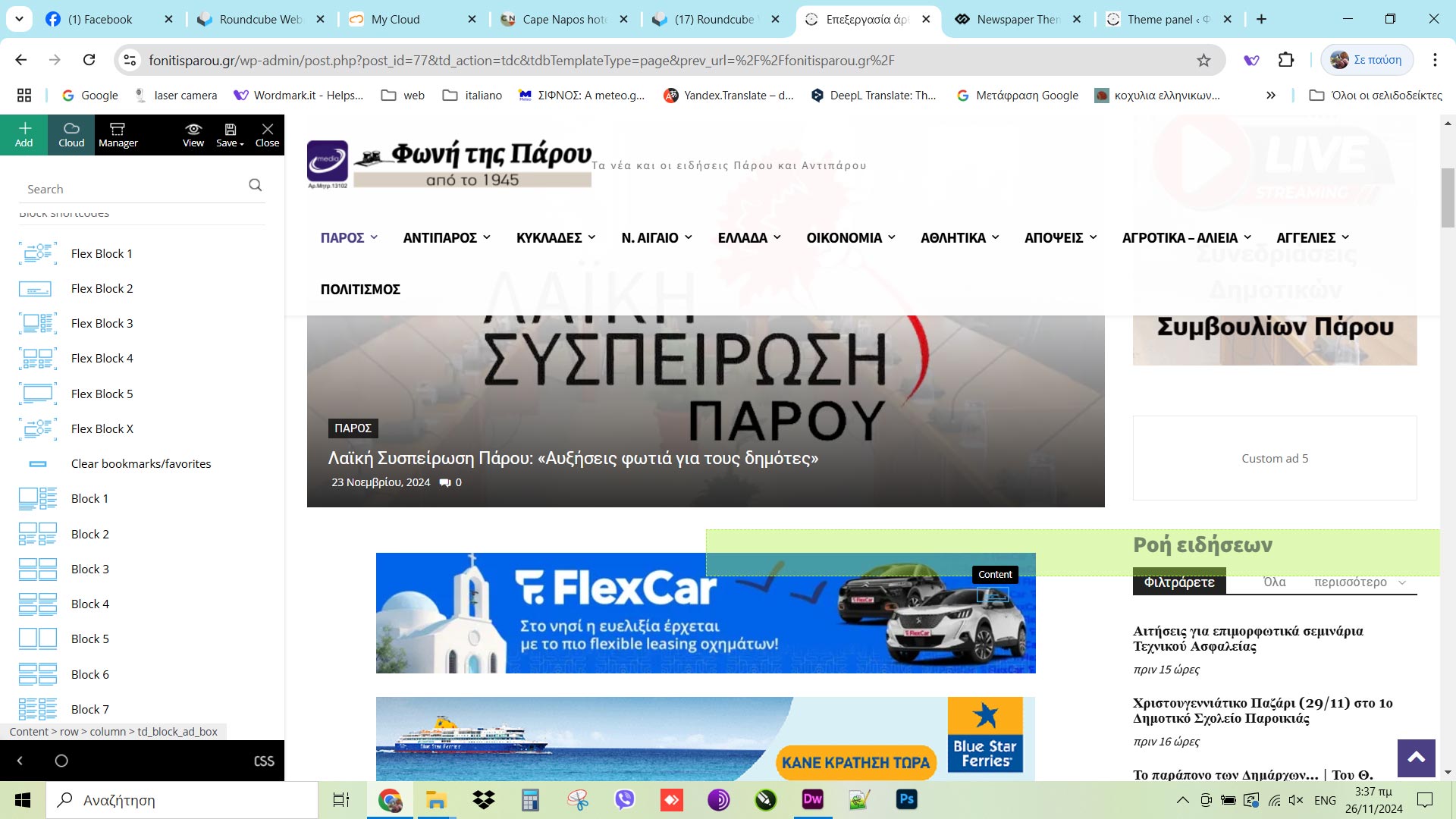
I have a problem that only happens in “content”; the “header” and “footer” work fine.
When I try to move items or add new, the green box indicating the position of the new item doesn’t get positioned correctly but more to the right. Do you know what is wrong and how can I fix it? Thanks!
https://fonitisparou.gr/



