- NewspaperFlex Block Builder and Flex Loop Builder
- NewspaperHow to use the Flex Blocks cache option
- NewspaperHow to edit modules for Flex Block X
- NewspaperFlex Block Settings Guide
- NewspaperBig Grid Flex Settings
- NewspaperSingle Post Excerpt
- NewspaperWP Rocket and Newspaper Theme: Optimization Guide
- NewspaperSearch setup for custom post type
- NewspaperBookmark – Save For Later
- NewspaperModules Builder in Newspaper Theme
- NewspaperFilters and sorting for taxonomies
- NewspaperHow to insert a block inside the content of a post
- NewspaperCustom Post Type Support
- NewspaperMeta Info on Modules and Blocks
- NewspapertagDiv Composer Tutorial
- NewspaperSocial Counter Styles on Newspaper
- NewspaperCloudflare (CDN)
- NewspaperPage templates
- NewspaperFeatured Posts
- NewspaperTheme Colors Introduction
 finsmes
I am having issues saving content after editing pages: on console i get save_post – ERROR and on network i see “Enable JavaScript and cookies to continue”. I am using cloudflare and i have made the custom rule for rocket loader, i have disable my security plugins but still having issues. I think the problem also affects other aspects of the theme: the prev next button on a flex block doesn’t work properly. I tryed also to update the theme hoping to solve this way, but it takes down wordpress for a while and after restoring the theme it still have same issues.
Hoping for you help
 Anamaria
 Hello,
You need to stretch the row and set a different layout for it -> https://imgur.com/QXIt4Gy -> https://tagdiv.com/flexibility-rows-columns-newspaper-theme/
-> https://tagdiv.com/how-to-add-delete-and-duplicate-row-newspaper-theme/
Also, you can set different width for columns.
Thank you!
 fabienpomies
Hello,
I’m looking to display the CPTs I’ve called “training” with a filter system on the front end. I’d like users to be able to filter both by category and by label. How can I do this?
I tried on this page (https://cadentes.dessitesetdesclics.fr/nos-formations) with a “flex block 1” but I can only display filters for categories but not for tags. I’ve also tried using the “Flex Loop Filters” module, but it only displays posts, not my CPT.
Anamaria Hello,
I recommend using Flex Block and use this special filter https://i.imgur.com/1OetyK3.png -> https://forum.tagdiv.com/flex-block-settings-guide/
Thank you!
Anamaria Hi,
In order to make them to look the same size, you’ll need to set an excerpt on title and post content like this -> https://i.imgur.com/o8UQm5B.png
Also, you can set the excerpt on words or letters from theme panel -> https://i.imgur.com/c7Q8ckX.png
Here is a similar topic -> https://forum.tagdiv.com/topic/flex-block-1-and-same-blocks-height/
Thank you!
 Calin
Calin Hi Wriper,
There is no need to activate the tagDiv Standard Pack because this one will work the same.
Also, form the bigging the numbered pagination was only for post loop elements. Form what i know there was a conversation about this option to be add this option on flex blocks and I hope it will be add soon. 😀
The infinite loading is using ajax and the blocks are loading in the same page so will not add the link as numbered pagination (this element has an auto filter that is automatically filter the posts based on the template where it is used and on pages will display articles based on latest).
Thank you for your understanding!
Anamaria Hello,
For each category, on the flex block there is a special filter for the current category, which dynamically displays the posts from that category within each category.
The Posts Loop automatically filters the posts depending on the cloud template you set (for example, on the category page, there will be posted posts from that category) https://forum.tagdiv.com/posts-loop/
If there is an offset set, please check the block with “No posts” and delete it. Leave it empty with no space or value: https://app.screencast.com/Gh9jDf6t0XtLS
You can find the documentation here: https://forum.tagdiv.com/offset-feature/
Thank you!
 thiru
thiru Thanks. First thing, I am not getting alerts when you guys respond to my queries even though I subscribe for alerts.
You can not use flex blocks without the plugin or theme
I dont understand this, I already have installed Newspaper theme and it has installed the required plugins.
The elements from the tagdiv Composer can not be used in the default templates.
Ok, I got this.
Check the settings of the flex blocks: https://forum.tagdiv.com/flex-block-settings-guide/
There are special filters as well and the block knows to filter by the current category for example. You can also copy-paste the block or save it as element and use it in another cloud page
I need more clarity on this, I have used tagdiv composer and used few blocks and created pages. Are you saying I can create a my own elements to be used on Tagdiv composer by using a block, change the settings and save as my own element template for further using on pages?
So you are confirming that there is no provision provided by Newspaper theme/plugins to embed the blocks or posts of specific category or filters on Posts by embedding short codes?
I saw reference to embedding blocks @ https://forum.tagdiv.com/set-block-inside-post-content/ ?
[td_flex_block_1 modules_on_row="" limit="1" hide_audio="yes" show_btn="none" show_excerpt="none" show_review="none" show_com="none" show_date="none" show_author="none" image_floated="float_left" sort="random_posts" image_width="200px" meta_padding="25px 0 0 25px" modules_category="above" modules_category_margin="0 0 10px 0" tdc_css="eyJhbGwiOnsiYm9yZGVyLXRvcC13aWR0aCI6IjEiLCJib3JkZXItYm90dG9tLXdpZHRoIjoiMSIsInBhZGRpbmctdG9wIjoiMTIiLCJwYWRkaW5nLWJvdHRvbSI6IjgiLCJib3JkZXItY29sb3IiOiIjZWFlYWVhIiwiZGlzcGxheSI6IiJ9fQ=="]
-
This reply was modified 2 years by
thiru.
 Wriper
Hello, i own 3 copies of your template but i am getting really upset how this theme is moving forward.
I wanted to create our new website with tagdiv composer but when i choose flex blocks i dont have numbers on pagination. Not even infinite scroll is count pages like /page3/ /page/4/ which is good practice for SEO.
When I choose post loop which has available option for numbered pagination on homepage i cant filter specific categories and it shows ALL homepage articles.
So here we go again and i have to activate standard pack plugin with latest articles and template option where i can filter? Which is not updated and according to your words slower? But how can i recreate website with good practices if your blocks have different functions. One dont have numbers on pagination and causing duplication for crawlers another cant filter.
I am really frustrated with this
 dita999
I’m using the Gourmet Pro header template that uses Flex Block 1 as a sticky menu showing recent posts (desktop). The sticky menu’s height varies by post title length, and long post titles make the menu oddly tall. I have successfully limited the number of posts to 8 per row, but nothing I have tried seems to affect the title length. I have tried these settings:
General > Content length > Title length > 25
General > Content length > Excerpt length > 25
I have also tried changing Theme Panel > Excerpts > Excerpts type from On Words to On Letters. It shortened the titles on the mega menu, but it didn’t affect the sticky menu.
CSS > Height 77px
You can see it on my site when you scroll down a bit on any page: https://www.hungrypinner.com/. Am I missing a setting, or does this need to be controlled with custom CSS?
 gleloudas
Hello everyone, in latest newspaper is see you have support for image preload (low priority via fetchpriority tag) in flex blocks as seen here https://forum.tagdiv.com/topic/preload-image-of-flex-block/
I would also like to ask for such support for more image elements such as Big Grid Flex 1(x) that are used in our sites homepage: https://www.kynigesia.gr/ (Version: 12.6.7 )
Thank you very much.
Alexandros S.
Calin Hi mixalisandrou, If I correctly understand you want to change the breakpoint in the theme files, now this is a little over hand because it will be need to edit many files, you should start with wp-content/themes/Newspaper/style.css continue with wp-content/plugins/td-composer/legacy/Newspaper/assets/css
I believe it will be easier to use cloud template and set the row width you want – https://forum.tagdiv.com/tagdiv-composer-tutorial/ – https://tagdiv.com/how-to-add-delete-and-duplicate-row-newspaper-theme/ – https://tagdiv.com/flexibility-rows-columns-newspaper-theme/
Anamaria Hello,
Unfortunately, we don’t have this option to extend the default theme breakpoints. This will require a pretty big amount of custom work.
You can stretch the rows and you can change the width for each column to do as you want or set the inner row https://i.imgur.com/zZnu0nr.png
You can find more details here https://imgur.com/QXIt4Gy -> https://tagdiv.com/flexibility-rows-columns-newspaper-theme/
-> https://tagdiv.com/how-to-add-delete-and-duplicate-row-newspaper-theme/
Thank you!
 sanseijob
Dear support
I plan to use Flex block builder.
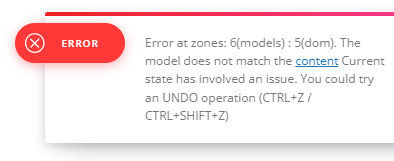
When I try to Module Template of Cloud template with TD, but I cannot edit it.
Error massage is as follows…
https://senkyojoho.com/img/20240925error.png
Please check it and tell me how to fix it.
Regards
Anamaria Hello,
You can filter the blocks using custom filed, the custom filed needs to be the type of text assigned to the posts, or CPT and use this value in the post id or use type acf type true/false to include/exclude posts https://i.imgur.com/bpiJMXL.png > https://forum.tagdiv.com/flex-block-settings-guide/
Thank you!
 brockpress_
I don’t know anything about ACF though I did download the plug in but I have no clue how to use it and the guides for it are all quite confusing. I think exclude custom field will do what I wish to exclude a few selected posts from showing up in flex block but how do I do it step by step?
 kubick
 Thank you for your reply, but I would like to clarify my question. My main issue is sorting the post with events by the start date, which is stored in an ACF field called “data_i_godzina_wydarzenia”. I would like to display only future events (those that haven’t occurred yet) and sort them by this field, not by the post creation date.
To give You a better idea, here’s a video that explains how to do it in Elementor: https://youtu.be/w-95BrIJyQA. However, I’m using Flex Block Builder i TagDiv Composer, so I would need similar guidance for that.
Could you please help me with adjusting the query or settings to achieve this?
Thank you for your assistance!
Calin Hi Jakub,
So you’ll need to create modules (you can add the element you’ll like on your block, like title, image, date, custom fields for ACF ….) that will display the data you wont for your CTP to be display on Flex Block Builder – https://i.imgur.com/FXiIsYA.png – https://i.imgur.com/a8TkqlA.png – https://i.imgur.com/TujQWUA.png
I hope this will help you!
Thank you!
 manuelencinar
Hi. I am trying to edite the flex block 1. Right now is like this: https://ibb.co/n7X8g9z. And I want something like: https://ibb.co/GtYHCZ1. Is this possible?
kubickHello Support Team,
I am creating an event calendar using Advanced Custom Fields (ACF) to store event information, including the event date and location. I want to achieve the following:
Display only future events, starting from the current date (including events happening today).
Sort events by the event date (stored in an ACF field) rather than the post creation date in the CMS.
The event date is stored in an ACF date_time_picker field named data_i_godzina_wydarzenia.
The event location is stored in an ACF text field named miejsce_wydarzenia.
I am using Flex Block Builder to display the posts from my custom post type (CPT). Could you please guide me on how to modify the query or settings so that my event list displays only future events, filtering out past ones and sorting them by the event date?
Thank you very much for your help!
Best regards,
Jakub
 don_poky
Hi,
I am seeking to have pagination as Normal Numbered in Flex blocks element and Woo Product element. Normal numbered pagination is available in Woo Loop element, Post Loop., etc. Is it possible to have in Flex Blocks?
Also, normal numbered displays pages numbers as “[1] [2] [3] … [25]”. I want to have more pages between [3] and [25].
Thanks
 Saniya
 I appreciate your suggestion, but it hasn’t completely resolved my
issue. I managed to integrate a view count in the flex block module,
but this has disrupted the pre-made design provided by the Newspaper
theme. Moreover, it’s crucial for me to have the view count displayed
in the post loop as well, as it is utilized across various sections of
the site such as the search page and author page. If this
functionality isn’t available out-of-the-box, could you please guide
me on how to implement this feature through custom code?
OLD WEBSITE: https://watercraftjournal.com/
NEW WEBSITE: https://watercraftdemo.yashamsoft.com/home-2/
Images
Old Website: https://postimg.cc/yDYGKz83
How old website shows views count on posts loop also: https://postimg.cc/G475hS47
Custom module I have created to show views count: https://postimg.cc/64t0hd74
design lost in custom module: https://postimg.cc/xkNtjjD8
Thanks,
Saniya Saher
 mande
mande I tried with Flex Block 1 and Flex Block 3.
Both are not working.
It has same outout as Posts loop module.
Keeps changing on page refresh.
Anamaria Hi,
Please use a flex block and check if it works.
Thank you!
Anamaria Hello,
Please use the option for Flex Block for title -> https://i.imgur.com/f6w9Snx.png and try after.
Thank you!