
- NewspaperFlex Block Builder and Flex Loop Builder
- NewspaperHow to use the Flex Blocks cache option
- NewspaperHow to edit modules for Flex Block X
- NewspaperFlex Block Settings Guide
- NewspaperBig Grid Flex Settings
- NewspaperSingle Post Excerpt
- NewspaperWP Rocket and Newspaper Theme: Optimization Guide
- NewspaperSearch setup for custom post type
- NewspaperBookmark – Save For Later
- NewspaperModules Builder in Newspaper Theme
- NewspaperFilters and sorting for taxonomies
- NewspaperHow to insert a block inside the content of a post
- NewspaperCustom Post Type Support
- NewspaperMeta Info on Modules and Blocks
- TutorialsFrom WPBakery to tagDiv Composer
- NewspapertagDiv Composer Tutorial
- NewsmagSocial counter styles on Newsmag
- NewspaperSocial Counter Styles on Newspaper
- TutorialsOffset Feature
- NewspaperCloudflare (CDN)
 dambo86
I can’t find an option where excerpts would become an active link to the post it applies to. I want it to work (after hovering over it and clicking) similarly to title and photo.
I use TD Composer and the Flex Box 1 module (but I also checked other modules) and I did not find such an option. The same applies to the mobile version.
Do you have this option in Newspaper or do you have to change the page source?
 seamie1990
Is it possible to assign specific posts to Flex blocks? I want to assign latest posts (1 to 6) to one flex block and latest posts (7 to 14) to a different Flex block.
 haipo
haipoHi TAGDIV team,
Recently we moved our news site to TAGDIV.
There is a problem witth the counting of post views.
–
To identify the problem, I compared the same post between Google analytics and WordPress-TAGDIV:
Post URL:
https://haipo.co.il/item/513336
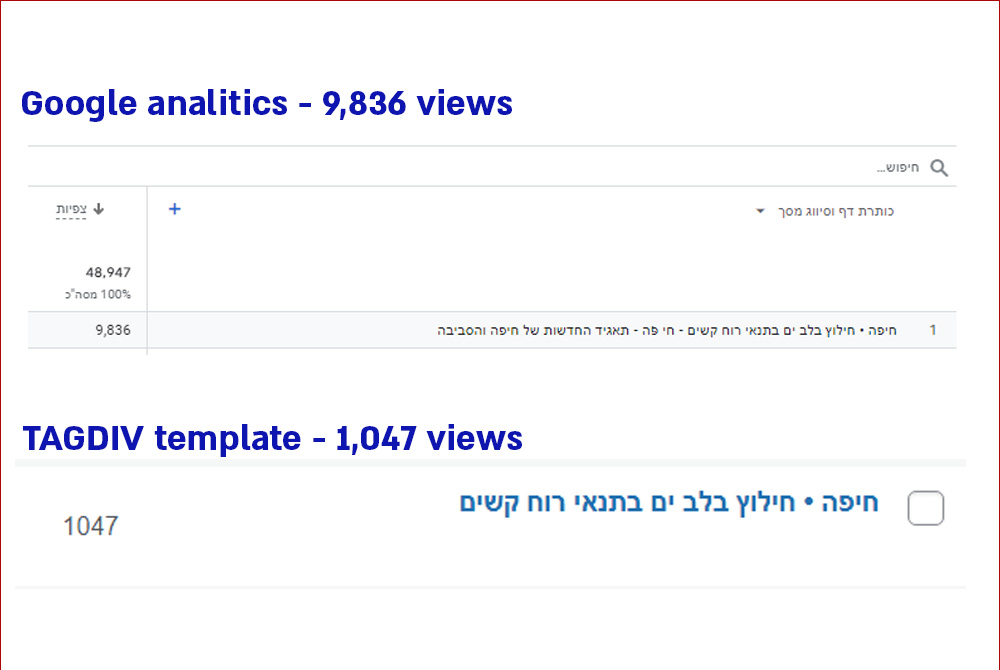
–
The issue has impact on several processes:
For examples:
1. Tagdiv flex block is using the post count to filter and sort posts.
2. Autors are monitoring their activity and measuring post success according to post view count.
3. Customers pay according to views.
–
Example of flex block filter according to post views:
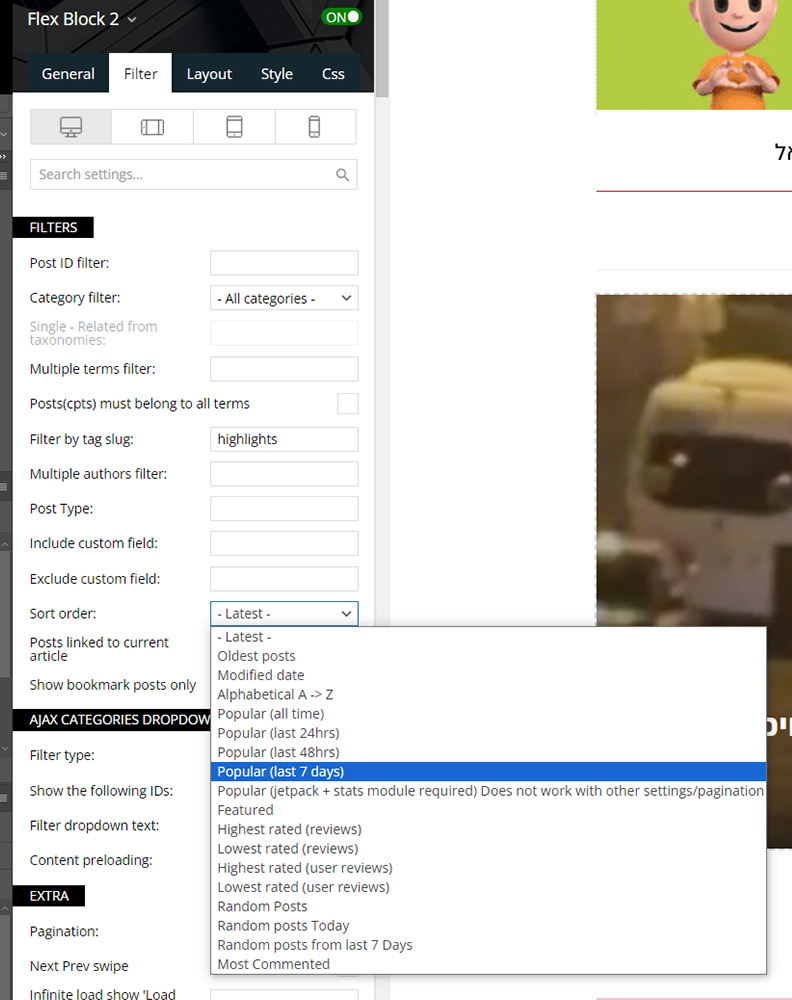
–
Can you advise if I missed something in my setup or there is a bug in the template?
–
Thanks,
Yaron Carmi
 curistorian
Hi – I have spent over an hour trying to get the real estate module in the hamburger drop down menu to widen/take up the remainder of space in the column (screenshot: https://ibb.co/bzdGj2D) I am using Flex Block X and have it set to max 1 item, 1 module per row. Why is it staying left aligned and not centering/taking up the remainder of space in the inner column?
 dlrms
dlrmsWould like to remove hyperlinks on thumbnails. Why? Well, having hyperlinks on thumbnails creates duplicate links on the page, since a post title with a hyperlink is also shown for posts displayed in flex blocks etc. Basically want cleaner, shorter code for better SEO. Is this possible via functions.php or something?
Please advise.
Thank you.
 Anamaria
 Hello,
For the category template, please use a posts loop; if you have set a posts loop, it will display all posts in this category. Alternatively, you can use Flex Block/Big Grid Flex and set the filter to “Category -Current category” => https://i.imgur.com/7P99qx0.png. This is why the block will display posts for each category.
Thank you!
 juniordiscart
Hi
I just discovered that you can create your own Flex Module blocks. However, I ran into the situation where I wanted to add a color/gradient overlay. This is currently not possible with the Featured Image block. It is allowed for the video popup, if any, but I’d like to do it as well for just the image.
Thank you!
Kind regards,
Jan.
Anamaria Hi,
You can add the flex block where you want.
Thank you!
Anamaria Hello,
Please replace the block 17 with a flex block.
Also, what PHP version do you have? We recommend using flex blocks instead of the standard blocks 1-25 and a big grid full. The flex blocks and modules builder have more options.
Thank you!
Anamaria Hello,
You can create your own modules https://forum.tagdiv.com/modules-builder-newspaper-theme/ or use the flex block https://forum.tagdiv.com/flex-block-settings-guide/, which has a lot of functions instead of standard blocks from the tagdiv Standard pack plugin
Thank you!
 dscom
dscomHello,
Currently, we are using the Big Grid Flex 4 by TagDiv Composer for our homepage (https://app.screencast.com/sxkUH6neupvay), and thus far, we are very satisfied with it. However, we would like to modify how the title, tag, and time are displayed within the image. We prefer these elements to be positioned outside of the main image, similar to how they appear in Block 1 (https://app.screencast.com/ffKsLtWZLXIRB), but maintaining the image dimensions of the Big Grid Flex 4. Is there a template or simple CSS solution that we can implement to achieve this?
 DocColin
Hello there,
I am already using Job Hunt Pro design and when trying to sort salaries within the filter, I do not have the option to customize it within the element. I have also tried sorting using ACF but there is only one option which doesn’t do the job.
https://jobtd.com/jobs/
Can you please help me out ?
Thanks
Calin
Anamaria Hello,
I think that you use a single post template, and you need to edit the single post template to add there a block, and filter it.
Hello,
We have some filters like this. For example, add a flex block in a post template, go to the filter tab of the element’s settings, and from the dropdown category filter, you can choose between Single – More from author, Single – Related by category, Single – Related from tags. Those special filters will work as expected.
Thank you!
 lub_mit
Hello,
My site is hosted on VPS & LiteSpeed Web Server & LiteSpeed Cache Plugin.
All cached pages have an issue with the paging buttons from Single Related Posts, Flex Block 1, Flex Block 3, Flex Block 4 and Posts Loop Modules of Newspaper theme.
When a request is sent to admin-ajax.php as a filter, it will have a security token, this is called a nonce.
This token is valid for 12-24 hours so I usually have this problem for less than a day because the page is still cached but the token has expired so it ends up with a 403 error.
To fix this issue, I need to add the nonce name to the ESI nonce list in LiteSpeed Cache Plugin.
Now please tell me what code generates this security token on action td_ajax_block.
Best regards
 zeropiquet
Hi as object i have switched to PHP 8.2 from PHP 7.4 and now i have a lot of errors in log
When use PHP 7.4 no issue , but when i switch to PHP 8 starts problems
I use Apache with NGINX as reverse proxy and varnish cache
[Wed Apr 17 13:31:02.360563 2024] [proxy_fcgi:error] [pid 30014:tid 140341663422208] [client xxxx:34924] AH01071: Got error ‘PHP message: PHP Warning: Undefined array key “color-1-overlay” in /home/xxxx/public_html/xxx/wp-content/plugins/td-composer/legacy/common/wp_booster/td_block.php on line 2677; PHP message: PHP Warning: Undefined array key “color-2-overlay” in /home/xxxx/public_html/xxxx/wp-content/plugins/td-composer/legacy/common/wp_booster/td_block.php on line 2677’
It seems for a problem with overlay on flex block 2 , please can i fix ?
Thanks
Anamaria Hello,
I recommend creating your own modules using this tool -> because these first modules, were made in code and difficult to change them https://forum.tagdiv.com/modules-builder-newspaper-theme/ -> https://forum.tagdiv.com/flex-block-builder-flex-loop-builder/
Thank you!
 Bettina
 Hello @lucadelpozzo!
For flex blocks (1-5) you can find the files here: wp-content\plugins\td-composer\legacy\Newspaper\includes\modules
If you can’t manage to do it on your own, then you can contact our custom work team here: https://tagdiv.com/premium-customization-services/
Thank you!
 lucadelpozzo
 Into the flexbox could be a flexible solution
 Lakuma
1) Can you please add Mastodon as an native option in the header Social icons in the header menu.
2) Can you please add the option to add more than
- one
Extra Custom Social Icon section?
3) Can you please add the option to add a “Custom” Social Icon with Link to the tagDiv Social Counter Plugin?
It would be nice to have this flexibility with all the new and old social networks changes recently and/or soon to come.
Thanks.
Bettina Hello @newspatron !
The Posts Loop element has only an option to exclude post IDs.
If you would like to use a Flex Block instead, then there is an option to exclude the categories: Multiple terms filter – This option allows you to filter the posts by multiple categories. The procedure is similar to the one used on Post ID filter. Add the category IDs separated by commas (ex: 13,23,18). If you want to exclude categories, add a ‘-’ symbol in front of each ID. If you want to display posts from a category and remove the posts included in one of its sub-categories, first add the parent category ID (ex. Fashion category – 341) and after it places the sub-category ID (ex. Daily subcategory id: 342) with a ‘-’ symbol in front. If you decide to use the ‘Multiple terms filter,’ the standard Category Filter is ignored.
Documentation is here: https://forum.tagdiv.com/flex-block-settings-guide/
Unfortunately, you can’t use two filter options.
We will take your query into consideration in the future.
Thank you!
Anamaria Hello,
Yes, for flex block 4 module 2, there is no option for the image position to be normal and this can be done only with custom work.
Thank you!
 stefanegirard
 Hi
I watched your video but it is ok for Flex Block 1 not for Flex Block 4 Module 2 as there is a Float left that cannot be removed – no “Normal” option.
Anamaria Hello,
You need to edit tagdiv Composer, select the block in the tab filter you and set what category you want -> https://i.imgur.com/0kz4hMP.png You can find more details here https://forum.tagdiv.com/flex-block-settings-guide/
Thank you!
Bettina Hello!
This block doesn’t have preloading or any pagination. But I mean to change these settings: https://app.screencast.com/S64zAK2SFZ53b and apply the settings presented in the guide to see if this helps with page speed. With flex blocks, you can create a big grid Flex 4, because it is more customizable.
Thank you!
 ausar
ausarI’m not able to show the publish date for posts using Flexblocks. They seem to ONLY show the modified date even though the modified date is NOT checked.
We are back publishing posts on a new install and want the original publish date to show.
See screen video


