- NewsmagSocial counter styles on Newsmag
- NewsmagNewsmag documentation
- NewsmagtagDiv Social Counter tutorial
- NewsmagIntroduction
- NewsmagCategory grid styles
- NewsmagTheme colors introduction
- NewsmagPage templates
 iniatisg
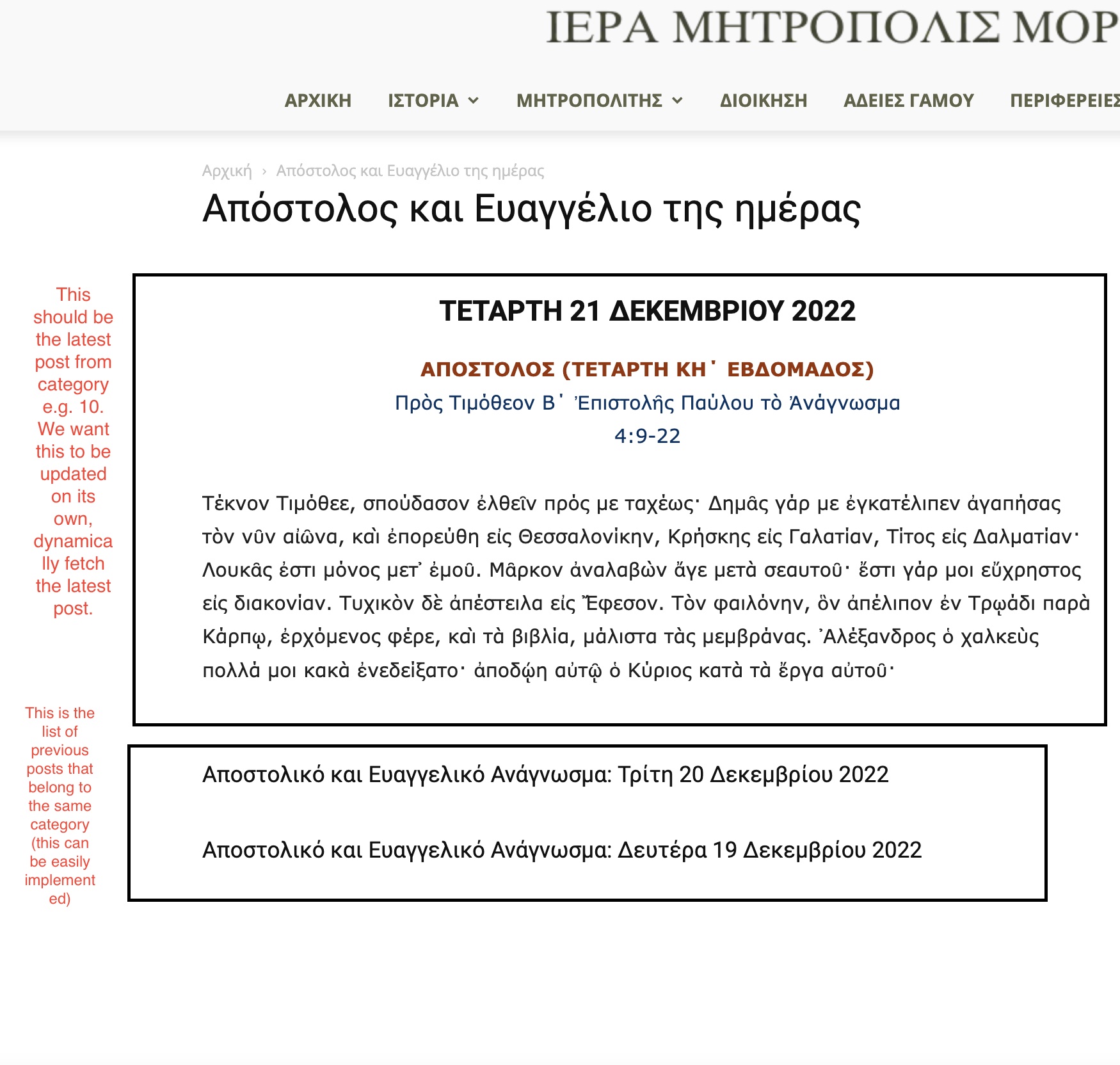
 Hello Bettina and thanks for the quick response. You can find the screenshot in the following link:
https://immorfou.org.cy/wp-content/uploads/2022/12/Screenshot-2022-12-21-at-9.07.11-AM.jpg
As you can see there are two boxes. The second box is easily implemented using flex block 1. The first box is what we want to achieve. I can easily do that using the “Text with title” element. But we want its content to be updated on its own each time a new post is added to that category. The content should be the category last post’s content.
Thanks.
 albertok
Hi there,
I’m trying to build home of my Church’s site…
I choosed flex box 2 to create a sort o f slider of last articles…

As you see in the image.. I don’t know why image has been moved on the left out of limits; I saw in the HTML / CSS and i noted this
.tdc-row .tdi_79_326 .td-module-thumb {
  height: 460px;
  margin-left: -100px;
}
I never set a left margin for that!!!!!
Could you help me pls?
 Anamaria
 Hello,
You can stretch the row -> https://i.imgur.com/0wXVt9V.jpg
You can find more details here
-> https://tagdiv.com/flexibility-rows-columns-newspaper-theme/
-> https://tagdiv.com/how-to-add-delete-and-duplicate-row-newspaper-theme/
A solution for sending a screenshot/video is this:
Download, capture, and send: https://www.techsmith.com/jing-tool.html
After making the screenshot, you will have a link; paste it here.
Thank you!
 Eduardo_Aranda
Hello, when configuring the flex box 3 component in editor mode, it shows me the selected entries, but when saving it does not display them on the website, I do not understand what is happening, how can I solve the problem?
 maghrebpost
 Thanks!
I’ve used the Flex Block Module 1 (File: tds_module_loop_1.php) and updated the module according to the theme api. Worked like a charm.
Anamaria Hello,
The headers style from Theme Panel are older templates. Now you can use Cloud Templates that are flexible and have more options. You can check our documentation here
-> https://forum.tagdiv.com/header-manager/
-> https://forum.tagdiv.com/tagdiv-cloud-library-plugin/
-> https://forum.tagdiv.com/add-logo-newspaper/
Thank you!
 ddj
ddj Like I said, in TagDiv Composer, the font is set to Oswald in all the locations. I specified that font via the editing panel on the left side of the screen.
For the two sentences, it is set at General > Post Content > Oswald.
For the main navigation, it is set at Style > Fonts > Element Text > Oswald.
For the Image Box (buttons), it is set at General > Style > Custom Titles Text > Oswald.
In the TagDiv editor, the font displays as Oswald. After saving and viewing the live page, the font shows up as Alegreya.
I do have some custom CSS, but none of it mentions Alegreya. Here’s what the custom CSS looks like.
.entry-crumbs {
display: none;
}
.woocommerce-ordering select {
display: none;
}
.woocommerce .td-container .page-title {
margin-top: 50px;
}
.woocommerce .product .images .flex-control-thumbs li img {
cursor: pointer;
opacity: .5;
margin: 10px;
padding-right: 10px;
padding-top: 10px;
}
.woocommerce .added_to_cart {
font-size: 12px;
color: #222;
padding-left: 10px;
}
.woocommerce div.product .woocommerce-tabs ul.tabs li {
display: none;
}
.woocommerce.widget {
margin-bottom: 38px;
background-color: lightgray;
padding: 5px;
}
.tdb_mobile_menu {
z-index: 10;
}
.tdb_mobile_search {
z-index: 10;
}
.td-search-wrap-mob .td-search-input span {
font-size: 20px;
font-family: ‘Oswald’;
}
.td-search-wrap-mob #td-header-search-mob {
font-family: ‘Oswald’;
}
.td-search-wrap-mob .result-msg {
margin: 0 5%;
font-size: 20px;
font-family: ‘Oswald’;
}
.tagdiv-type ul, .tagdiv-type ol {
margin-bottom: 6px;
}
-
This reply was modified 3 years by
ddj.
 Andy White
 Many thanks. I’ll play around with Flex Block 1 when I’ve got some time. Seems to be working fine now. Appreciated!
 Bettina
 Hello Andy!
There is a setting for show/hide: https://prnt.sc/J43shFfFExmA
If you want to share something in private, then you can send us an email at contact@tagdiv.com.
Every block has different styles and settings. However, the Flex Block 1 is the most useful and feature-rich. You can achieve and build almost every style with this block.
Thank you!
Andy White Thanks. I’ve made a lot of progress! I tried ‘Big Grid’ but couldn’t get the same ‘look and feel’ as the Flex Bock (see below*), so I simply filtered by Post ID and can control ‘which ones go where’. Brilliant 🙂
Few related questions:
– On the home page, How do I remove the ‘Categories’ from showing on the 4 smaller icons? (they still show on the photo above the Post title)?
– Can up update any previous posts in the forum (i.e. forum.tagdiv.com) to move the domain to make any questions more anonymous?
Thanks a lot. Great help
*I tried the ‘Big Grid’ but couldn’t get the following:
– get the ‘2+4’ layout – i.e. one big photo and 3 smaller ones
– get the ‘mouse over zoom’ effect on the photos
– get the Title to show over the top of the photo. It showed below it and looked rather old fashioned.
– get the ‘black fade’ across the photo so you can read the post title and other info (date etc.)
-
This reply was modified 3 years by
Andy White.
Bettina Hello Andy!
I suggest using flex blocks instead of a big grid to arrange them as you like. By setting the post ID, you can permanently exclude a post from appearing or allow only one post in the entire block to appear.https://forum.tagdiv.com/flex-block-settings-guide/
For example, check the Chained News demo, and there you can see a lot of flex block 1 arrangements: https://demo.tagdiv.com/newspaper_chained_news_pro/
Thank you!
Andy Whitehttp://www.doogle.com
Hopefully this is easy but I spent a couple hours trying.
2 questions below:
Question 1: The main page shows a grid of 5 photos (one large, 4 small). If I go into TagDiv editor I want to change them. After ‘fiddling’ they seem to be in the ‘Big Grid Flex 2’ area. I’ve used this article: https://forum.tagdiv.com/big-grid-flex-settings/
– But I can’t change the photos in the grid, order them or update them (for example if I do a new post – see below)
Question 2:
– If I write a post (for example: “Making great cheese at home”) I’d like to add the a photo so it appears in either the grid (see question 1) or when I select an article it appears at the top of the page. For example, https://doogle.com/wp-admin/post.php?post=929&action=edit
. . . if I go in and edit a post then I only get the text from the post and not the image that appears in the published article.
Thanks
Bettina Hello @salocharly!
You can use the post limit and the offset features. Check the documentation:
– https://forum.tagdiv.com/flex-block-settings-guide/
– https://forum.tagdiv.com/offset-feature/
Thank you!
Bettina Hello @maghrebpost !
Unfortunately, this is not possible, even with the child theme.
Check this guide: https://forum.tagdiv.com/edit-modules-flex-block-x/
Thank you!
Anamaria Hello,
I saw that you have there only a Big Grid Flex, which is not filtered correctly. To filter the block, you need to set the filter to “Category -Current category” => https://i.imgur.com/7P99qx0.png.
But to display all the posts from that category, you must add a Posts Loop block.
Thank you!
Bettina Hello @digitalrecordtv!
Unfortunately, you cannot filter the posts there. But you can create a menu from scratch on another page and customize it as you like: https://forum.tagdiv.com/page-menu/
You can use a flex block there.
Thank you!
Anamaria Hello,
Please edit the category template and add the posts loop element after the Big Grid Flex https://forum.tagdiv.com/cloud-library-category-templates/
If you don’t see the button edit with tagDiv composer in the top bar, then please check if you have this option enabled in the jetpack plugin, please disable it -> https://i.imgur.com/VFb1Oj7.png https://forum.tagdiv.com/general-options-may-interfere-newspaper-theme/
Thank you!
 parkaka
my website https://www.parkbin.hk/ on the front page (and also in post template) the Big Grid Flex 2 is broken like the below image.
I have outlined a single post should be like below
https://share.getcloudapp.com/qGuZKekw
Thanks for the support.
Best regards,
Joe
 TheStormer
Hai,
what is the technical environment:
• Newspaper Version: 12.1.1
• WordPress 6.1.1
• PHP Version 7.4.30
• Testing with Chrome and iPhone 6s
What is the problem: the settings are the same for all three modules and yet there are different mobile displays. From my point of view, this should not be the case, because I can only make mobile settings for Flex 10 M2. This means that otherwise the CSS settings for desktop should apply to mobile.
Maybe I am blind and do not see the right settings … thx for supporting the issue!
Rgds
TheStormer
I can force the desired behaviour by adding this CSS:
@media (max-width: 767px) {
body .tdi_115 .td_module_fex_6 .td-module-meta-info {
padding: 0px;
}
body .tdi_131 .td_module_flex_6 .td-module-meta-info {
padding: 0px !important;
}
body .tdi_131 .td_module_flex_7 .td-module-meta-info {
padding: 0px !important;
}
}
Module Settings:
Big Grid Flex 5
MODULE CATEGORY GRID 1
MODULE CATEGORY GRID 2
MODULE CATEGORY GRID 3
Meta info margin: 0px 0px 0px 0px
Meta info padding: 0px 0px 0px 0px
Article title padding: 2px 5px 2px 5px
Category tag spacing: standard
Category tag padding: standard
Big Grid Flex 10
MODULE CATEGORY GRID 1
MODULE CATEGORY GRID 1 – MOBILE
MODULE CATEGORY GRID 2
Meta info margin: 0px 0px 0px 0px
Meta info padding: 0px 0px 0px 0px
Article title padding: 2px 5px 2px 5px
Category tag spacing: 0px 0px 7px 7px


Anamaria Hello,
You can select the inner row or row and you can delete it with right-click.
-> https://tagdiv.com/flexibility-rows-columns-newspaper-theme/
-> https://tagdiv.com/how-to-add-delete-and-duplicate-row-newspaper-theme/
Thank you!
Anamaria Hello,
Please check this documentation about row and column elements
-> https://tagdiv.com/flexibility-rows-columns-newspaper-theme/
-> https://tagdiv.com/how-to-add-delete-and-duplicate-row-newspaper-theme/
Thank you!
Anamaria Hello,
Indeed, using a standard template, there is a problem with the reply to comments.
This will be fixed in the next update.
Also, we recommend using cloud templates; they are more flexibility and have more options.
Thank you!
 beyonduality
 There is also no opt-in plugin from tagdiv and after visual problems (without update or a logical reason) from the Big Grid Flex 4 Tagdiv Editor i made a update to the newest version and the bug is back …
Now i have a bug in the older verfsion on the startpage or an bug on the tag div editor with the newest version.
Anamaria Hello,
Please edit the category template, and filter the blocks to “Category -Current category” => https://i.imgur.com/7P99qx0.png.
If you have set a posts loop then will display all posts in this category.
Thank you!
 Calin
Calin Hello,
You mean to replace flex block 2 with slide, yes that would work too.
Thank you!