
- TutorialsDefault Block Settings Guide
 Calin
Calin Hi Levaire,
If you want a simple menu, you can just use the mobile menu option ( https://i.imgur.com/rmRwW7z.png ). In this case, there’s no need to create anything custom.
However, if you want a fully customized menu that looks exactly the way you prefer, then you can follow the method described above. This is only necessary if you need something special. For a simple setup, using the theme’s built-in header and mobile menu elements is the easiest solution.
 Levaire
 I am experiencing a similar problem with the Town Talk template in the Newspaper theme. I can edit the text logo to type in a new name, and I can even toggle it off, but I cannot toggle off the icon, and I cannot get the actual logo to replace what’s there. I have tried to add it in both the global header AND in the Newspaper theme settings, but nothing works. Feels like a bug. Same problem exists for the logo not appearing in the footer as well.
 regio-online
I am experiencing a critical issue with the Featured Image display on our Single Post Template.
The image is being cropped at the top and bottom with the Single Post Bg Featured Image, (e.g., faces are cut off) because the container height is fixed and incompatible with the image’s aspect ratio.
Also using Single Post Featured Image with custom CSS (see below) does not contain the image but cuts off below half of image:
.tdb_single_featured_image img.entry-thumb {
object-fit: contain !important;
width: 100% !important;
height: auto !important;
max-width: 100% !important;
}
.tdb_single_featured_image {
max-height: 500px !important;
overflow: hidden;
}
Good to understand that all images are served through the plugin WP Media Folder Cloud add-on from Google Drive, all images are resized offline with XN-Resize, before uploaded in media library folder in WPMF Google Drive, to be constrained to max 1400x600px size. So images have no seperate thumbnails created in Google Drive. The are coded as thumbnails automaticly inside Big Grid and Flex blocks.
Technical Cause and Conflict
Fixed Height Conflict: The core problem lies in the theme block used to display the header image. Specifically, the tdb_single_bg_featured_image block (which was previously used, or its properties are still inherited) has a hard-coded default height value (600px) that cannot be removed or set to ‘auto’ in the TagDiv Composer settings. This fixed height creates an inflexible CSS container.
Rendering Override: The theme’s rendering engine (or the WP Media Folder Cloud Add-on) applies a height constraint via an inline style or theme JavaScript (JS) that executes with the highest priority, forcing the image to fit the limited height while applying overflow: hidden.
CSS Failure: All attempts to override this constraint using standard CSS (Child Theme, Customizer, and direct Block CSS injection) fail to work against the theme’s rendering logic.
Desired Outcome and Required Solution
The required behavior is the precise inverse of the current rendering. The image must behave exactly like the CSS rule object-fit: contain.
Goal: The image must scale down proportionally based on the available width of the column, ensuring the entire image (full height and width) is visible within the container without any cropping. The container’s height must then dynamically adjust (height: auto) to accommodate the image’s resulting proportional height.
I require assistance in disabling the internal hard-coded height constraint (600px) on the Featured Image block within the TagDiv Composer’s source files, as external CSS solutions are being ignored, or have a workaround presented with custom code that can do the job.
Since Single Post Bg Featured Image is a background image this is difficult. The element is placed inside Single Post Featured Image, to be able to show caption. In the Extra Class of CSS of Single Post Featured Image we no have placed remove-image. When showing the image in this element it only shows with setting 485×360 but then doubles in height strangly.
Any help and solution in this would be much appreciated!
Calin Hi janabi,
If in wordpress everything is the same set on both websites and the situation is only on one of them, I will recommend checking the DNS settings on the host to see if the settings are similar or not.
Related to registration, our theme provides 2 options, for this, one is the element “Header login” that can be set with tagDiv Composer in the header zone, and it will pop up the login modal from where you can choose to register.
The other method is when tagDiv Opt-in builder is enabled, then you can create a page for login/register using teh theme elements “Page login/register” – https://i.imgur.com/3wPEkAs.png
Another solution is to use teh wordpress settings (those from domain/wp-login.php)
Thank you!
Calin Hi,
I have two suggestions. If neither of them works, we’ll need access to the website to investigate the issue further. Maybe you can set it on a staging.
1. Test with the default header and footer: Go to the Header & Footer settings, remove the Cloud header and footer, and leave them at their default state. After that, recheck the test page.
2. Test using only the theme plugins. Disable all other plugins and keep only the theme-related ones (tagDiv plugins) active.
Thank you!
Calin Hi Sim2,
Yes, you can use the old templates; for this, you just need to make sure that the plugin tagDiv Standard Pack is enabled. This can be installed/enabled from Newspaper > plugins https://i.imgur.com/xRM2JwH.png
Then in the theme panel in the header section for cloud, make sure is set the -no template- and choose the header style you need (i think is style 1) – https://i.imgur.com/QFTEkF2.png
Thank you!
 Sim2
Sim2 Thanks a lot for that Calin, that is a good idea.
Can we still use the classic header in version 12.7.3?
I have turned off the cloud template header and looking to put the header back like version 9 but can’t see the options to have a header logo to the left and ad box to the right, like screenshot.
Can we do this in the theme panel?

Calin Hello,
From the images the settings are done ok for the ad box. It is possible that it is just a period, but if you think that this situation is possible from cloud templates, maybe it would be better to do a test, set a classic header (which was used before) and see if the header status returns to the values it had before.
Thanks!
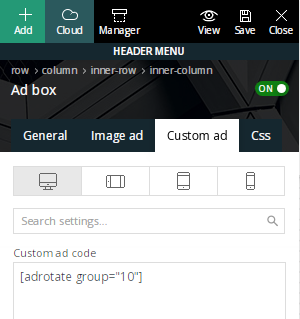
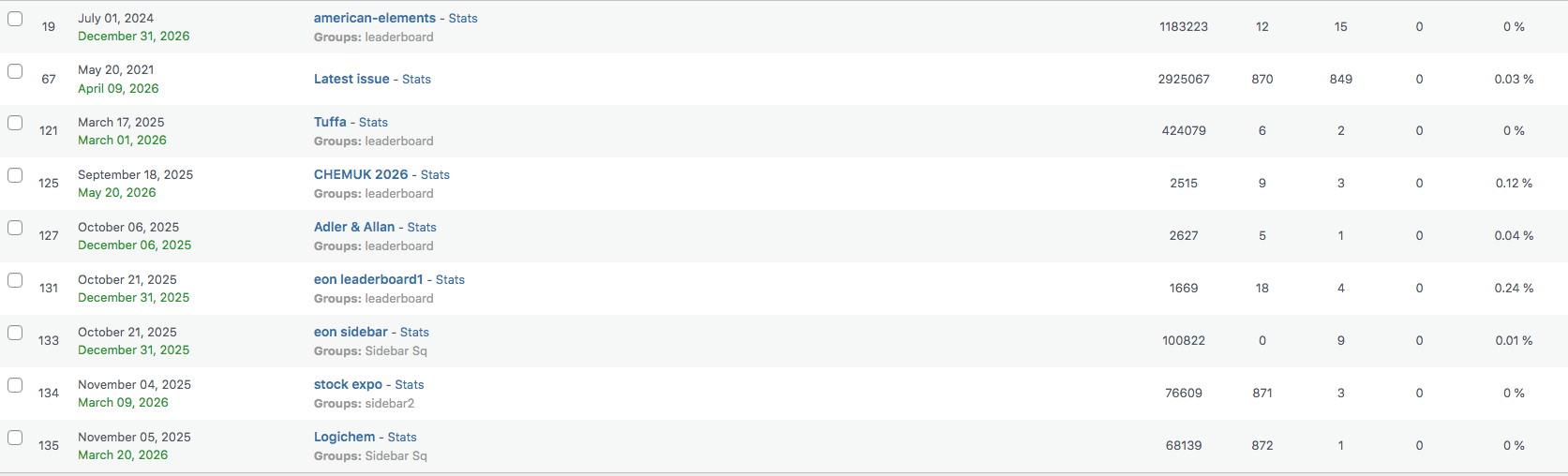
Sim2We use newspaper theme on our website chemicalindustryjournal.co.uk and we use a plugin called adrotate that manages ads on our site. Before we updated to newspaper 12 the stats for impressions from the header and the sidebar were consistently the same but since we have started to use the cloud templates the header stats have dropped down dramatically.
We use shortcodes in the ad box in header to place the ads and in the sidebar too, see screenshot, and we are just trying to work out why this is happening, does that make sense?
Calin Hi,
If you are referring to mobile version, please disable the td mobile theme plugin and use the responsive theme version, then you’ll be able to use tgaDiv Composer to edit the header version – https://forum.tagdiv.com/header-manager/
Thank you!
 awilbanks
If you look at my site on mobile https://independenttoys.news the hamburger menu is in the header. Anyone know of a way to remove that completely?
Calin Hi,
Please make a test on a new page. If tagDiv Composer is working, then it is related to something from that page; if it is not working, then it can be from the cloud header, cloud footer, or even from an extra plugin.
Thank you!
Calin Hi,
Please disable the tagDiv Mobile theme and amp plugins, clear all cache, and check again; it should be displaying the responsive version.
To set the logo on the responsive version, use tagDiv Composer, select the mobile viewport and replace the mobile logo – https://forum.tagdiv.com/header-manager/ https://i.imgur.com/6FG3i0K.png
Calin Hi,
Most of the time, the problem is from a shortcode that is not compatible with our theme or a plugin conflict; therefore, after you set it with tagDiv Composer and save the page/cloud template, the next time you try to edit it, you’ll get that error.
If is only for one page or a cloud template (it can be on the header or footer, you can change them for tests and see if the problem persists), this is from some settings/shortcodes set on it and it can be fixed using the page revision https://wordpress.com/support/page-post-revisions/
Thank you!
 pbase
pbase Prior image host may be problematic, here are the images
https://freeimage.host/i/ffecuEv
https://freeimage.host/i/ffecA4R
This header also sometimes displays, I have no idea where it’s coming from : https://freeimage.host/i/ffeM3Eg
pbaseI have the Today News theme installed, but the mobile headers are not displaying the headers I’ve indicated in the editor.
Our main site is at ourtimepress.com, and the mobile header is supposed to mimic the desktop header in font and color. The screenshots show what I’m seeing in the mobile theme editor, and what I’m actually seeing on a mobile device. I’ve tried everything I can to correct this problem. Nor can I get the correct author to display on the mobile page. Please advise.
What I’m seeing on the editor: https://ibb.co/hJ2VFmWw
What I’m seeing on a device: https://ibb.co/Pv8YXgyz
Calin Hi,
Can you please provide some screenshots of the settings for the header and footer in the theme panel?
Thank you!
 Tsako79
Hello all.
I have a strange problem and I can’t find a solution. Tried everything!
I have already built my website with the newspaper theme and I have used cloud templates for header and footer. As a last step I add the polylang plugin to create a second language (Main Greek secondary English). I ‘ve used this in the past many times without a problem but right now I have a strange conflict.
When I add my second language (english) and I create the pages, everything at this step works fine. But when I add a new menu and trying to check it as an English header menu, the checkbox unchecked automatically (screenshot 1). As a result, there is no way to add an english menu and even in the english pages, the greek menu appears always.

I’ve contact Polylang support already and they told me it’s a theme conflict.
Any help or any ideas please?
Calin Hi,
If the footer displays a text that can not be edited (when you hover it), then you are using a standard header, not a cloud header/footer, and it can be edited using the theme panel settings. In case you want to edit it with the theme builder, use cloud templates.
Thank you!
Calin HI,
I see that now you have images on the homepage https://i.imgur.com/VIFdMxs.png
For the header use tagDiv Composer and edit the logo text size https://forum.tagdiv.com/header-manager/
 mediax
Hi there,
I recently Updated Newspaper theme. After update, i tested – all worked, besides search that gave an empty white screen. Doing some troubleshooting I noticed in console that an error 500 was thrown.
Looking at logs, i see this:
[21-Nov-2025 10:37:05 UTC] PHP Fatal error: Uncaught TypeError: Illegal offset type in /var/www/html/public_html/wp-content/plugins/td-composer/legacy/common/wp_booster/td_util.php:1196
Stack trace:
#0 /var/www/html/public_html/wp-content/plugins/td-composer/legacy/common/wp_booster/td_util.php(340): td_util::get_template_id()
#1 /var/www/html/public_html/wp-content/plugins/td-composer/legacy/common/wp_booster/td_wp_booster_functions.php(513): td_util::check_header()
#2 /var/www/html/public_html/wp-includes/class-wp-hook.php(324): td_load_css_fonts()
#3 /var/www/html/public_html/wp-includes/class-wp-hook.php(348): WP_Hook->apply_filters()
#4 /var/www/html/public_html/wp-includes/plugin.php(517): WP_Hook->do_action()
#5 /var/www/html/public_html/wp-includes/script-loader.php(2299): do_action()
#6 /var/www/html/public_html/wp-includes/class-wp-hook.php(324): wp_enqueue_scripts()
#7 /var/www/html/public_html/wp-includes/class-wp-hook.php(348): WP_Hook->apply_filters()
#8 /var/www/html/public_html/wp-includes/plugin.php(517): WP_Hook->do_action()
#9 /var/www/html/public_html/wp-includes/general-template.php(3192): do_action()
#10 /var/www/html/public_html/wp-content/plugins/td-standard-pack/Newspaper/header.php(11): wp_head()
#11 /var/www/html/public_html/wp-content/plugins/td-composer/td-composer.php(254): require_once(‘/var/www/html/p…’)
#12 /var/www/html/public_html/wp-includes/class-wp-hook.php(324): {closure}()
#13 /var/www/html/public_html/wp-includes/class-wp-hook.php(348): WP_Hook->apply_filters()
#14 /var/www/html/public_html/wp-includes/plugin.php(517): WP_Hook->do_action()
#15 /var/www/html/public_html/wp-content/themes/Newspaper/header.php(2): do_action()
#16 /var/www/html/public_html/wp-includes/template.php(810): require_once(‘/var/www/html/p…’)
#17 /var/www/html/public_html/wp-includes/template.php(745): load_template()
#18 /var/www/html/public_html/wp-includes/general-template.php(48): locate_template()
#19 /var/www/html/public_html/wp-content/themes/Newspaper-child/search.php(1): get_header()
#20 /var/www/html/public_html/wp-includes/template-loader.php(106): include(‘/var/www/html/p…’)
#21 /var/www/html/public_html/wp-blog-header.php(19): require_once(‘/var/www/html/p…’)
#22 /var/www/html/public_html/index.php(17): require(‘/var/www/html/p…’)
#23 {main}
thrown in /var/www/html/public_html/wp-content/plugins/td-composer/legacy/common/wp_booster/td_util.php on line 1196
Please could you offer me some advice on how to resolve this?
Thanks
 habershamnews
I have a template that I’m trying to customize. I’d like to add a mobile menu to it. I open the template using the TD composer editor. Then, I chose the mobile icon. What I see is a red rectangle that says “Popup Modal”. That’s where I’m trying to drag and drop a “mobile menu” but unsuccessfully. Can you talk me through how to set it up correctly please? Thank you!
 klongmore
For some reason, and its probably me, my articles on the home page, are not showiug images and the header is whacked out. What am I doing wrong?
 nearview
We’re using a Flex Block 1 on a taxonomy template and are trying to hide the block title when no posts are returned. For example, our taxonomy template includes a “Company Profiles” block that’s configured to display profiles tied both to the current taxonomy term and to the Company Profiles category.
Some taxonomy terms have associated profiles and some don’t. For the ones that don’t, the template still shows the “Company Profiles” header with an empty section underneath.
Has anyone found a good way to conditionally hide the block title when the query returns zero posts?
 pdwesterman
I have a site: ainews.cafe . I want to disable search.
I commented out all the code that seemed to be rendering the search icon and search input box, but it’s still appearing.
What’s the best way to disable the search icon and link in the header ?



