- NewspaperHeader Builder
- NewsmagHeader styles
- NewsmagHeader ads
- NewspaperHeader ads
- NewspaperHeader styles
- Apitd_api_header_style::delete
- Apitd_api_header_style::update_key
- Apitd_api_header_style::update
- Apitd_api_header_style::add
- ApiAPI – Header style – Introduction
- NewspaperSearch setup for custom post type
- NewspapertagDiv Composer – Website Manager
- NewspaperBookmark – Save For Later
- NewspaperWooCommerce: Happy “Add to Favorites!”
- NewspaperModal Popup
- NewspaperFlex Block Settings Guide
- NewspaperPosts Loop Element
- NewspaperHow to Add a Logo in Newspaper
- NewspaperDefault Category Settings
- NewspaperWhen tagDiv Composer is Not Working
 VeriArtem
 Hello
I just noticed that text is on all pages which mean that is in header. As I mentioned before adding raw is not easy as your video show I want to be only on home page.
Regards
Alex
 Calin
Calin Hi Rahul chauhan,
Normally there should bot be a problem if is a standard template or a cloud template, the auto ads should be set in one place (between the head tags). What I can suggest is to also place the code in the website header in ads place (if is a standard template need to be set in the theme panel, but for a cloud need to be set using tagDiv Composer).
Also, if you want we can investigate the situation, for this we’ll need temporary wp-admin access. This can be provide via email at contact@tagdiv.com
Thank you!
 PetrSycha
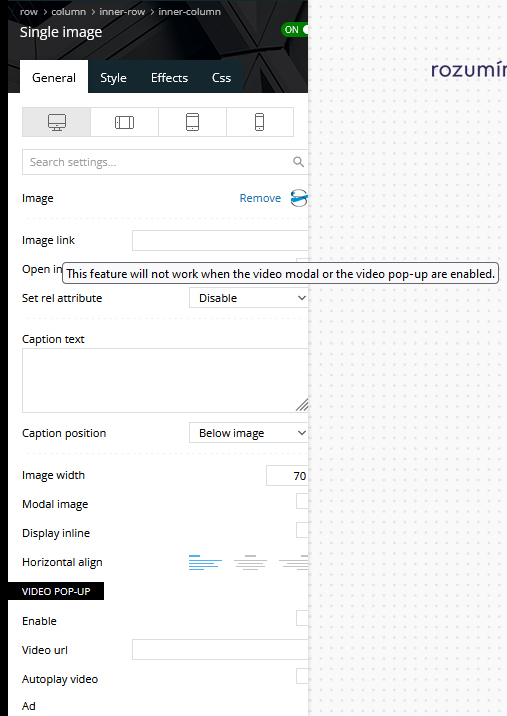
Hi, I want to add an URL to the images in a header on a web: https://www.rozumimepenezum.cz/
The place for images you can see here: https://www.rozumimepenezum.cz/wp-content/uploads/2022/08/image-2.jpg
Unfortunately I can´t saved the url. There is a notice in the header template: “This feature will not work when the video modal or the video pop-up are enabled.” – but the video isn´t enabled.
https://www.rozumimepenezum.cz/wp-content/uploads/2022/08/image1.jpg
Can you help me please?
Thank you, Petr
Calin Hi webmastermetrozita,
Yes, you can set individual header and footer on pages, and cloud templates. The method it is the same for all. First you need to edit the page, then select the manager, after that from the header and footer sections select the cloud template you want to assign (select by clicking the name of the template) -> https://i.imgur.com/eRWJx5w.png (do the same for the footer).
About the difference between extended and multipurpose elements, I can say that those are more the categories that those elements are part of. For example in the extended shortcodes we have the column text and text with title, those elements are quite similar and both use the wp editor so you can practically create post/page content. Now the multipurpose elements are simple elements for image and text, normally those have custom settings and fields for where to set them and how those will be displayed, for example a text in the left and image in the right.
I hope this will help you!
 narbariya
Newspaper Theme Header Menu not showing but proper work with mobile?
narbariya.com
 Anamaria
 Hello Bruno,
Check this topic: https://forum.tagdiv.com/topic/different-logo-in-categorypage/ ; Here it explained how to duplicate a header template correctly and the same changes for the footer.
Thank you!
 webmastermetrozita
 Hello Calin,
Ok thanks. I also understand now to make 1 custom page you need to put it inside the content. But if you want to have 1 page with another footer or header, how to do that?
If you add elements what is the difference between “extended” shortcodes and “multipurpose” shortcodes ?
Thanks,
Bruno
Calin Hello,
1. This problem can appear from more situations. We made a guide with the most common cases that can appear-> https://forum.tagdiv.com/tagdiv-composer-not-working/
Also, in case that the problem persist, please do a full backup for the website and contact us via email at contact@tagdiv.com and provide wp-admin and cPanel access. We’ll try to check the problem as soo as possible. Also include the link of this topic to identify you.
2. Those are not reflecting because you are using a cloud header and this can be edited only with tagDiv Composer. The theme panel settings are only from standard templates. If you do not use any of theme, I recommend to disable the tagDiv Standard Pack plugin.
Thank you!
Calin Hello,
This problem maybe because when you created the homepage you maybe set the content in the wrong place and instead to set it in the content area it has been set in the header/footer (or footer) area -> https://i.imgur.com/9GmVEMH.png -> https://i.imgur.com/BSEZ2yG.jpg -> https://i.imgur.com/k7l4fXt.png you need to drag and drop the content from header (or footer) area with tagDiv Composer in the main content area.
I hope this will help you!
 pratibimbnews
1. please check I am getting this error while going to edit header https://prnt.sc/CZUG7HYL_qJF
2. logos are set in header setting but not reflecting website https://prnt.sc/GE8aYfq8Mtfm
 anthonyblfc
 Ok great but was hoping that doing this was going to sort my problem out, of having no header on my post. I have done everything that you have said and still my header and logo are not showing up on my post. Its really frustrating I’ve tried everything with no joy thank you
 pixelnews
 Hi Annamaria
Thanks for clarifying.
It solved some issues but also still some are remaining.
Front Page on Mobile now looks quite good but the logo in the header semes to change the size while loading or refreshing the page. I tried to delete the element and add the logo again but can’t figure out what is causing the issue.
Here you can see a short video of the problem:
[video src="https://pixelnews.ch/wp-content/uploads/2022/07/video_2022-07-29_08-16-37.mp4" /]
Further the header titles of each section are not visible. But they have been set accordingly to the documentation of the theme:
https://pixelnews.ch/wp-content/uploads/2022/07/Unbenannt.png
Further and outmost my biggest issue is still remaining:
If I click on a article on a mobile device it is fully brooken
– images are not loading
– header with logo is not showed properly
– video is loading but no images
– color and fonts are way different than on desktop version
– related articles and footer are just plain text, no images
See scroll-screenrecording here https://pixelnews.ch/wp-content/uploads/2022/07/video_2022-07-29_08-33-50.mp4
and a classic screenshot here: https://pixelnews.ch/wp-content/uploads/2022/07/photo_2022-07-29_08-32-12.jpg
Please advice, we need to publish the site asap
 SujanRoy
Hi, my site fitbabu.com had 3 H1 tags on homepage. But I just disabled H1 on logo both on header and footer and also on mobile template.
Now it shows 1 H1 tag on home page “FITBABU.com”. But for SEO, I need to edit or change this tag. I tried edit on header.php on cpanel but it didn’t work. Can you please help me change the H1 tag?
Anamaria Hello,
The style that you can set on the element Column Title are those -> https://i.imgur.com/zSYsYsO.png
You can set a header title on each flex block.
Thank you!
Anamaria Hello,
I just checked, please select the viewport on phone, select the header logo and change it => https://i.imgur.com/cR7F0v4.png https://www.youtube.com/watch?v=HXQQygkCCJo -> https://forum.tagdiv.com/add-logo-newspaper/
Also, I saw you have those errors in the console https://i.imgur.com/RCjertp.png to fix this error please follow these articles
-> https://medium.com/@dtkatz/3-ways-to-fix-the-cors-error-and-how-access-control-allow-origin-works-d97d55946d9
-> https://developer.mozilla.org/en-US/docs/Web/HTTP/CORS/Errors/CORSMissingAllowOrigin
-> https://talhasariyuerek.com/en/cors-policy-no-access-control-allow-origin-solution/
-> https://crunchify.com/how-to-fix-access-control-allow-origin-issue-for-your-https-enabled-wordpress-site-and-maxcdn/
Thank you!
Anamaria Hello,
Please check if you don’t have set from Manager to No header -> https://i.imgur.com/oCYsipz.jpg
Thank you!
 tenacemente
Salve, sito tenacemente.com uso la demo default pro, header template 6, footer podcasts. Che font utilizza il tema di Default? Come posso disattivare i google fonts e impostare tutto su qualcosa di più leggero da caricare come Verdana? Grazie
Anamaria Hello,
Unfortunately, I can’t see the link to your website -> https://i.imgur.com/6gv031Z.png
You can add again the header menu from tagDiv Composer, ad set your menu.
Thank you!
 globalsouthvoice globalsouthvoice
I lost the header menu section at the top of the website. how does it happen and how could I recover it?
 Generaltech
hello community!
I need your help with the follow topic:
How can I monetize with ads by creating subscription plans?
I am building a newspaper which will have ads, so i need to create a metod in which clients (the people who want their advertising in my newspaper) pay a monthly fee, for example: USD 50 for a month of advertising in the footer, USD 150 for a month of advertising in the header of the main page , etc.
I need the bill to be generated automatically to the customer and charged monthly to their credit card, so if they don’t pay, or at some point cancel the payment of this “plan”, just there delete their ad from the newspaper.
maybe with Woocommerce, but i don’t know how.
I don’t want to create a typical product of a woocommerce store, but rather something similar (or equal) to the way hosting pages offer their plans.
I don’t know if there is any plugin that allows me to do the above.
I thank you very much in advance for your help, I’ve been looking for days and haven’t found anything, but I didn’t want to bother you either.
This is an example of what I want to create

Anamaria Hi,
If you create mobile templates/mobile pages you need to convert the existing header/footer like this => https://www.screencast.com/t/HrjOBNayd
Also, please provide the link to your website.
Thank you!
anthonyblfc Hello, they’re thank you for the reply. Yes, I have my header set to global exactly how you explained it. It’s perfect on my pages but soon as I click a post the logo disappears and it shows the newspaper logo instead. I haven’t got the mobile theme activated because it messes my page up and makes it nothing how I want it. So I have it off and I created my mobile pages using the Tagdiv composer and everything is perfect apart from this logo problem when I click on post thank you
 rahimahwaz2020
 Thank you Anamaria for your reply, I think my problem is different than the one mentioned in the link you provided.
I have no problem in the header and footer and some other templates (Like post template for example).
My problem is specifically in the “Search” and “404” templates, theme configurations do not allow me to choose a different template for each language (for example, when I choose the English template of Search it applies on the Arabic interface as well.
If I change the interface to Arabic and choose the Arabic search template, it applies to the English too as well.
 bstaff
 Hi Bettina, that seemed to do the trick. I followed a larger troubleshoot not I found on the forum. I deactivated all my plugins, I activated a non-newspaper theme, them i reactivated the Newspaper theme and reactivated all the plugins. Which re-installed the Opt-in builder.
ONE PROBLEM: everything is working fine now, but the URL that my website logo points to has changed to my staging server. I went into Cloud Templates and found the active header and checked and it is pointing to my proper URL, however the logo in the main theme is still pointing to a subfolder with my staging site.
Should be https://regulatorwatch.com
Currently is https://regulatorwatch.com/June24-BK
How do I change this back to it’s original?
Let me know thanks!
b…