- TutorialsDefault Block Settings Guide
 mverminski
 Hello,
I added the following to my .htaccess file, but do not see any change in the site.
<FilesMatch "\.(ttf|otf|eot|woff|woff2)$">

    <IfModule mod_headers.c>

        Header set Access-Control-Allow-Origin "http://skin.cdn.com"

    </IfModule>

</FilesMatch>
I cleared the cache in the backend of the website and my browser, but am still not seeing icons.
 niranjanmotonews
When I try to set it as global for a single post, it’s get auto revert back to standard default. another issue is when I try to downgrade to the old version, it’s do nothing.
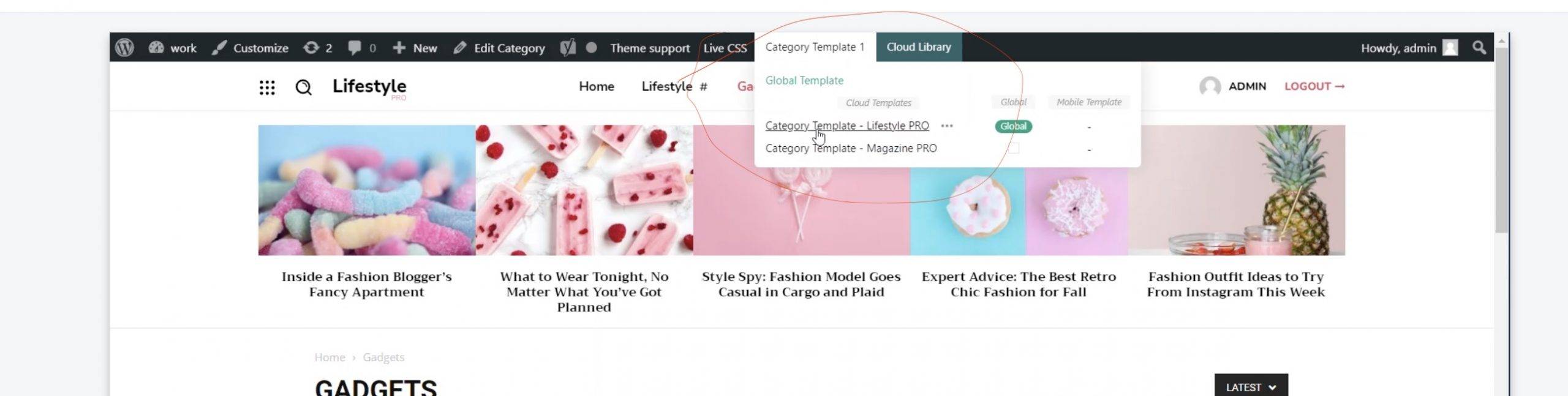
when we set post or category or header template from cloud library under thyme panel, it always reverts back to default,
let me know if there are any in the new theme and we are getting this fixed in updates, if not I need a refund.
also, the theme is not getting activated, it’s say got activated successfully but the above says not activated.
 candersonnm
Problem Overview:
*On posts on mobile devices (and in our app based on WPsite), the header doesn’t display the image or menu. Instead it displays the text of the site title and header and click here to use wpmenu builder.
*In the cloud template for the header, everything shows fine at each size
Site: discovermuscatine.com
Dropbox folder with screenshots: https://www.dropbox.com/sh/nzjkq0v4hlbfl3z/AADS_Y3QhBexEOMYIDkHU7uPa?dl=0
 PimpFred
 Thank you @Bettina
I tried it and yes it is working but only for ads inside my posts. How about ads on homepage like this under header and on sidebar? I can’t change it in “Single Post Content”. I’m sorry. Maybe this is easy but I tried many times and still can’t change it.
I tried to edit this ad on:
-every cloud template
-home page template
-theme settings > ads
By the way, is it normal that I can’t see any ad frame on my theme panel like it is shown on the screenshots and the movie which you have sent to me? I also don’t see those ads from sidebar and under menu. Only if I go to incognito or another browser I can see them. Maybe that’s why I can’t change it?
 Bettina
 Hello!
1. I can not see any black line at the top on the homepage in your website. Did you mean the sticky header or the top bar menu?
2. This demo uses the responsive version for mobile. A responsive version of your website is looking similar like on desktop, edit the page with TagDiv Composer, click on the mobile viewport: https://www.screencast.com/t/XDQJedlggSB ; there you can see your mobile version and you can edit the elements there.
Yes, you can import other templates and use mobile pages which are fully customizable and could be so different than desktop version, so you should build and assign them to each desktop page you need. If you do not build for every page, then for the rest of the pages you’ll have the responsive version of your desktop automatically. For more information about mobile pages, please check our article here: https://tagdiv.com/newspaper-10-3-7-update-brings-customizable-and-fast-mobile-pages/
OR if you do not want to build every page style, but you need different style too, then you can install the Mobile theme plugin. The Mobile Theme is a performance optimized theme included in the Newspaper main theme and it loads only for mobile devices. It comes with its own templates/design for page, post, category, etc so your current templates from the desktop theme will get converted to the mobile theme layout. For more details, please take a look here: https://forum.tagdiv.com/the-mobile-theme/ and https://forum.tagdiv.com/mobile-theme-introduction/
You can use which one is suitable for your needs.
Thank you!
 Anamaria
 Hello,
Please use a header/footer template on the 404 template and after you can set on No Header and No Footer => https://i.imgur.com/yzFsQdv.png
Thank you!
 fansabout
Hi,
Despite I’ve followed your documentation instructions (https://forum.tagdiv.com/add-logo-newspaper), I’m afraid that I’m unable to set the main logo, so I need your help to solve this issue.
Even I’ve set the new logo within the Theme’s panel header settings, but the logo is not displayed.
Thanks in advance.
Regards,
JC
Bettina Hello @AjitSirohi!
From what you describe, it seems that you add the content in the header zone and not in the content zone: https://www.screencast.com/t/LyeSCLfep
So, if you delete an element from homepage, it will delete on any page from your website which has that header. Please re-check and see the results!
Thank you!
Anamaria Hello,
You need to edit the page with tagDiv Composer => https://www.screencast.com/t/MIhm17tgIJeX select the logo and disable H1 on the logo => https://www.screencast.com/t/T6pvm7wR9 -> https://www.screencast.com/t/P7DuA9su from header and footer => https://www.screencast.com/t/31zJzmsS also if you use a sticky header.
The H1 must appear only once on the page/post and must be applied to an important element for SEO, usually placed on the logo.
Thank you!
 karrieristen
 Man Kam
Dear support team,
Thank you for your support all the time , I have questions as below
1. In pc version only, how to hide / reomve the black color line in top(with date and social media icon). I could edit the elements but cannot remove the whole line.
Example: http://www.hk01.com
2. Synchronize in PC and mobile version
Refer to below examle
https://demo.tagdiv.com/newspaper_magazine_pro/#
In my site, It only apply the sample theme, which only have latest news and without the catalog.
I guess that the reason is the selected per-build them is the normal one. Is it possible to apply other theme for mobile version only? I just don’t want to re-set everything.
Many thanks for support
 Alice62
How do I remove header and footer for 404 error page only?
 zaporo
Hi tagdiv team, im editing the mobile template for article page, however the gap below the menu header cannot be removed. ive tried to look into the css settings but didnt find any solution. please guide me to solve this problem. thank you
my website is https://techlagi.my

 PeteMason
I want to reduce the right margin as shown in the picture, extending right beyond the header and body.
I want to achieve what https://www.screencast.com/t/AplrIm3zs5 shows in the thread, https://forum.tagdiv.com/topic/menu-problem-12/. It says “you need to set the margin left and right on the row to -20”. But this has no effect on the right margin for me.
I can force the content into the middle of the screen by increasing the left margin to, say, 20, but I can’t reduce the right margin.
I have switched off background color/image in the Theme Panel as per the thread, and tried the other things.
It looks bad the smaller the screen and mostly on the mobile phone.
It varies as I adjust the the row “stretch row and 1200px content” to “default”, etc, but I want to stay with “stretch row and 1200px content” as it matches the header.
Hope you can help!
Thanks.
 mastaliyev
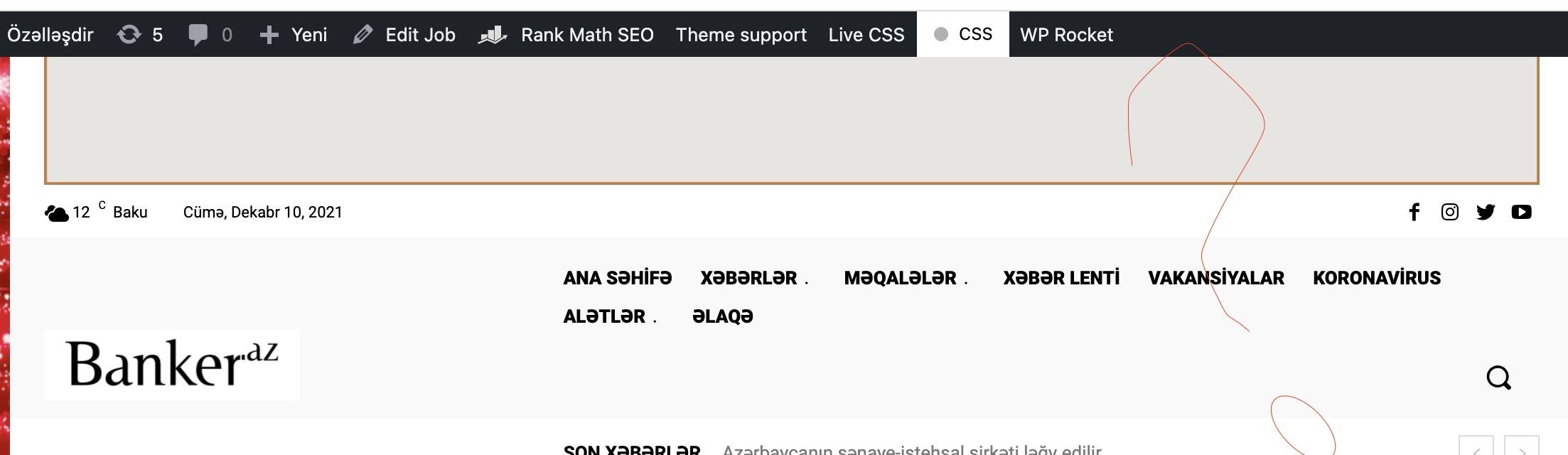
 but i don’t have menu like in that video to install that cloud header (https://banker.az/wp-content/uploads/2021/12/Screen-Shot-2021-12-10-at-16.39.25-scaled.jpg)
it’s like this in my page https://banker.az/wp-content/uploads/2021/12/Screen-Shot-2021-12-10-at-16.40.04.jpg
 Hashi2021
Hello,
The background colour of header menu is black (please click link to see) https://prnt.sc/22lei6q
How do you change colour?
Thanks
PeteMason Ummm…. the other thing is that there seems to be a very big right margin on the mobile version – the body, not the header. Should I open a new query?
This is seen in the image shown in the second picture uploaded above (don’t know why it says it is broken – it shows when I right click and “open in new window”).
and here, in the fixed version: 
thanks!
Bettina Hello @eddycom!
If you need different header only on some posts, then you can duplicate the header and assign it for your special posts. Please note that your special posts need to have different template also then the other posts.
Check this topic: https://forum.tagdiv.com/topic/different-logo-in-categorypage/ ; Here I explained how to duplicate a header correctly and do some changes.
Hope that helps you!
Thank you!
 Mark
MarkCan you have a custom Category Template for each category and subcategory? An example would be Sports Category. It would have a sports image in the header, flex blocks in the body for each team covered, with box scores, standings, etc, showing in the sidebar.
A sub could be for the team, and then flex boxes breaking down the team news, with team specifics in the side bar.
PeteMasonHi all,
Thanks for all your help.
I’d like to get my search icon on the same line as the title and menu bar. But on my pretty standard Samsung phone it wraps underneath.

Inspecting it shows padding but if I change the css padding on the row, columns or elements I have not got the result I want.
I’ve tried to customise by inspecting the code and adjusting the padding, but it perhaps the div width is the issue.

Any thoughts would be helpful.
I was hoping not to have to create a special mobile phone page (as that sounds like it is taking me down a very long path), if I could just adjust the header…
Pete
 eddycom
 Thank you, Anamaria,
Done! Only the “HEADER” remain the same, and in header I’ve just one for all pages/posts with Logo and Ads 728×90 px, and menù. Can help me please to change also header in some posts?
I have done the header for all website from Cloud template. If I change header in the duplicate page this change is reflected on all pages. i.e. if I delete the advertising at the top of the duplicated page and set as a favorite in some posts, the Ads also disappears from the other posts. Thanks
Bettina Hello Chris!
Please make sure you assigned the header in the Website Manager -> Header and in the theme panel -> header the same header template. Please follow this video: https://www.screencast.com/t/hEAyf6TBTfo2
Clear your cache or uninstall all the cache plugins and see the changes.
Hope that helps you!
Thank you!
Bettina Hello @ViktorJanecko!
You have 2 H1 because you have a logo and a sticky logo. Please edit the homepage with TagDiv Composer, scroll the page when you edit it with Composer, and you can edit the sticky header and the logo too. Disable the h1 from the sticky header.
Or check this video to understand where exactly you can find the sticky header and how you can modify it: https://www.screencast.com/t/vA8nj6T90x57
Hope that helps you!
Thank you!
Bettina Hello @mastaliyev!
In order to edit the header with the TagDiv Composer you should have a cloud header template installed and assigned in the Website Manager -> Header. Please follow this video: https://www.screencast.com/t/hEAyf6TBTfo2
It is the same for categories and posts.
By editing a page with TagDiv Composer you could delete elements but also the row called “Empty column”.
You could try to delete it like this: select the row, press the button delete from your keyboard, then with your mouse select “YES”.
Also you have another option too, check this: https://www.screencast.com/t/pxuOzYIIpcG
There is actually a recycle bin basket for every element if you just look carefully: https://www.screencast.com/t/wFYdqgpo6pT
We recommend to use cloud/PRO templates in order to have the possibility to edit them with the TagDiv Composer which contains a lot of functions and features, please check our tutorial here: https://forum.tagdiv.com/tagdiv-composer-tutorial/
Documentation here:
– https://forum.tagdiv.com/cloud-library-templates/
– https://forum.tagdiv.com/design-post-pages-using-cloud-library-templates/
– https://forum.tagdiv.com/cloud-library-category-templates/
Check also our video tutorials here: https://www.youtube.com/c/tagdivThemes/videos
Hope that helps you!
Thank you!
 Chris Baird
I set a new header as a global header, but I have been to different pages on site and it’s not updated with the changes.
Any idea why?