
- NewsmagHeader styles
- NewsmagHeader ads
- NewsmagtagDiv Composer Tutorial
- NewsmagCategory templates
- NewsmagSmart list ads
- NewsmagWeather Widget
- NewsmagInstagram widget
- NewsmagPage Menu
- NewsmagMain menu
- NewsmagTop bar templates
- NewsmagLogin – how to enable the user registration
- NewsmagLogo & Favicon
- NewsmagFooter templates
- NewsmagCategory grid styles
- NewsmagCategory top post styles
- NewsmagHow category settings work
- NewsmagTheme colors introduction
 Catalin
 Hi,
You need to load this template in the theme root and insert this template there -> https://www.screencast.com/t/iiVlkz9t7MBd http://cdn.tagdiv.com/wp-content/uploads/2019/02/page-empty.zip After you have made these steps, you need to load this template from your theme panel, and set up No Header from Header manager if you do not want to have any header and footer.
Thanks for your understnnding!
Catalin Hi,
If you want to use an Ad inside your header, you can use our premade header templates from here -> https://forum.tagdiv.com/header-styles/ Also, if you want a custom header style, you need to use the Header Builder which allows you to create your own header layout, using the TD Composer. -> https://tagdiv.com/newspaper-theme-customize-the-header-manager/
Thanks for your understanding!
Catalin Hi Borja,
I suppose that you want to change the Sticky header layout, right? If you want to make some changes over this section, notice that you can do it from Header Builder. Please check our documentation from here -> https://tagdiv.com/newspaper-theme-customize-the-header-manager/ -> https://www.screencast.com/t/m5Yuvoq6 Using the TD Composer, notice that you can create your own style for oyur header menu.
Please notice that if you want to have another menu on post pages, you should create another single with header template which customizes it as you wish (where you can show the Logo title in the top) and then, applies this template for your posts. -> https://www.screencast.com/t/stDbirHavj
If is not what you mean, please provide more details so I will be able to provide a more accurate response.
Hope this helps!
Thanks for your understanding!
 tzabula
Sorry, but v 9.6 update was total fail, which cost me huge decrease in mobile traffic – http://prntscr.com/mxpbj7
Who is responsible for such disaster? When do you plan to release new corrected update?
Here is my System Status – http://prntscr.com/mxpc0e
I had to change my perfectly working W3 Total Cache to WP Super Cache, recompile all ads codes (add new to Mobile and AMP section), remake used cloud templates (old ones didn’t want to work) and still the site’s mobile version looks horrible, AMP versions don’t work.
See details: wordofdecor.com
MOBILE
– no banners after header, as promised here – https://tagdiv.com/mobile-theme-automatic-optimization-for-mobile-newspaper-theme/ Screen of my site – http://prntscr.com/mxpkjc
– strange spaces in the loop – http://prntscr.com/mxpl3z (ads don’t load), ad code is inserted – http://prntscr.com/mxplwt
<script async src=”//pagead2.googlesyndication.com/pagead/js/adsbygoogle.js”></script>
<ins class=”adsbygoogle”
style=”display:block”
data-ad-format=”fluid”
data-ad-layout-key=”-i5+f-1x-68+it”
data-ad-client=”ca-pub-9196251467106158″
data-ad-slot=”8255795511″></ins>
<script>
(adsbygoogle = window.adsbygoogle || []).push({});
</script>
– no ads in the article, only after H1 – http://prntscr.com/mxpmra All ad codes are inserted – http://prntscr.com/mxpnjp
– horrible footer – http://prntscr.com/mxpo9h
AMP:
– lots of mistakes – http://prntscr.com/mxpp09
http://prntscr.com/mxpplw
– no guideline how to insert AMP auto-ads in the there panel. Here is one block for it, but Google gives two scripts:
http://prntscr.com/mxpr67
http://prntscr.com/mxps4q
– error in Google Search Console – http://prntscr.com/mxpsuc
Please, advise what should I do to improve the situation as soon as possible.
Many thanks in advance for your reply.
 Calin
Calin Hi,
If this is what you want to achieve -> https://www.screencast.com/t/RuWAmUADpyr, please make sure that you do not have set any header ads -> https://www.screencast.com/t/fIhUn9WsT and add this custom css in Newspaper?>Theme panel>Custom code>Custom css -> https://www.screencast.com/t/BYIaaIARL
.td-header-style-3 .td-header-sp-logo {

    position: unset;

}
-> https://www.screencast.com/t/mWMy04BtUiX7
Thank you!
 Simion C.
 Hi,
From what I can see at the moment there is only one header ad – http://prntscr.com/mxomjv
Let me know if I should check anything else.
Thanks
 bharathadigopula
Hello,
I want to make my sie header similar to https://www.androidauthority.com/ gradient color menu with trending menu. can anyone help me with this? (step-by-step)
Thank you. 🙂
 burakk
Hi there, is it possible to imlant an ad after header menu on posts. Like: 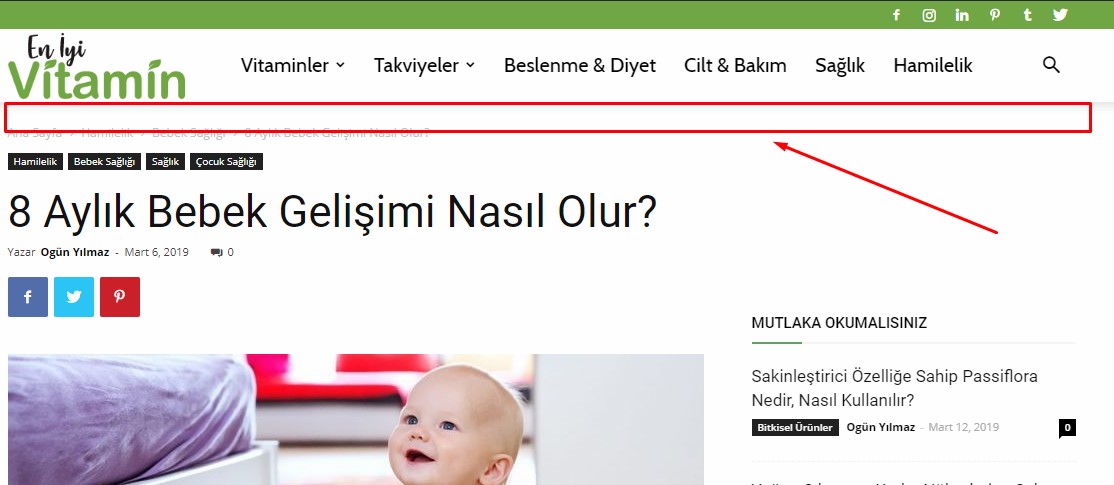
 Lubo
LuboI know you have an Ad system but can you please add more ad location (leaderboard-above header, skyscraper-left and right side: possibilities make them also sticky) and can you please add similar or even better ad management.
Something similar to your competitors, please?
like:
Better Ads Manager from betterstudio.com
Can you also make a plugin like:
Custom Layout – Hooks
more info for inspiration:
Custom Layouts Overview
Thank you.
Kind regards,
Lubo
 PuckWuck
Hi, I can’t for the life of me figure out what the identifying Class or Id be for the mobile menu.
Reason: I’m trying to replace it with a different menu plugin and I need the Class or id.
I’ve come up with all of the following using the browser inspectors but none of these work:
#td-header-menu, #td-header-wrap, #td-header-wrap-wrap, #td-header-menu-wrap-full, #td_stretch_container, #td-header-row, #td-container
#td-header-main-menu
#td-header-menu-wrap
#td-container-wrap
#td-header-style-4
#tdc-header-wrap
#td-top-mobile-toggle
#td-mobile-container
#td-mobile-content
#td-mobile-nav
#td-mobile-close
#td-menu-background
 omorfizoi.gr
 Hello again. The “events” are actualy a custom post type (called “tribe-events”) and they use their own page template. Is there a function I can insert so that the counter can appear?
For reference, here is the default, uncustomised template file for a single event (called “single-event.php”):
<?php

/**

 * Single Event Template

 * A single event. This displays the event title, description, meta, and

 * optionally, the Google map for the event.

 *

 * Override this template in your own theme by creating a file at [your-theme]/tribe-events/single-event.php

 *

 * @package TribeEventsCalendar

 * @version 4.6.19

 *

 */
if ( ! defined( 'ABSPATH' ) ) {
die( '-1' );
}
$events_label_singular = tribe_get_event_label_singular();
$events_label_plural = tribe_get_event_label_plural();
$event_id = get_the_ID();
?>
<div id="tribe-events-content" class="tribe-events-single">
<p class="tribe-events-back">
"> <?php printf( '« ' . esc_html_x( 'All %s', '%s Events plural label', 'the-events-calendar' ), $events_label_plural ); ?>
</p>
<!-- Notices -->
<?php tribe_the_notices() ?>
<?php the_title( '<h1 class="tribe-events-single-event-title">', '</h1>' ); ?>
<div class="tribe-events-schedule tribe-clearfix">
<?php echo tribe_events_event_schedule_details( $event_id, '<h2>', '</h2>' ); ?>
<?php if ( tribe_get_cost() ) : ?>
<span class="tribe-events-cost"><?php echo tribe_get_cost( null, true ) ?></span>
<?php endif; ?>
</div>
<!-- Event header -->
<div id="tribe-events-header" <?php tribe_events_the_header_attributes() ?>>
<!-- Navigation -->
<nav class="tribe-events-nav-pagination" aria-label="<?php printf( esc_html__( '%s Navigation', 'the-events-calendar' ), $events_label_singular ); ?>">
<ul class="tribe-events-sub-nav">
<li class="tribe-events-nav-previous"><?php tribe_the_prev_event_link( '<span>«</span> %title%' ) ?>
<li class="tribe-events-nav-next"><?php tribe_the_next_event_link( '%title% <span>»</span>' ) ?>
<!-- .tribe-events-sub-nav -->
</nav>
</div>
<!-- #tribe-events-header -->
<?php while ( have_posts() ) : the_post(); ?>
<div id="post-<?php the_ID(); ?>" <?php post_class(); ?>>
<!-- Event featured image, but exclude link -->
<?php echo tribe_event_featured_image( $event_id, 'full', false ); ?>
<!-- Event content -->
<?php do_action( 'tribe_events_single_event_before_the_content' ) ?>
<div class="tribe-events-single-event-description tribe-events-content">
<?php the_content(); ?>
</div>
<!-- .tribe-events-single-event-description -->
<?php do_action( 'tribe_events_single_event_after_the_content' ) ?>
<!-- Event meta -->
<?php do_action( 'tribe_events_single_event_before_the_meta' ) ?>
<?php tribe_get_template_part( 'modules/meta' ); ?>
<?php do_action( 'tribe_events_single_event_after_the_meta' ) ?>
</div> <!-- #post-x -->
<?php if ( get_post_type() == Tribe__Events__Main::POSTTYPE && tribe_get_option( 'showComments', false ) ) comments_template() ?>
<?php endwhile; ?>
<!-- Event footer -->
<div id="tribe-events-footer">
<!-- Navigation -->
<nav class="tribe-events-nav-pagination" aria-label="<?php printf( esc_html__( '%s Navigation', 'the-events-calendar' ), $events_label_singular ); ?>">
<ul class="tribe-events-sub-nav">
<li class="tribe-events-nav-previous"><?php tribe_the_prev_event_link( '<span>«</span> %title%' ) ?>
<li class="tribe-events-nav-next"><?php tribe_the_next_event_link( '%title% <span>»</span>' ) ?>
<!-- .tribe-events-sub-nav -->
</nav>
</div>
<!-- #tribe-events-footer -->
</div><!-- #tribe-events-content -->
 vapes
vapes There isn’t the ability to set these settings as you have shown above.
My header is set to style 3, I want that style but without the ad space and the logo centralised,
 independentngr
 Thanks, I have seen it but once it scrolls into another article the link doesn’t change, how do I work this out? Also, I don’t have control over the Ad inserted in the header. Lastly, Ad inserted via the Ad Inserter Plugin are duplicating upon activating the cloud library template for single post.
-
This reply was modified 7 years by
independentngr.
Calin Hi,
If you have the newspaper v9.5-v9.6 you can create your own header -> https://tagdiv.com/header-main-menu-newspaper-theme/
-> https://www.screencast.com/t/Auyun2kAdK
-> https://www.screencast.com/t/xDbFRfu86RA
Thank you!
Simion C. Hi,
@borvazq quite unusual, the header seems to be invisible on mobile
– http://prntscr.com/mx94ch
The mobile theme and AMP is loading, the issue is with the header from what I can see. It is there but it has a white background and icon color. Check what colors are used here
– http://prntscr.com/mx9714
Try setting them to default or use a different color than white, if a white color is used. Let me know.
@blyerts I have checked the website, the menu seems to open alright
– http://prntscr.com/mx98nu
But the menu items don’t direct anywhere, the links are not valid on desktop and on mobile. What exactly are those menu items supposed to do? Have you added them properly when you created the menu, if those are pages add them as pages, if they are categories add them as categories
– http://prntscr.com/mx9arv
Thanks
 sashos
Hello,
My website is translated with WPML in two languages, and has two RSS feeds.
In the theme header I add the RSS icon (via Admin panel – Social networks), but there is no option to choose different feeds per language.
Can you please advise?
Thank you!
sashosHello,
Is there a way to reorder the social media icons in the theme header?
For example, I would like the RSS icon to be last, but the icons seem to be displayed in alphabetical order by default.
Thanks!
 bellamum
 Hi Calin, thanks again for a prompt response.
I have disabled my hosting cache plug-in (SG optimizer), and installed WP super cache as recommended, with all the recommended settings. There is a small REDUCTION in the speed score (from 18 to 15). It is clear that the cache plugin I was using before is at least as good, in fact slightly better than WP Super cache. The issue is ENTIRELY the TDC template loading. If you go to the site http://www.ethical-intelligence.com you can see the header does not load immediately, but the rest of the site, including the footer, loads more or less instantly. The TDC template takes a further 1-2 seconds to load. The issue is ENTIRELY with the header template, and not with the rest of the site, or the footer, or the caching. Switch to the old header (the Theme Panel version) and loading is MUCH faster. It is very frustrating that the TDC header template problem is not being addressed. Can you look specifically at the TDC header performance on this site?
Simion C. Hi,
So the category that you used in the mega-menu has other sub-categories but they are not shown. Do you by any chance use a cloud header template?
If you do please chnage the default limit of 4 sub-categories in the mega-menu settings
– http://prntscr.com/mx7i6k
This would explain why the other sub-categories are not shown. Also be sure that the sub-categories have posts in them. Let me know.
Calin Hi,
You can achieve that borders using custom css -> https://www.screencast.com/t/ee0Thw8N3
.td-header-menu-wrap {

       border-top: 1px solid #ededed;

    border-bottom: 1px solid #ededed;

}

.td-header-gradient:before{

  display: none;

}
or using the header builder -> https://tagdiv.com/header-main-menu-newspaper-theme/
-> https://www.screencast.com/t/zLiWg2NV32u
-> https://www.screencast.com/t/TPflQq55
In footer section you have to set the numbers of posts in footer 1/2/3 to have the approximation the same height
-> https://www.screencast.com/t/QaCf1PeGD50u
-> https://www.screencast.com/t/ClA95rQDPAN
Thank you!
Simion C. From what I can find online it is a script that has to be entered between the head tags in the header
– https://www.iubenda.com/en/help/1205-banner-and-prior-consent-setup-and-customization
The mobile theme header is here – http://prntscr.com/mx6tfb try entering the code there.
A section in the theme panel for entering and loading code in the header when using the mobile theme does not exist at the moment. It may be added in a future update. So the code has to be manually added in the header file.
Catalin Hi,
I have checked your website and I saw that errors are from <amp-auto-ads> -> https://www.screencast.com/t/NdYnurRMOM, please make sure that you make the configuration as in the amp-auto-ads documentation-> https://www.ampproject.org/docs/reference/components/amp-auto-ads
Regarding the AMP issues, seems the auto ads code has been entered in the header ad spot
– http://prntscr.com/mf5orn
That would be wrong, that code can only be entered like this at the moment
– https://forum.tagdiv.com/topic/info-adv-amp/
I believe an option will be added in a coming update for the AMP plugin so that the code can be entered in the theme panel instead of the plugin files. But for the moment that is the only way.
Hope this helps!
Thank you!
Simion C. Hi,
Sorry that we failed to provide you with a solution. I will try to help you.
From what I understand the ad should be positioned above the website header. That is possible by designing your own header.
The default header templates will display and ad in various positions, but none will display it above the website – https://forum.tagdiv.com/header-styles/
The cloud library plugin will be necessary – https://forum.tagdiv.com/tagdiv-cloud-library-plugin/
There are cloud header templates designed by us (which can be modified if needed) or you can design your own using a blank template – http://prntscr.com/mx64qu
Once opening a cloud header template in the tagDiv composer you can add an ad box element in any position you want in the header – http://prntscr.com/mx6636 add it above all elements if that is what you want to do. When you are done save the cloud header template. You can apply to the whole website in the theme panel – http://prntscr.com/mx66tp
Please let me know if you have more questions.
Thanks
 r1kay
r1kayHey!
I build my whole website with the tagDiv composer and I absolutely love it! I want to place an custom ad between the header and the body. Is there a quick way to do this? I had to made separate templates for all my category pages and all other page templates. I don’t want to edit each and every template to place a custom ad spot, but placing it in the header template doesn’t work. How can I achieve this?
 Honored1
I’m strying to install revolution slider to my header for the ART CREEK DEMO. The demo doesn’t have an accompanying slider in so I purchased it seperately. I’ve seen the slider used on this demo here https://ayther.fr/ but I’m new to wordpress & need a little assistance
