
- NewsmagHeader styles
- NewsmagHeader ads
- NewsmagtagDiv Composer Tutorial
- NewsmagCategory templates
- NewsmagSmart list ads
- NewsmagWeather Widget
- NewsmagInstagram widget
- NewsmagPage Menu
- NewsmagMain menu
- NewsmagTop bar templates
- NewsmagLogin – how to enable the user registration
- NewsmagLogo & Favicon
- NewsmagFooter templates
- NewsmagCategory grid styles
- NewsmagCategory top post styles
- NewsmagHow category settings work
- NewsmagTheme colors introduction
 Mark Gilbert
 Many thanks – Stretch row and content and background boxed layout off does it.
Although – I’m not seeing Zone under Header Menu, only Rows, Columns, Elements.
 bburzycki
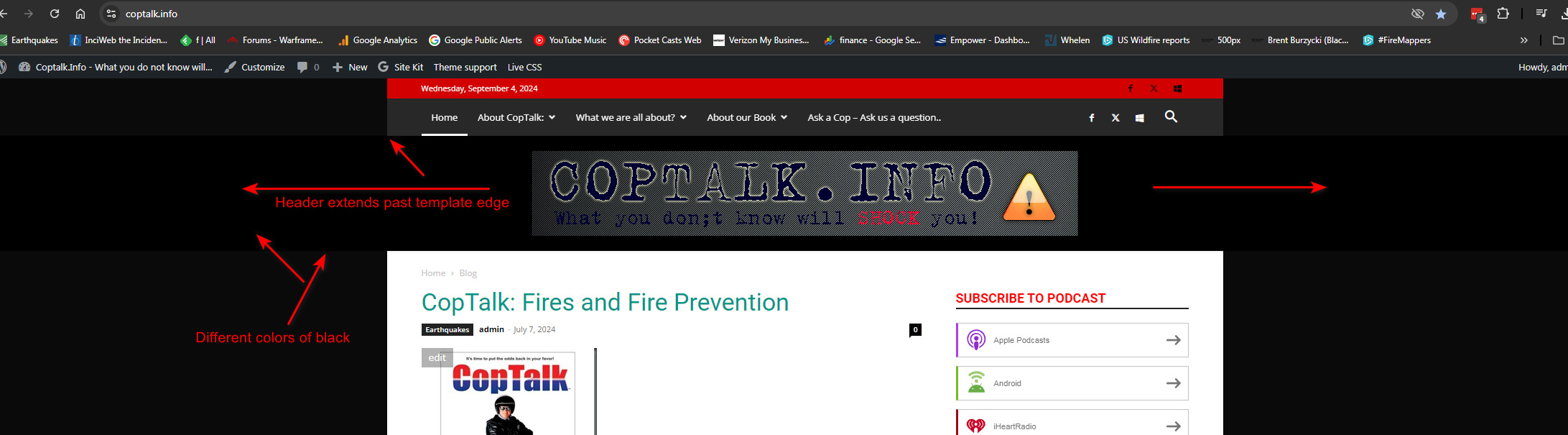
 Actually I think it is still showing a full width header but the footer is not showing that behaviour. Maybe this is just how the template shows on wider monitors?
I am very possibly just not understanding how the template works or the header is supposed to work with its background color inside that header space in relation to the edges of the template overall.
Is there a way to keep it from extending past the edges of the actual page template?
Image
 Bettina
 Hello!
Access the Newspaper -> Theme panel -> Header -> Logo & Favicon and delete the text logo.
Thank you!
Bettina Hello!
Please note that you can not edit the default header template with the tagdiv Composer. You can choose to use other header template from the Website Manager: https://forum.tagdiv.com/tagdiv-composer-website-manager/
When I check your website, I can see that your header template is a cloud one even on the single template. If you use the Mobile theme layout on the single post template, then you can control the way is looking from the theme panel settings -> Mobile theme.
We have 3 options available for mobile versions that you can use:
1. Responsive version: A responsive version of your website looks similar to the desktop version. TagDiv Composer is used to edit the page. Click on the mobile viewport: https://www.screencast.com/t/XDQJedlggSB. There, you can see your mobile version and edit or adjust the elements to look better.
2. Mobile pages: https://tagdiv.com/newspaper-10-3-7-update-brings-customizable-and-fast-mobile-pages
3. Mobile theme plugin: The Mobile Theme is a performance-optimized theme included in the main Newspaper theme that only loads on mobile devices. It comes with its own templates and designs for pages, posts, categories, etc., so your current templates from the desktop theme will get converted to the mobile theme layout. Please see https://forum.tagdiv.com/the-mobile-theme/ and https://forum.tagdiv.com/mobile-theme-introduction/ for more information.
A full explanation is here: https://www.youtube.com/watch?v=SpGkOnJeNZY
Thank you!
 positivenewsfoundation
Hi all,
our regular headers are fine, but the single post mobile template’s header is off. It shows only the wordpress website title and tagline. I had it displayed our logo and hamburger but during an update a while back it reverted back to title and tagline.
Trying to change this, I get this error message:
“this type of header is not editable with tagdiv composer. Please use cloud header template”
I dont want to replace headers for dekstop, only mobile. Trying cloud header templates I only see 2: 1x blank and 1 template. If I use the non-blank template, will this solve the mobile header issue? Or would it also change the desktop version (which I dont want?)
website is https://positivenewsfoundation.org
bburzycki I have not changed the plugins that were active or installed. All seem to be installed and active.
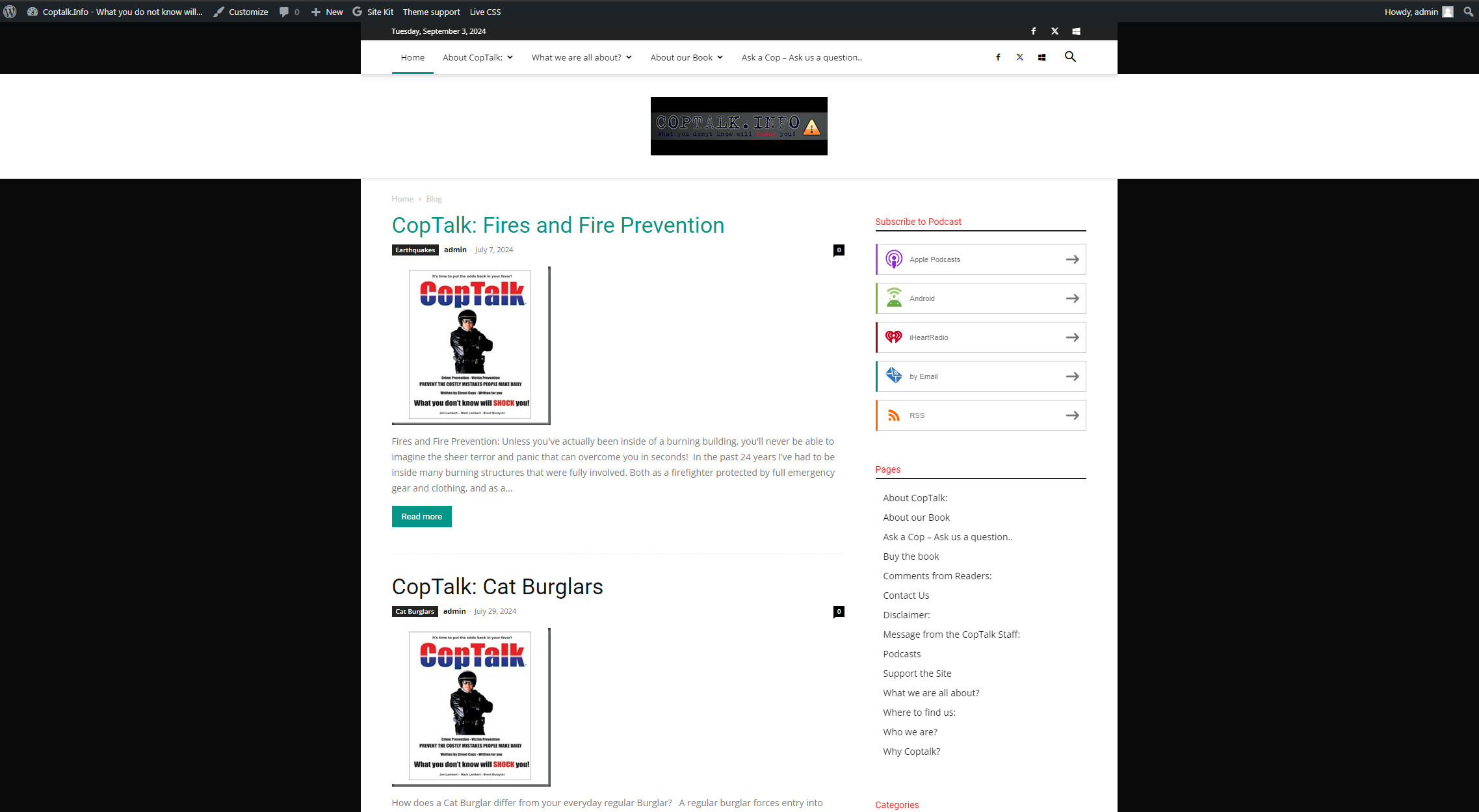
I activated the “Standard Pack” and now the header displays like this.
 animationmagazine
https://www.animationmagazine.net
This error apears in every Cloud templates exept header and footer when tring to edit.
I have already follow the steps here: https://forum.tagdiv.com/topic/errors-at-columns-1models-0dom-the-model-does-not-match-the-content-curr/
js_files_for_wp_admin.min.js?ver=5b75a1149b707159a7e71fd3bf09ff7b:42 Object

js_files_for_wp_admin.min.js?ver=5b75a1149b707159a7e71fd3bf09ff7b:30 Uncaught Errors at columns: 2(models) : 18(dom). The model does not match the content Current state has involved an issue. You could try an UNDO operation (CTRL+Z / CTRL+SHIFT+Z)
js_files_for_wp_admin.min.js?ver=5b75a1149b707159a7e71fd3bf09ff7b:42 Object
js_files_for_wp_admin.min.js?ver=5b75a1149b707159a7e71fd3bf09ff7b:30 Uncaught Error at zones: 6(models) : 4(dom). The model does not match the content Current state has involved an issue. You could try an UNDO operation (CTRL+Z / CTRL+SHIFT+Z)
Mark Gilbert Thanks – the only padding I see is in Elements – some on Meta info, Video (which I don’t use), Category tag – but no padding or margins in Row or Column.
When I select Stretch row and content in Row (in place of Default) the content below the header widens, but not to full width, as Town Talk etc.
However, how do I access padding/margin settings for Zone? I see Manager popup says “Open the zone manager” But I see there no settings for padding or margin, and a search gives nothing.
 Bordesley
Hi
My site darrenpriest.ie is displaying fine on the laptop, but I cannot see the Header Menu on mobile devices, i.e. phone. I have looked at everything, but cannot figure it out. I am grateful for guidance and advice.
 Abder Fath
Hello,
I would like to add border radius to the line in block header 8, and also in column title style 2 -with line (https://i.ibb.co/FxYg6Dy/screenshot.png).
Can you give me each one’s correct css class?
Thank you
Bettina Hello!
Make sure you have all the plugins installed and active in the Newspaper -> Plugins. Activate also the Standard Pack plugin if you use the default templates. Although I recommend you to use cloud templates and also cloud header templates and change the logo in the tagdiv Composer.
More documentation about the cloud templates is here:
– https://forum.tagdiv.com/cloud-library-templates/
– https://forum.tagdiv.com/design-post-pages-using-cloud-library-templates/
– https://forum.tagdiv.com/cloud-library-category-templates/
Thank you!
bburzycki And one more of the first site header it went to text only
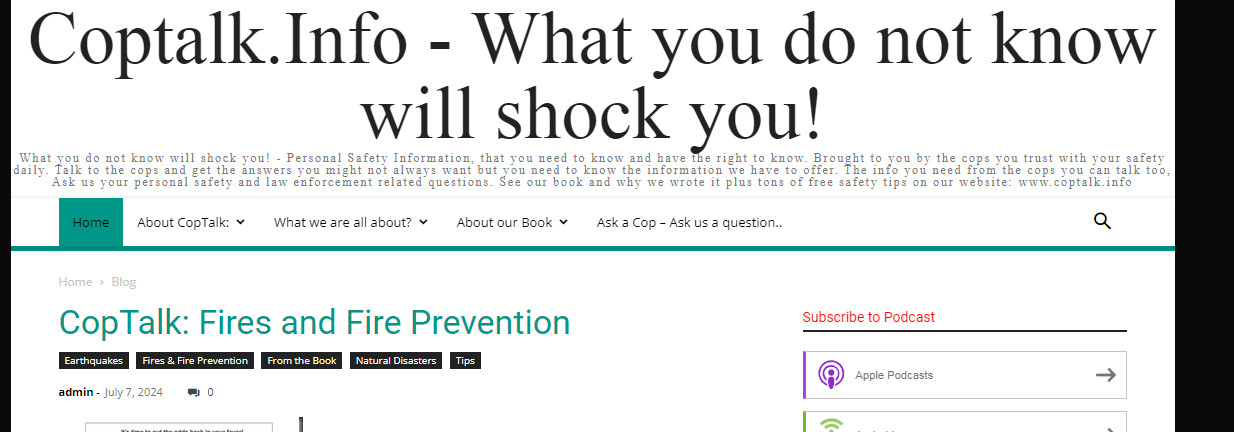
bburzycki Sure – here are the screen shots of the two sites that just changed the header
The header used to be similar to this for the one site:

Dashboard settings for header
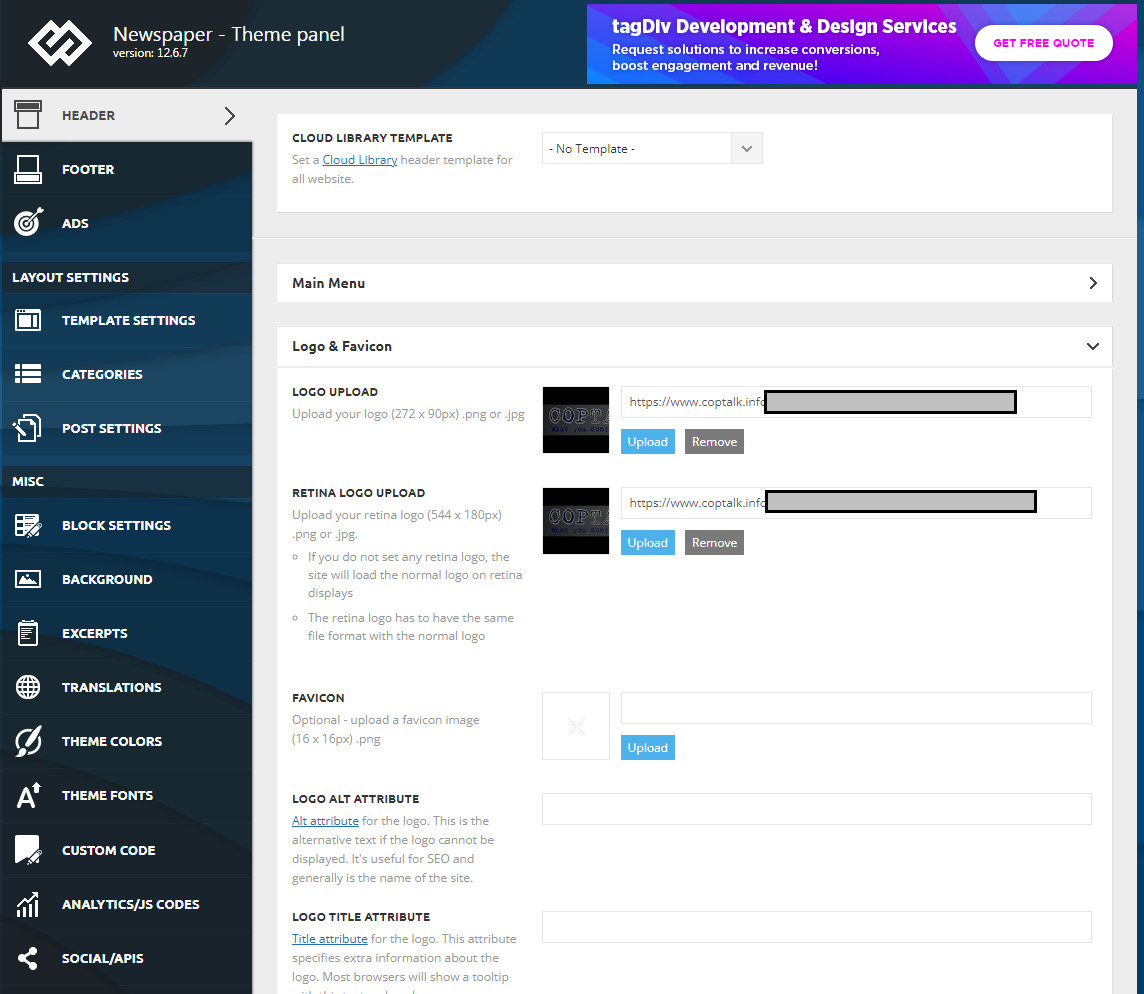
Other site where it changed in the same fashion:

 vimalgopal
I am unable to change the header background for posts on mobile devices. It works fine for the homepage.
There is only one global header template from the cloud library.
Site URL: concentratedwisdom.com
You can refer to the video recording below.
https://www.loom.com/share/954cbe41839d49669037a48859310b16?sid=cad37cb5-055f-4c8c-acd9-04a77bd47b11
Bettina Hello!
I can see that you did not change the logo in the sticky header. You should change the logo on your sticky header too. Please follow the video to see where you can find and edit/build your sticky header on mobile and desktop too: https://www.screencast.com/t/l6v2Belt
Click on the mobile viewport: https://www.screencast.com/t/XDQJedlggSB. There, you can see your mobile version and edit or adjust the elements. Click on that logo too and change it with yours.
2. In the tagdiv Composer, there are multiple options to show the presence of a submenu. For example: Add a submenu item to your menu: https://app.screencast.com/pgomkM0GpvBA5 (You can just drag & drop the items from the left side and place it as in my screenshot)
In Composer, choose the menu from the list and there you have the options: https://app.screencast.com/CNCxPAAajUK94
3. Do you have the Contact Form plugin installed and active?
Thank you!
 99ACORNS
I’m facing a couple of issues with my WordPress site that I could really use some help with. First off, I’m using a newspaper theme along with the “SSL & Security: REALLY SIMPLE SSL” plugin. The problem is that at least once a month, the plugin flags the TagDiv Composer as high-risk during the “vulnerability scan: Site-wide, admin notification” and disables it every time. It’s becoming a bit of a hassle to deal with.
Secondly, I haven’t done any design updates on my site for almost a year, but recently I’ve been trying to spruce things up by editing the footer and header using TagDiv Composer. Unfortunately, I keep hitting a roadblock with a “404 file not found” error every time I try to make changes—even when working on a new page. Any ideas on what might be causing these issues?
 snoopy
 i resolved the issues above, only have the issue below now.
i created an ar-eg language, the template is a copy from your Default Pro RTL, however, it seems that RTL is not applied.
i added the code below in the custom code to solve the RTL issue:
html[lang="ar"],
html[lang="ar-eg"] {
    direction: rtl;
    text-align: right;
}
however, the issue in the footer and header as in the images occurred https://ibb.co/VTkqTvY
https://ibb.co/DW6KJxq
also the problem of not being able to assign a Global Homepage template in the Arabic language.
i’ve already emailed you the access credentials, appreciate advising on how you resolved it.
Thank you
-
This reply was modified 2 years by
snoopy.
 nialmedia
Hello,
I have this website that uses WordPress + Newspaper theme: https://www.nialmedia.com/
I have recently updated to the latest version. However, for some reason, the header menu is no longer working. There should be more pages showing, but instead of the arrow showing the drop down of pages, there is a square. It only shows correctly if I am logged in as an admin.
I use no cache plugin.
What can I do to fix this?
bburzyckiIt seems after the latest update the Logo header I had has changed to a Text header. I run two different sites and it happened on both. Thinking it was related to Logo resolution I created new logos at the specific recommended header image sizes and sadly after saving changes the headers do not change.
Anyone else seeing this issue?
Mark GilbertHello – how can I get my website – https://jazzjournal.co.uk
to come out full width like this – https://demo.tagdiv.com/newspaper_free_news_pro/ or this – https://demo.tagdiv.com/newspaper_towntalk_pro/?
I have tried downloading both FN and Town Talk homepages and see my content but at the same narrower width as my live site. Is my header reducing page width, perhaps?
Thanks
 llaporte
 Bonjour,
J’ai le regret de vous dire que votre réponse était fausse pour corriger la date. Il faut faire l’ajustement dans le Theme Panel et plus particulièrement dans le menu HEADER et le sous menu TopBar et la vous avez le Date Format. Pour l’avoir en francais vous inscrivez l, j F, Y. Ainsi vous l’aurez en mode francais.
Merci tout de même…
Luc Laporte
 Dorothy
 Same issue with 12.6.6. Here is the error when WP-DEBUG is enabled:
Warning: Trying to access array offset on value of type bool in /home/880971.cloudwaysapps.com/pjkwkavkqf/public_html/wp-includes/post-template.php on line 324
Warning: Trying to access array offset on value of type bool in /home/880971.cloudwaysapps.com/pjkwkavkqf/public_html/wp-includes/post-template.php on line 324
Fatal error: Uncaught TypeError: count(): Argument #1 ($value) must be of type Countable|array, null given in /home/880971.cloudwaysapps.com/pjkwkavkqf/public_html/wp-includes/post-template.php:324 Stack trace: #0 /home/880971.cloudwaysapps.com/pjkwkavkqf/public_html/wp-includes/post-template.php(247): get_the_content() #1 /home/880971.cloudwaysapps.com/pjkwkavkqf/public_html/wp-content/plugins/td-cloud-library/wp_templates/tdb_view_author.php(23): the_content() #2 /home/880971.cloudwaysapps.com/pjkwkavkqf/public_html/wp-includes/template-loader.php(106): include(‘/home/880971.cl…’) #3 /home/880971.cloudwaysapps.com/pjkwkavkqf/public_html/wp-blog-header.php(19): require_once(‘/home/880971.cl…’) #4 /home/880971.cloudwaysapps.com/pjkwkavkqf/public_html/index.php(17): require(‘/home/880971.cl…’) #5 {main} thrown in /home/880971.cloudwaysapps.com/pjkwkavkqf/public_html/wp-includes/post-template.php on line 324
There has been a critical error on this website.
Learn more about troubleshooting WordPress.
 mpodatki
 Hello,
Even when “Show image” section is set to show and in “Logo text” section is nothing.
The Header logo didn’t change.
Here screenshot: https://prnt.sc/el7amO6G2GJE
mpodatkiHello,
When i am trying to change Header logo by importing and chaning image in logo image section and retina logo image section it still showing me previous image but not image imported.
Here is screenshot: https://prnt.sc/uIQb9rq8Mpih
 darrenhive
 I’ve been through tht twice already and the prblem is still persisting. Here’s what theconsole log shows.
jquery.min.js?ver=3.7.1:2  jQuery.Deferred exception: Cannot read properties of undefined (reading 'models') TypeError: Cannot read properties of undefined (reading 'models')

    at Object.getFirstModelByZoneType (https://<removed>/wp-content/plugins/td-composer/assets/js/js_files_for_wrapper.min.js?ver=5b75a1149b707159a7e71fd3bf09ff7b:316:340)

    at Object.getShortcodeFromData (https://<removed>/wp-content/plugins/td-composer/assets/js/js_files_for_wrapper.min.js?ver=5b75a1149b707159a7e71fd3bf09ff7b:353:457)

    at Object.saveHeaderState (https://<removed>/wp-content/plugins/td-composer/assets/js/js_files_for_wrapper.min.js?ver=5b75a1149b707159a7e71fd3bf09ff7b:28:388)

    at Object.init (https://<removed>/wp-content/plugins/td-composer/assets/js/js_files_for_wrapper.min.js?ver=5b75a1149b707159a7e71fd3bf09ff7b:23:279)

    at https://<removed>/wp-admin/post.php?post_id=49498&td_action=tdc&tdbTemplateType=page&prev_url=%2F%2F<removed>%2F:1138:44

    at c (https://<removed>/wp-includes/js/jquery/jquery.min.js?ver=3.7.1:2:25304)

    at fireWith (https://<removed>/wp-includes/js/jquery/jquery.min.js?ver=3.7.1:2:26053)

    at e (https://<removed>/wp-includes/js/jquery/jquery.min.js?ver=3.7.1:2:27300)

    at https://<removed>/wp-includes/js/jquery/jquery.min.js?ver=3.7.1:2:27330 undefined

(anonymous) @ jquery.min.js?ver=3.7.1:2

(anonymous) @ jquery.min.js?ver=3.7.1:2

setTimeout

(anonymous) @ jquery.min.js?ver=3.7.1:2

c @ jquery.min.js?ver=3.7.1:2

fireWith @ jquery.min.js?ver=3.7.1:2

fire @ jquery.min.js?ver=3.7.1:2

c @ jquery.min.js?ver=3.7.1:2

fireWith @ jquery.min.js?ver=3.7.1:2

(anonymous) @ jquery.min.js?ver=3.7.1:2

c @ jquery.min.js?ver=3.7.1:2

fireWith @ jquery.min.js?ver=3.7.1:2

(anonymous) @ jquery.min.js?ver=3.7.1:2

(anonymous) @ js_files_for_wp_admin.min.js?ver=5b75a1149b707159a7e71fd3bf09ff7b:49

IndexedDB

get @ js_files_for_wp_admin.min.js?ver=5b75a1149b707159a7e71fd3bf09ff7b:49

(anonymous) @ post.php?post_id=49498&td_action=tdc&tdbTemplateType=page&prev_url=%2F%2F<removed>%2F:1108

load

(anonymous) @ post.php?post_id=49498&td_action=tdc&tdbTemplateType=page&prev_url=%2F%2F<removed>%2F:1107

(anonymous) @ post.php?post_id=49498&td_action=tdc&tdbTemplateType=page&prev_url=%2F%2F<removed>%2F:1142
That’s the warning, and here are the errors.
td_wp_admin.min.js?ver=12.6.7:1  Uncaught SyntaxError: Identifier '_extends' has already been declared (at td_wp_admin.min.js?ver=12.6.7:1:1)

    at td_wp_admin.min.js?ver=12.6.7:1:1

(anonymous) @ td_wp_admin.min.js?ver=12.6.7:1

js_files_for_wrapper.min.js?ver=5b75a1149b707159a7e71fd3bf09ff7b:400  Uncaught ReferenceError: tdDetect is not defined

    at HTMLIFrameElement.loadIframe (js_files_for_wrapper.min.js?ver=5b75a1149b707159a7e71fd3bf09ff7b:400:385)

    at HTMLIFrameElement.dispatch (jquery.min.js?ver=3.7.1:2:40035)

    at HTMLIFrameElement.<anonymous> (jquery.min.js?ver=3.7.1:2:38006)

loadIframe @ js_files_for_wrapper.min.js?ver=5b75a1149b707159a7e71fd3bf09ff7b:400

dispatch @ jquery.min.js?ver=3.7.1:2

(anonymous) @ jquery.min.js?ver=3.7.1:2

load

add @ jquery.min.js?ver=3.7.1:2

(anonymous) @ jquery-migrate.min.js?ver=3.4.1:2

(anonymous) @ jquery-migrate.min.js?ver=3.4.1:2

(anonymous) @ jquery.min.js?ver=3.7.1:2

each @ jquery.min.js?ver=3.7.1:2

each @ jquery.min.js?ver=3.7.1:2

Le @ jquery.min.js?ver=3.7.1:2

on @ jquery.min.js?ver=3.7.1:2

checkIframe @ js_files_for_wrapper.min.js?ver=5b75a1149b707159a7e71fd3bf09ff7b:406

init @ js_files_for_wrapper.min.js?ver=5b75a1149b707159a7e71fd3bf09ff7b:400

init @ js_files_for_wrapper.min.js?ver=5b75a1149b707159a7e71fd3bf09ff7b:410

(anonymous) @ js_files_for_wrapper.min.js?ver=5b75a1149b707159a7e71fd3bf09ff7b:411

(anonymous) @ js_files_for_wrapper.min.js?ver=5b75a1149b707159a7e71fd3bf09ff7b:411

post.php:1  Access to fetch at 'https://cloud.tagdiv.com/services-img/banner-composer.png' from origin 'https://<removed>' has been blocked by CORS policy: No 'Access-Control-Allow-Origin' header is present on the requested resource. If an opaque response serves your needs, set the request's mode to 'no-cors' to fetch the resource with CORS disabled.

domExtractorInjector.bundle.js:1
GET https://cloud.tagdiv.com/services-img/banner-composer.png net::ERR_FAILED 200 (OK)
C @ domExtractorInjector.bundle.js:1
(anonymous) @ domExtractorInjector.bundle.js:1
h @ domExtractorInjector.bundle.js:1
A @ domExtractorInjector.bundle.js:1
(anonymous) @ domExtractorInjector.bundle.js:1
load
(anonymous) @ domExtractorInjector.bundle.js:1
(anonymous) @ domExtractorInjector.bundle.js:1
(anonymous) @ domExtractorInjector.bundle.js:1
Show 8 more frames
Show less
This is running on a dev environment with no caching or optimization plugins

