- NewsmagHomepage – How to build and set it
- NewsmagtagDiv Composer Tutorial
- NewsmagNewsmag documentation
- NewsmagMain menu
- NewsmagLogo & Favicon
- NewsmagPage templates
 Atithya
Hi, sometimes AMP pages will brick the content. Also, the homepage is not showing as mobile/AMP on phone and if I am opening any article, the AMP pages are not showing properly. Means, there is an issue with alignment of the header. Please check for electronicsforu.com.
 admin1109
Hello,
I need a little help. I want to add 4 authors (as image with title or author box – doesn’t matter) on my homepage. Also when one image with title(author) or author box is clicked – I need it to lead to the latest post of that specific author.
How can I get this done?
Thanks in advance 🙂
 Calin
Calin Hi garimanag,
Unfortunately, your screenshots are not working.
We also have live website with images and we do not have those problems, now indeed maybe are not the bet optimize and the website page speed depends on more elements, for page content, ads, external resources …
First, I want to make sure that I was able to inform you of all info about the mobile versions that our theme can have.
1. Responsive version, this is by default when you install the theme and you do not use mobile page or mobile theme plugin.
2. Mobile page/template this allows you to create with tagDiv Composer and cloud a different layout and set different elements for mobile and iPad/tablet and it will overwrite the responsive version.
3. Mobile theme plugin, this is a light theme version for mobile that will overwrite the mobile page and responsive version if enabled.
So when you have a mobile page/template this will be used instead of a responsive version, but if you also have the mobile theme enabled, this one will override both of them.
How to combine them? Yes, this can be possible, for example the mobile page/template will apply only on that page or cloud template that is assigned. But what to do if you want to use a mobile theme plugin too? If you use mobile theme, in Gutenberg editor it is an option to disable the mobile theme in current post/page, if you use the option, then it will be use the mobile page/template (if is assigned) or the responsive version.
So in your case you can disable the mobile theme on the homepage -> https://i.imgur.com/NX57q4t.png or if you do not want it at all, disable the plugin or use it only for amp -> https://i.imgur.com/Grlz5Ee.png.
Here is also a video that explains all those -> https://www.youtube.com/watch?v=SpGkOnJeNZY
Hope this will help you!
Hi CHKSN,
If I understand correctly, for you the mobile theme plugin is displaying on desktop, if is so, then indeed this is from the cache plugin that you are using, some for theme do not have support for mobile themes, some of plugins that do have are: WP Super Cache plugin, WP Rocked plugin.. Please make a test without cache plugin and see if the problem persist or not, if the problem is solved, then you need to check if your cache plugin have mobile theme support.
Also if you want, we can take a look at your website, for this please make a full backup and contact us at contact@tagdiv.com, provide wp-admin and cPanel access, also include the link of this topic in email.
Thank you!
 Kasidit Hirun
Hi Support,
Good Morning.
We just bought your very nice theme and still creating.
Need your help to clarify about non-Adsense advertisement.
1. We’re trying to input non-Adsense advertisement at the homepage;
https://www.judzue.com
I using TagDiv Composer to refer our custom Ad1 as below image
https://www.picz.in.th/image/2fRvyS
And this is our Ad code at custom Ad1 field;
https://www.picz.in.th/image/2fxs7y
My question is why our custom Ad1 is not appear in our homepage?
We also set inline Ad but not found in our post content as well?
https://www.picz.in.th/image/2fxmtI
2. Why our theme’s widget not found in our system? It’s blank
https://www.picz.in.th/image/2fQW5l
We checked all plugins in not error and already actived
https://www.picz.in.th/image/2fQNwQ
Please assist and thank you so much in advance.
Hirun
 fquiquet
Homepage lost after upgraded to the last version
The following message is displayed to the homepage
[td_block_12 limit= » » ajax_pagination= »infinite »]
https://www.spacesecurity.info/
 Anamaria
 Hello,
Using our theme you can choose from 3 mobile versions
-> mobile responsive => https://www.screencast.com/t/oJ2ShOp47
-> mobile theme plugin => https://forum.tagdiv.com/the-mobile-theme/
-> mobile page => https://tagdiv.com/newspaper-10-3-7-update-brings-customizable-and-fast-mobile-pages/
This is a video about Responsive Newspaper Theme, AMP & Mobile Theme, Mobile Pages & Templates -> https://www.youtube.com/watch?v=SpGkOnJeNZY
So, the mobile responsive is what you see then that you select the viewport on phone => https://www.screencast.com/t/matV17hH, so some settings may apply for each viewport(where is the border blue), and others are not(where the border is black).
The mobile page has the mobile templates from Cloud Library => https://www.screencast.com/t/YCcZ8rL8
The mobile theme comes with its own templates for page, post, category, 404 etc so your current templates from the desktop theme will get converted to the mobile theme layout, the page content is made without builders in mobile editor => https://www.screencast.com/t/xbgZG8kH also, the options that are provided to edit the mobile theme version are limited (this keeps the things simple).
Mobile responsive version of the theme and the mobile page editor can be edit with tagDiv Composer, the mobile theme plugin not.
For example, you can have the mobile theme plugin activate and use the mobile page/mobile responsive version for the homepage/pages, but for the categories page/404 page you can’t use the mobile page/mobile responsive version if you have the mobile theme plugin activate.
Thank you!
 Davidpinto
Hi All,
I have a problem with the version AMP on mobile, when I use chrome or safari on iPhone, but I’ve checked with android smartphone also.
The problem is on homepage, when i click on Menu icon or search icon they don’t expand, is like I cannot click on them!
In particular the problem arises when i found my site on google and open it through this link
https://www.google.com/amp/s/www.davidpinto.it/%3Famp
How I can resolve it?
thank you so much
David
 jtoney
I need to make a popup or some other type of notification within the homepage for users to accept cookies. How is this accomplished?
 IMPACTMag
Hi,
I’d like to remove the dates from the article previews on my homepage.
I’ve already removed the dates from the individual posts.
Homepage (lots of dates in Flex Block 2, Block 12):
https://impactmagazine.ca/
Post (no date, perfect, nothing to change):
https://impactmagazine.ca/features/erica-wiebe-canadas-olympic-sweetheart/
Thanks
Calin Hi petitefilms, unfortunately there is no documentation for how the Craft Ideas demo was made, usually, users use install the demo , also for this demo you can find some cloud versions, for homepage, header, footer, category -> https://i.imgur.com/x5HWcH1.png -> https://i.imgur.com/VtSis8N.png those can be edited using tagDiv Composer.
I hope this will help you!
 cginadmin
 I’m having the same problem, and I think it happened when updating to 11.
Here is my site: https://www.thecountygin.com/
The header and footer cloud templates have completely disappeared. Also notice on the homepage the coding block that’s displaying:
[td_block_4 m2_el=”20″ m2_tl=”50″ limit=”2″ block_template_id=”td_block_template_1″ m2f_title_font_weight=”700″ offset=”1″]
 Sheik
SheikI have used Block 3 at the bottom of my home page. Now I want to move this block further up the page. Is there a way in which I can shift/drag this block around the page or to the top of the page so that I don’t have to create the block with all the features once again?
Thanks.
 italend
 Hi Bettina,
I mean… If I use as Homepage the classic wordpress blog roll page, I have an archive of all posts, and at the end of the page I have different pages where I can go back to old posts.
In the tag div editor I found an element called “archive”. The archive orders posts only by month. Is there a method to build a page with your builder (not using the classic WordPress blog roll), and insert on that page all the posts (distributed by page)?
Thanks again for the support.
italendHello,
I’ve set the homepage showing the desired blocs. However, I would like to have a page on which I would like to show all the published posts (sort of archive but not divided by month… just an infinite/page divided blogroll). Is there a way I can build it within tagdiv editor?
Thanks
 Bettina
 Hello!
Edit the homepage with TagDiv Composer, click on the header main menu, Style tab and you can find where you can change the color: https://www.screencast.com/t/lK97XG55je
Thank you!
 biscoeleven
Good Morning
I updated my theme and tagdiv plugin. Now i see on the homepage the shortcode instead to see the posts.
Can you help me please?
This is the website: https://www.sportpaper.it/
 sumitkumarsid@gmail.com
Hi Team,
Website Post, category, Homepage all are working fine on Computer Browser and on browser’s device mode as well.
All Post Pages and Categories are also working on Mobile device as well but Home page design is not loading.
Regards,
Calin Hi SocietyN, our theme has a responsive version, and the mobile plugin and page are only suggestion to have better performance or a different content, so using our theme you can choose between three options for mobile:
1. Responsive version, this is by default when you install the theme and you do not use mobile page or mobile theme plugin.
2. Mobile page/template this allows you to create with tagDiv Composer and cloud a different layout and set different elements for mobile and iPad/tablet and it will overwrite the responsive version.
3. Mobile theme plugin, this is a light theme version for mobile that will overwrite the mobile page and responsive version if enabled.
So when you have a mobile page/template this will be used instead of a responsive version, but if you also have the mobile theme enabled, this one will override both of them.
How to combine them? Yes, this can be possible, for example the mobile page/template will apply only on that page or cloud template that is assigned. But what to do if you want to use a mobile theme plugin too? If you use mobile theme, in Gutenberg editor it is an option to disable the mobile theme in current post/page, if you use the option, then it will be use the mobile page/template (if is assigned) or the responsive version.
So in your case you can disable the mobile theme on the homepage -> https://i.imgur.com/NX57q4t.png or if you do not want it at all, disable the plugin or use it only for amp -> https://i.imgur.com/Grlz5Ee.png.
Here is also a video that explains all those -> https://www.youtube.com/watch?v=SpGkOnJeNZY
Hope this will help you!
Calin Hi,
First, I want to make sure that I was able to inform you of all info about the mobile versions that our theme can have.
1. Responsive version, this is by default when you install the theme and you do not use mobile page or mobile theme plugin.
2. Mobile page/template this allows you to create with tagDiv Composer and cloud a different layout and set different elements for mobile and iPad/tablet and it will overwrite the responsive version.
Also if you deleted the mobile page, please make sure that you first un-unsigned from your homepage, if you didn’t do it, make a new mobile page, then just select no mobile page, after that you can delete the new mobile page.
3. Mobile theme plugin, this is a light theme version for mobile that will overwrite the mobile page and responsive version if enabled.
So when you have a mobile page/template this will be used instead of a responsive version, but if you also have the mobile theme enabled, this one will override both of them.
How to combine them? Yes, this can be possible, for example the mobile page/template will apply only on that page or cloud template that is assigned. But what to do if you want to use a mobile theme plugin too? If you use mobile theme, in Gutenberg editor it is an option to disable the mobile theme in current post/page, if you use the option, then it will be use the mobile page/template (if is assigned) or the responsive version.
So in your case you can disable the mobile theme on the homepage -> https://i.imgur.com/NX57q4t.png or if you do not want it at all, disable the plugin or use it only for amp -> https://i.imgur.com/Grlz5Ee.png.
Here is also a video that explains all those -> https://www.youtube.com/watch?v=SpGkOnJeNZY
Hope this will help you!
Thank you!
 alan3wang
Hi Team,
I am trying to edit my homepage with Tagdiv Composer (I recently changed my URL), however, the interface is stuck on the loading screen – can you please help advise on a resolution?
https://paste.pics/D8T8L
Also, can you please help point out where the “Trending Now” toggle can be turned on?
https://paste.pics/D8T9N
Thanks
 GeertBoettger
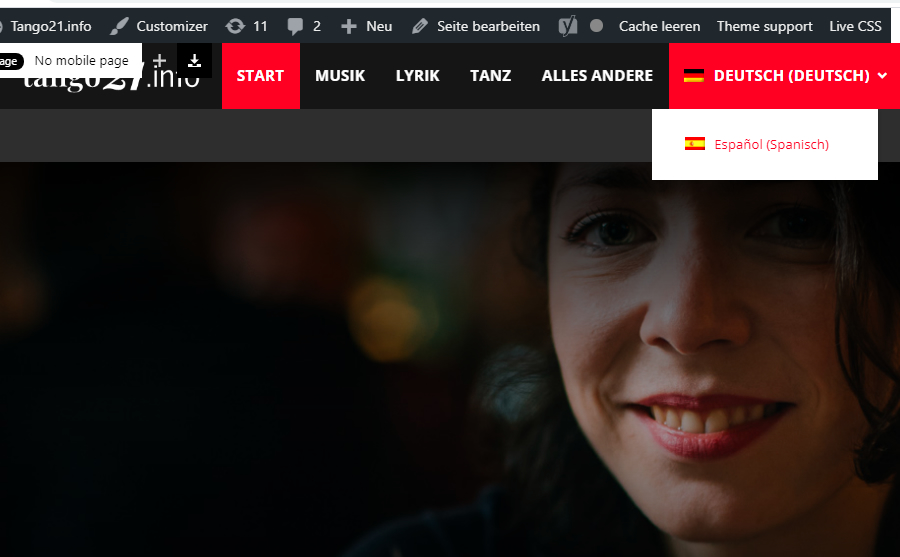
I am having problems switching languages.
My website http://www.tango21.info it has german as a main language, when I try to switch spanish it does not show the spanish homepage.
If I am logged in the website shows the two language options. Everything works well.
I attach two screenshots. Common unser not logged in cannot switch to spanish language in the Homepage.
http://tango21.info/wp-content/uploads/1-Tango21-not-logged-in.jpg
I am logged in, when I am in the german homepage and I want to switch the language to Spanish there is no problem
http://tango21.info/wp-content/uploads/2-logged-in.jpg
The spanish homepage url is: http://tango21.info/?lang=es
Whe I am logged in, the website works well and shows the right Spanish homepage.
http://tango21.info/wp-content/uploads/3-espanol.jpg
If I try to go straight to the Spanish homepage website, it shows page not found.
http://tango21.info/?lang=es
The homepage website works fine when I am logged in and didnt work as a common visitoir. Categories and other menu works ok.
I would really appreciate your help.
 kitojardimelba
 I also wanted the posts on the homepage, in categories and tags in theme mobile, to also be shown in the order they are modified.
Thank you for your help.
 SocietyN
I’m mostly used to building responsive websites where I build a desktop theme and the mobile resizes accordingly, with the ability to do small tweaks to make it fit better. But I see in Newspaper that you offer a Mobile specific option. Is this required? If not, is it suggested to use this? We messed around and built a rough mobile homepage but not even the color or the logo is the same. I just want some guidance before I go and build the site.
 dharma3d
I would like to have Social counter, or some other way of inviting people to like my FB, IG, YT on mobile homepage.
For example below first 3-4 grid articles on homepage.
Would that be possible?
 dannyscar
scarcity-studios.com
1 the social media block top right won’t save urls correctly
2 a “show full text” single column blogstream has appeared at the bottom of posts making page sizes massive
3 i can’t make the mobile header save a logo
4 sometimes, the mobile width homepage loads as a show-full-text blogstream again making the pages massive
this happens immediately on desktop view when i install the awful mobile theme plugin