
- NewsmagHomepage – How to build and set it
- NewsmagtagDiv Composer Tutorial
- NewsmagNewsmag documentation
- NewsmagMain menu
- NewsmagLogo & Favicon
- NewsmagPage templates
 giannisgiat
i use a default font style with color in intro text and i would like to display that color in the block . But it displays text with grey font color and not the color i have in the post. Is there a way to make it bring the style in the homepage block or is there any other way to display color text i am using block 16
 rickymio
 Hi,
ok, I edited my homepage, but in all other pages, header does not change.
Thank you
Riccardo
 fradipta
No Website logo in Homepage (mobile version), but the logo exist on other pages
Website link: Nmaa.co.id
 Bettina
 Hello!
Please try to edit your homepage with TagDiv Composer and try to make some changes to the header. Let me know about your results!
Thank you!
 Photoboy
http://www.thesteepletimes.com
The mobile theme looks and functions very very poorly, is this correct? It looks almost nothing like the normal homepage on mobile, it lacks almost every feature and it loads slowly too! it basically is just
here is the top/bottom of the very short mobile homepage:
https://www.dropbox.com/s/sebom6k7881ebz1/Screenshot%202021-02-09%20at%2016.51.14.png?dl=0
https://www.dropbox.com/s/6gicrsyvn70nao8/Screenshot%202021-02-09%20at%2016.48.35.png?dl=0
The articles are not so bad…
Is this correct? and how can this be improved?
 Tinystepsbabyclub
Hi Guys
I’ve noticed that my homepage is showing a different style of footer than the rest of my site. The homepage footer has blue header bar on all the menu subjects.
https://www.tinystepsbabyclub.com/
Image example of homepage footer is here = https://imgur.com/MVwGyNQ
I want my site to have the same footer on all pages (including the mobile theme, which I use) and this is an example of how my footer looks on every page on desktop but not my homepage:
https://www.tinystepsbabyclub.com/join-our-baby-club/
and
https://www.tinystepsbabyclub.com/5-things-to-know-about-sex-during-pregnancy/
Image example of the footer on all other pages that I want on homepage and mobile too is here = https://imgur.com/Fl5GqEG
Can you let me know how I can make my homepage footer the same as the rest of the site (no blue bar) and make sure it is the same across the mobile theme please?
thanks!
TS
 domino
 Regarding the Feature Image:
I’m running the site now under Troubleshooting Mode.
I’m using NewsMag Theme and the only active plugin is tagDiv Composer.
Following your advice I’m trying to manually add a Feature Image to a couple of Posts (from different categories just to see how the theme displays those images on the Homepage)… but the image doesn’t get saved into the Post.
?
This is how my Post looks after I select this photo (https://farevela.net/cms/wp-content/uploads/2021/01/m4109_crop169014_2000x2000_proportional_1611892935C95C.jpg) as the Feat Image:
https://tinyurl.com/y3ny429q
As you can see it just doesn’t get saved into the Post.
I tried with other article with the same result.
What can be happening?
Cheers.
 kcl1322
 I take that back. Looks like someone responded to my first inquiry, although I figured it out before I got to the response. In this case though, I’ve spent a few hours tweaking this or that just to get the audio player to show up in the block on the homepage, but nothing works. You’d think ‘show audio player’ would do the trick.
-
This reply was modified 5 years by
kcl1322.
 muabeti
Hi,
I can’t change head title on homepage categories. My domain is muabeti.mk.
Current demo installed: Romania News PRO. I tried with other demos, it’s the same.
Everything is ok with the hosting. You can see in the pics.
kcl1322I am attempting to post an audio file on the homepage of my site (newspaper theme). Clicking show/hide doesn’t make it work. I would like to replicate the block on the Pulse Pro homepage that features a podcast and audio player all on the front page.
Please advise. No one responded to my last forum message and I just purchased this theme. I thought support was available for a few months.
 DaveS
DaveSHi guys! Need some support!
I’m using version 9.5 of the Newspaper theme and I see that there’s an option to show or hide the sidebar on Woocommerce pages in the admin panel:
Template settings > WooCommerce template > Shop homepage + Archives
However I need to remove (not hide) the sidebar only from specific top-level archive pages via some code in functions.php or so… The sidebar has to stay on the child-level archives. How can I do this?
Thanks!
Bettina Hello!
I checked your website and it seems working well. The images show up in my case on your website. You could clear your cache and try again.
Also, I observed an issue on your website homepage which is displaying like mobile theme layout. This situation appear when you are using the mobile theme plugin and the cache plugin that you have does not feature options for a separate mobile theme plugin therefore do not know when to deliver the mobile version and when to deliver the desktop version.
We tested with our theme the WP Super Cache and with the settings from our guide this is working correctly: https://forum.tagdiv.com/cache-plugin-install-and-configure/
Hope that helps you!
Thank you!
 mrhavanna
https://mediafusion.at
The Image has a size of 2560px and 1195px, this shoudl be way enough to show clear.
how can i fix this?
 ccpa2318
Hi there,
I have had a very high cumulative layout shift on desktop view for every post (homepage excluded.) Below is an example URL that you can use as a reference.
https://victorytale.com/best-sat-prep-courses-to-learn-online/
All page speed tools would not be able to detect this issue. Still, Google Search console, Cloudflare, and Core Web Vital plugins can pick this up. You can also see the issue here on this video on GTMetrix https://gtmetrix.com/reports/victorytale.com/XK0MgpW3/ (Please select the “video” bar to view it.)
In my opinion, there is a significant shift because of FOUT.
Weirdly, if I refresh the same page manually without visiting other pages, the problems completely disappeared.
Could you please tell me how to solve this?
 lmulunda
Hello,
So I am using the “Old Fashioned” style on the Newspaper theme but for some reason, the homepage of my website doesn’t look as it’s supposed to on the demo because the font the website is picking is totally different than that of the demo.
Mark you, I’m using the font; Old Standard TT as the demo but nothing is showing
 pepperandplatinum
I want to get a similar block/shop the post on my blog page!
I currently am using a Tagdiv block to get something similar to this on my homepage, but I would like something a little closer to hers. The shop tab, the background color, view the post link.. I love all of it.
I know her website is custom made but is there any plugin for Newspaper or for Tagdiv that can create something similar?
Her blog page:
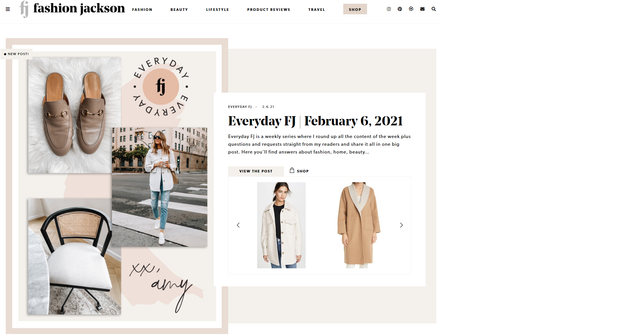
My blog: pepperandplatinum.com
 Campuschronicleasu
Hey! I’ve tried just about everything and I cannot get the homepage to update the categories to reflect new posts. However, the sidebar widgets update just fine.
There are certain categories that will reflect changes but others that will not.
I’m also having a problem with the page templates. For some reason, the header logo refuses to center even though it’s perfectly fine on the homepage but everywhere else it’s not.
Lastly, The Instagram widget will only update if I log out from the theme options and then log back in.
Can someone please help me? The most important of the three problems is the category bug. Thank you!
 educasoft
 For my homepage I did find how to do that, but for posts it is not clear to me 🙁
You say that I need to use tagdiv composer too, but I don’t find what I need to do. I want to have it in each and every post page on my whole site.
If I go to the theme panel and then > template settings > blog and posts template then I can choose an article view, a sidebar location and a sidebar template , but nothing special for mobile ? I guess I must be looking somewhere wrong ?
 yeiji shon
 My homepage already has more than 200MB of PHP memory. I think we need time to change after modification. It may or may not work in a few hours. It’s been resolved after a while. Thank you.
 blubbering
 How can I add the “Single Post Tags” to the category overview “Flex Block 5” like i use here on the homepage:
test.modulor.ch
For Single Post I found it, but not for flex block 5 Elements
-
This reply was modified 5 years by
blubbering.
 michelesfregola
I can’t modify my homepage with TD.
I see 524 error..
How can i fix it?
 Anamaria
 Hello,
Please edit the homepage with tagDiv Composer, => https://www.screencast.com/t/SaqhSgUaUlKP add a “Posts Loop” element and you will get the latest articles. => https://www.screencast.com/t/GbkqCsdl
Let me know about your results!
Thank you!
 terzogiornale
Hi, I’m using a flex block 1 on the homepage with an excerpt and the button read more. I would like the button to lead to the point where the excerpt stops and not to the beginning of the article. Is possible? how you do it? The tag “read more” doesn’t works, maybe because I use the excerpt hand crafted?
 AasifGanaie
 2. The homepage header background image is also resolved.
AasifGanaie 1. The homepage Footer issue is resolved. Thank you.



