mastaliyev
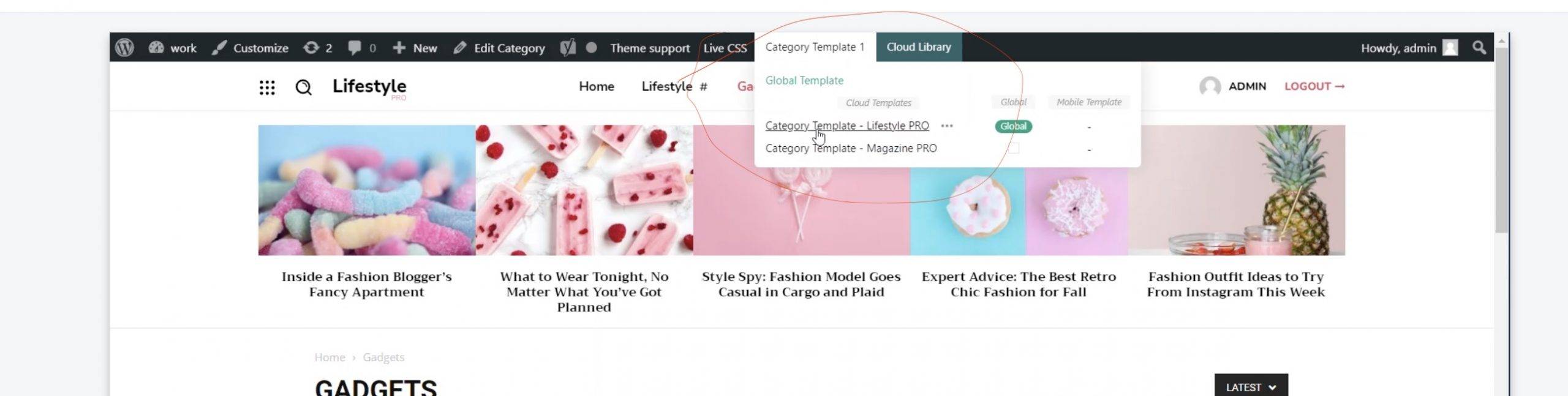
 but i don’t have menu like in that video to install that cloud header (https://banker.az/wp-content/uploads/2021/12/Screen-Shot-2021-12-10-at-16.39.25-scaled.jpg)
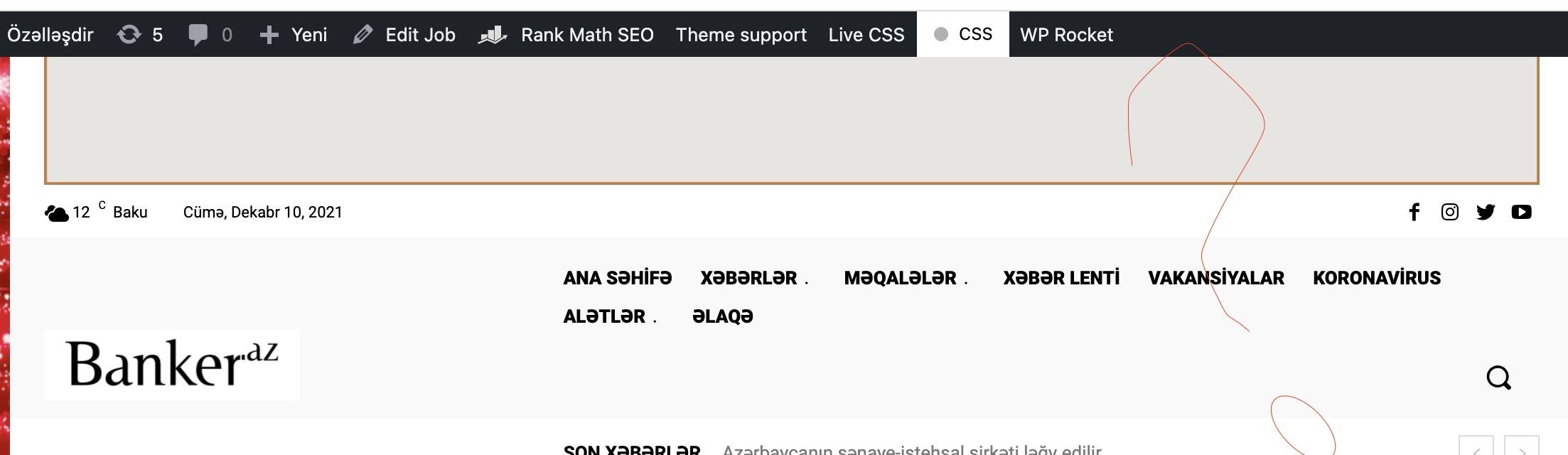
it’s like this in my page https://banker.az/wp-content/uploads/2021/12/Screen-Shot-2021-12-10-at-16.40.04.jpg
 Bettina
 Hello @ComicsBeat!
Please make sure you have the latest version (11.3.2) of the theme, plugins and all the requirements are done as you can see here: https://forum.tagdiv.com/requirements-for-newspaper/
If your settings from the theme panel are missing and you use default templates, then please make sure you have Standard pack plugin installed and active.
Please make a test, deactivate all the cache plugins, clear the cache from your browser and see the results.
Hope that helps you!
Thank you!
Bettina Hello @mastaliyev!
You should install a cloud template for that page and assign it. To assign the new cloud template you need to click on template and choose the cloud one.
For example, check this video: https://www.screencast.com/t/Ufid7bL3
Thank you!
 Calin
Calin Hi bettingspin,
I just made a test and I installed the theme on php 8.0.13 and for me is working without problems -> https://i.imgur.com/tgtsceb.png -> https://i.imgur.com/XfPQmAj.jpg therefore I do not think that the problem is from the php version.
Can you please provide more details about the settings and some screenshots with the error.
Thank you!
 globkeee
attempting to install the mobile theme but recieving a Sorry you are not allow error
Bettina Hello Chris!
Please make sure you assigned the header in the Website Manager -> Header and in the theme panel -> header the same header template. Please follow this video: https://www.screencast.com/t/hEAyf6TBTfo2
Clear your cache or uninstall all the cache plugins and see the changes.
Hope that helps you!
Thank you!
 mobiwizy
Hi,
I just installed the theme and imported a demo. When I try to update a template (automatically created by tagdiv), I get this error message appearing:
Error at zones: 6(models) : 0(dom). The model does not match the content Current state has involved an issue. You could try an UNDO operation (CTRL+Z / CTRL+SHIFT+Z)
The console shows me that:
Refused to display ‘https://mywebsiteurl.fr/’ in a frame because it set ‘X-Frame-Options’ to ‘deny’.
Victor
Bettina Hello Kishore!
Please make sure you have the tagdiv Standard Pack plugin installed and active (Newspaper -> Plugins).
If that problem is still there, then please execute these steps:
1. disable TagDiv Composer
2. uninstall(delete) TagDiv Composer
3. clear cache (if cache plugin exists)
4. install TagDiv Composer
5. activate TagDiv Composer
6. clear cache (if cache plugin exists)
Sometimes, the issue can be from a plugin conflict or a cache issue, that’s why, please deactivate ALL plugins except tagDiv ones, also if you are using a cache plugin, deactivate it, clear all cache (also from your browser) and try again.
Hope that helps you!
Thank you!
Bettina Hello @CampoAdmin!
We have a guide with some tips why our Composer is not working properly: https://forum.tagdiv.com/tagdiv-composer-not-working/
Please make sure that you have set the mod substitute in the htaccess file https://i.imgur.com/VuMw1lq.png -> https://forum.tagdiv.com/requirements-for-newspaper/ and you do not have any modSecurity enabled on host.
If that problem is still there, then please execute these steps:
1. disable TagDiv Composer
2. uninstall(delete) TagDiv Composer
3. clear cache (if cache plugin exists)
4. install TagDiv Composer
5. activate TagDiv Composer
6. clear cache (if cache plugin exists)
Sometimes, the issue can be from a plugin conflict or a cache issue, that’s why, please deactivate ALL plugins except tagDiv ones, also if you are using a cache plugin, deactivate it, clear all cache and try again.
Hope that helps you!
Thank you!
Bettina Hello @sdi126 !
Please make sure you have the tagdiv Standard Pack plugin installed and active (Newspaper -> Plugins).
Let me know the results!
Thank you!
Bettina Hello @mastaliyev!
In order to edit the header with the TagDiv Composer you should have a cloud header template installed and assigned in the Website Manager -> Header. Please follow this video: https://www.screencast.com/t/hEAyf6TBTfo2
It is the same for categories and posts.
By editing a page with TagDiv Composer you could delete elements but also the row called “Empty column”.
You could try to delete it like this: select the row, press the button delete from your keyboard, then with your mouse select “YES”.
Also you have another option too, check this: https://www.screencast.com/t/pxuOzYIIpcG
There is actually a recycle bin basket for every element if you just look carefully: https://www.screencast.com/t/wFYdqgpo6pT
We recommend to use cloud/PRO templates in order to have the possibility to edit them with the TagDiv Composer which contains a lot of functions and features, please check our tutorial here: https://forum.tagdiv.com/tagdiv-composer-tutorial/
Documentation here:
– https://forum.tagdiv.com/cloud-library-templates/
– https://forum.tagdiv.com/design-post-pages-using-cloud-library-templates/
– https://forum.tagdiv.com/cloud-library-category-templates/
Check also our video tutorials here: https://www.youtube.com/c/tagdivThemes/videos
Hope that helps you!
Thank you!
Bettina Hello Angela!
Please make sure you have the tagdiv Standard Pack plugin installed and active (Newspaper -> Plugins).
Let me know the results!
Thank you!
Bettina Hello @Darshit!
I can see that the layout/design is the same. If you did not install it with content, then the content is different.
Or did you solve your issue?
Thank you!
Bettina Hello!
In order to edit the header with the TagDiv Composer you should have a cloud header template installed and assigned in the Website Manager -> Header. Please follow this video: https://www.screencast.com/t/hEAyf6TBTfo2
Thank you!
 rsm
rsmHello,
I installed Molongui Author Box and the box shows properly but it is above Article Bottom Ad. How do I switch their places? I would like the Multiple Author Box to be below Article Bottom Ad. When you had support for Coauthors plugin, the author box was below Article Bottom Ad which was preferable.
TIA
 AjitSirohi
 I also installed the theme again afresh. It does not install the default Cloud templates any more now.
 sasimankan
 other things attempted:
deactivated all plugins. then only activated theme plugins. installed different versions of the theme .
still same result
sasimankanso I installed the theme and when I go to the theme editor panel and change things like color or upload the logo.. it wont update at the front end… I have disabled cache and also disabled cloudfare. what could be the problem?
 GusV
GusVHi I have a website that has woocommerce already installed however the theme I have is Flatsome, is it possible to upload Newspaper 11 and do away with flatsome theme but still keep all of my woocommerce products? the website is: https://britishcoinshop.co.uk
Thanks.
Gus
 yonish3
Hello,
I wanted to follow this tutorials:
https://forum.tagdiv.com/how-to-use-visual-composer/
https://forum.tagdiv.com/how-to-update-visual-composer-plugin/
But I don’t see the js_Composer.zip in the files I downloaded from ThemeForest:
https://prnt.sc/226dnv0
I already have WPBakery backend editor, but I think a developer has installed it not like in this tutorial, as I don’t see it under the theme plugins:
https://prnt.sc/226diyl
Also, if I get this sort, will I have access to WPBakery frontend editor?
Thanks
AjitSirohi Nothing worked. I have tried everything and read all the links. It does not address the issue. Finally, I deleted everything again, reinstalled Default Home Pro Template. Now it does not install any Templates inthe Cloud templates any more as that shows no templates. On the Home Page I get this message as per image attached. If I create a Mobile page it also gives samemessage. I am just tired having spent 100 hours following your instructions. Can you please delete everything, install Default Pro Templates and just create a Mobile Page. I will setup the website again. I can share my login details. I have given up.

 ludyma
Hello, how can I make the topic make a popup video when someone uploads a post.
Also how to make the promotional videos autoplay on the cover, I have seen on several websites that the video does auto play and as you go down the page it reduces and continues the reproduction in a lower corner.
What options does the theme have or if you have to install a plugin.
 SchoolVolley
 I have no tagdiv cloud library plugin to install. 
 anand.kumar321@gmail.com
 Even after installing php 8 and doing all this. the issue is still there.
 sellim81
Hello,
I started to use Newspaper theme again on my tech-news platform. I installed pre-build template and I can not change it. I am trying to edit the theme through TagDiv Composer. When I am adding somethings, there is only loading screen. Nothing is coming no matter how long I wait.
Also, if I check something from the cloud, there is Invalid reply from server endpoint error. I searched in the forum and increased the WP Memory Limit to 256M, nothing changes.
Thank you.