
- NewspaperHow to Add a Logo in Newspaper
- NewspaperShortcodes
- NewspaperHow to Set the Image Avatar
- NewspaperThe Mobile Theme
- NewspaperFavicon & iOS Bookmarklet
- NewspaperHeader styles
- NewspaperWhat’s Included in the Newspaper Theme Package
 info@eskuare.com
HI,
The tagdiv Video Playlist Youtube doesnt work well
We add the di of the videos but doesnt appear, only the demo videos are show
We check the documentation and see that is need to config the youtube api but on the section:
Panel logo Newspaper – Theme panel version: 10.3 >> Social Network
The option “Youtube api” doesnt appers too…
How we could solve this???
 Livingstone
 Logo design
 Calin
Calin Hi,
I do not quite understand what is the problem withe the logo, please provide some more details and some screenshots!
Thank you!
 RealDeal
I have updated the Newspaper theme from 9.6.1 to 10.3. I have to say, what a mess this has been. Just about all the settings were wiped out. Still have my posts and menus but things like logos, footer text all had to be redone. I still have a problem with Nextgen Galley not showing up on any pages. I have checked everything and everything “should” be showing. Same thing is happening with Smart Slider. Nothing shows. Tried adding the code to the templates and nothing. cleared all cache on the site and locally and nothing. Been messing with this for 2 days and no luck. Any ideas?
 melhorweb
Hello,
How to align logo at center of header in mobile devices ?
See below:
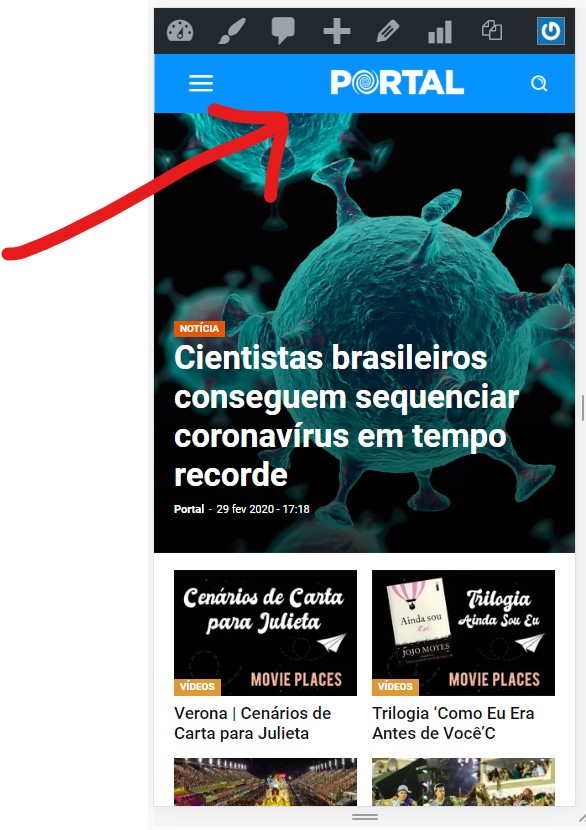
Thank you.
LivingstoneI need from your end, a long that will meet all the requirement of the demo logo. How may help.
 Mark Gilbert
I created in the Top Bar (in 9.2.2) a text “Login, logout or check JJ account” linking to https://jazzjournal.co.uk/my-jj-account/
This has disappeared with 10.3 and I cannot find in Theme Panel/Header/Top Bar how to recreate it. Can you advise? For now I have activated Sign In/Join but it’s not suitable.
Calin Hi,
So if this is still the l’histoire header, then the row should look like this -> https://i.imgur.com/F9E28jq.png each column have set a a number in % for width -> https://i.imgur.com/KG2Z5uY.png -> https://i.imgur.com/yv5Nf1q.png in first column is set the logo after that in the second one are set the search, login and these are set inline -> https://i.imgur.com/RBsQnzA.png and the Newsletter, so in order to set it there, click on the element and drag it like this -> https://i.imgur.com/kUCtKur.png you need to set the element after the login element -> https://i.imgur.com/sDSiIkc.png the results should be -> https://i.imgur.com/OLzjQfo.png after that all you need to do is to adjust the elements to look nice.
Thank you!
Calin Hi,
Make sure that you done these settings -> https://i.imgur.com/hvvqE0P.png
Also please check these similar topics -> https://wordpress.org/support/topic/a-value-for-the-url-field-is-required-3/
-> https://forum.tagdiv.com/topic/search-consolestructured-data-hentry-what-is-missing-updated-error/
-> https://forum.tagdiv.com/topic/amp-error-a-value-for-the-logo-field-is-required/
Thank you!
Calin Hi,
If you choose header style 7, 8 or 10 then you can set the size you want for the logo https://i.imgur.com/7SZvpfc.png -> https://i.imgur.com/qm5LYeR.png -> https://i.imgur.com/BWZ8IkK.jpg
Thank you!
 ntgtorque
Hi dear,
I have a logo related problem when I test the site url.
https://www.tuketicidostu.com.tr/haberler/haber/ferrari-if-designdan-uc-odulle-dondu/?amp
I did what was written on this page, but I think I did it incomplete.
https://wordpress.org/support/topic/a-value-for-the-logo-field-is-required-google-amp-validation/
I would be glad if you could help.
 itmentor38
i was purchase newspaper x theme . all is good but only 1 problem here . i was try to share post on facebook. when i shared post on facebook there post thumbnails changed as main logo so i wish to thumbnails as like main post please here is video of screen short please check https://www.loom.com/share/f768429f6baa449c9fe8356d535399e3
Calin Hi,
The header can be edited using tagDiv Composer and you can make the logo or the subscriber smaller, or you can change the place where to be display -> https://i.imgur.com/6vKlmAd.png
Hope this will help you!
Thank you!
 quanguous
Hello,
Maximum logo size in HEADER STYLE 10 (272 x 90px) is too small for my need.
I would to add to my a header a logo/banner with the following size : 728 x 210.
How can i remove the logo size limitations?
thanks
Livingstone How will it appear on mobile if it’s statics. I was aiming something can be scrolled left or right to view all the logos/image. Static won’t work in this manner
 Innova
 Thanks – this is actually what I have done, and it works well enough. I created a new menu and used that in the top bar, and duplicated a login/logout link, and a profile link. The menu items look very similar to the items in the theme (just without decorative icons). And there is no modal for a login screen – which would have been nice, but I guess not possible without some significant code changes. I have used a login screen customizer to add some corporate styling to the login page.
 codeofarms
Hello!
Is it possible to use a logo that is not the desktop or mobile logo in the sticky menu on desktop?
I was trying to make it happen with CSS content and jQuery attr to no avail. Any insights would be appreciated.
Livingstone I was trying to come up with something like this although I want to have many teams (logo image) which can be responsive on mobile. Something like a slide (slide left to right)
https://prnt.sc/r99jrt
I was doing the above just in the editor (pasting the image logo in category editor) which is not a good practice
Please advice
 nealo
nealoI’m new to the TD Composer and I’m trying to add static pages for about us and a contact form. when i publish the pages the page content starts at the top and runs through the header splitting the logo on the left and the menu to the right.
how do i set the header to be static on “pages” so that the page content begins below the header like the home page or posts pages?

Innova The Newspaper login does work, but I assume it has its own login code separate from the default WordPress login code?
If I try to login using the NewsPaper login, the login fails. But if I go to the wp-login.php page, I am able to login using my Active Directory user/password. At this point, my userID in the WP database has been updated with my current Active Directory password. If I then logout, and login again using the NewsPaper login – it is successful. It will be successful until my password in Active Directory changes, and I am trying to login with my new password.
The Active Directory plugin (NADI) has hooks into the WordPress login which validates a user’s credentials against Active Directory, and then updates the WordPress database with the userID and password (or just updates the password if the userID exists in WP already).
If Newspaper processes login requests differently, then the NADI plugin will not be compatible as the hooks won’t be there.
Am I correct in the assumption of how NewsPaper processes login? Is there any way to change this, or am I going to have to use the wp-login.php and disable the Sign in/Join link in the ThemePanel? I like the look of the NewsPaper login screen, but if it will never work with a plugin that validates against an LDAP directory, then I will use the default WP login method.
Calin Hi,
If the logo from theme panel is not apply, that means that you are not using a standard then you need to edit the header using tagDiv Composer as in our video tutorial from here -> https://www.youtube.com/watch?v=HXQQygkCCJo
Hope this will help you!
Let me know the results!
Thank you!
 WebGuy411
I just bought this theme and went into setting of the theme panel to change the logo and favicon but it doesn’t update it on the front end. I saved setting and my logo shows in the panel, but it does appear, only the dummy logo is there.
 Sebastian Escobar
Hello, I activated the layout of l’historie in the theme of my newspaper, but this does not have the subscription module bar as the demonstration shows in the header space, next to the logo and I cannot find it in the modules list. What kind of module is this? and I think it should be customizable, is that so?
Thanks!
 INVESTOR
 Ok thanks – it’s pitty the theme generates all those copies. None of the plugins you suggested works with current version of WordPress. Nevereless I decided to use the first one but my site crushed after this. I had a backup of course but these plugins don’t work properly. Isn’t there any other way to change it? If I create another several templates I’ll have my media library full of duplicated logos etc.
 sobelarry
Hi there,
I am using Cloud Template for my posts, I found some of the items (i.e. widgets, ads, share buttons, etc) will be displayed twice – one in the correct location, and the other in either “above footer” location, or “below top menu” location. Here is an example – https://biologydictionary.net/aldosterone/
In this case, the social shares should not be displayed above footer. Interestingly, if I choose the location of social shares to “before article”, the duplicated social share buttons will be displayed below logo.
Could you please help?
P.S. I less prefer to simply “hide” the extra item, because I am worried the problem is because the html is not set up correctly, which will impact my site performance.



