- NewspaperWhen tagDiv Composer is Not Working
- TutorialsSystem status parameters guide
- NewspaperCache plugin – install and configure
- NewsmagRequirements for Newsmag
- NewspaperRequirements for Newspaper
 Doug Thompson
Upgraded Newspaper 8.6 to 8.7.1 over the weekend on my primary political news site (www.capitolhillblue.com). Put the site on Ultimatum (previous drag and drop theme) while deleted 8.6 and the plug-ins. First try to install via “add theme” kept giving timeouts and requests to retry. Finally gave up and installed via FTP on dedicated server running CentOS (8-processor, 64Core, 32GB of memory) with Apache/PhP 7.2.
Installed newer version of T/D Composed and everything appears in place and running fine. First impressions show faster page loading and accesses but some slower access to wp-admin functions. Status function shows PhP version 7.2.2, 128M post_max_size, 120 mad_execution_time, 3000 max_input_vars, 256MB WP Memory Limit and green status lights.
So far, everything appears to be working.
Then I tried upgrading my copy of Newspaper 8.6 on my local news site (www.blueridgemuse.com) running on Siteground. Upgrade of the software appeared to run OK but deleteing the old T/D Composer and upgrading showed the installation going through fine but then the white screen on any access that involved WP-Admin functions. Nothing worked. The only way to get the WP-Admin back was by deleting the T/D Composer, which restored admin operations but with no composer functions. After switching the versions of PhP from 5.6 up to 7.1 (latest offered by SiteGround) with no results I deleted version 8.7.1 and reinstalled 8.6 and the plugins for that version and everything returned to normal.
After reading some of the problems here, it appears a problem with some web hosting operations but not others. The SiteGround setup is at their “Go Geek” level with a dedicated IP and extra services. The system status for the Version 8.6 version that runs that site shows PhP Version 7.0.27, 128M post_max_size, 120 max_execution_time, 3000 max_input_vars and 128MB WP Memory Limit.
Version 8.6 works OK for now on the SiteGround site but I hope the problems with compatibility can be resolved in the future. Providing this information to see if any of the info might help.
Doug
 onkarkore1
 Thank you very much for your prompt response, the problem is resolved by disabling plugins and clearing cache memory.
However, I would like to know the max count of plugins which we can keep at the same time while using newspaper 8.7 theme.
 Simion C.
 Hi,
It seems to mention insufficient memory allocated, it should be of a minimum of 64mb (or more)
– https://forum.tagdiv.com/system-status-parameters-guide/
Check the system status again, maybe that is the case. Let us know.
Thanks
 Catalin
 Hello mydisneydorks,
Check the system status parameters to be increased according to our documentation from here -> https://forum.tagdiv.com/system-status-parameters-guide/ Most likely, the PHP memory has exhausted and that’s why you cannot save anything.
Thanks for your understanding!
 jberkley77
Hi all,
New to site. I just installed newspaper 8 and the cryptocurrency demo…everything was working fine.
I checked the theme status and it needed some updating in the php.ini configuration and WordPress and plugins so that the boxes were in the green.
I did that and everything was updated and working ok. I was just playing with the options and suddenly I got this error:
Fatal error: Allowed memory size of 67108864 bytes exhausted (tried to allocate 72 bytes) in /home/content/a2pewpnaspod05_data01/96/41645696/html/wp-content/themes/Newspaper/includes/wp_booster/td_util.php on line 1378
I can’t do anything now…can someone tell we what this error is and how do I correct it?
Thank you
Jon
 The Rooter
Hi,
My TD composer won’t load for my homepage. The page remains grey and the spinner just keeps spinning. It works fine on other pages, just not for my homepage (which is where I need to do most of the work!).
I understand this can often be caused by insufficient system resources, so I’ve checked my theme system status and updated any that were yellow, including increasing my WP Memory Limit. Everything is now green, but the problem with the TD Composer remains.
Can anyone help with this?
Much thanks.
Catalin Hello tanteidee,
Check the system status parameters to be increased according to our documentation from here -> https://forum.tagdiv.com/system-status-parameters-guide/ Most likely, the PHP memory has exhausted and that’s why you edit anything.
Thanks for the message!
 rodrigosicone
 Thanks for that. But I am getting some odd errors like this when I generate the thumbnails:
Skipped Attachment ID 502 (xxxxxxxxxxxxxx): Insufficient memory (case 4) `xxxxxxxxxxxxxxxxxxxx.jpg’ @ error/jpeg.c/JPEGErrorHandler/316
What do I have to do in this case?
Thanks
Rodrigo
 Bogdan B.
 Hello,
Please use this guide to increase your memory allocation: https://forum.tagdiv.com/system-status-parameters-guide/
If the problem is still there after you made the proper implementation, please contact us on our email address at contact@tagdiv.com and provide a link to your site and wp-admin (login information and admin rights) so we can login and investigate. Please also include a link to this conversation.
Thank you!
Simion C. Hi,
Please check the theme system status, check if there are sufficient resources
– https://forum.tagdiv.com/system-status-parameters-guide/
That issue could be caused by insufficient memory, ask your hosting provider to increase the parameters if necessary. Then check if the issue is solved.
Thanks
 rafael-l
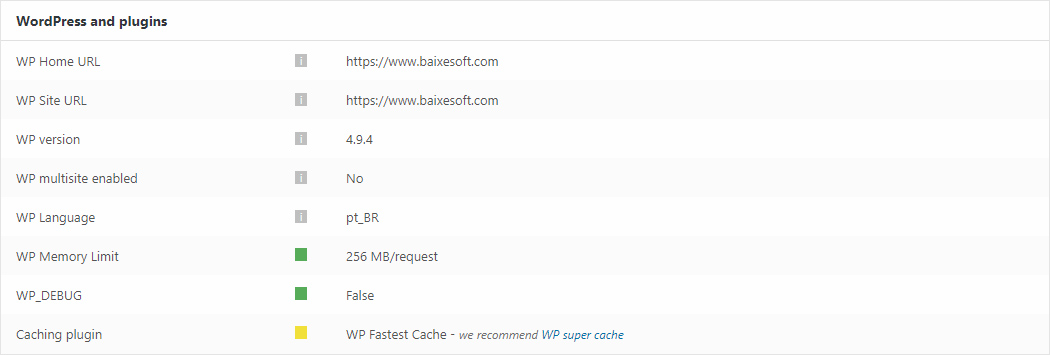
Hi there! Just two quick things about this screenshot form the system status:
https://www.baixesoft.com/wp-content/uploads/2018/02/Sem-Título-1.jpg
1) How much memory in wp memory limit will you recommend for a dedicaded server with a considerable number of access and with 4GB DDR3 RAM Memory at disposal only for this website?
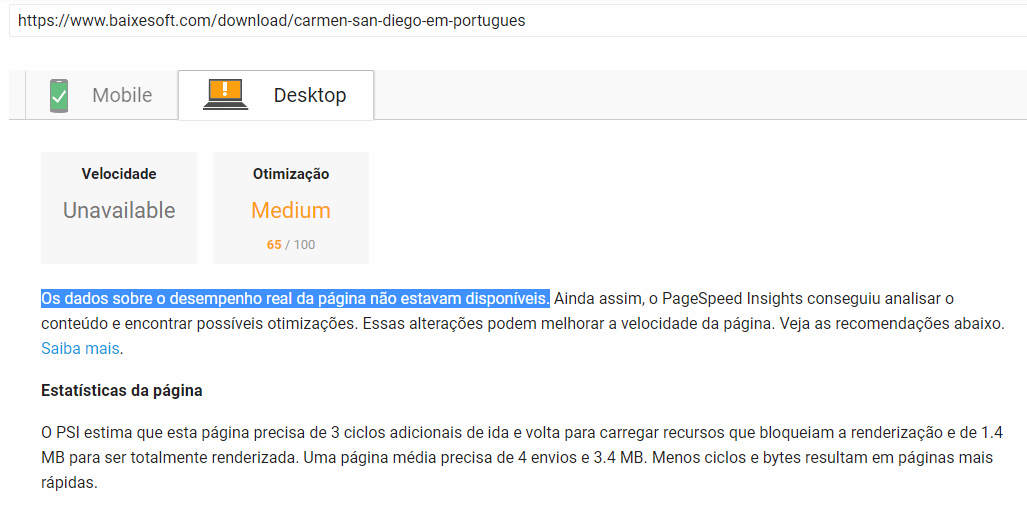
2) I have the premium version of WP Fastest Cache, cause it did way more effect than WP super cache in the previous theme, so there is any problem to use the fastest cache in newspapper? Cause i experienced this in PageSpeed Insights: “Data on actual page performance is not available” like the screenshot above (in portuguese language).
https://www.baixesoft.com/wp-content/uploads/2018/02/Page-speed.jpg
Thank’s for the support!
 EntertainmentWorld
 I spent 2 1/2 hours on phone today with Hostgator and they tracked it down the Tag Composer. The resources were taking up 41% of the memory. Pages have been taking a long time publish because of not enough memory.
Anyone know if disabling it after creating the pages will work?
Bogdan B. Hello,
Please check the ssl implementation and make sure the home url and the site url are both in https if you have ssl active.
Also please disable all other plugins except the tagdiv composer and clear all caching.
Also make sure you memory allocation is done properly: https://forum.tagdiv.com/system-status-parameters-guide/
Thank you!
 rahul56
Hi,
I have just installed this theme at indiapups.com – could not even enter the activation code and the admin page is giving 502 error. The server team has increased the memory/updated PHP version and confirmed that the problem is with the theme. I have deactivated the theme and now can access the admin. Please advise a solution. Checking the other questions – it seems the problem is with TagDiv composer plugin?
 dialogcrm
 I got a 500 error when I first tried. Upgraded memory from 40 to 64mb in wp.config that helped and I was also able to complete the upgrade to 8.7.
define( ‘WP_MEMORY_LIMIT’, ’64M’ );
With Server 500 errors it is also good to regenerate .htaccess file to make sure that is not causing an error. Do that by saving the permalinks again before you start the upgrade.
For the record I used CPanel upload and extract to do the upgrade. I used FTP and the Envato Market plugin previously but I think it was the memory config in my situation. 8.6 worked with 40mb and it looks like 8.7 needs 64Mb at least.
 ctoweett
 Does your host allow you to make those changes? Contact your host for assistance. As for the memory limit, just add this to wp-config.php (preferably above where it says “do not edit…” define(‘WP_MEMORY_LIMIT’, ‘64M’); (I don’t work here).
 gogobss
 I’ve talked with the hosting and they increased some parameters but same problem ..
Also they increased the WP Memory Limit but the system keeps showing it’s 40 MB ..
Also they checked and said there’s no errors on their side
Catalin Hello svharishtech,
This problem seems happens due to a memory cache. Try to clear all of these, purge all CDN files if you are using something like this, clear browser caches and check the results. Make sure that your theme has been installed via FTP way and if you are using some untested plugins which can interact with them core files, try to remove all of these.
Hope this helps!
Thanks for the message!
 pocto
poctoJust recently bought and installed the version 8.6 on a test server and it worked flawlessly, but today I installed the new version 8.7 on the main server it didn’t work. It installed okay but when I apply any function in the theme panel, the spinning indicator just spins and spins but doesn’t proceed.
I later deleted everything and reinstalled the theme again using ftp but still the same thing.
I later also deleted all plugins and tried again but still the same thing.
The system status shows everything is okay, including the max_execution_time, WP Memory Limit, etc.
Please help!
 mariusfv
Salut!
Am upgradat la 8.7 (am reinstalat plugin-urile tdcomposer si social counter, singurele care le folosesc) fiindca nu mai aparea homepage – dupa reinstalare a reaparut homepage.
Probleme folosire site pentru utilizatorii autentificati:
– pentru admin meniul de la themepanel functioneaza rapid.
– pentru admin / editor / contributor – dureaza intre minim 30 secinde si 45 secunde sa accesezi orice meniu (toate articolele, adauga articol, media, adauga pagina, toate paginile, etc – orice meniu WordPress).
Testat in Firefox si Chrome (in Chrome in 50% din situatii primesti white screen la accesare orice meniu, dupa refresh si 45 secunde incarca totusi pagina, neacceptabil la ce server detinem si la cum ne functioneza alte website-uri).
Uneori (sporadic) in admin area in consola sunt urmatoarele erori:
https://postimg.org/image/ga5b27y97/
care la Read more te duc la mixed content:
https://developer.mozilla.org/en-US/docs/Web/Security/Mixed_content
Folosim:
https
server dedicat (liber 60 GB ram)
SSD / I7 / PHP 7 (php-fpm) / MariaDB / WHM /cPanel up2date
WP Memory Limit: 256 MB/request
Theme panel system status – all recommended (toate verzi)
Doar plugin-uri recomandate
Doar tdcomposer si social counter instalate dintre plugin-urile voastre
Cache curatat / dezactivat (aceiasi problema).
Ce am facut:
Am rezolvat mixed content prin inlocuire globala in database http cu https (timp greu de incarcare persista si dupa inlocuire).
Am optimizat baza de date (lucrez cu WordPress de peste 8 ani)
Am incercat browserele Firefox si Chrome – timp reincarcare foarte mare persista
Am dezactivat si sters orice alt plugin – timp reincarcare foarte mare persista
Am optimizat baza de date – timp reincarcare foarte mare persista
Am testat pe mai mult de 2 PC-uri super tari / 2+ PROVIDERI DE INTERNET DIFERITI – aceiasi problema pt utilizatorii autentificati.
Am schimbat temporar tema Newpaper cu alta tema (Divi si default teme WP) – toate meniurile functioneaza foarte rapid (0.01 secunde) – deci clar Newspaper este problema!
Credeti-ma ca nu se poate lucra asa, ne-au sunat editorii ca nu mai functineaza, le-am explicat ca incarca mai greu site-ul, unii spun ca au white screen (oamenii sunt redactori nu experti pe partea de IT, ei nu inteleg ca merge foarte greu).
Va rog gasiti un patch sau explicati-mi cum sa rezolv timpul greoi de incarcare orice meniu WordPress – de cand upgrade la 8.7!
Sincer: In productie nu sunt acceptate asemenea erori, Jira – sau ce CRM folositi voi pt. sprint-uri ( programare, testing & debugging) + containerele virtuale (multi linux VPS servers) unde testati compatibilitatile (apache, nginx, php-fpm, fastcgi, etc) trebuia sa nu ajungeti in asemenea cazuri – la productie nu se accepta asa ceva!
La clientul meu i-a placut mult tema voastra (prezentata de mine), daca pe viitor mai intampin asemenea probleme ii customizez o alta tema sa arate exact ca si a voastra ca si design si atunci voi pierdeti potentiali clienti.
Retineti: clientii se pricep sa scrie, design, hosting lucreaza cei ce se pricep. Dar cei ce se pricep nu au timp de asemenea erori netestate.
Momentan o sa lucrez in continuare pe tema voastra, sper pe viitor sa testati mai mult, intainte de update!
O zi buna & astept patch!
mariusfv I have exactly the same problems!
Homepage not load after upgrade to 8.7 (with all other plugins deactivated).
After I deactivate and DELETE all Newspaper plugins & reinstall them from the new version 8.7 – homepage back to normal.
The problem after upgrade is: Admin section load very very slow (20-30 seconds to load a new admin page / menu). For user speed is OK (Not logged in)
We use:
https
dedicated server (free 60 GB ram)
SSD / I7 / PHP 7 / MariaDB
WP Memory Limit: 256 MB/request
Theme panel system status all recommended (all green)
Only recommended plugins
Only tdcomposer and social counter installed from plugins.
Cache cleared / deactivated (the same).
Any idea why logged in as admin everything move so slow after upgrade?
 biggleem
 Thank You so much.
i increased the max vars but it is not acknowledged in the system status.
also my wp memory limit is set to 64 and that is not acknowledged in the system status.
 Severan
 My configuration:
.htaccess
define( ‘WP_MEMORY_LIMIT’, ’64M’ );
define(‘WP_DEBUG’, false);
define(‘AUTOSAVE_INTERVAL’, 300); // seconds
define(‘WP_POST_REVISIONS’, 5);
define(‘CONCATENATE_SCRIPTS’, true);
define(‘DISALLOW_FILE_EDIT’, true);
define(‘DISABLE_WP_CRON’, true);
php.ini
max_input_vars = 20000
max_execution_time = 600
post_max_size = 64M
upload_max_filesize = 64M
 Madsari
I was set on homepage youtube playlist video, but video is blank and wont playing if i click, please help?
System status:
Theme name i
Newsmag
Theme version i
4.2
Theme database version i
4.2
HTTP channel test
wordpress
Installed demo i
Video – demo ID: video | install type: full
Speed Booster
v4.9 – Disabled – incompatible plugin detected: really-simple-ssl/rlrsssl-really-simple-ssl.php
php.ini configuration
Server software i
Apache
PHP Version i
5.4.45
post_max_size i
8M – You cannot upload images, themes and plugins that have a size bigger than this value. To see how you can change this please check our guide here.
max_execution_time
30 – the execution time should be bigger than 60 if you plan to use the demos. To see how you can change this please check our guide here.
max_input_vars
1000 – the max_input_vars should be bigger than 2000, otherwise it can cause incomplete saves in the menu panel in WordPress. To see how you can change this please check our guide here.
SUHOSIN installed
false
mbstring
available
WordPress and plugins
WP Home URL i
https://www..co.id
WP Site URL i
https://www..co.id
WP version i
4.8.5
WP multisite enabled i
No
WP Language i
id_ID
WP Memory Limit
40 MB/request – We recommend setting memory to at least 64MB. The theme is well tested with a 40MB/request limit, but if you are using multiple plugins that may not be enough. See: Increasing memory allocated to PHP. You can also check our guide here.
WP_DEBUG
False
Caching plugin
WP super cache – for best performance please check the plugin configuration guide here.
Catalin Hello dylanswims,
Please check the system status parameters to be increased according to our documentation from here -> Most likely, the PHP memory has exhausted and that’s why some icons do not appear. Clear all the caches and check the results.
Thanks for your understanding!