
- TutorialsFrom WPBakery to tagDiv Composer
- TutorialsWhat is Ajax preloading?
 keyforweb
 I’ve found how to disable sidebar on mobile… i’ve also the issue on vertical allignament for submenu!

-
This reply was modified 9 years by
keyforweb.
 Jose
JoseHello,
I have installed the latest version of the theme and plugins, all updated. I use your pluguin for mobiles.
I use the same menu for footer (in pc and mobile). In PC links of footer run ok, but in mobile not run.
¿Why?
My website: https://goo.gl/zFiz6M
When I click on link, no open the page, only show ads. Add image
https://fotos.subefotos.com/994eae9cc138f748eabfc1c8c8ed507bo.png
Can you help me?
Cheers
 alzipco
 Hi,
I’m following this thread.
and i followed your instruction.
However, it also gives an effect to mobile view.
What should i do to make this changes, only applied in desktop version.
So in mobile, it still looks okey.
-
This reply was modified 9 years by
alzipco.
keyforwebHi to all, we had bought some hours ago this fantastic theme and we had uploaded on our staging site for some test before upload online….
We are using last version 7.8 and we have an strange issue with menu and submenu that is not perfectly aligned..
A little question: how can i disable sidebar on mobile?
Thx a lot for help
Orlando
 Jfthai2015
 Thanks, worked wonders.
How can I implement that on the mobile theme too?
 dhincapie
 I am assuming that this problem mayba doesnot comes from mobile menu
 leapdsc
Hey there,
Based on the image and url provided below,
As viewed on desktop resolution the image per row seems to be working good (aligned centered). However, when viewed in mobile, the image seems to be flushed left. Is there any way I can work towards this? Please advice me on this.
Website url: https://leapdsc.com/leapdsc/client/astar/techdepot/
Image1 (on desktop): https://1drv.ms/i/s!Ai3uwVtbSehutoJRBoAUznGdciZHAQ
Image2 (on mobile): https://1drv.ms/i/s!Ai3uwVtbSehutoJQ3H2SF5UeDJj1iQ
 Simion C.
 Hi,
You can try this code that changes the z-index on that element, and applies only when the mobile menu is displayed – https://www.screencast.com/t/RYliJHxCmS6Q or when the mobile search screen is open – https://www.screencast.com/t/WciwI1axFKck
These are the codes used, please try and see if they are working properly for you
.td-menu-mob-open-menu

.woofc-trigger,

.woofc-inner {

z-index: auto;

}
.td-search-opened

.woofc-trigger,

.woofc-inner {

z-index: auto;

}
Thanks
 Catalin
 Hello alerazak,
First of all, I will thank you for your interests in our theme! Notice that our theme has 2 possibilities for using in mobile mode -> Mobile Theme or Default Mobile Responsive Mode. Which one do you want to use? For more information about Mobile Theme, please consult our guide here -> https://forum.tagdiv.com/the-mobile-theme/
Thanks for your understanding!
Catalin Hello dhincapie,
I have inspected your website for many other mobile devices and the mobile main menu seems to work as expected, as you can see here -> https://www.screencast.com/t/5hdplQgw6p Try to clear all the caches from your mobile or try check it for other mobile and check the results.
Thanks for your understanding!
 Bogdan B.
 Hello,
Sorry but still no go. The site cannot be reached. I have tried from my mobile device using the mobile data so the ISP was different but the site still cannot be reached. You maybe have a country block maybe. We are located in Romania.
Regarding your issue with comments, please disable all plugins except visual composer, clear cache and reset cdn files if you use it. Please also check any custom code you might have added to the theme panel or the theme files. If you use a child theme, please switch to the main theme to make sure it does not affect the proper functionality of the theme.
Thank you!
Bogdan B. Hi,
Sorry but I cannot see any woo floating cart on your mobile menu. We have not tested this plugin so I cannot say for sure how you can implement it in our custom mobile menu. You can try a bit of css positioning on the button:”
https://www.w3schools.com/css/css_positioning.asp
Thank you!
 simchris
 Generally, the AMP version has no relation to the main theme as the AMP endpoint is highly mobile optimized and doesn’t support any of the theme features, so kind of pointless to have as “part of the theme.”
But we all have our own thoughts on this.
What if TagDiv abandons the theme on your 100,000 page site, and no longer works with PHP 7.5? You’d need to suddenly change to an agnostic plugin. if you had been using agnostic plugin originally, it would work regardless of “theme.” I prefer that “separate” function, personally, especially if it gets added into something like http/2 as a feature.
I’d like a flying car, too, but not going to hold my breath 🙂
I’m out!
-
This reply was modified 9 years by
simchris.
 ben.hinc
 For example the mobile plugin could support non https, and support javascript, and various things which AMP does not support, ad units, TagDiv API, speed booster hooks, etc.
The only reason I’m suggesting a single plugin as a solution is because AMP for WP, when used with Automattic’s AMP plugin, can function as both an AMP plugin and the site’s mobile theme.
I can toggle a setting in AMP for WP and it will replace Newspaper with its theme (which is AMP compliant) for any mobile visitor.
That’s what I would envision Newspaper’s implementation to be like: completely transparent to the end user. For normal people who don’t know what AMP is, it would serve as a mobile theme as it does now. For those who want AMP functionality and are willing to live with the limitations it brings, they can flip a switch and everything is instantly AMP’d.
It’s not like the work hasn’t been and isn’t being done by the AMP for WP guys — everything is open source and freely available. It could literally be taken, sprinkled with a little Newspaper magic and be ready to go.
ben.hinc I get what you’re saying. I would think that the developers would be MORE interested than I am that websites using their theme have the best AMP experience available.
Let’s say — for the sake of argument — that Newspaper is the best desktop theme available anywhere. And, continuing this hypothetical, let’s also say that on mobile, when using the mobile plugin, it’s also the best theme money can buy. The absolute, hands-down best.
If this were true, why would the developers be okay with whatever AMP implementation a site owner wants to use?
To protect the integrity of the theme and keep it at the forefront, I’d certainly want to offer my own solution if I had my name on this theme.
But to have every experience be the best available EXCEPT when someone clicks into a site from a mobile search result? That reflects poorly on everyone involved.
 alerazak
Hi folks!
I´m a new one here. I´m wondering how can I handle the mobile version, I want to edit the menu and add the back to top arrow.
Thanks.
 genoze
using MAG Post template 2 or 3:
I would like to move the featured image lower so that my adsense ads can be higher (above the fold).
layout would be like
1 – Title
2- paragraph 1 or 2
3- adsense ad
4- Featured image
5- additional article content
============================
Any help appreciated. Can existing post template be modified as a new post template leaving original intact?
============================
simchris I guess my point was, theme devs not going to make the theme mobile plugin setup for AMP, as this would introduce giant amount of support for people who don’t understand AMP or how it works.
For example the mobile plugin could support non https, and support javascript, and various things which AMP does not support, ad units, TagDiv API, speed booster hooks, etc.
It would be NICE if they had an AMP plugin that works like the mobile plugin, as separate paid product, perhaps, which could replace the one included with theme with specific guidelines on what it does and can never do. Two totally different things.
Making ONE mobile plugin for theme that worked for both mobile/noAMP and mobile/AMP would add huge amount of code bloat, also possible issues with adding the AMP end-points and hooks and all sorts of bizarro potential issues with folks who can’t even clear their caching when updating.
“In a perfect world…” sure, would be nice. But unlikely to happen anytime soon.
Frankly, I believe the “back end” skunkworks plan is more focused on developing a replacement for Visual Composer for their “ION” version and doing sideways dev on that which can be sold outside of ThemeForest as traditional foundry method (“direct sale”).
I got what you were saying about “wouldn’t it be nice if …” — I was just pointing out wasn’t going to happen based on working with them for 3+ years here.
The support overhead for that would be insurmountable from a business case standpoint. Look at all the issues with Facebook (“why doesn’t my photo show up…” or “why isn’t my views incrementing…” “why do I need a Facebook account to use the FB widget …” etc.). So, experienced devs already moving on making their own solution based on the available tools; newbies already confused by what AMP is, and unlikely to get the issues with search/replace of inline styles, ad unit custom inserts, etc.
It’s awesome we have so many active folk here actually “into” this stuff.
My opinions are only my own, so take all with grain of salt — sure you were doing that anyway 😉
But again, to get on with your life you really should consider this the way forward:
a) desktop > theme CSS (main URL)
b-1) mobile > theme CSS responsive (main URL)
b-2) mobile > theme plugin/CSS mobile (optional) with custom settings (main URL)
c) mobile > AMP compatible > AMP plugin + custom template (AMP endpoint)
You can only have 3 of the 4 options as it stands.
In our case we do a, b-1, c.
What you were wanting was a, b-2 – where b-2 has multi-thread option based on visitor including redirect to AMP endpoint vs normal URL.
Betcha box of gingerbread cookies you will have an eternal wait on that!
 Thomas
Hello
I use an extension Woo Floating Cart but it appears on the mobile menu.
To test add some products to the cart for example here:
http://www.virtualmagie.com/boutique/tours/inv3rsion-pierre-boc-yves-meret/
How I could achieve that this block cart be under the menu?
Regards

Simion C. Hi,
If you would like to change the default functionality of the mobile theme, this can only be done by modifying the theme files. Please follow this topic and make the mentioned changes to the specified file
– https://forum.tagdiv.com/topic/mobile-theme-featured-posts/
Thanks
Bogdan B. Hello,
Thank you for your appreciation.
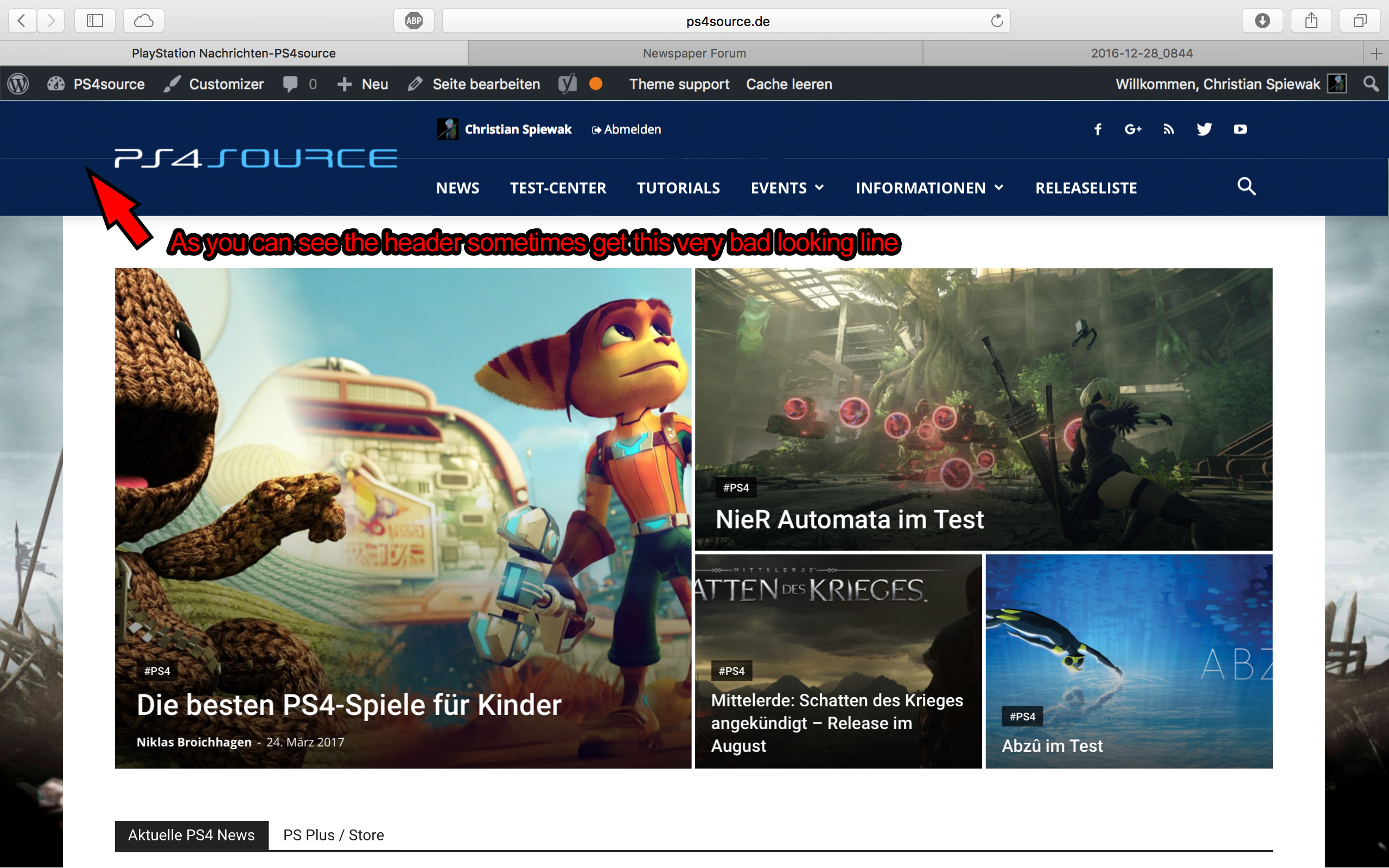
1) I have tested your site on mac but could not see the line you mention. https://www.screencast.com/t/kHdvVpdbcJUN
2) Our theme has a custom login already which can be accessed on the front-end: https://forum.tagdiv.com/login-how-to-enable-user-registration/ – https://www.screencast.com/t/D0BiMNXRTqyG
3) sorry but there is no gradient color section for the header and footer but you can add a footer background image: https://www.screencast.com/t/rKgVA4TL
For the header it can only be done with custom css.
4) Sorry but only by using the obile theme can you have a separate menu for mobile devices.
5) The quotes can be changed from the fonts option: https://www.screencast.com/t/tcwLRz4daHU
6) and 7) It is ok as there are no restrictions in this regard. It will load all of the elements, yes, but you should not experience drastic loading speed drops. It is recommended to increase your overall loading speed by using this guide: https://forum.tagdiv.com/how-to-make-the-site-faster/ and increase your system status parameters like so: https://forum.tagdiv.com/system-status-parameters-guide/
lease only use wp super cache and these settings: https://forum.tagdiv.com/cache-plugin-install-and-configure/ if you plan on using a cdn server: https://forum.tagdiv.com/cloudflare-cdn/
8) This topic explains how to use speedbooster together with other plugins: https://forum.tagdiv.com/topic/tinymce-advanced-and-other-various-disabling-speed-boster/
9) Please provide an example as the image is not working
10) The validator also provides errors for ALL of the well known sites including google, facebook, Amazon, Yahoo, etc. We have stopped trusting it 🙂
Thanks
 airulafiq
Hi,
I would like to use another category for the top 3 highlight grid when using the mobile theme plugin instead of Featured.
How do I do it? Thanks!
ben.hinc I’m sorry, I must have missed where Chris offered advice on how to achieve what I’m looking to accomplish.
I’m asking for the mobile theme that is put in place when the tagDiv mobile theme plugin is activated be AMP compliant so that when someone searches on mobile and clicks an AMP link, that is what they see.
Anything less than that is unsatisfactory and very much a brick wall.
I’m not looking for alternatives. I’m not looking to modify some existing AMP template to be close to the real thing. These are all workarounds that offer a less-than-optimal experience. Am I the only one that sees this?
What I don’t understand is why everyone seems to be so accepting of compromises and workarounds.
Just a quick note: I already have a heavily customized AMP implementation that is just as functional as the tagDiv mobile theme (maybe more so). The problem is that it ISN’T the tagDiv mobile theme. It’s not like I’m not familiar with how this works and I’m coming at this with zero knowledge which seems to have been implied in this thread.
-
This reply was modified 9 years by
ben.hinc.
 Michael
 Google will give you plenty of warning about when it will become a signal, just like with mobile friendly.
Yes, you should be planning ahead. But keep in mind you will be planning for an event that could be still 6 months away.
 fenomeno0chris
Hello to the whole Newspaper/Newsmag team!
First I want to say, thank you very much for creating such great themes.
After 3 years I decided with my team to change the overall design of my homepage, by buying Newspaper7. The reaction of our readers and users are mostly positive. So thats a good sign.
Of course such a huge change is not that easy to handle and thats why I still have some problems and question, which should be solved.
All problems occur on the latest version of Newspaper 7.8
1) On my MacBook with the default Safari browser, I often get this annoying and bad looking line through the whole header section. How can I solve the problem?
2) Which register plugin should I use? I don’t want to let new users to set a new password on the bad looking interface of WordPress. Im sure you guys know what I mean and have a good recommendation for that. Beside that, what should I use to prevent registrations from bots?
3) Is it possible to have a gradient header and footer, instead of just one color? It looks a bit boring.
4) How can I change the menu just for the mobile page, without using td-mobile-plugin?
5) How can I change the the font style and size of quotes? At default settings it looks way too big (see here)
6) Is it ok too use the responsive options, to create one site with different blocks and grids for mobile and desktop? Im asking cause I don’t know if my site will load much longer, if it has to load information even though there are not displayed. (see details here)
7) My current page speed is a disaster (see here). Why is it so bad, since Im using kraken.io image optimizer and WP Super Cache? How can I improve the score?
8) How can I use td-speed-booster, without uninstalling my plugins? (Disqus Comment System, TablePress, TotalPoll…) I really need those plugins, but I still want to have a fast homepage!
9) If I set [Template Setting->Force Full width->Header Menu] to “No Stretch”, the logo of my site is not at the correct position.

10) validator.w3.org shows, that my page has 33 errors (see here). How can I fix them?

