- TutorialsFrom WPBakery to tagDiv Composer
- TutorialsDefault Block Settings Guide
- TutorialsOffset Feature
- TutorialsSystem status parameters guide
- TutorialsWhat is Ajax preloading?
- TutorialsHow to Update the WPBakery Page Builder plugin
- TutorialsHow to Install bbPress forum
 Demir
Demir Hi Edward,
I opened a content randomly. There were links to other content in this content.
https://www.arthenos.com/wp-content/uploads/2017/09/Screen-Shot-1-19.09.2017.png
I pressed the “Update” button without making any changes. There are 2 entries in the “Comments” section of the admin panel.
https://www.arthenos.com/wp-content/uploads/2017/09/Screen-Shot-2-19.09.2017.png
At the same time, my e-mail address came to 2 e-mails.
https://www.arthenos.com/wp-content/uploads/2017/09/Screen-Shot-3-19.09.2017.png
It looks like this when I open one of those e-mails.
https://www.arthenos.com/wp-content/uploads/2017/09/Screen-Shot-4-19.09.2017.png
This entry appears in the “Comments” section at the bottom of the relevant content.
https://www.arthenos.com/wp-content/uploads/2017/09/Screen-Shot-5-19.09.2017.png
I always have to delete them.
Regards.
 morsalinmallik
 i did already cleared caching.. But the issue is whenever i login into admin panel and then i visit any page of website it start showing me google ads properly. But when i check same page into private window or any other browser without login your default ads visible.
and there is one more issue some time few post in desktop start showing mobile view i have to visit post and edit than it become normal desktop view.
 Bogdan B.
 Hello,
You can use a sidebar ad
https://forum.tagdiv.com/sidebar-ads/
and use this method for any custom implementation:
https://forum.tagdiv.com/using-other-ads-non-adsense-ads/
Thank you!
morsalinmalliki have added google ads code but it become visible when i am login into theme. If i check from other browser it is showing old ads which comes with default theme.
 pureglamtv
Hi again,
another question unable to fix it without assistance.

Everything works fine with the blogposts and connection to KEYCDN for photo delivery worldwide. Every photo of your theme will be delivered quickly and is available.
E.g. the blogpost:
https://www.pureglam.tv/2015/08/26/kameha-spa-powerhouse-wellness-im-rheinland/
is also served worldwide via KEYCDN and featured photo is available via
but won’t be displayed – this happened only on blogposts with style8 or style7.
How do I get this fixed?
Thank you
Vanessa
 awoodhams
 I did the changes that you suggested. I cleared all caches and waited a week to make sure, because sometimes it takes a while for the changes to appear on my phone. Unfortunately, the problem is still happening.
On phone screens, the featured image jumps. When it loads, it is too small and there is a grey space at the bottom. But as soon as you scroll the page, the featured image zooms to the correct place. You can see that on a phone here: http://e50.4da.myftpupload.com/. I have tried using many different background images…high resolution, lower resolution, and different dimensions.
Do you have another fix?
 barronlau
Hi, I asked this question in another topic thread that wasn’t related, so i’m just reposting here. How do I delete the ads that come with the theme at the end of each of my posts?
http://streamtheplanet.com/kissanime-kodi/
 raymukesh
 Dear Bogdan,
I am still unable to display the header banner on newspaper theme. I am sending you the script which I got from Amazon. Please let me know me know what is the exact problem.
Amazon affiliate is important for my site and if this does not work, it will be bad for my site. Kindle help. On the other note, it was showing the Hostgator banner perfectly.
<script type=”text/javascript” language=”javascript”>
var aax_size=’728×90′;
var aax_pubname = ‘techbull-21′;
var aax_src=’302’;
</script>
<script type=”text/javascript” language=”javascript” src=”http://c.amazon-adsystem.com/aax2/assoc.js”></script>
 ribasksd
Header as is not working for me. Facing same issues with other inbuilt ads
 josecarlos
Hi,
I want to know if it´s possible to have one Slide Gallery format type for desktop and another Slide Gallery format for mobile?
I have the Tagdiv Slide Gallery format for desktop which is ok, but I need the “Default” type on Mobile.

Can you send me the code and Php file where I can do this, or can i do it with CSS?
Thanx so much for your help?
 AlexSoyer
Hello everyone,
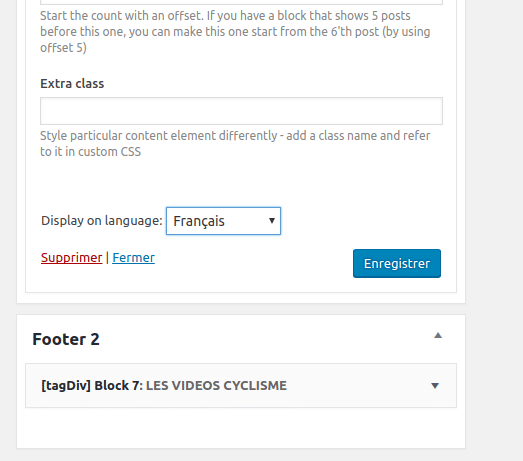
I just used WPML for our website, it works very good!
But on tagDiv widgets, the selectbox rollbacks to “All languages” everytime I choose a language and save.
I tested on other widgets, it works very well.
https://todaycycling.com/wp-content/uploads/2017/09/footer-2-widget-roolback-englush-french.png
Thank you
 alexliu0317
Hello,
My website is http://jazko.com/#
1) Where should I go to remove STAY CONNECTED (facebook/twitter/youtube) I don’t mean to remove the social icons for all pages, but do not want them to appear on the homepage to show how many followers at first sight. Can I remove the entire section including the bar says ” STAY CONNECTED”?
2) I am installing Default Demo (dummy version) , and wonder where should I go to edit the articles for “Lifestyle News” and “Make It Modern”? In other word, how do I choose which articles to show up on those sections? Can the headline or title to be changed from ” Lifestyle News” to “Lifestyle”? or they cannot be changed?
3) What tags do I need to add to make sure stories show up on the top of the page? Big rectangular space(not ads) cut into 4 different categories? Where can I go to change the setting if I want them to be reduced to 1 big space for top story only? (1 instead of 4)
4) If you roll down on homepage, to Lifestyle news section, you can find first article written in Chinese. I added the phrase “tbd” to the story. My question is, I don’t want to reveal all story when people read them on homepage. I want it to stopped at where I typed “tbd” , so the readers who are interested to carry on, they can hit “Read More…” and enter that page to finish up the story. How do I do that?
5) If I want to remove the whole section at homepage as I think it is too long for readers to scroll down to the bottom. Let’s say, if I wish to remove the entire section of Tech and Gadgets, where should I go to do so?
Thank you for your help.
Bogdan B. Hello,
Please use this implementation method for non adsense ads: https://forum.tagdiv.com/using-other-ads-non-adsense-ads/
Thank you!
 simchris
 See other thread.
Try simply putting your ad code in a normal text box.
Turn off your ad blocking software or browser extension.
Check your AdSense account to see if your site got ‘unapproved’ for loading ads.
 goalivemedia
we are being using this theme for the last couple of years and i wanted to thank the team for putting in such a awesome theme file
ok now there are two issues on this system i guess
first of all the no of images the featured images multiplies are too many , i understand that it is based on the theme but imagine my site is now 25GB plus only for uploads, no matter what ever server i use it spikes and i need to find a solution.
so after a lot of testing i feel that the site should adapt to the images only according to the theme or just according to the devices mostly used.
Next comes the main feature which any newspaper site should have is archive system , it helps the system in two ways make the initial site light by archive the old content and the database also can be made into two one for main site and another for archive.
now after so many years like 3+ years i had to pull the site down and start fresh as i was totally fed up and had no way that i could afford another huge server.
 Arkadiusz
Hello, can you help mi how I can geo targeting ads? In your theme I can’t see option like this. For me it’s very important, cause I need to show some ads in one region and another ads for different region in my country.
Thanks!
 Simion C.
 Hi,
I believe the theme will not display anything else except the ad itself. If this code is required to display, you could try to use a plugin like Adrotate to insert the ads in the website.
This ad plugin works for other theme users, and it may be a solution in this case as well. You could test it and see if the extra code around the ad is displayed like you need.
Thanks
 Nicholas Gibbs
I need some guidance on what is/is not affected by updating. The help documentation and videos are ambiguous, imo good examples of information being provided by people who already know the answers and find it difficult to put themselves in the mindset of people who don’t. My points may seems obvious to tech people, but are not to me, and judging by the number of post-update-panic-posts in the forums, they are not to many other users too.
For me, upgrading to 8.0 went from the quick and easily hour set aside indicated by the video, to a weekend of my life I will never see again. I want to avoid the same again. By example in your docs it says “Once you activate a different theme, delete the Newspaper theme. Don’t worry, your content will not be lost.” The documentation also mentions code. But nowhere does it mention the effect on the hugely important and time consuming settings?
So i would appreciate it if you could clarify which of these headings will be affected by updating (and ideally any steps to be taken post update). I’ve started with the two I think I am clear on …
EFFECT OF UPDATING
Bespoke Code (including, but not necessarily limited to, anything entered into theme panel/custom code and theme panel/mobile theme/custom code): All will be overwritten. Must be copied out and re-applied.
Content (posts and pages): No effect, all will be retained.
Theme Panel Settings (all under header, footer, ads, layout and misc): ??? (if they are affected can the export/import settings tool be used – it states ‘to copy to another server’, and does not specify whether it would work between different theme versions. Is there anything not included in that settings export?
Mobile Theme: ???
Visual and TagDiv Pagebuilder elements used on posts & pages: ???
Demo Theme: ???
Licence key/activation: ???
METHOD OF UPDATING
in the documentation it gives alternative methods of updating, without any indication any are better than others. However i have noticed that in the forum when problems occur it is often stated that people should re-upgrade using the ftp method. does this indicate that the ftp method is more stable/reliable way of updating? I expect many of us will go for what appears the easiest method (wordpress) but if we knew ftp was a better way would jump through the extra hoops to do it that way.
I hope you can see that armed with that information I can see whether the benefits of an upgrade are worth the potential hassle, and also get a better idea of the realistic time it will take.
Thank you.
 D Dev
D DevI have a google adsense code which is wrapped with another code that controls the adsense code. But when I put this code in the ad section of the theme, the additional code seems to be removed as a javascript just runs with the publisher and data id from the adsense part of the code. Is there a way the theme would run the code the way it is?
I tried to put the code in the header file (header-style-11.php) before the ad part of the code, it works but the ad block is not centered, it is towards the left. I put the some classes (check the first two line of the code), but it didn’t help. The code is provided below,
<div class=”td-banner-wrap-full td-banner-bg td-container-wrap”>
<div class=”td-container-header td-header-row td-header-header”>
<!– Ezoic – Header Ad Wrap – top_of_page –>
<div id=”ezoic-pub-ad-placeholder-100″>
<script async src=”//pagead2.googlesyndication.com/pagead/js/adsbygoogle.js”></script>
<!– Header Ad –>
<ins class=”adsbygoogle”
style=”display:block”
data-ad-client=”ca-pub-5555555555555555″
data-ad-slot=”3333333333″
data-ad-format=”auto”></ins>
<script>
(adsbygoogle = window.adsbygoogle || []).push({});
</script>
</div>
<!– End Ezoic – Header Ad Wrap – top_of_page –>
</div>
</div>
 Catalin
 Hello seanmason136,
Unfortunately, our theme does not have any such an option that allows you to add the ad exactly below each post title, sorry! If you will check our Ads section from Theme panel, you will that that there exists an option for Article Top Ad, as you can see here -> https://www.screencast.com/t/23GRaEbO Also, if is not what you want and if you want to have another result, notice that you should insert your ad custom code through core files to bring as you wish. If you are not aware of the steps which are needed to take in this case, please consider hiring a freelancer/developer to help you because e cannot provide custom services at the moment, sorry!
Thanks for your understanding!
 steve83
 My pages are still messed up 3 weeks after my initial support request. I emailed tagDiv directly but was told by one person “your site is completely messed up’ and another said “everything is working fine”. Must have spent all of 20 seconds looking into it.
Current advice is:
“Either recreate the pages with the tagDiv composer, or deactivate it and keep using Visual composer.”
Seriously you suggest I should recreate 130 pages of detailed content with a completely different composer (which doesn’t even include many of the elements I have used with visual composer)? Good job I don’t have ten thousand pages eh?
Deactivating tagDiv, gives me the error described in my first post:
“/web/sites/steve83/cancuncare.com/wp-content/themes/Newspaper/includes/wp_booster/td_api.php wp booster error: Missing parameter: ‘file’ /web/sites/steve83/cancuncare.com/wp-content/themes/Newspaper/includes/wp_booster/td_autoload_classes.php” and none of my sites pages work.
Re-creating the affected pages with Visual composer from scratch just gives the same error results.
I have tried deleting all plugins, all theme files and reinstalling everything except the database multiple times. Spent several tens of hours on this and still no further on, and still have a broken site that wasn’t broken before 8.1.
You really shouldn’t have introduced a completely new composer rendering visual composer useless when it was perfectly fine, at the very least ensure visual composer still works while adding tagDiv composer. There are threads daily about this same issue. Not happy.

 BruceInLouisville
 I have to say, I’m disappointed in both the content and the tone of your reply. I understand that you cannot do troubleshooting on every plugin that comes along; but as I noted earlier, Thrive Leads is a major company in the WordPress world. To simply throw them under the bus as if they are some kid in his mother’s basement strikes me as a fairly cavalier attitude.
Since this has now come up more than once in the forum, I also thought that you might want to explore further why it is happening, and perhaps give the many of us who use Thrive some indication as to where to look.
I am still quite happy with the theme, as I posted elsewhere. Less happy, at this point, with the support.
I will now go to the Thrive support site, and hope that they have some ideas.
 sgaialand
Hi,
Just updated to Newspaper 8 and redeisgned my homepage at http://www.sgaialand.it.
From certain computers, I see it perfect. When I zoom in/out, all blocks remain in the right position:
See it here
Using other computers, the main column goes full width, all blocks stick to the sides of the page, image thumbnails don’t adapt, etc.:
See it here
It’s quite a big deal and need to fix this ASAP… can anybody help me?
Many thanks!
PS: Gotta get back to the old Newspaper 7 /visual composer homepage in the meantime, so I guess you won’t see the issue when you visit the website.
awoodhams I just was able to copy code from another button that works. Apparently, the link code was wrong, although I don’t understand why the link needs to be so convoluted. At any rate, the code that works is here:
<div style=”border: 1px solid Lightgray; padding: 20px;”>
<h6> </h6>
</h6>
<h6 style=”text-align: center;”><span style=”font-size: 16pt; font-family: avenir-light;”>A Thousand Different Colors</span>
<span style=”font-family: avenir-light;”> is the creative community for everyone.</span></h6>
<p style=”text-align: center;”><span style=”font-family: avenir-light;”>This is the place to show your creative work, get connected, and discover ways to make a lasting difference in the world.
</span></p>
[vc_btn title="Learn more" style="custom" custom_background="rgba(64,110,135,0.9)" custom_text="#ffffff" shape="square" size="xs" align="center" i_icon_fontawesome="fa fa-lightbulb-o" add_icon="true" link="url:http%3A%2F%2Fe50.4da.myftpupload.com%2Fabout%2F||target:%20_blank|"]
</div>
 FilipV
Hello
I would need to use Background ad space for ads that are generated by code just like other ad spaces in the theme. Current solution when you have to upload one image is not good for me. My coder is afraid to do any changes to the theme in this way so the only solution for me is if you could do it. So, my question is if it is possible and how much it would cost.
Thank you
Filip